Do these 3 things before closing this tab:
1Fix the driver behind crashes, sound loss and screen glitches2Repair Windows errors before they cause bigger problems3Scan for outdated or missing drivers - takes under a minuteSome links on this page are affiliate links: if you buy through them we may earn a commission, at no extra cost to you.
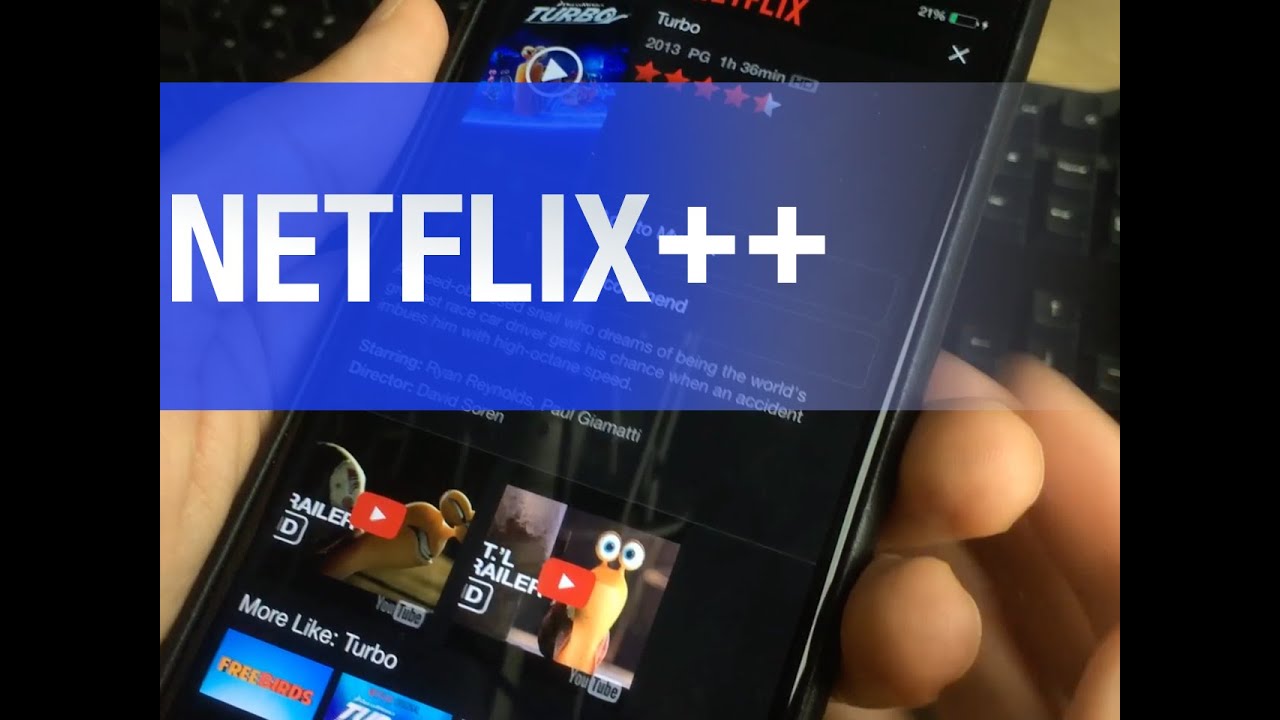
Netflix++ was a real iPhone and iPad jailbreak tweak from the 2014 era. It modified the official Netflix app to place YouTube trailers on title-information pages, below a film or show’s description and above its recommendations. It was reportedly free and installed through Cydia’s BigBoss repository.
However, Netflix++ should now be treated as legacy software—not as a supported Netflix enhancement for modern iPhones or iPads. Archived package metadata lists version 1.2r-9, updated February 23, 2017, with old iOS compatibility, and no current maintained release or verified installation source was established. Archived package metadata also warns that the package may no longer be hosted.
| # | Preview | Product | Price | |
|---|---|---|---|---|
| 1 |

|
Netflix eGift Card | $15 | $15.00 | Buy on Amazon |
| 2 |
|
Netflix eGift Card | $100 | $100.00 | Buy on Amazon |
| 3 |

|
Netflix Physical Gift Card | $50 | $50.00 | Buy on Amazon |
| 4 |
|
Netflix Physical Gift Card - $60 | $60.00 | Buy on Amazon |
| 5 |

|
Netflix Physical Gift Card - $30 | $30.00 | Buy on Amazon |
What was Netflix++?
Netflix++ was an iOS jailbreak tweak, not a separate streaming service, unofficial Netflix app, or Netflix subscription tier. Attributed to UnlimApps Inc., it was designed to modify the official Netflix application on a jailbroken iPhone or iPad.
Its main purpose was simple: add trailers to Netflix’s title-details interface. When a user opened a movie or television show, Netflix++ attempted to find what it considered the best matching trailer on YouTube and embed that video into the title page.
Popular on Amazon
- Unlimited movies, TV shows, and more. Watch anywhere. Cancel anytime.
- Give the gift of entertainment so your friends and family can stream unlimited films and Netflix original series. Whether your loved one already has a Netflix account or they will be creating a new account, they can use a Netflix gift card toward their membership.
- No credit card is required to redeem a gift code.
- Codes are applied to your account as a gift balance
- Redemption: Online
Contemporary coverage from iDownloadBlog and Gadget Hacks places the tweak’s debut in late October or early November 2014.
What did Netflix++ add?
The historical behavior was reported as follows:
- Open the Netflix app on a jailbroken iPhone or iPad.
- Select a movie or show.
- View the title’s description.
- Find an embedded trailer below the description and above the recommendations.
- Tap the video to watch it without leaving the Netflix title page.
The important distinction is that these were YouTube trailers embedded into Netflix’s interface. They were not necessarily Netflix-hosted preview assets or official Netflix playback. That meant the result depended on trailer matching and the continued availability of the selected YouTube video.
The archived package description also mentions “Netflix trailers and background playback,” but the available contemporary reports document the trailer-insertion feature more clearly than every feature listed in the package metadata. It should not be assumed that background playback worked consistently across all devices, app versions, or titles.
The Tool Desk
Outbyte PC Repair FREEClear out junk files and repair common Windows errorsFree Scan →Outbyte Driver Updater FREEScan for outdated or missing drivers - takes under a minuteDriver Scan →An archived demonstration is available on YouTube.
What did Netflix++ require?
At the time, installation generally required:
- A jailbroken iPhone or iPad.
- Cydia or another compatible jailbreak package manager.
- The official Netflix app.
- A valid Netflix account or subscription.
- A compatible legacy iOS and Netflix-app combination.
The original reports described Netflix++ as free, available through Cydia’s BigBoss repository, and requiring no user-facing configuration. One contemporary installation guide also instructed users to restart the iOS device after installing the tweak.
Also popular on Amazon
- Unlimited movies, TV shows, and more. Watch anywhere. Cancel anytime.
- Give the gift of entertainment so your friends and family can stream unlimited films and Netflix original series. Whether your loved one already has a Netflix account or they will be creating a new account, they can use a Netflix gift card toward their membership.
- No credit card is required to redeem a gift code.
- Redemption: Online
- No Returns and Refunds on Gift Cards
Archived compatibility records need to be read cautiously. One package record lists iOS 8 or later, while an older BigBoss record lists iOS 5 or later. These are package metadata fields, not proof that Netflix++ functioned correctly on every version in those ranges.
Historical installation procedure
The following is an archival account of the period-correct workflow, not a verified 2026 installation guide. Do not interpret it as a recommendation to download an unmaintained package or add an unknown repository.
- Use a compatible jailbroken iPhone or iPad.
- Open Cydia.
- Search for Netflix++.
- Confirm that the package is attributed to UnlimApps Inc. before installing.
- Install the package and restart or respring the device if prompted. The contemporary guide specifically described restarting the iOS device.
- Open Netflix and sign in.
- Select a title and look beneath its description for an embedded trailer.
If Netflix++ cannot be found in Cydia, that is consistent with its age and the possibility that the package is delisted or no longer hosted. It is not a reason to install a random replacement package, download an unknown .deb file, or use a repackaged “Netflix++ IPA.”
Recommended Free Tools
Package and compatibility history
The archived UnlimApps record identifies the package as com.unlimapps.netflixplus and lists version 1.2r-9. Its recorded update date is February 23, 2017. Those details establish the age of the known package; they do not establish an active developer, a current repository, or compatibility with present-day Netflix.
Also popular on Amazon
- Unlimited movies, TV shows, and more. Watch anywhere. Cancel anytime.
- Give the gift of entertainment so your friends and family can stream unlimited films and Netflix original series. Whether your loved one already has a Netflix account or they will be creating a new account, they can use a Netflix gift card toward their membership.
- No credit card is required to redeem a gift code.
- Codes are applied to your account as a gift balance. Gift codes can be added to any plan, regardless of the amount.
- Redemption: Online
Jailbreak tweaks that inject code into another app are especially dependent on the target app’s internal interface and behavior. Netflix has changed its user interface, APIs, account systems, video delivery, and platform requirements substantially since 2014. A tweak built for an old Netflix release can stop working after an app update even if the package itself remains installed.
Does Netflix++ still work on modern iPhones?
There is no verified current support story for Netflix++. The safest conclusion is to treat it as discontinued or archival unless someone can independently verify a maintained package and a matching legacy device-and-app environment.
The known package record is several years old, lists old iOS compatibility, and indicates that the package may be unavailable. Netflix’s current documentation says the latest Netflix app for iPhone and iPad requires iOS or iPadOS 18 or later. Users on iOS 12 through iOS 17 may only be able to redownload Netflix if they previously downloaded it, subject to Netflix’s compatibility rules. See Netflix’s current iPhone and iPad availability guidance and its mobile-app support documentation.
That does not prove that Netflix++ can never run in any preserved environment. It does mean that an old package designed around old iOS and Netflix versions should not be assumed to work with current releases. No specific latest compatible Netflix version has been verified here.
Also popular on Amazon
- Unlimited movies, TV shows, and more. Watch anywhere. Cancel anytime.
- Give the gift of entertainment so your friends and family can stream unlimited films and Netflix original series. Whether your loved one already has a Netflix account or they will be creating a new account, they can use a Netflix gift card toward their membership.
- No credit card is required to redeem a gift code.
- Codes are applied to your account as a gift balance. Gift codes can be added to any plan, regardless of the amount.
- Redemption: Online
Common failure cases
- No trailer appears: The tweak may not have found a suitable YouTube match, or it may have failed after a Netflix app update.
- The video will not play: The YouTube video may have been removed, blocked, region-restricted, or incompatible with the old embedded player.
- Netflix crashes: The tweak may be incompatible with the installed Netflix build. Avoid random downgrades or package replacements without reliable compatibility evidence and a backup.
- The package is missing from Cydia: It may no longer be hosted or indexed. Do not “solve” this with an unknown jailbreak repository.
Modern alternatives to Netflix++
Netflix Autoplay Previews
Netflix now provides an official preview setting that addresses part of the same discovery problem without jailbreaking. On a current iPhone or iPad, Netflix documents this path:
- Open Netflix and select a profile.
- Tap My Netflix in the lower-right corner.
- Tap the profile name at the top.
- Tap Manage Profiles.
- Select the profile.
- Turn Autoplay Previews on or off.
- Tap Done.
Netflix notes that the change may require refreshing the device, switching profiles, or signing out and back in. Preview availability can vary by title, country, device, and app version. Netflix also notes that iPads and some older TVs or streaming devices do not support preview autoplay in the same way. Consult the official Autoplay Previews instructions for current behavior.
Autoplay Previews are not identical to Netflix++. The tweak reportedly inserted manually selected YouTube trailers into title pages, while Netflix’s feature uses Netflix’s own preview experience and autoplay controls. The two features overlap in purpose but are not the same product.
Netflix Clips
Netflix has also introduced a Clips feed in select countries, offering short clips from shows, movies, and podcasts. It is not a successor to Netflix++ and is not universally available; access depends on country, device, and app version. Details are available in Netflix’s Clips documentation.
Also popular on Amazon
- Unlimited movies, TV shows, and more. Watch anywhere. Cancel anytime.
- Give the gift of entertainment so your friends and family can stream unlimited films and Netflix original series. Whether your loved one already has a Netflix account or they will be creating a new account, they can use a Netflix gift card toward their membership.
- No credit card is required to redeem a gift code.
- Codes are applied to your account as a gift balance. Gift codes can be added to any plan, regardless of the amount.
- Redemption: Online
Search for official trailers
When Netflix does not provide a useful preview, searching for a title’s official trailer through Netflix’s own channels or the studio’s verified YouTube channel is generally more reliable than relying on an abandoned tweak to match third-party videos.
Should you try to install Netflix++?
For most readers, no. Netflix++ was a clever solution to a real interface gap in 2014, but there is no verified maintained release for modern Netflix. Installing unknown jailbreak packages can also create unnecessary security, stability, update, and app-compatibility concerns.
The only reasonable historical use case is a deliberately preserved, compatible legacy device on which the owner understands the risks and has reliable backups. Even then, the package should be obtained only from a source that can be independently trusted and verified—not from an unverified mirror or a repackaged download.
Verdict
Netflix++ was a genuine UnlimApps jailbreak tweak that embedded YouTube trailers into Netflix title pages. It was free and relatively simple to use in its original Cydia-era environment, but its known package history ends in the old iOS era. In 2026, it is best understood as jailbreak history rather than a supported way to add trailers to Netflix.






Say something about this film