Free tools Windows power users keep installed
One-click scans. No signup required.
YTMP3 is a name associated with third-party websites that claim to turn a YouTube URL into an MP3 or another downloadable file. The basic process sounds simple—paste a link, choose a format, and download—but it is not automatically authorized, legal, safe, or available for every video.
The responsible rule is straightforward: use an official download feature, a direct file supplied by the creator or rights holder, or a local conversion workflow for media you own or are explicitly permitted to use. Do not treat a YTMP3-branded website as an official YouTube service or as blanket permission to copy other people’s content.
What YTMP3 actually means
“YTMP3” is generally used as a category or search term for third-party YouTube-to-MP3 conversion websites. Historically, rights-holder and industry materials have identified YTMP3-branded domains as examples of services marketed for YouTube-to-MP3 or MP4 conversion. That does not establish that all domains using the name are operated by the same company, that any particular domain is currently available, or that one is official, authorized, secure, or representative of the others.
A typical converter claims to perform three actions:
Quick wins for a faster PC:
Fix the driver behind crashes, sound loss and screen glitchesFind Drivers →Repair Windows errors before they cause bigger problemsFix Now →#1 Best Overall

- Perfect connection: This standard 3. 5mm jack headphone splitter extension cable can transfer audio from your iPhone, iPod, iPad, Samsung, MP3 players, CD players, Laptops, tablets, PlayStation, WII to 2 output devices including headphones, speakers and more. Compact and lightweight design is ideal for your road trips and plane rides.
- Unparalleled sound quality: polished 24K Gold-plated connector ensures accurate data transmission and eliminate signal loss and Noise possible. Offer the clear and clean stereo sound in both outputs.
- Outstanding durability: Double shielding significantly enhances protection against interference, and the precise measurement connector contributes to safe and reliable connection. This slim connector fits almost all cases (except life proof case).
- Premium materials: this soft nylon jacket encased audio extension cable ensures an ultra-long lifespan, can withstand at least 15, 000 cycles of 90-degree bend test. Mental housing design adds extra strength and looks gorgeous.
- Great support: friendly and fast customer service to solve your problems within 24 hours.
- Accept a YouTube video URL.
- Extract or process the audio associated with that video.
- Offer a downloadable file, often described as an MP3.
The resulting file is not guaranteed to be authorized, permanent, malware-free, high quality, or identical to the source audio. Conversion can also involve another round of compression, and the site may not preserve reliable metadata such as the artist, album, or copyright information.
Is converting a YouTube video to MP3 legal?
Sometimes, but not by default. The answer depends on the video, the rights involved, your country, the purpose of the copy, and the permission granted by the platform or rights holder.
YouTube’s currently published Terms of Service are dated December 15, 2023. They allow users to access and use the service as made available, including viewing or listening to content for personal, non-commercial use. The same terms restrict accessing, reproducing, downloading, distributing, transmitting, altering, or otherwise using the service or its content except where YouTube expressly authorizes it or where you have prior written permission from YouTube and, where applicable, the relevant rights holders. They also prohibit circumventing features that prevent or restrict copying or other use of content.
That means “I am only doing it for personal use” is not a universal answer. Personal, non-commercial use may be relevant to a legal analysis, but it does not automatically override YouTube’s terms or the copyright owner’s rights.
Situations that may be lawful
- Your own upload: You own the necessary rights and download your source video through YouTube’s creator tools before converting your own local copy.
- Permission: The creator or relevant rights holder has clearly authorized you to download and convert the material.
- Public-domain material: The work is genuinely in the public domain in the jurisdiction where you use it.
- Creative Commons content: The specific video is offered under a license that permits your intended use, and you follow its conditions, including attribution where required.
- An applicable copyright exception: A local exception may apply, but exceptions are fact-specific and differ between countries. In the United States, fair use is determined from the circumstances and ultimately by courts; it is not an automatic right to convert or retain any online video.
- Officially downloadable material: YouTube or the rights holder provides a download function or file for that content.
Creative Commons deserves particular care. YouTube’s default is the Standard YouTube License; Creative Commons Attribution is a separate option. A CC BY label does not prove that the uploader actually owns every element of the video or had authority to apply the license. Check the license, confirm what reuse it allows, preserve the attribution information, and avoid assuming that music, footage, artwork, or samples embedded in the upload are covered.
Situations that are not automatically lawful
- Downloading a commercial song, film, podcast, audiobook, or documentary merely because it is publicly viewable.
- Converting a video because it has a “download” button supplied by an unrelated third-party site.
- Using an MP3 in a new video, podcast, documentary, presentation, or public performance without the necessary rights.
- Assuming that a short clip is automatically fair use.
- Assuming that “free,” “royalty-free,” or “no copyright” in a title or description is a legally sufficient license.
Choose the right route before you download anything
| What you want to do | Safer route | What you receive |
|---|---|---|
| Listen offline to eligible YouTube videos | YouTube Premium offline downloads | Offline playback inside supported YouTube experiences, not a freely exportable MP3 |
| Listen offline to songs, albums, playlists, or podcasts | YouTube Music Premium offline listening | Offline playback inside the YouTube Music app, subject to the service’s requirements |
| Download a video you uploaded | YouTube’s creator download workflow or Google Takeout | An MP4 or your exported creator media, which you may convert locally if you own the rights |
| Use music in a project | YouTube Audio Library or properly licensed music | Audio supplied under the relevant library or license terms |
| Convert somebody else’s video | Obtain written permission or a direct file from the rights holder | A permission-based source, rather than an unexplained third-party extraction |
Official offline options: convenient, but not ordinary MP3 files
YouTube Premium
YouTube Premium supports offline downloads of eligible videos through supported YouTube experiences. YouTube documents computer downloads in Chrome, Edge, Firefox, and Opera, although availability, eligible content, and how long downloads remain available can vary by location and by the status of the video.
The important distinction is that YouTube Premium offline downloads are managed inside the YouTube experience. They are intended for offline viewing, not for exporting an unrestricted MP3 file to a music player, editing program, or arbitrary folder.
YouTube Music Premium
YouTube Music Premium supports offline downloads of songs, albums, playlists, and podcasts within the YouTube Music app. The service’s help documentation states that the device must reconnect at least once every 30 days to maintain downloaded content.
YouTube Music offline listening is therefore a good fit for someone who wants convenient listening without an internet connection, but it is not the same as receiving an MP3 that can be copied, renamed, edited, or used outside the service. Subscription access, offline availability, and rights restrictions continue to apply.
Rank #2

- SHARE AUDIO WITH 2 HEADPHONES – Turn one 3.5mm audio jack into two headphone outputs. Share the same music, movies, lessons, or gaming audio with a friend, family member, or child without using the device speaker.
- CLEAR DUAL STEREO AUDIO – Both output ports deliver full left-and-right stereo sound. 24K gold-plated connectors and oxygen-free copper wires help maintain a stable connection and clear everyday audio.
- 11-INCH CABLE FOR COMFORTABLE SHARING – The 11-inch headphone splitter gives two listeners more room to sit comfortably while remaining compact enough for airplane travel, road trips, school, home, or daily carry.
- BRAIDED FOR EVERYDAY DURABILITY – The nylon-braided cable helps resist tangling and daily wear. Reinforced aluminum housings add support around the connectors where ordinary audio cables are often bent or pulled.
- WORKS WITH STANDARD 3.5MM DEVICES – Compatible with PCs, laptops, tablets, phones, Nintendo Switch, MP3 players, and powered speakers with a 3.5mm audio jack. Audio output only; microphone, calls, gaming chat, inline controls, and separate volume adjustment are not supported.
Purchased movies and television
Purchased YouTube movies and television episodes can be downloaded for offline viewing on supported devices where the feature is available. This is a platform-controlled viewing option tied to the purchase and service rules. It should not be treated as permission to extract an audio track from a movie or episode and redistribute it as an MP3.
How to convert an authorized video to MP3
If the video is yours or you have clear permission to convert it, the safest workflow is to obtain an authorized local source first and perform the audio conversion locally. This avoids giving a third-party converter your account credentials, exposing a URL to an unknown site, or relying on a website with unclear rights and file-handling practices.
Step 1: Confirm the rights
Save the permission, license, or ownership record before converting. If the video is Creative Commons, record the license URL or identifying information and the attribution wording. If you received permission by email or message, keep that record with the resulting file.
Step 2: Obtain the source file through an authorized method
For a video you uploaded, YouTube documents MP4 downloads through its creator workflow and also points creators to Google Takeout for downloading their uploaded videos. YouTube’s creator-download help explicitly does not provide this workflow for downloading other users’ videos.
For someone else’s work, ask the creator or rights holder for the original audio or video file, or use the download function they have expressly provided. Do not use a creator-download feature as a workaround for content that you do not own.
Step 3: Convert the local file
Once you have an authorized local video file, you can use a reputable desktop media tool. In VLC, a common workflow is:
- Open Media > Convert/Save.
- Add the authorized video file and choose Convert/Save.
- Select an audio profile such as Audio – MP3.
- Choose a destination filename ending in
.mp3. - Start the conversion and verify that the output plays correctly.
Advanced users who already have FFmpeg installed can convert a local MP4 with:
Do these 3 things before closing this tab:
1Scan for outdated or missing drivers - takes under a minute2Repair Windows errors before they cause bigger problems3Fix the driver behind crashes, sound loss and screen glitchesffmpeg -i input.mp4 -vn -c:a libmp3lame -q:a 2 output.mp3Here, -vn omits the video stream, while the remaining options encode the audio as MP3 at a high variable-quality setting. This command converts a file you already possess; it does not download from YouTube, bypass YouTube controls, or grant rights to the underlying material.
Step 4: Check the result and preserve the license information
- Play the MP3 from beginning to end or sample several points for clipping, silence, or an incorrect track.
- Check the file extension carefully. A real audio file should not unexpectedly end in
.exe,.scr,.msi, or another executable extension. - Add the artist, title, source, license, and attribution details where appropriate.
- Keep the original authorized file and the permission record rather than retaining only the converted copy.
Downloadable MP3 music for creators
YouTube Audio Library
If your real goal is background music or sound effects for a documentary, video, podcast, or presentation, YouTube’s Audio Library is usually a more appropriate starting point than converting a random video. It provides production music and sound effects, including tracks that can be downloaded as MP3 files under the library’s stated usage framework.
Rank #3
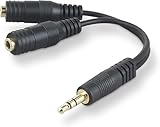
- DUAL AUDIO OUTPUT FOR HEADPHONES OR SPEAKERS: This Belkin splitter allows you to connect two headphones or speakers to a single 3.5mm audio jack, enabling easy sharing of music, movies, or podcasts from one device with friends or family.
- CONVENIENT CONNECTION FOR STEREO SPEAKERS: Offers a simple solution to connect two mini-stereo speakers to your iPod, smartphone, or any 3.5mm audio device, providing enhanced audio for listening at home or on the go.
- DURABLE 3.5MM ADAPTER W/ UNIVERSAL COMPATIBILITY: Equipped with one male 3.5mm plug and two female 3.5mm ports, this splitter works with a wide range of devices including headphones, speakers, and portable audio players, making it highly versatile.
- PERFECT FOR USE WITH LAPTOPS & MOBILE DEVICES: Ideal for use with laptops, smartphones, and tablets, this audio splitter makes it easy to share audio during video calls, presentations, or simply when watching media together with others.
- BELKIN LIFETIME PRODUCT PROTECTION FOR PEACE OF MIND: Backed by Belkin’s lifetime warranty, this splitter guarantees long-term reliability and performance. Enjoy worry-free use knowing your product is protected against defects and covered for life.
Some tracks use Creative Commons terms and require attribution. Follow the individual track’s instructions. Do not assume that music labeled “free” on another website is cleared for your project; it may still trigger Content ID or another rights dispute.
Creator Music
Creator Music is available to eligible creators in the U.S. YouTube Partner Program. Depending on the individual track, a creator may be able to pay an upfront license fee or use the track under revenue-sharing terms. Availability, pricing, and permitted uses vary by track.
PC Slower Than It Used to Be?
A free scan shows the junk files, broken settings and background clutter dragging Windows down - then fixes them in one click.Free scan · Windows 10 & 11Crashes, No Sound, or Screen Glitches?
Random freezes, missing sound and display glitches usually trace back to one bad driver. Find and replace yours safely.Free scan · under a minuteIf a track is not available for the relevant license or revenue-sharing option, using it can expose a video to a Content ID claim or a copyright removal request. Creator Music is a licensing route for eligible creators, not a general-purpose method for turning any YouTube upload into a reusable MP3.
Safety checklist for YTMP3-type websites
No particular YTMP3 domain should be called safe or malicious without current, documented testing. Multiple domains can use the same brand name while being unrelated, and a site’s behavior can change. The following is general download hygiene, not evidence that every YTMP3-branded website is infected.
- Do not sign in. Never enter a Google password, payment-card details, recovery code, or other account credentials into a converter page.
- Do not install software to unlock a download. An MP3 should not require a browser extension, executable, codec pack, “download manager,” mobile configuration profile, or system administrator permission.
- Watch for deceptive controls. Fake download buttons, full-screen advertisements, pop-ups, redirects, and notification-permission prompts are reasons to close the page rather than continue.
- Inspect the downloaded file. If a supposed MP3 is an installer, archive, script, or unfamiliar file type, do not open it. Delete it and empty the trash or recycle bin.
- Scan files before opening them. Use current security software and your operating system’s protections. A scan cannot establish that the source site is trustworthy, but it can help detect some harmful files.
- Keep the browser and operating system updated. Updates reduce exposure to known browser and operating-system vulnerabilities.
- Review browser changes afterward. Check installed extensions, notification permissions, the default search engine, and the home page if the browser behaves differently.
If you already clicked a suspicious download
- Do not run the file. Disconnect from the site and delete the unexpected download.
- Run a scan with current, reputable security software.
- Review and remove unfamiliar browser extensions and notification permissions.
- Check recently installed applications and uninstall anything you did not intentionally add.
- If you entered a password or payment information, change the affected password from the official service and contact the relevant financial institution if necessary. Enable multifactor authentication where available.
- Seek professional assistance if pop-ups, redirects, account alerts, or other suspicious behavior continues.
Common misconceptions about YouTube-to-MP3 conversion
“It is only audio, so copyright does not apply.”
Copyright can apply to the sound recording, the underlying musical composition, spoken performance, and other elements. Removing the video portion does not remove those rights.
“A short video or short song clip is automatically fair use.”
There is no universal duration threshold that automatically makes a copy fair use. The analysis depends on the purpose, nature of the work, amount used, and effect on the market in jurisdictions that recognize that doctrine.
“Premium downloads are MP3s I can keep forever.”
Premium offline downloads are controlled by YouTube or YouTube Music and are designed for in-service offline playback. They are not unrestricted audio exports. Availability can change with location, subscription status, content rights, and required reconnection.
“Creative Commons means I can use the audio without checking anything.”
Creative Commons is a family of licenses with conditions. Check the exact license, provide attribution when required, observe restrictions such as noncommercial or no-derivatives terms where applicable, and consider whether the uploader had the right to license all parts of the upload.
“A converter made an MP3, so the file must be legitimate.”
File creation proves neither permission nor safety. A converter may provide a technically playable file while the copying is unauthorized, the quality is poor, the metadata is wrong, or the download is accompanied by unwanted software or tracking.
The Tool Desk
Outbyte PC Repair FREEClear out junk files and repair common Windows errorsFree Scan →Outbyte Driver Updater FREEFix the driver behind crashes, sound loss and screen glitchesFind Drivers →Rank #4

- 2 to 1 Mic Headphone Splitter: UGREEN Headphone Audio Splitter offers a simple way to connect headsets of 4-pole 3.5mm TRRS plug to PC or laptop with separate audio and mic jack, use with VOIP applications, such as Skype or chat programs, MSN Messenger, online gaming, classes online and teams meetings. For example, connect turtle beach recon 50 gaming headsets to PC via the headphone splitter for computer
- Hi-Fi Stereo Sound: This 3.5mm splitter with polished 24K Gold-plated connectors, oxygen-free copper wire ensures higher audio transmission without signal loss and noise. So the headset adapter remains original sound quality, offers better gaming and communication experience. Note: For functional microphone output, a 3.5mm CTIA-compliant TRRS cable is required. (OMTP/other standards will cause mic failure)
- Everlasting Durability: UGREEN Aux Splitter Cable is built to last. Aluminum alloy casing and gold-plated plugs significantly enhance the durability for a longer lifespan. Nylon braided jacket passes 10000+ bending tests and is solid enough to withstand twist, tug, and tangle
- Wide Compatibility: UGREEN PC headset adapter is suitable for most TRRS headsets, compatible with Turtle Beach XO1/PX24/Recon 50X/XO 7, Hyperx cloud 2, Razer Kraken X gaming headset, Bose headphones, PS4, Sennheiser HD 598 Cs wired headset, speaker, HP ProBook 450 G1, Lenovo Thinkpad T400 and more
- Slim and portable design, easy to carry around. Cable Length: 20cm/7.87 inch. NOTE: This headphone jack splitter is only compatible with CTIA standard headphones, incompatible with CTIA standard Apple Earbuds and Beats headphones. This adapter is a 2*3.5mm TRS male to 3.5mm TRRS female adapter, not a 3.5mm male to 2*3.5mm female adapter
A practical decision tree
- Do you own the video or have permission? If no, stop and look for an official offline option, a licensed source, or permission from the rights holder.
- Does YouTube provide the offline feature you need? Use YouTube Premium for eligible video viewing or YouTube Music Premium for in-app music and podcast listening when that meets your goal.
- Do you need a real MP3 file? Obtain an authorized source file or use YouTube Audio Library tracks whose terms permit your project. Then convert locally if conversion is allowed.
- Will the audio be published or distributed? Check the license for commercial use, attribution, derivatives, territory, and platform restrictions before release.
- Is a third-party page demanding software or account information? Leave it. The convenience is not worth surrendering credentials or installing an unknown program.
What is the safest answer for most readers?
For offline listening, use YouTube Premium or YouTube Music Premium and accept that the downloads remain inside those services. For an actual MP3, use your own uploaded material, a direct file from the rights holder, public-domain material, or properly licensed audio. Convert that authorized local file with a reputable desktop tool.
For creator projects, start with the YouTube Audio Library or a properly licensed music service rather than extracting a soundtrack from a video. The correct question is not simply whether a YTMP3 page can produce an MP3. It is whether you have the right to make the copy, whether the file can be trusted, and whether your intended use is covered by the applicable license.
Official information behind this guide
This guide is based on YouTube’s Terms of Service, copyright and licensing guidance, creator-download documentation, Premium offline-download documentation, YouTube Music help, Audio Library guidance, Creator Music information, and the product description for Outbyte PC Repair. Product availability, eligibility, licensing terms, and download behavior can change by country, account, device, and content owner.
Frequently Asked Questions
Is YTMP3 an official YouTube service?
No official status should be assumed. YTMP3 is a name used by third-party sites associated with YouTube-to-MP3 conversion. Domains using the name may be unrelated, and a particular domain should not be treated as authorized or safe without current authoritative verification.
What’s actually slowing this PC down?
Pick the symptom - the matching free tool is one click away.
Can I download someone else’s YouTube video as an MP3?
Not merely because it is publicly viewable. You need an applicable license, permission from the rights holder, public-domain status, or another legally valid basis. YouTube’s creator-download workflow is for videos you uploaded; its help documentation does not provide that workflow for other users’ videos.
Does YouTube Premium let me export MP3 files?
No. YouTube Premium supports eligible offline viewing inside supported YouTube experiences. YouTube Music Premium similarly supports offline listening within the YouTube Music app. These downloads are not unrestricted MP3 files for use in other apps or devices.
What is the safest source of downloadable MP3 music for a video project?
Start with YouTube’s Audio Library or another reputable source whose license clearly covers your intended use. Check attribution and commercial-use requirements for each track. Do not rely solely on labels such as “free” or “no copyright.”
What should I do if a supposed MP3 downloads as an installer?
Do not open it. Delete the file, scan your device with current security tools, review recently installed applications and browser extensions, and check notification permissions and browser settings. If you entered credentials, change them through the official service.
Recommended Free Tools
The Bottom Line
Bottom line: YTMP3-type sites may claim to make MP3s from YouTube URLs, but that does not make every conversion authorized or every download safe. Use official offline playback when you only need listening, and use a local converter only for a source you own or are licensed to convert. For creator work, YouTube Audio Library and properly licensed music are safer starting points than extracting audio from an unrelated video.
Quick Recap
Product prices and availability are accurate as of the date/time indicated and are subject to change. Any price and availability information displayed on Amazon at the time of purchase will apply.