Some links on this page are affiliate links: if you buy through them we may earn a commission, at no extra cost to you.
CapCut was made by ByteDance, the technology company best known for TikTok. The official app is a legitimate, widely distributed video editor—not malware according to the sources reviewed—but it is not a privacy-minimal or purely offline tool. CapCut can collect account, device, usage, diagnostic, and content-related information, while cloud, AI, captioning, template, and sharing features may involve additional processing.
The practical answer is therefore: CapCut is generally reasonable for ordinary public videos when downloaded from an official source, but it is a poor choice for confidential, highly sensitive, or privacy-critical footage.

Who made and operates CapCut?
CapCut belongs to ByteDance’s corporate ecosystem. It began in China under the name Jianying and was rebranded internationally as CapCut in 2020. ByteDance also owns TikTok, which explains CapCut’s strong TikTok integration, shared creator focus, and role in the wider debate over data governance and national-security risk.
CapCut is not simply TikTok’s built-in editor. It is a separate editing platform with its own app, services, terms, privacy policy, and distribution channels, although it is operated by ByteDance-related entities and can connect with TikTok and other services.
#1 Best Overall

- Wider Compatibility: No matter what kind of phone device you have, the wireless mini mic is compatible with android system and all the iPhone & iPad series, including iPhone 14 below and the latest iPhone 16, 17, series which is usb c port. Moreover, it can also with laptop and tablet, which is convenient for content creators to make recordings with various devices for podcasting, vlogging, live streaming and interviewing
- Longer Receiver: The interface of the receiver for the mini microphone has been upgraded to be longer for phone connection. Compared with other professional wireless microphones, this one has the advantage of using together with most of the phone cases. In other words, for youtube or tiktok influencers or online celebrities on different social media platforms, they don’t have to take off the phone case before filming or online teaching, video conference
- Easy Automatic Connection: This wireless lapel microphone is much easier to set. No adapter or application needed. Just choose the right adapter and get it into your device, then turn on the lav mic, you will see there is a solid green light on both of the receiver and the mic, which means the two parts are connected successfully. Then you can start audio/video recording
- Omnidirectional Pick Up & Crystal Clear Sound: Equipped with microphone windscreen and noise reduction chip, our wireless mic on the one hand can clearly records every detail of the sound regardless of surrounded environment. On the other hand, it helps to cuts off noise interference while recording so as to deliver high quality audio and ensure you a better sound experience
- Stable Wireless Range & Long-Lasting Battery: Enjoy wireless audio that follows you across the studio while filming — no need to stay tethered to your phone. The rechargeable battery carries you from morning vlogs to evening livestreams, so you can focus on the content instead of watching the battery indicator.
For U.S. users, the responsible legal entity can also depend on the date, service, and version of the applicable documents. The U.S. privacy policy reviewed for this article, dated April 15, 2026, identifies TikTok USDS Joint Venture LLC as the operator of U.S. services. The U.S. Terms page reviewed separately, dated January 22, 2026, likewise identifies that entity. Older or non-U.S. pages may identify Bytedance Pte. Ltd. instead. Apple’s U.S. App Store listing currently shows the developer as “Bytedance Pte. Ltd.”
These distinctions matter because “made by ByteDance,” “listed by Bytedance Pte. Ltd.,” and “operated under the current U.S. terms by TikTok USDS Joint Venture LLC” describe related but not identical layers of the service.
Apple App Store listing · CapCut U.S. Terms · CapCut U.S. Privacy Policy · TIME background on CapCut and ByteDance
Quick wins for a faster PC:
Fix the driver behind crashes, sound loss and screen glitchesFind Drivers →Clear out junk files and repair common Windows errorsFree Scan →Scan for outdated or missing drivers - takes under a minuteDriver Scan →Is CapCut safe to download?
There are three different questions hidden inside “safe”:
- Is the official app legitimate? Yes. CapCut is an established, widely distributed editing service.
- Is the official app proven to be malware? The sources reviewed do not establish that it is malware.
- Is it private and risk-free? No. Its policies and disclosures describe substantial data collection and processing, and its ByteDance affiliation creates additional regulatory and geopolitical considerations.
Download CapCut only from an official source:
- Apple’s App Store or Google Play on mobile;
- CapCut’s official website or an authorized operating-system store on desktop;
- a listing whose developer identity matches the expected ByteDance-related entity.
Avoid “Pro unlocked” APKs, cracked desktop installers, unofficial mirrors, modified watermark-free versions, and download links distributed through random social-media posts. CapCut’s creator terms state that unofficial versions obtained from unauthorized websites or platforms are not authorized and are used at the user’s own risk.
Keep your operating system and the app updated. After installation, review permissions and disable access that your workflow does not require. On platforms that support it, give the app access only to selected photos and videos rather than your entire library.
App-store labels are useful—but not independent audits
Apple’s privacy label and Google Play’s Data Safety information provide useful summaries of developer-disclosed data practices. However, Apple says the privacy information is supplied by the developer and has not been verified by Apple. Google’s Data Safety information is also based on information supplied by the developer. App-store approval is therefore not a comprehensive privacy or security audit.
Apple privacy disclosures · Google Play Data Safety information
What information does CapCut collect?
CapCut’s current U.S. privacy policy describes several possible categories of information, with the exact collection depending on geography, platform, account status, age, and the features used. Potential categories include:
- account, contact, and customer-support information;
- device identifiers and technical information;
- network, app-use, interaction, and usage data;
- crash, performance, and diagnostic information;
- photos, videos, audio, and other user content;
- payment and transaction information for paid features;
- information from linked or integrated services.
The policy also says CapCut may analyze characteristics of content when relevant to particular services or features. Examples include objects and scenery, the presence and location of faces and other body parts, the nature of audio, and spoken words—for example, when auto-captioning is used.
This does not prove that every file is permanently uploaded or manually reviewed. The more precise conclusion is that CapCut’s policy permits collection or processing of content and content-derived information in connection with particular functions. A cloud project, AI effect, auto-captioning tool, synchronized draft, online template, or collaboration feature should not automatically be treated like a completely local edit.
Free tools Windows power users keep installed
One-click scans. No signup required.
Does CapCut upload or see your videos?
The answer depends on the workflow.
| Workflow | What to assume | Privacy implication |
|---|---|---|
| Basic local editing | Some processing may happen on the device. | Do not assume that every feature is local merely because editing starts on a phone or computer. |
| Cloud storage or synchronization | Projects or drafts may be transmitted to and stored through the service. | Cloud retention and account access become relevant. |
| AI effects, auto-captioning, or recognition features | Content or content-derived information may be processed for the feature. | Faces, voices, objects, and spoken words can be sensitive. |
| Online templates, collaboration, or community sharing | Additional distribution and reuse may occur. | Private footage can become visible, downloadable, remixed, or otherwise harder to control. |
| Linked TikTok, Google, YouTube, or other accounts | Another account and integration relationship is involved. | Review permissions and disconnect services that are not needed. |
CapCut’s Terms of Service also say it has no obligation to maintain a user’s content and that content may not remain available after the platform is deleted. Do not treat CapCut as your only archive. Keep the original media and an exported master outside the app.
Rank #3

- CRYSTAL-CLEAR AUDIO & SMART NOISE CANCELLING: Capture details with this high-sensitivity lavalier microphone's advanced DSP chip. This mini mic intelligently eliminates ambient sounds for pure vocals. This wireless mic is the best microphone for content creator interviews, outperforming ordinary wireless microphones
- UPGRADED PRO WINDPROOF & PREMIUM AESTHETICS: Transform video aesthetics with our exclusive furry windscreen and stylish silicone wind muff. Perfect as a mini microphone for vlogging, the wind muff completely covers the transmitter for a sleek, professional studio look. Enjoy superior outdoor wind noise reduction with this premium wireless lavalier microphone. A must-have recording microphone for content creators
- UNIVERSAL 2-IN-1 MINI MICROPHONE: One mini mic for all! This plug & play wireless lavalier microphone fits iPhone 17-11 series, iPads, and Androids. No apps needed for this bluetooth microphone for iPhone alternative! The ultimate phone microphone and reliable microphone for iPhone for instant connection
- ULTRA-MINI & DISCREET CLIP-ON DESIGN: Enjoy ultimate portability with our button-sized mini mic. Its compact transmitter clips onto your collar as a perfect lapel microphone wireless solution. Attach these mini mics discreetly via the magnetic disc for comfortable wear. The best wireless mini microphone for any occasion
- STABLE 100FT L.O.S WIRELESS TRANSMISSION: Equipped with an upgraded chip, this premium wireless microphone for iPhone and Android delivers up to 100ft (30m) of stable audio transmission in open, line-of-sight (L.O.S) environments. For optimal indoor use or when turning your back to the receiver (body blocking), it reliably covers up to 65ft (20m). Outperforming many standard wireless microphones, it ensures a smooth, interference-free connection for your everyday vlogging and interviews
Deleting the app is not the same as proving that every server-side copy has been deleted. Similarly, deleting a public template cannot guarantee that downloaded or remixed copies elsewhere have disappeared.
CapCut Privacy Policy · CapCut Terms of Service
Can CapCut use your videos?
CapCut does not necessarily claim ownership of everything users create. But ownership and licensing are different.
CapCut has said that its 2025 Terms update did not change the user-generated-content section and that it does not claim ownership of users’ work. It explains that the license language is intended to support ordinary platform functions such as storing, formatting, displaying, sharing, and enabling derivative works from shared templates.
The Tool Desk
Outbyte PC Repair FREEClear out junk files and repair common Windows errorsFree Scan →Outbyte Driver Updater FREEFix the driver behind crashes, sound loss and screen glitchesFind Drivers →A user can retain copyright ownership while granting a platform broad permissions to host, process, display, distribute, or adapt content. Language described as perpetual or irrevocable can matter after publication, especially when copies, remixes, downloads, or template-based derivatives continue to circulate.
The risk is higher when you upload:
- confidential business information or unreleased products;
- client material restricted by contract;
- private individuals’ faces or voices;
- customer records, legal, medical, or financial information;
- valuable voice, likeness, or identity-related material;
- footage of children or vulnerable people without appropriate consent.
Read the applicable U.S. Terms, Creator Agreement, Materials License Agreement, and Privacy Policy together. CapCut’s explanation of the 2025 update is the company’s own interpretation, not an independent legal opinion.
CapCut’s explanation of the 2025 Terms update · Creator Agreement · Materials License Agreement
Rank #4
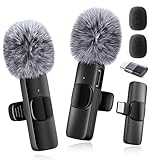
- 【Pro Wireless Mic】: Trusted by creators, this mini microphone delivers broadcast-quality 48kHz/24-bit audio. The ultimate wireless lavalier microphone for iPhone & Android clips discreetly for studio-grade podcasts, interviews, and videos
- 【Instant Plug-Play】: Includes USB-C + Lightning adapters — no Bluetooth pairing or apps needed. Connects to iPhones, Androids, tablets, and laptops in 1.3 seconds for true plug-and-play performance 🔺𝐍𝐨𝐭𝐞: For Android users, pls enable the "OTG" function on your device before using the mini microphone
- 【Omnidirectional Sound & Noise Reduction】: Mini Mics with upgraded intelligent AI chip, 360°omnidirectional pickup mode (included high-density anti-spray sponge*2 + windproof deadcat*2). Cuts plosives and wind interference for crystal-clear indoor/outdoor recordings. Let creators produce more excellent works
- 【66ft Range & long battery life】: Rechargeable wireless Lavalier microphone lasts for 12 hours solo or 8 hours dual-mic sessions. Charging while recording via the Receiver’s port — never stop creating. Plus, the wireless mic is designed with 2.4GHz wireless transmission technology, 66ft barrier-free effective distance
- 【Lightweight & Durable】: The wireless microphone is made of high-quality materials, weighs less than an ounce and is extremely portable, sturdy and durable, suitable for everyday use, and ready to record anytime, anywhere
Is CapCut safe for children and teenagers?
An official app-store listing does not make an app automatically appropriate for unsupervised child use. CapCut’s terms include age requirements and parental-consent language, while its privacy policy includes a teen privacy summary. The practical concern is that children may upload faces, voices, school settings, location clues, uniforms, addresses, and background conversations.
Do these 3 things before closing this tab:
1Fix the driver behind crashes, sound loss and screen glitches2Repair Windows errors before they cause bigger problems3Scan for outdated or missing drivers - takes under a minuteParents should:
- use a supervised account and review the applicable age requirements;
- keep projects private and limit public sharing;
- avoid school IDs, school names, home addresses, and identifying locations;
- disable contacts, location, microphone, and notifications unless needed;
- review connected TikTok, Google, or other accounts;
- teach children not to place private family footage into public templates;
- discuss consent before uploading another person’s face or voice.
Extra caution is appropriate for biometric-sensitive footage. A face or voice can identify a person even when the video itself appears harmless.
CapCut Terms · CapCut Privacy Policy
Is CapCut suitable for businesses and professional creators?
For public, already-approved social-media clips, CapCut may be a reasonable convenience tool. It is a weaker fit when confidentiality, retention, data residency, or contractual control matters.
Usually reasonable with normal precautions
- public social-media clips;
- personal edits;
- non-confidential short-form content;
- approved marketing material;
- projects where cloud processing and platform terms are acceptable.
Often a poor fit
- legal, medical, financial, or government-sensitive footage;
- unreleased campaigns and internal presentations;
- trade secrets;
- client work with confidentiality restrictions;
- footage involving minors or vulnerable people;
- voice, face, or identity data requiring strict control.
Organizations should verify whether the service offers the business agreement, administrative controls, deletion and retention commitments, subprocessors, international-transfer terms, AI-processing rules, account-recovery controls, and employee-offboarding features their policy requires. Do not assume CapCut is prohibited for every U.S. government or enterprise use; the correct answer depends on the organization’s rules and contract.
Independent reader supportYour contribution helps us test, update, and keep practical guides available for everyone.What about TikTok, ByteDance, China, and U.S. national-security concerns?
Keep three issues separate:
- Corporate affiliation: CapCut is a ByteDance-related service and TikTok is part of the same broader corporate ecosystem.
- Privacy and data governance: CapCut collects and processes information under its applicable policies.
- Regulatory and geopolitical risk: ByteDance-related apps have faced U.S. scrutiny and interruptions in availability.
The Congressional Research Service records that CapCut and other ByteDance apps were removed from Apple and Google app stores beginning January 18, 2025, and restored on February 13, 2025 after developments involving U.S. enforcement and assurances to app-store operators.
What’s actually slowing this PC down?
Pick the symptom - the matching free tool is one click away.
That episode demonstrates availability and regulatory risk. It does not, by itself, prove that CapCut is malware, that every user’s video was accessed by the Chinese government, or that the app is permanently banned in the United States. App availability and legal status can change, so creators who depend on CapCut should maintain an exportable workflow and a backup editor.
Best Value

- [Widely Compatible Design] SmaFun wireless lavalier microphone is a content creator's essential, compatible with smartphones, PCs, laptops, and tablets by type-c, lightning connectors. Ensuring seamless recording for professional videos on YouTube, TikTok, and more.
- [Premium Sound Quality with Smart Noise Cancellation] Experience crystal-clear audio with SmaFun mini microphone omnidirectional pickup and smart noise cancellation, perfect for interviews, vlogs, podcasts, and ASMR videos, providing clear sound even in noisy environments.
- [Easy Plug and Play Setup]SmaFun Bluetooth microphone Offers hassle-free operation, ideal for vlogging, podcasting, and outdoor filming without complex setups, allowing you to focus on creating quality content.
- [Long Standby Time for Extended Use]SmaFun wireless microphone for iPhone stays powered up for lengthy recording sessions with the built-in rechargeable battery, ensuring uninterrupted filming for interviews, live streams, or outdoor shoots.
- [Compact and Portable Design]SmaFun wireless lavalier microphone clips discreetly onto clothing, providing a compact and wearable solution for content creators, perfect for interviews, fitness instruction, or outdoor filming, delivering professional results every time.
Congressional Research Service: TikTok FAQs and Issues for Congress
How to use CapCut more privately
- Install only the official app or desktop version.
- Use a unique password and enable two-factor authentication where available.
- Grant photo access only to the media required for the project.
- Deny contacts and location access unless a specific feature genuinely needs them.
- Review microphone access, especially before using voice or caption features.
- Disable cloud synchronization when it is unnecessary.
- Avoid cloud, AI, public-template, and collaboration features for sensitive footage.
- Do not link TikTok, Google, YouTube, or other accounts unless the integration is useful.
- Export completed videos and preserve original files elsewhere.
- Recheck permissions and privacy settings after major updates.
- Delete unnecessary drafts and revoke connected-account access when finished.
- Review the current terms and privacy policy before using face, voice, AI, cloud, or collaboration tools.
A VPN does not solve the central issues here. It may obscure some network activity from a local network operator, but it does not eliminate the data the app itself collects, change the service’s terms, or remove corporate and regulatory concerns.
When should you choose another editor?
Choose an offline-first editor when your priority is minimizing transmission, cloud dependence, or social-platform exposure. Potential alternatives include:
Outdated Drivers Are Slowing You Down
One free scan finds every outdated or missing driver and matches the right update for your exact hardware.Free scan · exact hardware matchPC Slower Than It Used to Be?
A free scan shows the junk files, broken settings and background clutter dragging Windows down - then fixes them in one click.Free scan · Windows 10 & 11| Editor | Best suited to | Main trade-off |
|---|---|---|
| DaVinci Resolve | Desktop editing, color, audio, and more professional workflows. | Steeper learning curve and less phone-first convenience. |
| Adobe Premiere Pro | Professional, collaborative production workflows. | Subscription cost, complexity, and continued account/cloud considerations. |
| Apple iMovie | Simple personal editing for Apple-device owners. | Fewer advanced effects, AI tools, and cross-platform options. |
| Clipchamp | Lightweight browser and Windows editing. | It is not automatically a privacy solution; review its cloud behavior and policy. |
The important comparison is not simply the company’s country of origin. Check whether editing works offline, whether AI features process media remotely, whether an account is required, how cloud storage works, how long projects are retained, whether public templates are involved, and how easily projects can be exported or migrated. Current pricing and regional availability should be checked directly with each vendor.
Bottom line: is CapCut safe?
CapCut is a legitimate ByteDance video editor, not an app that the reviewed sources establish as malware. For casual creators making ordinary public videos, the official version is generally a reasonable choice if it is installed from a trusted source and given only necessary permissions.
That answer does not make CapCut private, offline-first, free from data-processing concerns, or immune to regulatory disruption. Treat it as a cloud-connected ByteDance service. Use an offline-capable alternative for confidential client work, unreleased material, sensitive voices and faces, government-related work, or any footage you are unwilling to have processed under the applicable service terms.
Quick Recap
Product prices and availability are accurate as of the date/time indicated and are subject to change. Any price and availability information displayed on Amazon at the time of purchase will apply.

