Some links on this page are affiliate links: if you buy through them we may earn a commission, at no extra cost to you.
Yes—but only selected Amazon Fire TV devices support direct hearing-aid streaming. The connection uses ASHA (Audio Streaming for Hearing Aids), not ordinary Bluetooth. Amazon’s current supported list includes the second- and third-generation Fire TV Cube and selected Fire TV and Amazon Ember televisions. Fire TV Stick models are not included on Amazon’s current official ASHA list.
For simultaneous sound through hearing aids and the television speakers, the supported list is narrower: Amazon currently documents Dual Audio for the Fire TV Omni Mini-LED Series and Amazon Ember Artline TV.
Fire TV devices officially listed for ASHA hearing-aid streaming
Amazon identifies the following Fire TV families as supporting compatible ASHA hearing devices:
Recommended Free Tools
| Fire TV family | Direct ASHA streaming | Dual Audio |
|---|---|---|
| Fire TV Cube, 2nd generation | Yes | Not listed by Amazon |
| Fire TV Cube, 3rd generation | Yes | Not listed by Amazon |
| Fire TV Omni Mini-LED Series / Amazon Ember Mini-LED Series, 2024 release | Yes | Yes |
| Fire TV Omni QLED Series | Yes | Not generally listed |
| Amazon Ember QLED Series / Fire TV Omni QLED Series, 2025 release | Yes | Not generally listed |
| Fire TV 4-Series | Yes | Not listed by Amazon |
| Amazon Ember 4-Series / Fire TV 4-Series, 2025 release | Yes | Not listed by Amazon |
| Fire TV 2-Series | Yes | Not listed by Amazon |
| Amazon Ember 2-Series / Fire TV 2-Series, 2025 release | Yes | Not listed by Amazon |
| Amazon Ember Artline TV, 2026 release | Yes | Yes |
See Amazon’s current ASHA compatibility list before buying. Amazon’s documentation now uses both Fire TV and Amazon Ember branding, so check the exact series, model year, and regional model number rather than relying on a broad retailer label.
Popular on Amazon

- Advanced Bluetooth 6.0 Dual-Mode Audio Freedom:In TX mode, use this bluetooth transmitter to connect to any AUX/RCA audio source—from TV as a bluetooth transmitter for TV, to airplane seatback as a bluetooth transmitter for airplane—pairing with headphones for clear, lag-free audio. In RX mode, receives wireless audio from a smartphone, tablet, or computer and plays it through audio systems that lack Bluetooth functionality.Hands-free calling via an integrated microphone.
- Smart Auto-Pairing & Universal Compatibility:Instant plug‑and‑play starts at power‑on. System memory enables quick reconnection with all models of AirPods, Bose, Sony, and other Bluetooth audio gear. Perfect as a Bluetooth adapter for various setups. Includes a dual‑prong AirFly‑style Bluetooth airplane adapter and QR guide for easy use.Note: Not compatible with live music, instruments, karaoke, 2.4G‑sync devices, or Bluetooth hearing aids.
- All-Day 20+ Hours Playback & Fast USB-C Charging An essential among plane travel essentials and travel accessories, our battery provides over 20 hours of playback—ideal for long flights. Recharge fully in 1.5 hours via USB-C while continuing to use. Stay powered anywhere.
- Compact Travel Design with Intuitive Control Engineered for life on the move, this ultra-lightweight device is a must-have travel gift. Easily adjust volume and switch modes with dedicated buttons. Clear LED indicators show battery and connection status, making it a reliable aux bluetooth adapter for any journey.
- Certified Safe & Versatile Everyday Companion Certified to global safety standards (FCC/CE/RoHS/BQB) with multi-layer protection. Whether you're watching TV, flying internationally, working out, or gaming, this adapter ensures safe and high-quality audio everywhere, truly living up to its name as a travel essential and airplane travel essential.
Fire TV Stick models are not officially confirmed for ASHA
Amazon’s current ASHA list does not name the Fire TV Stick HD, Fire TV Stick Lite, Fire TV Stick 4K, Fire TV Stick 4K Max, Fire TV Stick 4K Plus, or the first-generation Fire TV Cube. It also does not name older third-party Fire TV Edition televisions.
That does not prove that every one of these products can never connect to any hearing device. It means Amazon does not currently list them as supporting its dedicated direct ASHA hearing-aid feature. Bluetooth support by itself is not enough evidence.
Bluetooth is not the same as ASHA
ASHA is a protocol designed for streaming audio directly to compatible hearing aids, cochlear devices, and some bone-conduction hearing devices. A hearing aid may connect to a smartphone using Apple MFi, Android ASHA, a manufacturer-specific system, or another Bluetooth method without supporting the protocol required by Fire TV.
Both sides must qualify:
- The Fire TV model must appear on Amazon’s ASHA-supported list.
- The exact hearing-aid or hearing-device model must support ASHA.
Amazon names compatible devices from Starkey, Widex, and Cochlear, but this does not mean every product from those manufacturers works. Confirm the precise model, firmware, region, and protocol with the manufacturer or audiologist. Amazon’s device comparison table can help identify Fire TV hardware, but its Bluetooth specifications should not be treated as proof of ASHA support.
Also popular on Amazon

- 【Enter Wireless Age w/ Minimal Cost】Upgrade non-smart/non-Bluetooth TV to pair headphones for enhancing your hearing or get an undisturbed personal space. Connected TV to Bluetooth Home Stereo, no need to replace your old TV, our Bluetooth audio transmitter for TV-RANGER help you upgrade the old one and CUT OFF the budget for a new. NOTE: This is a Bluetooth transmitter only, not a receiver
- 【Mindless Operation】No need to be a tech junkie, Simply press the power button to start, and the Bluetooth adapter will automatically connect. Connect the audio cable to your TV output, then wirelessly transmit audio via Bluetooth to headphones or speakers
- 【Share TV, Double Happiness】Press 2 Bluetooth buttons to connect 2 headphones or speakers at the same time, sharing TV with family/friend/lover with this TV Bluetooth audio transmitter. You are no longer an island at this moment
- 【Longer Range, No Delay】Dual antenna design amplifies the TV signal so you can hear the TV from anywhere in the house, aptX Low Latency technology eliminates the lip-sync delay. NOTE: To get low latency, your Bluetooth headphones/speakers must support aptX Low Latency, otherwise, some delay may occur
- 【Multiple Connection】The 1Mii B06TX Bluetooth Transmitter has both analog and digital audio inputs, compatible with TVs that have Optical, Coaxial, RCA, or 3.5mm outputs. NOTE: If using TV optical/coaxial output, please set the audio output to optical/digital output
Which Fire TV should you choose?
For an existing television: Fire TV Cube
The second- and third-generation Fire TV Cube are the clearest external-device choices for owners who want to keep an existing television and use direct ASHA streaming. They connect through HDMI and do not require replacing the TV.
Neither generation should automatically be treated as a Dual Audio device. Amazon’s current Dual Audio documentation specifically names selected televisions, not the Fire TV Cube.
For an affordable new television: Fire TV 2-Series or 4-Series
Both families appear on Amazon’s ASHA list and may be sensible choices when replacing a television. Screen size, picture quality, processing, software, and availability vary by release and country, so verify the exact model rather than assuming every television with “Fire TV” in its name has the feature.
Do these 3 things before closing this tab:
1Repair Windows errors before they cause bigger problems2Scan for outdated or missing drivers - takes under a minute3Clear out junk files and repair common Windows errorsFor a higher-end television: Omni QLED or Mini-LED
Omni QLED and Mini-LED models are listed for direct ASHA streaming. The Mini-LED range is especially relevant to households that want hearing-aid audio and television-speaker audio at the same time, because Amazon specifically documents Dual Audio for that family.
Also popular on Amazon

- Wireless Freedom - Say goodbye to tangled cords with the Twelve South AirFly. Listen to audio from in-flight entertainment, gym equipment, gaming devices, or any 3.5mm audio jack to your AirPods, earbuds, or wireless headphones.
- Extended Battery Life - Enjoy uninterrupted audio for over 20 hours on a single charge, perfect for long-haul flights. Plus, the AirFly can be used while charging with the included USB-C cable, ensuring you never run out of battery life.
- Compact and Portable - Designed for convenience, the Twelve South AirFly is lightweight and easy to carry, making it an essential travel accessory for anyone who values comfort and high-quality audio on the go.
- Seamless Bluetooth Connectivity – Quickly pairs with your AirPods, wireless earbuds, or headphones for a hassle-free listening experience, letting you enjoy your favorite music, movies, or games in seconds.
- Intuitive Controls – Easily adjust volume with built-in buttons, giving you full control of your audio.
For shared viewing: Omni Mini-LED or Amazon Ember Artline
If one person needs hearing aids while other viewers need the built-in speakers, prioritize a model Amazon explicitly lists for Dual Audio: the Fire TV Omni Mini-LED Series or Amazon Ember Artline TV. Do not assume that ordinary ASHA support keeps the TV speakers active.
How to pair hearing aids with Fire TV
- Charge and switch on the hearing aids.
- Put them into pairing mode using the hearing-aid manufacturer’s instructions.
- Temporarily disconnect them from a phone, tablet, or other device. Amazon’s pairing guidance notes that they may connect to only one device at a time in this setup.
- On Fire TV, open Settings.
- Select Accessibility, then Hearing Aids.
- Select Add Hearing Aids and follow the on-screen instructions.
- If the left and right devices appear separately, select each one as directed.
Amazon also provides a pairing walkthrough. If the Hearing Aids menu is absent, check the exact Fire TV model, software, region, and whether the device is actually a supported ASHA model.
How volume and Dual Audio work
On supported software, press and hold the remote’s Home button to open Quick Settings, then select Hearing Aids to adjust hearing-aid media volume. You can also use Settings → Accessibility → Hearing Aids.
With Dual Audio, hearing-aid volume and TV-speaker volume are controlled separately. The hearing aids receive the direct stream while other viewers hear the television speakers. Because those two audio paths can process sound at different speeds, speech may not initially match the picture or may sound out of sync with the speakers. Open Quick Settings, choose Hearing Aids, then Hearing Aid Delay Adjust and change the setting until the timing is acceptable. Amazon documents Dual Audio controls here.
Also popular on Amazon
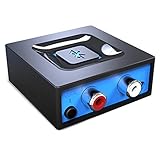
- Listen music wireless: Connect with computer speakers, home stereo systems or other speaker systems via the 3.5 mm or RCA cable, then pair with the Bluetooth audio devices such as smartphones or tablet for streaming music.
- Easy setup and automatic reconnect: There is a big bluetooth symbol button in bluetooth receiver middle. Pair your bluetooth device to this adapter with a single button press. Click once means Bluetooth Connect/Disconnect. Hold the botton 3 second mean ON/OFF. It can reconnect automatically with the previously paired device.
- Wireless range: Indoors(without obstacles) connect rang up 30-40 ft (10-12 m).
- Works with most device: Bluetooth enabled device including smartphones, tablets, computers, laptops upon and any powered PC speakers, home stereo systems and A/V receivers.
- NOTE: This adapter doesn't have built-in battery, power by AC to DC power adapter or USB cable. This product is a bluetooth receiver ONLY, not a bluetooth transmitter. Only to give Bluetooth capabilities to an existing stereo / powered speaker / PA. If you have any problems, please contact us at any time by Amazon Order, and we will speed up the process to resolve the issue.
A separate option: BLE Audio and Auracast
Do not confuse ASHA with newer BLE Audio or Auracast connections. Amazon separately documents BLE/Auracast pairing for selected Panasonic Fire TV televisions:
- Panasonic W90/W95 Series Fire TV Smart TV
- Panasonic Z85 Series Fire TV Smart TV
- Panasonic Z90, Z93, and Z95 Series Fire TV Smart TV
The hearing device must support BLE Audio. The pairing route is Settings → Controller and Bluetooth Devices → Audio Devices and Features → Add New Audio Device. This is a separate pathway from the ASHA list and does not establish compatibility for other Fire TV models. See Amazon’s BLE/Auracast guidance.
Troubleshooting checklist
- Disconnect the phone: Turn off Bluetooth temporarily on phones, tablets, and other devices connected to the hearing aids.
- Charge and restart: Fully charge the hearing aids, switch them off and on, and re-enter pairing mode.
- Reduce the distance: Keep the hearing aids within approximately 10 feet (3 metres) of Fire TV, with line of sight where possible.
- Try 5 GHz Wi-Fi: Amazon recommends it as a troubleshooting or best-experience measure.
- Check the menu: Retry through Settings → Accessibility → Hearing Aids, not the ordinary Bluetooth-audio menu.
- Reconnect: If the devices are listed but not producing sound, disconnect and reconnect them.
- Confirm the exact models: Verify ASHA support for both Fire TV and hearing aids, including firmware and regional availability.
- Investigate delay: Use Hearing Aid Delay Adjust for Dual Audio. If hearing-aid-only audio works but Dual Audio does not, the issue may be the two separate processing paths.
Amazon’s official troubleshooting page covers connection distance, charging, pairing, and network recommendations.
The Tool Desk
Outbyte Driver Updater FREEScan for outdated or missing drivers - takes under a minuteDriver Scan →Outbyte PC Repair FREEClear out junk files and repair common Windows errorsFree Scan →What to do if your Fire TV is unsupported
If you own a Fire TV Stick or a hearing aid without ASHA, upgrading the streaming device may not be the simplest solution. Consider a manufacturer-specific TV streamer matched to the exact hearing-aid model. Starkey, Widex, Cochlear, and other hearing-aid manufacturers offer model-specific accessories, but brand-level compatibility is not enough.
Also popular on Amazon
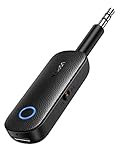
- 2-in-1 Bluetooth 5.4 Transmitter Receiver: This UGREEN 3.5mm wireless adapter supports TX and RX modes to meet all your wireless audio needs.TX: Plug into non-Bluetooth devices like TV or airplane jack to send audio to Bluetooth headphones/earbuds. RX: Plug into wired speakers or old car stereo to receive Bluetooth audio from phone/laptop and output sound. Ideal for home, car, and flights, it helps you ditch messy, tangled wires for convenient wireless audio
- 8H Battery Life & Dual Pairing: This Bluetooth adapter delivers up to 8 hours playback in TX mode and 5.5 hours in RX mode under ideal test conditions. It supports simultaneous pairing with two devices, allowing you to share music with travel companions during flights. Equipped with a built-in microphone for hands-free call answering and ending. (Note: Calls are only supported in RX mode. Actual battery life varies by connected devices, volume and environmental interference.)
- Easy to Use: Simply press and hold the function button for 3 seconds to power on and pair with Bluetooth devices. After the first pairing, this airplane headphone adapter will auto-reconnect when powered on again. No complicated setup needed, so you can easily enjoy wireless audio on flights or in your car
- Wide Compatibility: This Bluetooth transmitter works with most devices with a 3.5mm AUX port, including car , TVs, projectors and more, bringing Bluetooth wireless audio to non-Bluetooth gear. The AUX wireless adapter supports mainstream Bluetooth devices like AirPods and Bluetooth headphones. Whether upgrading old wired speakers or pairing airplane audio jacks with wireless headphones, this adapter gets it done without complicated setup
- Compact and Portable: This UGREEN Bluetooth transmitter receiver features a pocket-sized compact design. Lightweight and travel-friendly, it fits easily into your pocket or travel bag to access wireless audio anywhere at any time
An external Bluetooth transmitter connected through optical, RCA, AUX, or a headphone output may work with some hearing devices. It is not equivalent to ASHA and can introduce delay, remove TV-speaker output, limit volume control, or fail entirely if the hearing aids do not accept ordinary Bluetooth audio.
Before buying, compare the total cost and practical result of a supported Fire TV Cube, a compatible television, a manufacturer TV streamer, or a transmitter plus any required cables. An audiologist or hearing-device manufacturer can confirm the correct accessory for a particular hearing-aid model.
How to identify the exact Fire TV model
Check the device name and model number in Fire TV settings, the television’s label or documentation, its generation or release year, and whether Settings → Accessibility → Hearing Aids is present. Amazon’s device-identification page lists model names, build models, Android levels, and Fire OS versions.
Quick wins for a faster PC:
Scan for outdated or missing drivers - takes under a minuteDriver Scan →Clear out junk files and repair common Windows errorsFree Scan →Fix the driver behind crashes, sound loss and screen glitchesFind Drivers →Do not rely on descriptions such as “Fire TV,” “Fire TV 4K,” or “Bluetooth-enabled.” Amazon’s current naming includes both older Fire TV labels and newer Amazon Ember branding, and availability can vary by country and model variant.






Say something about this film