What’s actually slowing this PC down?
Pick the symptom - the matching free tool is one click away.
Yes—Google’s Veo-powered video generation is already integrated into YouTube Shorts. The feature began with Veo 3 Fast in 2025, then expanded through Veo 3.1 image-guided creation, Shorts remixing, and a newer “Create Video” experience powered by Gemini Omni Flash. Availability, model access, limits, and controls vary by country, device, account, and rollout stage.
What Google added to Shorts
The original announcement was not simply a promise to bring AI video to YouTube. YouTube said in July 2025 that Veo 3 would arrive in Shorts, and by September it had announced a Shorts-focused Veo 3 Fast implementation. It generated short vertical clips from text prompts, with lower latency, 480p output, and generated sound during the initial rollout.
The feature has since developed in stages:
- July 23, 2025: YouTube announced that Veo 3 would come to Shorts later that summer. (YouTube)
- September 16, 2025: Veo 3 Fast arrived as a Shorts-oriented text-to-video tool with sound generation. (YouTube announcement)
- January 13, 2026: Veo 3.1 “Ingredients to Video” added generation from up to three reference images in Shorts and YouTube Create. (Google)
- March 18, 2026: YouTube introduced Reimagine, which transforms an existing Short using a prompt and generated audio. (YouTube)
- June 25, 2026: YouTube described the newer image-guided “Create Video” experience as powered by Gemini Omni Flash, with improved motion, up to 10-second clips, up to three reference images, and optional generated audio. (YouTube support announcement)
Is Shorts using Veo 3, Veo 3.1, or Gemini Omni Flash?
All three names can appear in accurate coverage, but they do not describe one unchanging Shorts feature. The original integration used Veo 3 Fast. The January image-guided update concerned Veo 3.1 Ingredients to Video. The later “Create Video” update identifies Gemini Omni Flash as its powering technology.
The safest summary is that Veo powers Google’s broader video-generation family, while the exact model and feature name inside Shorts have changed over time. Shorts, YouTube Create, Gemini, Flow, Vertex AI, Google Vids, and the Gemini API should not be assumed to expose identical models or controls.
#1 Best Overall

- 62" Phone Tripod & Selfie Stick Combo: Extendable phone tripod for iPhone and Android, combining a tripod stand and selfie stick in one lightweight design for selfies, photos, videos, vlogging, live streaming, and family gatherings.
- Adjustable Height & 360° Rotation: The tripod extends up to 62 inches to support standing shots, group photos, video calls, and content creation. The 360° rotating phone holder allows vertical or horizontal shooting.
- Stable Phone Holder for Daily Recording: Designed for hands-free video recording, online meetings, tutorials, livestreams, and social content. The phone holder keeps your device positioned securely for clear, steady shots.
- Wide Compatibility with Phones and Cameras: Fits most smartphones from 2.8" to 5.7" wide and includes a universal 1/4" screw mount for compatible cameras, action cameras, webcams, and camcorders.
- Wireless Remote & Complete Kit: Includes 1 phone tripod/selfie stick, 1 universal phone holder, 1 adapter, and 1 wireless remote shutter. Backed by 12-month after-sales support for everyday shooting needs.
What can creators make?
The current Shorts-related tools are suited to short visual beats rather than complete films. Depending on the feature and account, creators can make:
- Text-prompted vertical video clips
- Animated versions of still images
- Scenes guided by up to three reference images
- Video backgrounds and standalone visual inserts
- Shorts remixes or “Reimagine” transformations
- Motion, restyling, and prop effects
- Clips with generated dialogue, music, or ambient sound when supported and requested
Reference images can represent a person, object, or environment. They can improve continuity, but they do not guarantee that a character’s identity, clothing, pose, or object details will remain exact.
How to find Create Video in YouTube Shorts
- Open the YouTube mobile app.
- Tap Create or the + button.
- Open the media gallery.
- Select Create Video.
The feature may also appear through the Shorts AI playground or a creation menu in the upper-right corner. Depending on the rollout, you can enter a text prompt and optionally add up to three reference images. Be explicit about the subject, action, setting, camera movement, lighting, mood, aspect ratio, and desired audio.
Rank #2

- 【CRYSTAL-CLEAR WIRELESS AUDIO – NO APP, JUST PLUG & PLAY】 Includes 1 transmitter + 2 lavalier mics with 3-in-1 receiver (USB-C/Lightning/3.5mm). Plug in, press power – auto pairing. No Bluetooth, no app, no Wi-Fi needed. AI noise reduction delivers studio-quality sound. Unplug receiver to save battery. 79ft range, 12h recording on 2h charge. A top wireless mic for iPhone and podcast microphone for iPhone for vlogs, interviews, voiceovers.
- 【4-IN-1 CONTENT CREATOR SET】Extends 13" to 71" – use as handheld selfie stick, desktop stand, floor tripod, or light stand. Includes a phone tripod, a selfie stick, and a wireless remote. Lift handle for smooth 360° manual rotation + 270° tilt. No motors, no apps – you control every angle. Also works as tripod for camera and phone. Saves space and money.
- 【DUAL DETACHABLE LIGHTS + 360° PHONE HOLDER】 Two lights with 270° tilt & 360° swivel, 3 color temps (warm/cool/natural white). Phone holder spins 360° & tilts 270°. Fits 4.7–6.9" smartphones (clamp width 2.6–3.9"). Wireless remote included – control lights and shutter. Both lights and remote are USB‑C rechargeable. A versatile selfie light for iPhone and phone selfie light for any scene.
- 【SMART REMOTE – TIKTOK, REELS, SHORTS, KINDLE】 The remote (stored on tripod) connects via Bluetooth with 33ft range. Use as TikTok remote – scroll, swipe, double‑tap likes. Also remote shutter for iPhone for photos/videos. Works with Instagram Reels, YouTube Shorts, Kindle page turns. A true phone stand with remote and selfie tripod with remote for hands‑free control.
- 【COMPLETE VLOGGING KIT】Folds to 12" with a storage bag – a true iphone tripod stand and phone tripod stand. 1/4" screw fits DSLR/SLR cameras, GoPros, ring lights, and other recording devices. Works with iPhone, Android, iPad, PC. Four-leg base prevents tipping. Also a great cell phone tripod, iphone stand, or iphone video stand for tabletop or floor use. A complete vlog kit tripod for all creators.
Using YouTube Create
In the YouTube Create app, look for the homepage banner or tap Generate Video in the editor toolbar. This is the better mobile route when the generated clip needs captions, music, transitions, or additional editing before publication.
Availability: why the button may be missing
YouTube’s wording describes Shorts AI tools as available in most countries for users whose device language is set to English, while the newer Create Video feature is available in selected markets on iOS and Android. YouTube Create began with a narrower rollout, including Android users in India, the United States, Canada, New Zealand, and Australia.
Access can vary according to:
- Country or market
- iOS or Android device and operating-system version
- YouTube app version
- Device language
- Account type and staged rollout cohort
- Whether the feature is available in YouTube Create in that market
If Create Video is absent, update YouTube, confirm the device language and market requirements, try both the media-gallery route and AI playground, and check YouTube Create separately. These steps cannot guarantee access because Google may still be rolling the feature out.
Output limits and quality
The current Shorts/Create Video description supports clips of up to 10 seconds and up to three reference images. Vertical output is central to the workflow. Audio generation depends on the particular feature, prompt, and rollout; it is not safe to assume that every generation includes sound.
Rank #3

- EXTENDABLE & PORTABLE SELFIE STICK: Selfie stick phone tripod is designed the hidden retractable design, can extend a long way: 26.45'' (67.2 cm), let you capture with a larger field of view, great for selfies, group photos, video shooting, social life. It is extremely compact when folded up, only 7.28'' (18.5cm) and a weight of 121g, you can easily pack it in your backpack and take it with you wherever you go, making it the perfect travel companion it ideal for outdoor
- MULTI-PURPOSE SELFIE STICK TRIPOD: This is a nifty piece of kit, not only a selfie stick but can also be converted very easily into a phone stand, At the bottom end, you can release the three legs to get a tabletop tripod. In normal conditions on a flat surface, the shorter it is extended, the more stable it will be. Perfect for selfies, photography, video recording and content creation on social media platforms like Instagram, youtube, and tiktok
- ADJUSTABLE ANGLE AND ROTATABLE PHONE HOLDER: Cell phone tripod empty mobile phone holder adopts be 360 ° rotation and a 225° elevated and overhead shots design to help you quickly find the best shooting angle to get the composition is more diversified, allow you could take photos, video call or live broadcasting. The phone clip is equipped with soft silicone and protect your phone or devices from scratches or falls down. Suitable for family gatherings and friends reunions, trips, etc
- DETACHABLE REMOTE CONTROL: Wireless remote with detachable design, can be placed on the remote notch of your cell phone tripod to prevent loss, supports shooting within 30 ft (10m), compatible with ios/android, it’s as simple as holding the remote button down for a few seconds and the selfie stick appears and is ready to connect and once connected and open the phone camera app to use it to take a selfie. Freeing your hands to capture the most beautiful you
- WIDELY COMPATIBLE: Cell phone tripod comes with a detachable phone holder that can be adjusted to a width of 2.5-3.7" (6.5-9.5 cm), our multifunctional selfie stick is compatible with most smart phone and gopro to enhance your photography experience. Ensures a seamless fit with most makes and models of smartphones for an effortless and enjoyable photography experience, such as iphone 16/15/15 pro/14 pro/13/13 pro/12/12 mini/12pro/11/11pro/xr/x/8plus/galax note 20
Google emphasizes better prompt matching, motion, image consistency, vertical output, audio, and control over characters, objects, and environments. Those are Google’s claims, not independent benchmark results. In practice, creators should inspect every result for:
- Unstable hands, faces, and fine anatomy
- Misspelled signs, labels, logos, and other generated text
- Objects changing shape or disappearing between frames
- Incorrect physics or implausible motion
- Dialogue, lip movement, and sound-effect mismatches
- Inconsistent recurring characters
- Ambiguous or crowded action caused by a vague prompt
A 10-second clip can work well as a visual hook, transition, gag, background, or documentary illustration. It is not automatically a coherent narrative, and rerunning the same prompt can produce materially different results.
Is the Shorts feature free?
The initial Veo 3 Fast Shorts rollout was announced as free, and YouTube’s later announcement describes the Veo 3.1/Create Video experience as free in Shorts and YouTube Create, subject to availability and feature limits. A paid Google AI Ultra subscription is therefore not required for the basic Shorts feature as described by YouTube.
Rank #4

- 【360° AI Face Tracking】 No app needed! The auto-tracking tripod instantly recognizes and follows your face or body, keeping you perfectly centered in the frame. It automatically adjusts the shooting angle, making it a must-have tool for content creators, video recording, live streaming, and vlogging.
- 【Selfie Stick with Remote Control】 Features advanced gesture recognition—make an "OK" sign to start and an open palm to pause. It responds like a robot to your commands. The detachable remote allows for one-click shooting, ideal for hands-free remote photography. Optimal working distance (0.5-5m).
- 【Selfie Stick Tripod with Ring Light】 Includes a detachable mini ring light with 3 color modes (warm, cool, and natural) to enhance video quality in low light. Whether in dim settings or bright outdoors, it delivers perfect lighting for stunning photos and videos.
- 【Versatile Shooting Modes】 Designed for content creators, it transforms into a selfie stick, desktop tripod, floor stand, or handheld stabilizer. Compact and foldable, it’s highly portable and features a built-in fill light. The integrated 1/4-inch screw supports cameras, GoPros, and ring lights.
- 【Stable Quadpod】 Made of durable aluminum alloy, this phone tripod extends up to 64.4 inches (163.5 cm) yet folds down to just 13 inches, remaining lightweight for easy carry. Its unique quad-foot design ensures superior stability when fully extended, preventing slips for rock-solid shots.
That is separate from Google’s other products:
| Product | Best for | Access or billing |
|---|---|---|
| YouTube Shorts | Fast, phone-based vertical clips and publishing | Free feature where available |
| YouTube Create | Generation plus mobile editing | Free capability where available |
| Google Flow | More structured filmmaking and model choices | Credit-based; allocations vary by plan |
| Gemini API | Automation and programmatic generation | Paid per generated video second |
Google Flow lists 50 daily credits for non-subscribers, 200 monthly credits for Google AI Plus, 1,000 for Pro, 10,000 for the $100 Ultra tier, and 25,000 for the $200 Ultra tier. Model costs vary, and Google says the in-product display is authoritative. (Flow Help)
The Gemini API lists Veo 3.1 pricing such as $0.40 per second for Standard at 720p/1080p, $0.60 per second for Standard 4K, $0.10 per second for Fast 720p, and $0.05 per second for Lite 720p. API access is a separate developer product with no free Veo 3.1 generation tier. (Gemini API pricing)
Recommended Free Tools
Do not transfer Flow’s durations or 1080p/4K options to Shorts. Flow supports separate model-specific limits, while Google’s professional-product claims do not establish that Shorts offers the same resolution controls.
Best Value
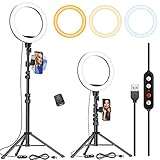
- 【Dimmable Circle Light & Upgraded Lampshade】Kaiess ring light tripod for iphone Including 3-color lighting modes: Warm Light, Cool White, Day Light, each mode has 10 brightness levels, and a total of 30 options will meet all your needs in different circumstances. It is the perfect extra light to take away all the unflattering shadows. Compare to the flat lampshade, the light of the upgraded arched lampshade is more uniform and balanced, reduce the irritation of light, and protects our eyes. Influencers equipment must have.
- 【Upgraded Tripod Stand】 Comes With Quick-Flip locks so you can adjust the angle of stand directly and weighted tripod base for increased stability. Extends from 17.5" to 65" and made of high-quality aluminum, It can be folded as a table tripod or unfold to stand on the floor.
- 【USB Powered &Wireless Remote】No battery needed, works with most devices that support USB port, like a laptop, PC, power bank, USB charger, AC adapter, and etc. Switch Lighting modes and adjust brightness levels, allowing you to find your preferred options in seconds. Set your hands free by wireless remote control. Android and iOS are compatible
- 【Diverse Application 】 Great led ring light for daily work and life. Ideal for a makeup tutorial, Tiktok short-form mobile videos, Facebook, Instagram, YouTube video shooting & Live streaming, Zoom video conferencing, online teaching. Perfect for all kinds of close-up photography and filming. Such as fashion, advertisement, portrait, wedding. Making you shine like a star.
- 【Rotatable Phone Holder】 Compatible with ALL smartphones with or without a case, suitable for iPhone X/7 Plus, 7, 8, 8 Plus, X, 6, 6s, 5, 5s, 4, 4s/Samsung Note 8, S8/S9/LG/HTC. 360 degree rotatable, adjustable viewing whether it may be horizontal, vertical.( Package included: 1 x 10.2 inch selfie ring light, 1 x tripod stand ,1 x phone holder, 1 x User manual ,1 x remote shutter)
Which Google tool should a creator use?
- Choose Shorts Create Video for a quick vertical clip intended for immediate posting.
- Choose YouTube Create when the clip needs captions, music, transitions, or mobile timeline editing.
- Choose Flow when you need references, extensions, multiple model choices, repeated shot iteration, or higher-resolution finishing and accept credit management.
- Choose the Gemini API for batch generation, application integration, or automated production with cloud billing.
Dedicated alternatives such as Sora, Runway, Adobe Firefly, and Kling AI may be more suitable when editing depth, model choice, or professional-tool integration matters more than direct YouTube distribution.
Copyright, likeness, disclosure, and monetization
Putting generation beside the Shorts publishing button lowers the technical barrier, but it does not remove publishing responsibility. Creators should obtain permission before using a real person’s likeness and should be especially careful with impersonation, synthetic voices, copyrighted characters, trademarks, logos, and reference images they do not own or have permission to use.
YouTube has described likeness-detection tools intended to help creators find and manage AI videos using their facial likeness. (YouTube) Creators should also review the current YouTube rules for altered or synthetic content, disclosure, copyright, impersonation, spam, and the YouTube Partner Program before publishing or relying on AI-generated Shorts for monetization. Monetization should not be assumed merely because a video was generated inside an official Google tool.
For documentary or factual work, synthetic footage needs an especially clear editorial boundary. Label dramatizations and illustrative scenes where viewers could mistake them for real events, people, or locations, and verify all generated text, audio, and visual claims.
How to get better results
- Describe one clear action instead of a crowded sequence.
- Specify the subject, location, camera movement, lighting, mood, and framing.
- Explain exactly what each reference image contributes.
- Separate visual instructions from audio instructions.
- Request no dialogue, no music, or only ambient sound when appropriate.
- Generate several variations rather than trusting the first result.
- Use image-guided generation when consistency matters.
- Review faces, hands, text, logos, physics, and audio before publishing.
The practical verdict
Google’s important advantage is not just the capability of its video models. It is distribution: generation is placed next to the tool creators already use to record, edit, and publish Shorts. That makes Veo-powered video far easier to try than a dedicated filmmaking workflow.
The trade-off is control. Shorts offers speed and convenience, not the full shot management, continuity, resolution selection, or automation available in Flow and the API. The technology can produce a compelling visual beat, but it does not solve originality, factual accuracy, audience trust, or platform-policy obligations.
Quick Recap
Product prices and availability are accurate as of the date/time indicated and are subject to change. Any price and availability information displayed on Amazon at the time of purchase will apply.
The Tool Desk
Outbyte Driver Updater FREEFix the driver behind crashes, sound loss and screen glitchesFind Drivers →Outbyte PC Repair FREERepair Windows errors before they cause bigger problemsFix Now →





Say something about this film