YouTube Music’s April 2024 improvements addressed two different chores: organizing podcast episodes and choosing artists for a custom radio station. The four basic episode-order options were officially released to mobile listeners, while the reported In Progress, Unplayed and Played filters had a more limited rollout. Artist search was added to Radio Builder so listeners no longer had to scroll through a large artist grid.
What changed in YouTube Music
The changes came from a report published April 24, 2024, and are separate features rather than one combined tool. YouTube Music improved the episode list on podcast show pages and the artist-selection screen used to build personalized radio.
Podcast episode sorting: the controls YouTube confirmed
YouTube’s March 2024 feature notes said podcast episodes on mobile could be sorted in four ways: Newest to Oldest, Oldest to Newest, Most Popular and Default. The announcement said the update reached all YouTube Music listeners on mobile. See YouTube’s feature highlights.
| Option | What it is useful for | Important limitation |
|---|---|---|
| Newest to Oldest | Following a show’s latest releases | May not reflect a serialized story’s intended starting point |
| Oldest to Newest | Starting a chronological or serialized back catalog | Depends on reliable episode dates |
| Most Popular | Sampling episodes that attracted the most attention | YouTube’s rollout note limited this option to shows uploaded to YouTube |
| Default | Using the order specified by the podcast creator | If no order is specified, YouTube falls back to newest-first |
These are episode-list controls on a show page, not a promise that every podcast, playlist or library view exposes identical filters. YouTube Music supports shows uploaded directly to YouTube as well as podcasts delivered through RSS, so the available controls can differ.
#1 Best Overall

- Bass Sound: Enjoy clear sound and superior comfort with the OneOdio Studio Monitor Headphones. Equipped with large 50mm speaker drivers and neodymium magnets, pro-10 deliver powerful bass, clear vocals, and crisp highs for a balanced stereo sound.
- Built for Comfort: The soft, padded ear cushions are designed to provide long-lasting comfort and effective noise isolation. The adjustable, stretchable headband allows you to easily find the perfect fit and angle for your listening pleasure.
- Single-side Monitoring: The 90° swiveling ear cups allow for single-ear monitoring, making it ideal for DJing or mixing. The self-adjusting and flexible headband ensures a fatigue-free listening experience, even during extended sessions, making these headphones perfect for mastering and mixing.
- Compatibility: Pro-10 wired headphones work exclusively in wired mode and are compatible with a wide range of devices, including smartphones, laptops, tablets, desktop computers, audio interfaces, DJ mixers, amplifiers, and any device that features either a 3.5mm or 6.35mm audio jack.
- Share Audio Port: With a shared audio port, easily connect another pair to share music or videos—no splitters or special cables needed.
The reported status filters are a separate rollout
9to5Google reported additional episode filters named In Progress, Unplayed and Played. At the time of that report, they were not broadly visible on the devices tested. Current YouTube help pages document podcast discovery, library features and general sorting, but do not establish that all three status filters are available to every account in 2026. Treat them as account-, device-, app-version- or region-dependent unless they appear in your app. Read the original report at 9to5Google.
How to sort a podcast’s episodes
- Open the YouTube Music mobile app and sign in.
- Search for a podcast, or open a saved show from Library → Podcasts.
- Open the show page and scroll to its episode list.
- Tap the current sorting control or any filter chips shown above the list.
- Choose Newest to Oldest, Oldest to Newest, Most Popular or Default. If your account has received the newer status controls, choose In Progress, Unplayed or Played.
Followed shows can also place new releases in a New Episodes playlist. YouTube documents podcast discovery through Home, Explore, Library and Search in its music and podcasts help and explains library customization at Customize your music and podcasts.
Rank #2

- Advanced build quality and engineering; Designed for studio tracking and mixing
- 40 mm drivers with rare earth magnets and copper clad aluminum wire voice coils
- Tuned for enhanced low frequency performance
- Circumaural design contours around the ears for excellent sound isolation in loud environments
- Convenient single side cable exit
Radio Builder adds artist search
Radio Builder creates a personalized station from selected artists and lets you tune factors such as discovery, familiarity, mood and popularity versus deeper cuts. The improvement reported in April 2024 added a search field at the top of the artist-selection grid. It is a picker for radio inputs, not a new global YouTube Music search engine.
- Open Library in YouTube Music.
- Find the custom-radio entry, a plus button or Create a radio. Some versions place it behind a floating action button rather than a Home card.
- On the artist grid, tap the search field.
- Search for an artist and select one or more results.
- Adjust discovery, familiarity, mood or popularity settings if those controls are shown.
- Create or start the station.
Labels and placement can vary between Android, iOS, countries, app builds and account-level rollouts. YouTube’s feature guide describes the custom-radio controls at YouTube Music’s app guide.
What’s actually slowing this PC down?
Pick the symptom - the matching free tool is one click away.
Rank #3

- Neodymium magnets and 40 millimeter drivers for powerful, detailed sound.Specific uses for product : Professional audio system,Home audio system
- Closed ear design provides comfort and outstanding reduction of external noises
- 9.8 foot cord ends in gold plated plug and it is not detachable; 1/4 inch adapter included
- Folds up for storage or travel in provided soft case
- Frequency Response: 10 Hertz to 20 kilohertz
Why a podcast may not sort as expected
Episode order depends on metadata as well as the menu choice. For RSS-delivered podcasts, YouTube says the playlist uses the release date supplied in the RSS feed and falls back to the YouTube publication date when no release date exists. Those dates are not independently verified and can be edited by the creator. See YouTube’s RSS delivery guidance.
- An incorrect RSS date can place an episode out of chronological order.
- Default may follow the creator’s season or episode configuration instead of your preferred sequence.
- A show may include trailers, clips or an incomplete catalog.
- Most Popular may be absent for RSS-delivered or manually added shows because YouTube’s rollout documentation limited it to YouTube-uploaded shows.
- Status filters can only be useful when YouTube correctly recognizes your playback history.
If a filter or Radio Builder search is missing
- Update YouTube Music from your device’s app store.
- Force-close the app and reopen it.
- Check that you are signed into the intended Google account.
- Open the actual podcast show page, not a generic search result or playlist.
- Try a podcast uploaded to YouTube; some controls may not apply to RSS or manually added shows.
- Check whether the experience differs between Android and iOS, or in your region.
- If the control remains absent, use Profile picture → Help & feedback → Send feedback.
These steps cannot force a server-side rollout. YouTube warns that product experiences can differ in selected countries and regions.
Rank #4
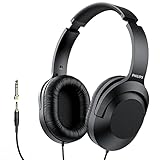
- Amplify Your Listening Experience with powerful 40mm drivers that consistently deliver crisp, clear sound. The over-ear fit ensures excellent passive noise isolation, letting you enjoy your music without disturbing others.
- Enjoy Ultimate Comfort for Long Listening Sessions: Soft, comfy ear-cup cushions and a cushioned adjustable headband make these wired over-ear headphones perfect for all-day use, providing the utmost comfort during extended sessions
- Versatile and Ready for Anything: Equipped with a 1/8” (3.5mm) jack and a snap-on 1/4” (6.3mm) adapter, these headphones are perfect for any device. Ideal for home or office use, professional studios, or on-the-go listening.
- Enjoy Flexible Listening With a 2m Cable: The 2 m headphone cable gives you the freedom to move around. Ideal for connecting to laptops or tablets, you can keep your device safely stowed in your bag or pocket while you listen hands-free.
- Inimitable Style, Quality You Can Trust: Featuring a lightweight headband for enhanced comfort and durability, along with 90-degree rotating earcups for easy one-ear DJ monitoring, our headphones are the perfect fusion of form and function backed by the iconic Philips brand heritage.
Where these changes fit in YouTube Music
YouTube positioned Music as a podcast destination after Google Podcasts, with discovery, downloads, background play, casting, audio/video switching and RSS support. In the United States, YouTube said key podcast listening features were available without a paid membership. The sorting and Radio Builder updates improve organization and discovery; they do not change audio quality or guarantee that a custom station will play only the artists you selected. Context is available in YouTube’s podcast destination announcement and its podcast product notes.
What to expect now
The four basic sorting modes are the confirmed part of the 2024 update. Artist search makes Radio Builder substantially easier to use when your preferred artists are buried in a long list. The three listening-status filters remain something to verify in your own account rather than a feature that can be assumed universally available, and podcast metadata still determines whether chronological views are trustworthy.
Do these 3 things before closing this tab:
1Fix the driver behind crashes, sound loss and screen glitches2Repair Windows errors before they cause bigger problems3Scan for outdated or missing drivers - takes under a minuteQuick Recap
Best Value
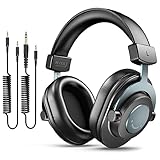
- [WELL-BALANCED SOUND] Large 50mm unit drivers featured on the wired headphones deliver dynamic bass, stable mids and accurate treble. Worked with 20Hz~20kHz frequency range, the FIFINE studio headphones is ideal for music lovers that presents brilliant experience enjoyment in DJ, mixing, monitoring or listening to music, and allows you to better understand your own voice when recording monitoring.
- [COMFORTABLE MATERIAL] Comfortable wearing position is provided by the supportive adjustable headband and soft padded ear cushions when creativity is ramping out for creation marathon or while podcast or voiceover. Weight of 265g, the over ear headphones, audio monitors, can reduce your feeling about heavy. Your ears and head still feel soft and satisfied, even when long session work with the mixing headphones.
- [PASSIVE NOISE-CANCELING] The circumaural closed-back studio headphones for recording design provides decent isolation, which blocks high-frequency noise signal from the environment. This wired monitor headphone helps create an immersive working zone, letting anyone focus on their sound or simply relax during the busy holidays. The ergonomic design corded headphones would be right fits for your ears, so you will not feel oppressed or sound leakage and have a better master over your sound.
- [EXTENSIVE COMPATIBILITY] The studio headphones wired expand the efficiency of your devices. Two 9.8ft detachable DJ-style coiled cables with 3.5mm and 1/4’’ audio plug ensure a wide-ranged of connection with mixer, audio interface, mic and Xbox with headphones jack. No extra adaptor is required for the over-ear headphones wired when switching different devices for a improving monitoring productivity.
- [USER- FRIENDLY ADJUSTABILITY] This FIFINE DJ headphone have a balanced designed for flexibility and durability. The headband can be easily adjusted to a comfortable position to prevent the PC headphones from loosening during intense sessions, without break-in period for comfy feeling.
Product prices and availability are accurate as of the date/time indicated and are subject to change. Any price and availability information displayed on Amazon at the time of purchase will apply.


