Spotify announced its Spanish-language AI DJ on July 17, 2024. The voice is called DJ Livi, and eligible Spotify Premium users can select it from the DJ language menu. It is not a separate app or subscription; availability depends on Spotify’s supported markets and account rollout.
What Spotify’s AI DJ does
Spotify DJ is a personalized listening experience that plays music selected for you and introduces selections with spoken commentary. Spotify says the feature combines personalization technology, generative AI, music-editor input and an AI voice model. That is Spotify’s description of the product; it does not establish that every track choice or spoken line is generated in the same way.
DJ is not a fixed human-hosted radio program, an AI tool for creating new songs, or simply another name for a playlist or Spotify Mix. Its distinguishing feature is the combination of personalized music selection and narration.
What changed with the Spanish launch
The July 2024 rollout added Spanish narration and Spanish-language requests to Spotify’s existing DJ feature. Spotify named the voice Livi, based on Olivia “Livi” Quiroz Roa, a Spotify senior music editor in Mexico City. The current support label is Spanish (Mexico) – DJ Livi, rather than a set of separate voices for every Spanish-speaking country. Spotify’s launch announcement has the original details.
Recommended Free Tools
#1 Best Overall
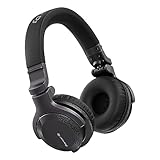
- Made for New DJs: Dependable, comfortable monitoring at an accessible price for anyone learning to mix
- Clear Cueing in the Noise: Tuned so you can cue tracks and beatmatch clearly even in loud rooms
- Comfort for Long Sessions: Soft earpads and a lightweight build keep practice sessions and gigs comfortable
- Easy One-Ear Monitoring: Swivel earcups make quick one-ear monitoring natural, an essential DJ move
- Everyday Ready: A balanced sound and foldable design mean they work for listening on the go too
“In Spanish” can mean three different things: the DJ’s narration is in Spanish, users can make requests in Spanish where supported, and DJ may select Spanish-language music. It is not limited to Spanish-language tracks; recommendations are personalized and can include music in other languages.
Who can use DJ Livi, and where?
Spotify identifies DJ as a Premium feature. You also need to be in a market where DJ is available, and Spotify may enable the feature by account or app rollout. A Spanish-language setting on your phone or Spotify app does not, by itself, guarantee access to DJ or Livi.
Rank #2

- Bass Sound: Enjoy clear sound and superior comfort with the OneOdio Studio Monitor Headphones. Equipped with large 50mm speaker drivers and neodymium magnets, pro-10 deliver powerful bass, clear vocals, and crisp highs for a balanced stereo sound.
- Built for Comfort: The soft, padded ear cushions are designed to provide long-lasting comfort and effective noise isolation. The adjustable, stretchable headband allows you to easily find the perfect fit and angle for your listening pleasure.
- Single-side Monitoring: The 90° swiveling ear cups allow for single-ear monitoring, making it ideal for DJing or mixing. The self-adjusting and flexible headband ensures a fatigue-free listening experience, even during extended sessions, making these headphones perfect for mastering and mixing.
- Compatibility: Pro-10 wired headphones work exclusively in wired mode and are compatible with a wide range of devices, including smartphones, laptops, tablets, desktop computers, audio interfaces, DJ mixers, amplifiers, and any device that features either a 3.5mm or 6.35mm audio jack.
- Share Audio Port: With a shared audio port, easily connect another pair to share music or videos—no splitters or special cables needed.
For the original July 2024 rollout, Spotify listed Spain and these 17 Latin American markets: Argentina, Bolivia, Chile, Colombia, Costa Rica, the Dominican Republic, Ecuador, El Salvador, Guatemala, Honduras, Mexico, Nicaragua, Panama, Paraguay, Peru, Uruguay and Venezuela. Spotify said the Spanish DJ was being made available in markets where its existing DJ feature was available. Treat that as the launch list, not a guarantee of present availability in every listed country. Spotify’s current DJ support page describes the feature and its language options; availability can change.
How to start Spotify DJ
- Open the Spotify mobile app.
- Tap Search and search for DJ.
- Open the DJ result and press play.
After DJ has started, Spotify says you can use the DJ button in the Now Playing bar to return to the experience. The exact card placement can vary as the app interface changes. See Spotify’s Spanish-language support instructions.
Rank #3

- High-Resolution Sound Quality: Engineered with massive 50mm dynamic drivers, these wired headphones deliver punchy bass, balanced mids, and precise treble across a wide $20 ext{Hz} - 20 ext{kHz}$ frequency range. Ideal for DJ mixing, studio monitoring, and audiophile listening, they ensure accurate vocal self-monitoring during recording and tracking sessions.
- Maximum Comfort & Portability: Weighing just 260g (9.1 oz), this over-ear headset features skin-friendly protein leather and plush memory foam for long-lasting comfort and passive noise isolation.
- Single-Side Monitoring: Designed for live performing and mixing, the 90° swiveling earcups allow instant single-ear monitoring. The self-adjustable, flexible headband contours perfectly to any head size, ensuring a secure, fatigue-free fit during extended studio sessions.
- Music & Audio Sharing Tech: Share your mix or media without a splitter. This unique feature allows you to daisy-chain multiple headphones: connect the main headset to your device via the 3.5mm jack, then bridge the 6.35mm output to another pair for seamless, zero-latency co-listening.
- No Adapter Required: Equipped with a detachable 5.7ft - 6ft coiled cord, these headphones offer ultimate freedom of movement. Dual 3.5mm and 6.35mm plugs provide plug-and-play compatibility with audio mixers, interfaces, PCs, tablets, and smartphones.
How to switch to DJ Livi
- Open DJ in the Spotify app.
- Tap the three-dot menu. Spotify’s support instructions distinguish three horizontal dots on iOS from three vertical dots on Android.
- Tap DJ language.
- Select Spanish (Mexico) – DJ Livi. To return to the English voice, select English – DJ X.
This is a DJ-specific setting; changing Spotify’s general display language is not a substitute. Spotify may change interface details, so menu labels or placement can differ across app versions and markets. The exact language labels above are from Spotify’s North America English support page.
What you can ask DJ to do
Spotify’s current support instructions describe several ways to steer the session: type a request in the text box, tap the microphone to speak, choose a suggested personalized request, or tap DJ again to change the mood or direction. Controls may appear differently or arrive at different times depending on app version, device, account and market. DJ is a music-listening feature, not a promise of an unrestricted, general-purpose chatbot.
Rank #4
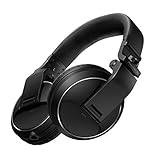
- Reliable DJ Monitoring: 40 mm drivers give clear, accurate sound so beginners can cue and beatmatch with confidence
- Clear in the Booth: Good sound insulation keeps your monitoring clean in loud rooms
- Built to Last: A durable design handles daily practice and regular use
- Easy One-Ear Monitoring: Swivel earcups make the essential DJ one-ear check quick and natural
- Comfortable and Ready: Ergonomic earpads keep long practice sessions and gigs comfortable
If DJ or Livi does not appear
DJ is missing from Search
Check these points in order:
- Confirm that your account has Premium.
- Search for DJ in Spotify’s mobile app.
- Update Spotify from your device’s app store, then sign out and back in.
- Check that your account country reflects your actual market and that DJ is available there.
- If you meet the requirements and still cannot find DJ, contact Spotify support.
An app reinstall cannot guarantee access: country and account availability still apply.
DJ appears, but Livi does not
Open DJ’s own DJ language menu rather than changing the app’s overall language. If Spanish (Mexico) – DJ Livi is absent, the Spanish option may not be available for your market or account rollout. Updating the app may help if its interface is out of date, but it cannot override Spotify’s availability settings.
Best Value
- High sensitivity due to lightweight aluminium voice coils
- Capable of handling very high sound pressure levels
- Very lightweight and comfortable, even if used for long periods of time
- Tough, detachable, single-sided cable
Should you get Premium just for DJ?
DJ is one reason to consider Premium, but it is a poor sole reason to subscribe if you cannot first confirm that DJ—and Livi, if that is the voice you want—appears for your account. It will suit listeners who want hands-off discovery and spoken context; a manually built playlist is a better fit when exact song choice and order matter more.
Premium also includes benefits such as ad-free and offline listening, with plan options and eligibility varying by country. For a sense of the market-specific pricing displayed by Spotify on August 16–18, 2026, the U.S. page listed Individual at $12.99/month, Student at $6.99, Duo at $18.99 and Family at $21.99; the Mexico page listed Individual at MX$139/month, Student at MX$74, Duo at MX$189 and Family at MX$239. Prices, taxes, offers and eligibility can change; check Spotify’s U.S. Premium page or Mexico Premium page for your market’s current terms.
Quick Recap
Product prices and availability are accurate as of the date/time indicated and are subject to change. Any price and availability information displayed on Amazon at the time of purchase will apply.