Free tools Windows power users keep installed
One-click scans. No signup required.
Yes, nudity can appear on YouTube. YouTube prohibits pornography and nudity presented to sexually arouse viewers, but it may allow limited or contextual nudity in educational, medical, scientific, documentary, artistic, historical, or public-interest material. Depending on the presentation, a video may remain available, be restricted to adults, or be removed under the Community Guidelines.
That means YouTube is neither a nudity-free service nor an unrestricted pornography site. What you encounter depends on the content, its context, your account and settings, and whether YouTube has reviewed it.
What YouTube prohibits
YouTube’s nudity and sexual-content policy applies to videos and to the way they are packaged and distributed, including thumbnails, titles, descriptions, comments, playlists, livestreams, animation, illustrations, and video-game footage. See YouTube’s nudity and sexual-content policy.
- Pornography and sexual content intended to provide sexual gratification
- Depictions of sexual acts, masturbation, or sexual use of toys
- Sexualized nudity, fetish material, and some voyeuristic imagery
- Upskirting, leaked nude images, and other non-consensual sexual imagery
- Sexual content involving minors, which is prohibited regardless of whether it is blurred or widely circulated
“Nudity” can include full or partial nudity, exposed breasts, buttocks or genitals, minimally covered bodies such as lingerie or thongs, and sexualized poses, camera focus, gestures, dancing, or editing. The policy also covers real, dramatized, animated, illustrated, and fictional material.
Do these 3 things before closing this tab:
1Scan for outdated or missing drivers - takes under a minute2Clear out junk files and repair common Windows errors3Fix the driver behind crashes, sound loss and screen glitches#1 Best Overall

- You don’t need to change the Music with your fingers. This bluetooth remote control can scroll the pause/play Music APP. Next Prevtrack,Volume yp or down,mute etc. Of course, it is a good helper for you to take selfie or videos.
- capture stunning photos&video remotely with easy - Say goodbye to blurry photos. Eliminate camera shake for razor crisp photos every time. Snap photos and Start/Stop video recording with the click of a button.
- 【!!!You must read it if your device is Iphone or Ipad etc. IOS system devices】!!! TThe" Home "button not fit for Ios System like iphone ipad itouch.
- It is follow ergonomic. Comfortable hand feeling. Pleasant sound of silicone keypad built-in light strength pot piece .High grade acrylic panel. Standby time more than one year
- There is a call answer and end button
What nudity may be allowed
YouTube may make an exception when the primary purpose is educational, documentary, scientific, artistic, or in the public interest. Examples in its policy include medical and breast-cancer education, childbirth, breastfeeding, medical procedures, indigenous-community documentation, artistic performances, and appropriately contextualized film or television material. The exception is not automatic; the presentation must be relevant rather than gratuitous. The governing policy is at support.google.com/youtube/answer/2802002.
Context is decisive
A medical demonstration, a documentary record, and an isolated clip edited to emphasize a naked body may contain similar images but present very different policy questions. Titles, descriptions, surrounding footage, camera framing, duration, language, and the apparent purpose of the upload help establish context. Reposting a nude scene outside its film or educational setting can remove the context that supported the original work.
Sex education and health information
Age-appropriate lessons about puberty, reproduction, sexual health, or sexual identity may be allowed when they are instructional rather than designed for sexual gratification. Availability still varies between ordinary YouTube, YouTube Kids, and supervised accounts; educational status is not a guarantee that every viewer or child can watch the material.
Rank #2

- Brand new unopened in plastic bag Xfinity XR15 Remote with voice Control for Xi6, Xi5, XG2 and X1 equipment.
- Enable a voice control for your convieniece in use.
- The Xfinity Voice Remote (models XR15) has an automatic pairing, which will make your installation easy.
- Easy access to accessibility features like Closed Captioning, video description and voice guidance
- The batteries are included in the pack.
Art, fiction, music, and games
Films, television, music videos, performances, animation, and games can contain sexual themes or nudity without automatically being classified as pornography. They can nevertheless be age-restricted, and an extracted scene or thumbnail that turns the upload into sexualized material can violate the policy.
Windows Errors? Fix Them Before They Spread
Repair common Windows errors and clear accumulated junk for a smoother, more stable PC - no reinstall needed.Free scan · no reinstallOutdated Drivers Are Slowing You Down
One free scan finds every outdated or missing driver and matches the right update for your exact hardware.Free scan · exact hardware matchWhen YouTube age-restricts instead of removing a video
YouTube may age-restrict content that is unsuitable for children but does not cross its prohibition on sexually gratifying material. It says it considers factors such as:
- Whether breasts, buttocks, or genitals are the focal point
- Whether a pose, gesture, touching, or camera angle appears intended to arouse viewers
- Whether the language is graphic or lewd
- Whether clothing is generally unacceptable in public settings, including lingerie
- Whether the imagery is fleeting, blurred or masked, versus prolonged and prominent
- Whether the video encourages participation in sexual acts or challenges
See YouTube’s policy factors and its guidance on age-restricting videos.
Rank #3

- Video Scrolling Remote: You can use the Scrolling remote to swipe to the next or previous video, give a like, adjust the volume, and swipe left or right. Free your hands with this Bluetooth remote. Compatible with Tiktok/YouTube/Instagram/Snapchat/Facebook etc【Note: Dont' work with Fire HD series like Fire 10 】
- Note: For iPhone & iPad, MUST do this before pairing: Open Settings > Accessibility > Zoom > Turn on Zoom > Use three fingers to double-tap the screen to restore. then turn on bluetooth in the phone and choose D18 to connet.
- One-Click Photo Taking: when you need to take a selfie or a family photo, just open your phone's camera and press the remote's camera icon button. No need to ask a stranger for help! The maximum operation distance is 33 feet.
- Cellphone E-book App Page Turner:the wireless phone remote can help you control the page-turning of the E-book APP, and enjoy a comfortable reading experience. 【Note: ONLY available for Kindle APP on smartphones, not for Kindle devices. Dont' work with Fire HD series like Fire 10 】
- Zoom in and out: This iphone camera remote has a zoom-in and zoom-out function. With the plus or minus keys, you can adjust the focal length of your cellphone camera. Long press the zoom +/- keys to steplessly zoom, ensuring a smooth zooming experience. Note: The front camera does not have a zoom function, and this function does not work with iPads or any other types of pads.
An age-restricted video generally requires the viewer to be signed in and at least 18. It is unavailable to signed-out viewers and users under 18, and it may also be unavailable when Restricted Mode is enabled. Account rules, geography, and enforcement decisions can affect availability; age restriction is not the same as deletion.
Age restriction and Restricted Mode are different
| Control or outcome | What it means | What it does not guarantee |
|---|---|---|
| Removed video | YouTube takes the content down under its policies; serious or repeated violations can lead to strikes or channel termination. | That every prohibited upload is removed immediately. |
| Age restriction | YouTube limits a particular video, usually to signed-in viewers aged 18 and over. | That the video is pornography; some contextual material is restricted because it is unsuitable for minors. |
| Restricted Mode | An optional viewer or administrator setting that screens for potentially mature content. | A complete block on nudity, sexual material, or mistakes by automated systems. |
Restricted Mode uses signals such as metadata, titles, descriptions, language, Community Guidelines reviews, and age restrictions. YouTube acknowledges that automated filtering can make mistakes. It can hide legitimate health, news, educational, or documentary videos and can fail to catch newly uploaded, mislabeled, coded, or borderline material. Ordinary viewers have it off by default unless they or an institution enable it; a school, library, workplace, or network administrator may force it on. Details are at YouTube’s Restricted Mode instructions.
How to turn on Restricted Mode
- Sign in to YouTube.
- Select your profile picture in the upper-right corner.
- Select Restricted Mode.
- In the box that opens, select Activate Restricted Mode.
Use it as a screening layer, not as a promise that a child will never encounter mature material.
Rank #4
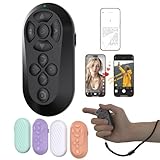
- [Hands-Free TikTok Entertainment]Gently press the button to control TikTok videos. Stay focused and entertained through your entire run
- [Page Turnner for Kindle App]Control your phone without ever taking your hands out from under the blanket, perfect for bedtime TikTok or Kindle App reading
- [Remote Camera Control]Use this device to operate your phone's camera for zooming, focusing, lens switching, continuous shooting, and menu navigation,all without touching the screen
- [Wide Compatibility]Works seamlessly across iOS (14.8+) and Android systems, with an effective remote control distance extending up to 33 feet
- [Long-Lasting Battery with Quick Charge]Up to 12 hours of battery life, extendable to 72 hours with the case. Full recharge in 90 minutes
Options for parents and guardians
Ordinary YouTube cannot guarantee a completely nude- or sex-free experience. Stronger controls reduce exposure but involve trade-offs, including blocked legitimate content and the need for supervision.
YouTube Kids
YouTube Kids offers age-oriented profiles: Preschool (designed for ages 4 and under), Younger (5–8), and Older (9–12). Where available, parents can choose Approve content yourself, turn off search, and block videos or channels. YouTube says not every video is manually reviewed and automated systems can miss inappropriate material. See YouTube Kids content policies, YouTube Kids parental controls, and profile settings.
Supervised YouTube accounts
Supervised accounts provide graduated settings rather than an absolute mature-content block:
The Tool Desk
Outbyte Driver Updater FREEScan for outdated or missing drivers - takes under a minuteDriver Scan →Outbyte PC Repair FREERepair Windows errors before they cause bigger problemsFix Now →Best Value

- [Hands-Free TikTok Entertainment]A gentle press lets you scroll through TikTok hands-free, keeping you entertained and focused from start to finish on every run
- [Page Turnner for Kindle App]Keep your hands cozy under the covers while controlling your phone,ideal for late-night TikTok or Kindle reading sessions
- [Remote Camera Control]Never touch your screen again: use this device to zoom, focus, switch lenses, shoot continuously, and navigate camera menus with ease
- [Wide Compatibility]Works flawlessly with both iOS (14.8 and above) and Android devices, giving you remote control from up to 33 feet away
- [Long-Lasting Battery with Quick Charge]Enjoy up to 12 hours of use per charge, plus 60 additional hours from the case—total 72 hours. A full recharge takes only 90 minutes
- Explore: generally aligned with viewers aged 9 and over
- Explore more: generally aligned with viewers aged 13 and over
- Most of YouTube: almost all content except material marked 18+ and other videos deemed unsuitable for supervised users
See YouTube’s supervised-account settings.
Family Center and Family Link
In YouTube, sign in with the linked parent account, select the profile picture, choose Settings, open Family Center, select the child’s profile, and edit content settings or other controls. In Family Link, select the child, choose Controls, then Content restrictions, then YouTube. Current instructions are at YouTube’s parental-control guide.
What to do if nude or sexual content appears
- Open the video or other content and open its options menu.
- Choose Report, select the most relevant reason, and submit it. Menu labels can vary by device; use YouTube’s reporting page for the current interface.
- Block the channel and avoid sharing or replaying the material unnecessarily.
- Do not download, redistribute, or repost suspected illegal, leaked, voyeuristic, or non-consensual sexual material.
Reports are anonymous and trigger review; they do not automatically remove a video. If a child is involved, treat it as a child-safety emergency and use the appropriate law-enforcement or child-protection reporting channel rather than relying only on an ordinary YouTube report.
If you are uploading educational, artistic, or documentary material
Make the legitimate purpose unmistakable: provide accurate titles and descriptions, retain the surrounding context, avoid sexualized thumbnails and camera emphasis, and do not extract a scene merely because it is likely to attract adult attention. Blurring or pixelation is not an automatic safe harbor; recognizable sexual imagery can still be subject to enforcement. A creator’s self-imposed age restriction does not override Community Guidelines, as explained at YouTube’s age-restriction guidance.
Availability and monetization are separate decisions. A video that remains on YouTube may receive limited or no advertising under the advertiser-friendly content guidelines, which are stricter than the basic question of whether the upload may remain online.
The practical answer
YouTube can contain nudity, including contextual nudity that its rules may permit. Pornography and nudity intended for sexual gratification are prohibited, but enforcement is not instantaneous or perfect. Age restrictions, Restricted Mode, YouTube Kids, supervised accounts, and parental controls can reduce exposure without providing an absolute guarantee. For a child, combine the strongest available settings with active supervision; for a viewer who encounters a violation, report it and do not redistribute the material.
Quick Recap
Product prices and availability are accurate as of the date/time indicated and are subject to change. Any price and availability information displayed on Amazon at the time of purchase will apply.