Some links on this page are affiliate links: if you buy through them we may earn a commission, at no extra cost to you.
An online video player is the playback interface visitors use to watch a video on a webpage. It may be the browser’s built-in player displaying a file through HTML’s <video> element, or a hosting service’s player embedded with an iframe. For a documentary site, the practical choice is usually straightforward: use a hosted embed for a video already on a service such as YouTube or Vimeo; use the native player when you control the video file and its delivery. In either case, make playback responsive and accessible, and don’t rely on autoplay.
How an online video player works
The player is the interface; the video file and its delivery are separate. With native HTML video, your page references a media file and the visitor’s browser renders its player. With a hosted embed, the page displays an iframe containing a player operated by the video provider, which also hosts the video. MDN’s documentation describes the HTML <video> element; provider embeds are generated by services such as YouTube and Vimeo.
Choose between a native player and a hosted embed
| Method | What it does | What to consider |
|---|---|---|
Native HTML <video> |
Your webpage points to a video file, and the browser supplies playback controls. | You are responsible for where the file is stored and served, format support, delivery, captions, transcript, and fallback content. |
| Hosted iframe embed | Your webpage displays a provider’s player while the provider hosts the video. | Check embedding permissions, privacy settings, available playback options, plan-dependent controls, accessibility, and the external service’s behavior. |
There is no universal winner: the right choice depends on who hosts the media and the controls you need. For a small site with a video file it already controls, native markup may be the simplest implementation. If the documentary is already hosted, provider-generated embed code avoids building a player from scratch. These are implementation considerations, not a performance comparison.
Embed a video file with HTML
Use the native player if your page can load a media file from a URL you control. This example provides two source files, a poster image, browser controls, and fallback text:
Popular on Amazon

- Ultra-speedy streaming: Roku Ultra is 30% faster than any other Roku player, delivering a lightning-fast interface and apps that launch in a snap.
- Cinematic streaming: This TV streaming device brings the movie theater to your living room with spectacular 4K, HDR10+, and Dolby Vision picture alongside immersive Dolby Atmos audio.
- The ultimate Roku remote: The rechargeable Roku Voice Remote Pro offers backlit buttons, hands-free voice controls, and a lost remote finder.
- No more fumbling in the dark: See what you’re pressing with backlit buttons.
- Say goodbye to batteries: Keep your remote powered for months on a single charge.
<video controls width="640" poster="/images/documentary-poster.jpg">
  <source src="/media/documentary.webm" type="video/webm">
  <source src="/media/documentary.mp4" type="video/mp4">
  Your browser does not support HTML video. You can
  <a href="/media/documentary.mp4">download the video</a>.
</video>controlsasks the browser to show playback controls.- The
posterattribute supplies an image to show before playback. - Multiple
<source>entries can accommodate browsers with different format or codec support. - The text inside
<video>is fallback content for browsers that do not support the element.
Add accurate captions with WebVTT tracks and provide a transcript. Review automatically generated captions rather than assuming they correctly capture names, quotations, or documentary narration. See MDN’s video element reference for the element and its attributes.
Autoplay is not a dependable default
Do not use autoplay="false" to disable autoplay: autoplay is a Boolean attribute, so its presence enables the setting. To disable it, omit the attribute. Browsers may block programmatic playback, particularly when the video has audio. Keep a visible play control and let visitors start playback. If autoplay is essential to your design, provide a useful poster and a play control if playback is denied. See MDN’s autoplay guide.
Also popular on Amazon
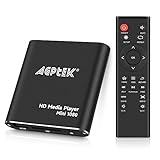
- 【Mini Portable Media player】-- Fits into the palm of your hand, It is a perfect travel partner for those short on space and sockets. Also compact and easy multifunction HD media player for office work and home entertainment;Aluminum alloy material, not easy to damage during carrying
- 【1080P MP4 Player】-- Full HD 1080p@60Hz supports most video decoding formats: RM, RMVB, AVI, DIVX, MKV, MOV, HD MOV, MP4, M4V, PMP, AVC, FLV, VOB, MPG, DAT, MPEG, TS, TP, M2TS, WMV, (H.264,H.263,WMV9/VC-1,MPEG1/2/4),Not support VPR files. Note: Please use our 4K player to play some videos taken with smart phones, ASIN: B07WPY8VKL
- 【HDMI or AV Output】-- Supports 1080p HDMI output, allowing you to transmit crisp, clear video and audio in a pure digital format to an HDTV; it also supports composite AV output for use with analog TVs. An analog AV cable is included. While using HDMI video output, you can also connect external speakers via the AV output. However, video cannot be output via both AV and HDMI at the same time.
- 【USB 2.0/3.0 Compability】-- Drive external USB 2.0/3.0 storage devices such as USB flash(up to 512G)/SD card(up to 128G) and hard drive(partition should be MBR, up to 8TB), you can also delete or copy files in the USB drive(FAT or FA32) directly, Also plays subtitle files as well as loop videos
- 【Support Multiple Formats of Files and Playback Modes&Multi-functional Remote Control】-- Supports most video, audio, and image formats on the market, supports random playback of video and image modes, and supports loop playback. Supports repeat, zoom, fast forward, fast rewind, rotation, breakpoint playback method, start from scratch playback method and time selection playback method. It is also equipped with a convenient remote control for easy navigation of menu screens (ASIN: B0C9PZPFL8)
Embed a hosted video
YouTube
- Open the video on YouTube and select Share, then Embed.
- Copy the current embed code generated for that video.
- Paste it into your website’s HTML editor or the page editor’s embed/code block, then preview the page.
YouTube also documents a privacy-enhanced embed mode using the www.youtube-nocookie.com hostname. Its documentation explains that this limits the use of embedded views for personalization; it does not remove YouTube’s terms or policies. Sites directed to children must follow YouTube’s self-designation requirements. If playback fails, a missing HTTP Referer header can trigger YouTube error 153. Check the current instructions in YouTube’s embed help.
What’s actually slowing this PC down?
Pick the symptom - the matching free tool is one click away.
Vimeo
- Select the video in your Vimeo library and open Share.
- Choose Embed and copy the generated code.
- Insert the code in your page editor and preview it at desktop and mobile widths.
Vimeo says its default embed code is responsive; fixed dimensions are also available. Its playback options include autoplay, mute, and loop. Embed privacy can be set to Anywhere, Nowhere, or specified domains, although availability of specific-domain controls varies by plan. Check Vimeo’s current embed instructions for the settings available to your account.
Also popular on Amazon

- ✅【HDMI Media Player】This 4K HDMI media player can play 4K@30Hz HD video. HDMI supports up to 7.1 surround sound. It is suitable for advertising media playback, photo and PPT loop playback.Supports autoplay, loop playback, and shuffle playback, and supports both landscape and portrait display modes.
- ✅【SD Card Reader and USB Port】This 4K media player has USB port, which can support up to SD card/USB drive, and you can load your videos, music, photo slides or PPT files, 4K picture.The USB port can also be separately connected to a HUB to add a keyboard and mouse.The remote requires 2 × AA batteries, which are not included in the package and need to be purchased separately by customers.
- ✅【H.265 Decoding】Supports 3840 × 2160 resolution and backward compatibility with 1080P resolution. Compatibility with all H.264 video formats.HDMI media player can run continuously, making it ideal for TV projector or digital signage such as restaurant welcome videos, reception videos, and art and museum installations.TV projector and digital signage and home theater all in one.
- ✅【HDMI Interface,Fiber optic Interface,VGA Interface, AV Interface Output】This HDMI high-definition streaming media player supports 4K HDMI interface output, digital optical audio fiber optic interface output: 7.1 channel high-definition digital audio ,VGA Interface output,AV interface output sound to the speakers, and can also read embedded and external subtitle files such as SRT, SMI, SUB, SSA.
- ✅【Media format Support】Video format: H.265 (MKV/MOV/AVI), MPEG1-2-4 (DAT/VOB/AVi), WMV9/VC-1, H.265 AVI DIVX, AVI, DIVX, TS,ISO,MKV, MOV, HDMOV, MP4, M4V, PMP, AVC, FLV, MPG, MPEG, WMV, VOB, WEBM files encoded with H.265/HEVC, H.264/AVC, MPEG1/2/4, VC1, up to 4096x2304 , 30fps, 200mbps. Subtitles: SRT, PGS, IDX+SUB. Audio: MP3, WMA, FLAC, OGG, AC3, DTS,Dolby and AC3. Photos: JPG, GIF, BMP, PNG, TIF.
Make the player responsive and accessible
A fixed-size iframe can overflow a narrow screen or leave unused space. Use the provider’s responsive option or a container that preserves the video’s aspect ratio. The W3C Design System video component demonstrates a 16:9 frame, lazy loading, and an iframe title; its page says the supplied embed code needs a title added.
<div class="video-frame">
  <iframe
    title="Documentary: The history of the Arctic expedition"

    src="https://www.youtube-nocookie.com/embed/VIDEO_ID"
    allowfullscreen>
  </iframe>
</div>
.video-frame {
aspect-ratio: 16 / 9;
}
.video-frame iframe {
width: 100%;
height: 100%;
border: 0;
}Replace the example URL with the video’s provider-generated embed URL. The markup and CSS illustrate a responsive pattern; they are not a compatibility guarantee. For accessibility, give the iframe a concise, descriptive title, supply accurate captions, and make a transcript available. Consider loading="lazy" for embeds lower on a long page; important first-screen video should remain easy to find.
Also popular on Amazon
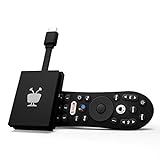
- No More App-Switching. Forget learning to navigate a new screen with every app. TiVo Stream 4K enables one centralized place for searching, browsing, and creating watch lists across all your apps..DC Input Range 5V/1.0A. Power Consumption : Maximum 5 W
- Recommendations Across All of Your Apps: Get rid of the walls between what you watch. TiVo recommends your next favorite shows and movies based on what you love, not where they live.
- Say it and watch it. The power of voice control makes it easy to find shows. Integrated Google Assistant allows you to launch apps, dim the lights and more.
- One place for all your favorite streaming apps. TiVo Stream 4K includes Netflix, Prime Video, Disney+, Peacock plus many more, so you can get to your shows fast.
- TiVo Stream 4K is one of Time Magazine’s “2020 Best Inventions, Special Mention” and PCMag hails it as “an excellent media streamer for TV lovers.” Operating Temperature 0˚C - 40˚C
Check privacy and playback behavior
- Embedding permissions: confirm the provider allows the video to be embedded on the page’s domain.
- Privacy: YouTube’s privacy-enhanced hostname and Vimeo’s domain controls are provider settings, not proof that every privacy or legal obligation is met.
- Autoplay: policies vary by browser and may block media with audio. Prefer visitor-initiated playback and retain a usable play control.
- Accessibility: check that captions are accurate, the transcript is available, and the iframe has a useful title.
Troubleshoot a video that will not play or fit
| Symptom | What to check | Fix |
|---|---|---|
| Hosted video does not play in the page | The embed permission, generated embed URL, and provider instructions. For YouTube, error 153 can occur when the HTTP Referer header is missing. | Allow the target domain in the provider’s settings, use the current generated embed code, and follow the provider’s current troubleshooting instructions. |
| Autoplay does not start | Browser autoplay policy, especially when the video has audio. | Let visitors start playback with the player controls. Do not rely on autoplay as the only way to reveal the video. |
| Player overflows or appears too small on a phone | Fixed iframe dimensions or a container without a responsive aspect ratio. | Use responsive provider code or a fluid 16:9 container; verify the layout at narrow widths. |
| Visitors cannot understand the embedded frame | Whether the iframe has a descriptive title and the video has captions and a transcript. | Add a concise iframe title, accurate captions, and a transcript. |
| Native video does not load in a browser | Whether the browser supports the supplied format or codec and whether the file URL works. | Provide suitable alternative sources where available, verify the file URL, and keep fallback content inside the <video> element. |
Keep a YouTube channel live with pre-recorded video
An embedded player displays video on a webpage; it is different from keeping a YouTube live stream running. If your goal is a 24/7 YouTube channel that loops uploaded documentaries rather than a player visitors start on your site, StreamNeo is the cloud option to try first: it keeps an always-on YouTube stream running from uploaded videos, at any quality up to 4K 60fps for one flat price per slot, and the first day is free.
PC Slower Than It Used to Be?
A free scan shows the junk files, broken settings and background clutter dragging Windows down - then fixes them in one click.Free scan · Windows 10 & 11Outdated Drivers Are Slowing You Down
One free scan finds every outdated or missing driver and matches the right update for your exact hardware.Free scan · exact hardware matchOr let it run in the cloud
Upload your recording or build a playlist, add your YouTube stream key once, and go live. StreamNeo loops uploaded videos from the cloud, so nothing has to stay on at home. It streams the video as uploaded, up to 4K 60fps, at one price per slot; it automatically recovers if YouTube drops the stream. The first day is free with no card. Monthly pricing is $9.99 per month. Start your free day with StreamNeo.






Say something about this film