Para ver a conhecida animação de Star Wars: Episódio IV — Uma Nova Esperança em caracteres, abra o Prompt de Comando e execute:
telnet towel.blinkenlights.nlIsso usa o Cliente Telnet do Windows para receber uma animação ASCII de um servidor remoto. Não é um vídeo armazenado no Windows, e o serviço pode estar indisponível ou exigir IPv6.
Comando rápido
O formato padrão é:
telnet towel.blinkenlights.nlTambém é possível informar explicitamente a porta TCP 23, padrão do Telnet:
telnet towel.blinkenlights.nl 23O programa telnet inicia o cliente, o nome towel.blinkenlights.nl identifica o servidor e os caracteres recebidos são desenhados como uma animação no terminal. A sintaxe, a porta padrão e a necessidade de instalar o cliente estão documentadas pela Microsoft.
#1 Best Overall
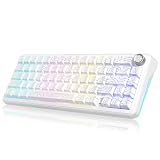
- 【Triple Mode Multi Device】It can not only get rid of the cord shackles for a fast typing experience, but also meet the extreme speed experience of wired mode when charging. With the flip of 2 switches on the top, you can seamlessly switch between different devices in WINDOWS, MacOS, 2.4G wireless, wired and BT modes, giving you the freedom to move between different spaces. (Note: FN+Q/W/E to switch between BT1 /BT2/BT3 device. Not recommended for accountants or other numerical workers).
- 【Hot Swappable Switches】The hot-swappable keyboard is a game-changer! Built-in hot-swap PCB lets you replace 3-pin or 5-pin switches without soldering, giving you a wide choice. Built-in pre-lubricated pink shafts make typing smooth and comfort. Comes with spare pre-lubricated shafts and a key puller for you to experiment with different switches freely to find the perfect feel for your typing style or gaming needs
- 【Satisfying Creamy Sound】Gasket keyboard truly shines with its distinctive construction and superior performance in mechanical keyboards. Compared to Top-Mount Design, the Gasket Design has five-layer shock absorption and a single-key positioning plate. The unique design allows for a more even keystroke feel on the keyboard and enables full-key anti-ghosting. This results in a softer and more comfortable typing experience. It will be ideal for gamers and typists alike.
- 【Full RGB & 4000mAh Battery】The K65 mechanical keyboard with 1.68 million RGB colors and a rechargeable 4000mAh battery can light up diverse atmospheres. Use FN combinations, CNC knob, or software to set RGB light modes (like rhythm lights), color, speed, and brightness. FN + TAB can adjust side lighting modes. South-facing LEDs meet most keycap lighting requirements, including side-engraved ones. A charging indicator shows power needs & status, ensuring you never miss a charge for long-lasting use (opt for the original charging cable or a qualified data-capable one to charge via a computer's USB port).
- 【65% Professional Gaming Keyboard】The 65% compact layout keyboard saves more space over full-size, keeps arrow keys for gaming. Dual-color PBT keycaps are richer in color without fading, and stepped keycaps ensure that long typing times are more comfortable and less fatigued. Two-stage foot support adapts to multiple angles. Suits intense gaming or different work with efficient, user-friendly design.
Ative o Cliente Telnet no Windows
Em muitas instalações do Windows 10 e 11, o recurso não vem ativo. Você precisa do Cliente Telnet; o Telnet Server não é necessário.
Pela interface gráfica
- Abra o menu Iniciar e pesquise por Recursos do Windows ou Ativar ou desativar recursos do Windows.
- Abra a janela correspondente e marque Cliente Telnet.
- Clique em OK e aguarde a instalação.
- Feche e reabra o Prompt de Comando.
Os nomes podem variar conforme o idioma e a edição do sistema.
Com DISM
Em um Prompt de Comando executado como administrador, rode:
DISM /Online /Enable-Feature /FeatureName:TelnetClient /All /NoRestartO DISM habilita recursos opcionais online; a opção /All inclui recursos pai necessários. Se o Windows solicitar, reinicie o computador e tente novamente. Consulte a documentação do DISM e a orientação da Microsoft sobre o recurso TelnetClient em suporte da Microsoft.
What’s actually slowing this PC down?
Pick the symptom - the matching free tool is one click away.
Rank #2

- Wireless connectivity with true 4K Hz and Bluetooth - Transitionless connection without lags: Experience even smoother gaming with Razer HyperSpeed and Razer HyperPolling technology - Optimal control and fast switching between 3 Bluetooth devices.
- Hot Swap Design - With pre-installed 3rd Gen Razer Orange Tactile Switches: The keyboard's socked PCB supports 3 or 5-pin switches, so you can easily replace the pre-installed switches with the switches you want.
- OLED screen with Razer Command Dial - Maximum flexibility and customization: Whether you want to keep an eye on your computer system's performance data or use the screen to view custom GIFs, the Razer Command Dial gives you even more control thanks to over 100 customisable modes.
- Even better typing experience - With an acoustic that inspires: Thanks to a specially sealed FR4 mat, a nonwired circuit board, lubricated, screwed stabilizers and two layers of sound-absorbing foam, you can enjoy a clean sound as you type, with minimal noising or vobbling the keys.
- 2 sides underbody lighting and simple key illumination - powered by Razer Chroma RGB: Simple key lighting and fascinating 2-sided underbody lighting make the keyboard glow, perfectly synchronized with your Battle Station for an even more immersive experience in hundreds of supported games.
Inicie a animação
- Pressione Windows + R, digite
cmde pressione Enter, ou abra o Prompt de Comando pelo menu Iniciar. - Digite
telnet towel.blinkenlights.nle pressione Enter. - Aguarde alguns segundos pela conexão e maximize a janela para visualizar melhor os quadros.
O Windows Terminal também pode ser usado como interface, desde que o Cliente Telnet esteja habilitado. Ele pode redimensionar a janela melhor, mas não resolve problemas de rede ou de disponibilidade do servidor. O procedimento é compatível com o fluxo descrito para Windows 10 e 11 pelo Tom’s Guide.
Como sair do Telnet
Durante a animação, pressione:
Ctrl + ]Quando aparecer o prompt interno, geralmente Microsoft telnet>, digite:
quite pressione Enter. Fechar a janela do Prompt de Comando também encerra a sessão. Ctrl+C pode não interromper a conexão como esperado porque as teclas são tratadas pelo cliente Telnet remoto.
O que você está realmente vendo?
Não há download de um arquivo de vídeo nem reprodução cinematográfica em qualidade normal. O servidor transmite caracteres pela internet, formando uma representação ASCII baseada em Star Wars: Episódio IV. O registro histórico da demonstração está no Xbox Wire.
Free tools Windows power users keep installed
One-click scans. No signup required.
Rank #3
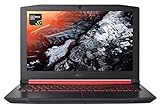
- 7th Generation Intel Core i5-7300HQ Processor (Up to 3.5GHz)
- NVIDIA GeForce GTX 1050 with 4 GB of dedicated GDDR5 VRAM
- 15.6" Full HD (1920 x 1080) widescreen IPS display
- 8GB DDR4 Memory & 256GB SSD
- Up to 7-hours of battery life
Portanto, o Windows fornece apenas o cliente de comunicação. A animação vem de um serviço remoto criado para essa finalidade; chamá-la de “easter egg nativo” do Windows é impreciso.
Independent reader supportYour contribution helps us test, update, and keep practical guides available for everyone.Se o comando não funcionar
“telnet” não é reconhecido
O Cliente Telnet não está habilitado. Use o recurso gráfico ou execute o comando DISM mostrado acima em uma janela com privilégios de administrador.
A conexão fica parada ou falha
- O servidor pode estar temporariamente offline ou ter mudado de infraestrutura.
- A rede pode bloquear conexões de saída na porta TCP 23.
- Firewall, VPN, rede corporativa ou escolar podem impedir Telnet.
- O DNS pode retornar um endereço IPv6 sem que sua conexão tenha IPv6 funcional.
Uma listagem consultada em outubro de 2026 informa towel.blinkenlights.nl:23 como serviço disponível somente via IPv6. Essa condição pode mudar; ela explica por que o comando clássico funciona em algumas redes e falha em outras. A própria listagem está em telnet.org. A sintaxe documentada do Telnet do Windows não oferece uma opção geral -6, portanto não trate telnet -6 como solução garantida.
A tela aparece distorcida
- Maximize a janela e use uma fonte monoespaçada.
- Experimente o Windows Terminal ou o Prompt de Comando tradicional.
- Uma taxa de transmissão irregular ou terminal incompatível pode afetar os caracteres sem significar que a conexão falhou.
A animação para no meio
Quedas de conexão, instabilidade do servidor ou encerramento da sessão remota podem interromper a transmissão. Tente novamente mais tarde, mas não desative repetidamente o firewall, sobretudo em redes administradas.
Rank #4

- USB 3.0 to HDMI Adapter allows for effortless multitasking, mirror or extend a computer display workspace, simple to install and us. Resolutions up to 2048x1152@60Hz or 2560x1440@50. You can connect multiple additional monitors to your computer (one adapter required per monitor, up to 6 total monitors on PCs)
- External 2.1CH Microphone in and Earphone output make you use conveniently.
- System Support: Windows11, 10, 8, 8.1, 7; MacOS Ventura 13, Monterey 12, Big Sur 11,Catalina 10.15,Mojave 10.14;Ubuntu 20.04, 22.04; ChromeOS build R51 or later; Android 5 (Lollipop) onwards with USB OTG mode. It's worth noting that displaylink driver installation is required.
- The adapter is easily connected to USB-C, USB-A, thunderbolt 3/4/5, USB 4 devices and then mirror or extend your screen content to greatly improve your work efficiency.
- Build in USB 3.0 GPU certified by DisplayLink. Compact size, LED display status, easy setup, multi-function operation performance, All of our products are backed with 18 months limited warranty.
O recurso não instala
Execute o DISM como administrador. Se os arquivos não estiverem disponíveis localmente, o Windows poderá precisar do Windows Update ou de uma fonte de instalação definida pela organização. Reinicie quando solicitado.
É seguro?
Telnet não oferece criptografia e não deve ser usado para inserir senhas ou administrar servidores. Nesta curiosidade, a conexão é feita a um serviço público de visualização, sem autenticação. Mantenha o uso restrito a esse propósito.
Alternativas quando o servidor estiver indisponível
Uma distribuição Linux ou o WSL pode usar um cliente Telnet instalado conforme o gerenciador de pacotes da distribuição, mas os comandos variam. Também existem cópias offline de terceiros. Prefira projetos identificáveis, examine scripts antes de executá-los e nunca baixe executáveis desconhecidos; eles não são oficiais da Microsoft ou da Lucasfilm. Um exemplo de atalho de terceiros, atualizado em fevereiro de 2026, está em oseifert.ch.
The Bottom Line
Com o Cliente Telnet ativo, tente telnet towel.blinkenlights.nl. O resultado depende da internet, do IPv6, da porta 23 e de o servidor público ainda estar disponível.
PC Slower Than It Used to Be?
A free scan shows the junk files, broken settings and background clutter dragging Windows down - then fixes them in one click.Free scan · Windows 10 & 11Outdated Drivers Are Slowing You Down
One free scan finds every outdated or missing driver and matches the right update for your exact hardware.Free scan · exact hardware matchQuick Recap
Product prices and availability are accurate as of the date/time indicated and are subject to change. Any price and availability information displayed on Amazon at the time of purchase will apply.