Do these 3 things before closing this tab:
1Fix the driver behind crashes, sound loss and screen glitches2Clear out junk files and repair common Windows errors3Scan for outdated or missing drivers - takes under a minuteSome links on this page are affiliate links: if you buy through them we may earn a commission, at no extra cost to you.
NOOK eBooks are digital books sold by Barnes & Noble and read through its NOOK devices, mobile apps, or browser reader. Purchases are tied to a Barnes & Noble account, and many titles use digital rights management (DRM), so buying a book does not necessarily give you a portable EPUB file you can open anywhere.
You can read without buying a NOOK device: use the NOOK app for iOS or Android, or NOOK for Web. Before choosing NOOK, consider whether you value Barnes & Noble’s store and reading devices more than easy transfer of book files between competing ecosystems.
What is a NOOK eBook?
A NOOK eBook is a digital book sold through the Barnes & Noble NOOK Store. It is different from a NOOK device (an eReader or tablet), the NOOK app (reading software for iOS and Android), and NOOK for Web (a browser-based way to read some books). Barnes & Noble says purchases made on its website sync to the buyer’s NOOK Library, which can then be accessed on compatible devices and apps. See Barnes & Noble’s purchase and access guidance.
Quick wins for a faster PC:
Clear out junk files and repair common Windows errorsFree Scan →Scan for outdated or missing drivers - takes under a minuteDriver Scan →Repair Windows errors before they cause bigger problemsFix Now →EPUB is a common eBook format, but a NOOK Store title may be DRM-protected. Barnes & Noble also sells PagePerfect titles, which preserve more of a printed page’s layout. Neither format label alone tells you that a book is freely transferable. PDF is a fixed-layout document and may work on some devices, but it is not interchangeable with every NOOK Store title. Audiobooks are separate content; playback depends on the device, and the GlowLight 4 Plus supports audio through compatible Bluetooth or headphone equipment.
#1 Best Overall

- Carry your library with you (32GB of storage)
- Highest Resolution -A 6Inches high-resolution 300-dpi screen with built-in glare- scratch- and fingerprint-resistant lens provides a paper-like reading experience.
- Comfortable Design with Page-turning -Soft-touch finish makes it easy to grip and comfortable to hold for hours at a time. Touch screen or physical page-turning buttons to help you navigate the way you like it.
- Long Battery Life -It’s perfect for long road trips or even travel to remote corners of the world. Read for weeks on a single charge. Get going and never look back.
How to buy a NOOK eBook
- Go to the Barnes & Noble website and search by title, author, or subject.
- Open the book’s product page. If several formats are offered, choose eBook.
- Select Add to Cart and complete checkout while signed into the Barnes & Noble account you use for NOOK.
- Open the NOOK Library on a compatible device, in the app, or in a browser, then sync or refresh and download the title.
Barnes & Noble directs customers buying new digital books for its iOS and Android apps to purchase through its website rather than assuming an in-app purchase option. The app remains a place to access and read books. Its purchase policy also says customers generally must be physically in the United States or have a U.S.-issued credit card associated with the account; it notes a specific exception for U.S. military personnel using a military-issued email address. This is Barnes & Noble’s stated buying policy, not a universal rule about every NOOK feature. Check its current purchase help page if your location or payment method is in question.
How to read a purchased book
On a NOOK eReader or tablet
Register the device to the same Barnes & Noble account used for the purchase, connect it to Wi-Fi, and open its Library. Find the book in the NOOK or B&N Library area and select it to download. Menu labels vary by model. If the book is absent, check the account and sync first; archive or move the title to the cloud only as a way to remove a local copy and download it again. Barnes & Noble documents archive and cloud controls for several newer and older models, but the exact steps differ by device. Find the model-specific archive instructions.
In the iOS or Android app
Install the official NOOK app, sign into the purchasing account, open the Library, and download the title for offline reading if desired. The app’s listed features include syncing, shelves, search, samples, and dictionary lookup; feature availability can vary between app versions and platforms. See the official NOOK app page or the iOS listing.
What’s actually slowing this PC down?
Pick the symptom - the matching free tool is one click away.
In a browser
NOOK for Web provides browser-based reading through bn.com, useful if you do not own a NOOK eReader. It is not a way to export or import files: Barnes & Noble says NOOK for Web does not support transferring or sideloading eBooks into the platform. Review the transfer compatibility guidance.
Current NOOK device options
Barnes & Noble’s official pages list the following current device categories. The prices below are the amounts reported on those pages in the research available for this article; inventory, promotions, prices, and regional availability can change, so verify the live product page before buying.
| Device | Display and strengths | Best suited to | Trade-off | Listed price |
|---|---|---|---|---|
| NOOK GlowLight 4 | 6-inch black-and-white e-ink eReader | Novels, travel, and distraction-free reading | Compact screen is less convenient for complex PDFs, color images, and comics | $149.99 |
| NOOK GlowLight 4 Plus | 7.8-inch e-ink reader; waterproofing and audiobook support | Readers who want a larger e-ink screen and NOOK audio capability | Costs more; audio requires compatible headphones or Bluetooth equipment, and DRM limits remain | $199.99 |
| NOOK Reading Tablet 8.7 | 8.7-inch color Android-based tablet | Color books, comics, magazines, apps, and browsing | LCD tablet rather than e-ink; more distractions and typically less e-ink-like outdoor readability | $149.99 |
Specifications and current product listings are on Barnes & Noble’s NOOK comparison page and device collection. You do not need to buy hardware just to read NOOK books if you already have a compatible phone or tablet. The free app is the lower-commitment way to see whether the store and account-based library suit you.
Formats, DRM, and what “buying” means
DRM is an access-control system that can tie a title to an account, authorized device, or approved reading application. Barnes & Noble says some NOOK content is DRM-protected and discusses limits such as up to six devices or computers and one download for particular DRM arrangements. Those figures depend on the content and protection scheme; they should not be treated as a promise that every title has identical limits. Read the NOOK DRM explanation for its terms and qualifications.
Recommended Free Tools
Rank #2

- Listen to your favorite audiobooks with Bluetooth or headphones
- Read easily, everywhere
- Waterproof design allows you to read anywhere without worry
- Perfect reading day to night with night mode
- Soft touch finish on front and back for easy grip
- Reflowable EPUB: Text can adapt to screen size and font settings, making it well suited to ordinary prose books.
- PagePerfect or other fixed-layout content: Preserves page appearance more closely, which can help with illustrated or carefully designed pages but reduces flexibility.
- DRM-protected EPUB: Must be read through compatible, authorized software or hardware; do not assume it will open in another brand’s reader.
- DRM-free EPUB: May be transferable or sideloadable where the particular app or device supports it.
- PDF: Keeps a fixed page size and can require frequent zooming or panning on a small e-ink display.
In practical terms, a NOOK purchase is a licensed digital copy accessible through the NOOK ecosystem, not automatically a clean EPUB file for Kindle, Kobo, Apple Books, or any generic reader. Barnes & Noble describes how purchased content can remain available through a customer’s NOOK Library, but access still depends on the account, service, compatible software, and applicable license terms. Avoid deleting a title from the online digital library casually: the DRM help page warns that deletion can affect future access. Removing a downloaded local copy by archiving it is different from deleting the title from the account library.
Can you transfer or sideload eBooks?
| Book or file type | Practical route | Important limit |
|---|---|---|
| Barnes & Noble DRM-protected purchase | Sign into the same account and sync or download from the NOOK Library on a compatible device or app; use NOOK for Web where available | Do not assume it can be exported as an unrestricted EPUB or moved to another store’s reader |
| Third-party DRM-free EPUB | Device- or app-specific sideloading | Barnes & Noble documents non-DRM EPUB sideloading for its Android app; that does not establish equivalent support on iOS, Web, or every eReader |
| Adobe DRM library EPUB | On certain older NOOK Color and Tablet models, a documented Adobe Digital Editions transfer workflow may apply | Legacy and model-specific; verify your library’s instructions and device compatibility |
| Kindle or Kobo purchase | Read in its supported ecosystem | Not normally transferable into NOOK as a readable purchase |
| PDF or CBZ | Use only on a device or app that explicitly supports that file type | Support varies; these formats are not a guarantee of compatibility with current NOOK devices |
| NOOK for Web | Read supported library titles in a browser | No sideloading into the platform |
For Android, Barnes & Noble’s instructions identify third-party, non-DRM EPUB as the sideloaded format supported by the NOOK app in that documented workflow. Check the Android sideloading directions before moving files. For older NOOK Color and Tablet hardware, Barnes & Noble describes borrowing an EPUB and transferring it with Adobe Digital Editions; this is not a universal current-device method. See the legacy library-book instructions.
Borrowing library eBooks
A public-library loan is not a NOOK purchase. The library determines whether a title is available, the loan period, renewals, and how many copies can be borrowed. Depending on the library, book, file format, DRM, and NOOK generation, borrowing may involve Libby/OverDrive or an Adobe Digital Editions EPUB workflow. Do not assume that a book visible in Libby will work on every NOOK or that one library’s instructions apply to another.
Barnes & Noble’s help material for NOOK Color and NOOK Tablet demonstrates an Adobe Digital Editions route for compatible older devices. Current compatibility should be confirmed with both the library and the exact NOOK model. If you encounter references to Barnes & Noble’s LendMe feature, treat it separately from library lending: eligibility is title-specific and it is not a substitute for a public-library loan.
The Tool Desk
Outbyte Driver Updater FREEScan for outdated or missing drivers - takes under a minuteDriver Scan →Outbyte PC Repair FREERepair Windows errors before they cause bigger problemsFix Now →Using an older NOOK
Older NOOK, NOOK Color, NOOK Tablet, Samsung NOOK, and earlier GlowLight models may still be covered by support documents, but that does not mean they can buy directly from the device, install current app releases, or open every newly sold book. A title that works on a current GlowLight or phone app may not work on a first-generation NOOK. Check the exact model, the book’s compatibility notice, and current Barnes & Noble support information before buying for legacy hardware.
Independent reader supportYour contribution helps us test, update, and keep practical guides available for everyone.Fixing a book that is missing or will not open
- Check the account. Confirm the device or app is signed into the same Barnes & Noble account used to buy the book. A different account is a common reason a purchase appears missing.
- Confirm the purchase is in the online NOOK Library. If it is not there, check the order and account before attempting another purchase.
- Check compatibility. Verify that the title supports your exact NOOK model, app, or browser. Legacy hardware has more restrictions.
- Reconnect and sync. Use a stable internet connection, then refresh or sync the Library.
- Check storage. Free space if a download repeatedly fails.
- Archive the local copy and download again. Archiving removes the device copy while retaining the title in the account library; controls vary by model. Follow the official archive instructions.
- Restart and update. Restart the device or app and install an offered software or app update.
- Escalate before repurchasing. If the purchase remains unavailable, contact Barnes & Noble support with the order and device details. Do not delete the title from the online library as a troubleshooting shortcut.
Other causes include a temporary network or service problem and a DRM authorization issue. If an old tablet cannot install or run a current app, the limitation may be the device’s age rather than the book purchase.
Is NOOK worth using?
NOOK is a reasonable choice if you buy from Barnes & Noble, want its books to sync through one NOOK Library, or prefer a dedicated e-ink reader connected to the store. The GlowLight 4 suits compact prose reading; the GlowLight 4 Plus adds a larger screen, waterproofing, and audiobook playback; the Reading Tablet 8.7 suits color and general tablet uses.
Rank #3
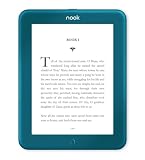
- Carry your library with you (32GB of storage)
- Highest Resolution -A 6Inches high-resolution 300-dpi screen with built-in glare- scratch- and fingerprint-resistant lens provides a paper-like reading experience.
- Comfortable Design with Page-turning -Soft-touch finish makes it easy to grip and comfortable to hold for hours at a time. Touch screen or physical page-turning buttons to help you navigate the way you like it.
- Long Battery Life -It’s perfect for long road trips or even travel to remote corners of the world. Read for weeks on a single charge. Get going and never look back.
It is a less compelling fit if your priority is unrestricted file portability, a single library spanning competing stores, broad support for very old hardware, or dependence-free access to files. Kindle may suit someone already invested in Amazon’s store; Kobo or another open-format-oriented reader may suit readers prioritizing broader EPUB workflows, subject to local catalog and library support. A general tablet is more flexible for color and apps, but less like a dedicated e-ink reader. For many undecided readers, try the NOOK app first and buy hardware only if the reading experience justifies it.
Free tools Windows power users keep installed
One-click scans. No signup required.
Frequently Asked Questions
Can I read NOOK books without owning a NOOK?
Yes. Compatible purchases can be read in the NOOK app for iOS or Android, or through NOOK for Web, subject to title and platform compatibility.
Can I read a NOOK eBook on a Kindle?
Usually not as a direct transfer. Many NOOK purchases use DRM and are meant for authorized NOOK apps or devices, not Kindle.
Can I download a NOOK book as an EPUB?
Do not assume so. Some NOOK titles may be DRM-free or transferable, but many are protected and cannot be treated as unrestricted EPUB files.
Does NOOK work with Libby?
It depends on the library, loan format, DRM, and specific NOOK model. Confirm compatibility with your library; legacy Adobe Digital Editions workflows are not universal.
Can I read NOOK books offline?
Generally, download a compatible book to the NOOK device or app while online; then it can be read offline, subject to app and title restrictions.
Can I sideload my own EPUB?
Barnes & Noble documents non-DRM EPUB sideloading for the Android NOOK app. Support is not established equally for iOS, NOOK for Web, or every NOOK eReader.
Quick Recap
Product prices and availability are accurate as of the date/time indicated and are subject to change. Any price and availability information displayed on Amazon at the time of purchase will apply.

