Do these 3 things before closing this tab:
1Scan for outdated or missing drivers - takes under a minute2Repair Windows errors before they cause bigger problems3Fix the driver behind crashes, sound loss and screen glitchesPlayPhraseMe turns a phrase search into a listening exercise: enter words and hear short examples from movies and television. That makes it valuable both for authentic language practice and for tracking down screen dialogue—but it is not a complete film archive or a rights-cleared clip library.
Type a word or phrase into PlayPhraseMe and it returns short scenes from movies and television in which that language is spoken. Instead of giving only a definition or isolated audio example, the service lets you hear expressions in context—with an actor’s pronunciation, rhythm, surrounding words, and scene-level meaning.
That makes PlayPhraseMe useful for two overlapping audiences: people studying spoken language and people hunting for memorable film dialogue. It is best understood as a searchable corpus of screen dialogue, not as a complete movie database, formal language course, pronunciation examiner, or rights-cleared clip library.
What PlayPhraseMe does
The basic workflow is simple:
- Enter a word or phrase.
- Review the matching movie or television clips.
- Play several examples to compare how different speakers use the expression.
- Save useful examples where the current interface makes that possible, or return to them for further listening and research.
A search for a phrase such as “I’m not sure,” “what do you mean,” or “take it easy” can reveal differences in speed, stress, emotion, accent, and register that are difficult to understand from a dictionary definition alone. A learner can hear the same expression in several situations; a film fan can use the results to investigate where a line appears; and a writer or educator can find short examples of conversational language.
The Tool Desk
Outbyte Driver Updater FREEFix the driver behind crashes, sound loss and screen glitchesFind Drivers →Outbyte PC Repair FREERepair Windows errors before they cause bigger problemsFix Now →#1 Best Overall

- 【High-Quality Display】This MWE-QIXZOCV digital signage kiosk features an IPS display screen with FHD image and video quality, offering a wide 178° viewing angle. The vibrant and clear visuals ensure that the content is easily visible and appealing from various positions, making it ideal for attracting attention in busy environments.
- 【Versatile Input Options】It supports USB/HDMI input, allowing for easy plug and play via USB disk. After startup, it has an automatic loop playback feature, ensuring continuous display of content without manual intervention. Additionally, it supports HDMI input and WiFi connectivity, providing flexibility in content management and updates.
- 【MWE-QIXZOCV CMS Real-time Update】The Content Management System (CMS) enables real-time update of the displayed content. It supports synchronous remote publishing and management, allowing users to control and change the displayed images or information from a remote location. This feature is highly useful for businesses that need to update their promotions or messages frequently.
- 【Continuous Playback and Timed Settings】The MWE-QIXZOCV digital signage can operate continuously for 7 days and 24 hours, ensuring uninterrupted display of important information or advertisements. Moreover, it has timed power on/off settings, which helps in saving energy and managing the display schedule according to business hours or specific needs.
- 【Portable and Foldable Design】The MWE-QIXZOCV digital signage display is foldable, movable, and portable. It can be easily folded and moved around with the help of built-in wheels, making it convenient for transportation and setup in different locations. This portability makes it suitable for various events, exhibitions, and temporary promotional setups.
PlayPhraseMe’s newer Clip Search mode
The service has expanded beyond a general phrase lookup. According to a June 15, 2026 announcement from developer Evgeny Potapenko, its Clip Search mode allows users to combine text searches with metadata filters. Reported filters include:
- Individual movies
- Television episodes
- Release years
- Genres
- Directors
- Actors
- Voice actors
- Cast
For example, a user could search for “hello” within Once Upon a Time in Hollywood, rather than searching the entire catalog. This is a meaningful change for film research and quote hunting because it turns a broad language search into something closer to a targeted dialogue investigation.
Clip Search is described as an additional mode, not a replacement for ordinary phrase search, Favorites, or Reels. The exact filters and access level should be checked in the live service: product features, account requirements, and paid-access rules can change.
Who will get the most from it?
Language learners
PlayPhraseMe’s clearest educational value is authentic context. Learners can see how a phrase behaves in real dialogue rather than studying it only as a written sentence. Several clips may show that the same words sound friendly in one scene, impatient in another, and sarcastic in a third.
The official app listing presents the service as useful for natural speech, everyday expressions, slang, pronunciation, speaking rhythm, and contextual understanding. The University of South-Eastern Norway’s learning library also describes it as a way to search English-language film clips for vocabulary, authentic language use, and pronunciation practice.
It is particularly helpful when a learner already knows the literal meaning of a phrase but has trouble recognizing it at normal speed. Repeated exposure can make reductions, connected speech, intonation, and conversational timing easier to notice. The service can also help answer practical questions such as:
- Do native speakers use this phrase in formal or casual situations?
- Which words receive emphasis?
- Does the speaker sound annoyed, uncertain, surprised, or playful?
- How does the phrase change when spoken quickly?
- What expressions commonly appear before or after it?
However, PlayPhraseMe is not documented as a structured course. The reviewed material does not establish that it offers lessons, teacher feedback, pronunciation scoring, a formal syllabus, or CEFR-aligned progression. It works best as supplementary authentic listening practice.
Pronunciation and listening practice
A useful exercise is to search one expression and listen to three or four different clips. First, listen without reading. Then check the caption or displayed text, replay the line, and imitate the speaker’s stress and rhythm. Finally, record yourself saying the phrase and compare your timing—not to copy the actor’s accent, but to notice whether your speech is understandable and naturally paced.
Free tools Windows power users keep installed
One-click scans. No signup required.
Short clips make this kind of practice manageable. They can be replayed several times without requiring the learner to work through an entire episode or lesson. Different actors also provide useful variation in voice, speed, emotion, and delivery.
Rank #2

- 【Ideal for Advertising and Promotion】MWE-QIXZOCV Floor Standing Digital Signage Display is designed with durability and sturdiness in mind. Its simple design and easy operation make it suitable for diverse indoor locations such as retail stores, restaurants, malls, airports, hospitals, and commercial centers. Stand out in the competition with this powerful and versatile LCD Advertising Display Kiosk
- 【Multifunctional Display Equipment】Advertising Display: Showcase advertisements for products, and promotional campaigns. Attracts attention, increase brand exposure, and drive consumer purchasing behavior; Brand Display: Showcasing brand logos, product information, brand stories, brand vision and more, effectively displays and enhances brand image
- 【MWE-QIXZOCV Intelligent solutions】Information Communication: Convey various types of information, such as announcements, public messages, transportation directions, event schedules, and more, to help people access the information they need; Wayfinding: Provide detailed maps and route instructions. In large venues like shopping centers, exhibition halls, hotels, LCD digital signage serves as a navigation system to guide people to their destinations
- 【Advantage Features】Slim Design: Ultra screen bezel. We're using the recent popular slim design, not heavy old design Kiosks; Stable Open Cell technology: Low-power consumption with lower heat generation. Make the screen life long time longer; Compatibility Design: Supported with other media player box installation and power connected insdie; Andriod Stable System: User friendly interface, Support app installation.
- 【High-Quality Visual Experience】Enjoy stunning image and video quality with the UHD IPS display screen, providing crisp and vibrant visuals. The wide 178° viewing angle of MWE-QIXZOCV Digital Signage ensures maximum visibility from various perspectives, while customizable display settings optimize viewing in different environments
Do not treat a single movie performance as the only correct pronunciation. Actors may exaggerate delivery for a character, speak in a regional accent, whisper, shout, or use deliberately unnatural timing. The value comes from comparing examples and listening for patterns.
Film researchers and quote hunters
PlayPhraseMe is also a practical discovery tool for people trying to locate a line or investigate how a phrase appears across screen history. The official homepage positions the service toward “cinema archaeologists,” and the newer metadata filters make that positioning more credible than a simple quote-search description would suggest.
General phrase search is useful when you remember the wording but not the title. Clip Search is more useful when you know part of the title, a performer, director, period, genre, or episode. Searching within a particular film or narrowing by cast can reduce the noise produced by a large catalog.
It should still be treated as an aid to discovery, not a definitive quotation archive. A missing result may mean that the title is not indexed, the wording differs from the remembered line, captions are unavailable or inconsistent, or the service does not cover that source. A result should be checked against the film or episode itself before being used as a final citation.
Creators and educators
Short dialogue examples can help an educator demonstrate vocabulary, conversational register, pronunciation, slang, or speaking rhythm. A creator might use the service as a reference when looking for how a particular phrase has been performed on screen or when studying the tone of a line.
That use does not automatically grant permission to download, redistribute, remix, or publish the clips. Movie and television dialogue is copyrighted audiovisual material, and the reviewed sources do not provide a blanket reuse license. Anyone incorporating a clip into a lesson, video, presentation, or commercial project must consider copyright, platform rules, and any applicable educational or fair-use exceptions in the relevant jurisdiction.
How to use PlayPhraseMe effectively
1. Start with a phrase, not just a single word
Single-word searches can produce many results and may be ambiguous. A short phrase often gives more useful information about grammar and conversational use. Try both forms when researching a word: search the word alone, then search it in a phrase such as “come on,” “I can’t believe it,” or “as far as I know.”
What’s actually slowing this PC down?
Pick the symptom - the matching free tool is one click away.
2. Compare multiple contexts
Do not stop at the first clip. Listen to several results and note how the meaning changes with the scene. This is especially important for expressions with pragmatic meanings that a dictionary may not fully convey.
3. Use captions as support, not as a substitute for listening
Read the text once to confirm what you heard, then replay the clip with your attention on the sound. Captions can make fast speech easier to decode, but relying on them continuously can hide difficulties with reduced sounds and word boundaries.
Rank #3

- 18.5-Inch 4K UHD Display | Immersive Viewing Experience: Features an 18.5-inch 4K UHD (3840x2160) screen with four times the pixels of Full HD. Enjoy stunning clarity and razor-sharp details for work, creative projects, and entertainment.
- Professional Color Accuracy | 100% sRGB, 10-bit & HDR: Ideal for creators, it covers 100% sRGB and displays over 1 billion colors with 10-bit depth for smooth gradients. Combined with HDR and 400 nits brightness, it delivers vibrant, true-to-life images with enhanced contrast.
- Simplified, Powered Connectivity | Dual USB-C & HDMI: Features two USB-C (for video and data) and one HDMI port. To set up, simply connect your device (laptop, phone, or console) with both a signal cable and the included power adapter. This ensures full functionality and a clean, clutter-free desk.
- Built-In Adjustable Stand | 0-180° Tilt: The integrated stand offers a full 180° of tilt adjustment. Find your perfect viewing angle effortlessly to reduce neck strain and boost comfort during long work sessions—right out of the box.
- Versatile Multi-Mode Use | Extend or Mirror Your Screen: Easily set up the screen as an extension or a duplicate of your main display. Perfect for multitasking, gaming, or presentations, it adapts to your needs as a portable productivity or entertainment station.
4. Narrow the search when you have a research question
If you are trying to find a line in a known film, use Clip Search filters for the title or other available metadata. If you are studying how a phrase is used across time or genres, try the year and genre filters where visible. If you are investigating a performer’s delivery, filter by actor or voice actor when that option is available.
5. Save examples for later review
The service’s current product materials distinguish Favorites and Reels from Clip Search. Use the available saving or organizing tools to collect examples around a learning goal—for example, polite requests, disagreement, phrasal verbs, or informal greetings. Recheck the live interface before relying on a particular organization feature, since labels and availability may change.
Quick wins for a faster PC:
Fix the driver behind crashes, sound loss and screen glitchesFind Drivers →Clear out junk files and repair common Windows errorsFree Scan →Scan for outdated or missing drivers - takes under a minuteDriver Scan →Catalog size, languages, and result limits
Publisher materials currently promote a catalog in the tens of millions, but the figures are not directly interchangeable. The Android listing refers to more than 44 million movie clips, while the developer’s announcement refers to more than 40 million phrases. “Clips” and “phrases” are different units, and these are publisher or developer claims rather than an independently audited database count.
The practical conclusion is that PlayPhraseMe has a very large searchable corpus, not that it contains every line from every film and episode. Results depend on the service’s source catalog, available captions, indexing, language coverage, and the exact wording entered.
Language availability also needs care. The app listing names English, Spanish, and additional languages where available, while the independent university description focuses on English-language films. Check the current interface for the languages offered in your region rather than assuming that every catalog feature works equally across all languages.
The University of South-Eastern Norway’s learning-library page reports that the free version showed up to five clips per search. That is a useful independent description of the service at the time it was written, but it should not be treated as a permanent universal limit. Free results, subscriptions, supporter access, and regional availability should be confirmed in the current website or app purchase flow.
Website, mobile access, and account considerations
PlayPhraseMe is available through the PlayPhrase.me website and a mobile app. The Google Play listing shows in-app purchases, but the reviewed sources do not establish a complete current price table, plan comparison, or worldwide availability matrix. It would be misleading to promise that every feature is free or to quote a monthly price without checking the live purchase screen.
The service’s privacy policy says that subscription or supporter information may be supplied by Patreon, Apple, or Google when necessary to provide access or manage entitlements. It also says the service may collect account and contact information, saved Favorites and preferences, personal usage statistics where available, technical and usage information, cookies or local-storage identifiers, and diagnostic data. The policy says the service uses Google Analytics, Firebase, and similar tools, does not sell personal data, does not store full payment-card details, and describes deletion and data-rights provisions for applicable users.
Those are statements made by the service operator, not an independent privacy audit. Read the current policy before creating an account or subscribing, particularly if you want to understand retention, analytics, deletion, or regional data-rights procedures.
Rank #4
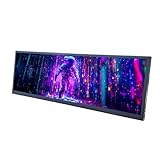
- 【High Resolution】12.7'' 2880x864 2K stretched bar LCD display;Aspect Ratio:15:4;Screen Brightness: 500cd/m2;Contrast Ratio 1200:1 (Typ.) (TM)
- 【LCD Size】Outline Size 317×100×12(H×V×D)mm;Display Area:308.448(W)×92.534(H) mm
- 【Multiple Interfaces】Supports USB C/Mini H/D video input
- 【Easy to Use】Plug and play,12.7'' LCD monitor comes with power cable and a signal cable,it's convenient to connect and use directly; There is 75x75mm(about 2.95x2.95 inch) mounting holesing holes on the back of monitor,it's convenient to install desk/wall mount
- 【Widely Application】Used as secondary display for computer/laptop;Also fit for monitoring computer health speed temperature GPU/CPU sensor panel(Tips:This is a monitor screen,if you want to monitoring data of your pc,it'll need to download software by yourself)
Content suitability
PlayPhraseMe’s results come from movies and television, so the material will not be uniformly suitable for children or every classroom. The Google Play listing displays a teen-oriented content rating and notes occasional swearing and sexual innuendo. The privacy policy says the service is not directed to children under 13.
Recommended Free Tools
For educational or family use, preview clips before assigning them. A search for an ordinary word can return scenes containing profanity, violence, sexual references, or other material unrelated to the learner’s goal.
What PlayPhraseMe is not
- Not a complete film database: It searches indexed dialogue, not necessarily every movie, episode, caption variant, or language release.
- Not a formal language course: It does not replace a planned curriculum, grammar instruction, feedback, or progressive exercises.
- Not a pronunciation assessor: The reviewed materials describe pronunciation practice, not automated scoring or teacher evaluation.
- Not a definitive quote archive: Search results should be verified against the original film or episode.
- Not a rights-cleared media library: Finding a clip does not give permission to republish or redistribute it.
Verdict
PlayPhraseMe deserves a positive but qualified recommendation. Its central idea remains unusually effective: search for language, then hear that language performed in real screen dialogue. That combination makes it more revealing than a conventional dictionary for listening, rhythm, slang, register, and pronunciation practice, while the newer metadata filters make it more useful for film research and quote discovery.
Use it when you want authentic examples quickly, especially as a supplement to language study or as a first step in locating a movie line. Do not rely on it as a comprehensive film index, a formal course, or permission to reuse copyrighted footage. Check current language coverage, result limits, pricing, and filter availability before planning around them.
Frequently Asked Questions
What is PlayPhraseMe?
PlayPhraseMe is a searchable movie- and television-dialogue service. Enter a word or phrase and it returns short clips in which that language appears.
PC Slower Than It Used to Be?
A free scan shows the junk files, broken settings and background clutter dragging Windows down - then fixes them in one click.Free scan · Windows 10 & 11Outdated Drivers Are Slowing You Down
One free scan finds every outdated or missing driver and matches the right update for your exact hardware.Free scan · exact hardware matchIs PlayPhraseMe useful for language learning?
Yes, it can support listening, vocabulary, pronunciation, rhythm, slang, and contextual language practice. It is supplementary practice rather than a documented formal language course or pronunciation assessor.
Can you search for dialogue from a specific movie?
Its current product materials describe Clip Search filters for movies, television episodes, years, genres, directors, actors, voice actors, and cast. The exact filters and access requirements should be checked in the live interface.
Does PlayPhraseMe contain every movie quote?
Not necessarily. The catalog depends on indexed sources, captions, language coverage, and exact wording. PlayPhraseMe should not be treated as a complete archive of every movie or episode.
Can you legally reuse PlayPhraseMe clips?
Finding a clip does not grant permission to download, republish, remix, or redistribute it. Copyright and platform rules still apply, and the reviewed sources do not provide a blanket reuse license.
The Bottom Line
Bottom line: PlayPhraseMe is an excellent contextual dialogue-search tool for language learners and film researchers. Its value lies in hearing phrases in real scenes; its main limitations are incomplete and changing catalog coverage, uncertain current access rules, and the absence of a general reuse license.
Quick Recap
Product prices and availability are accurate as of the date/time indicated and are subject to change. Any price and availability information displayed on Amazon at the time of purchase will apply.




