Quick wins for a faster PC:
Clear out junk files and repair common Windows errorsFree Scan →Scan for outdated or missing drivers - takes under a minuteDriver Scan →Repair Windows errors before they cause bigger problemsFix Now →For most US viewers, Crunchyroll is the best anime-first app for offline viewing. It supports downloads on iPhone and Android through its mobile apps, provided you have an eligible Mega Fan or Ultimate Fan plan. Netflix is the better all-purpose choice if you also want mainstream TV and movies, while HIDIVE is the strongest alternative for selected exclusives and niche anime.
Offline viewing means downloading a title inside an official app—not obtaining a normal MP4 file. These downloads are controlled by the service, account, device, subscription, licensing rights, and expiration rules. You generally cannot move them to VLC, copy them to another phone, or keep watching after cancelling the service.
Best apps for watching anime offline
| App | iPhone | Android | Best for | Download requirement or limit | Main qualification |
|---|---|---|---|---|---|
| Crunchyroll | Yes | Yes | Anime-first viewing, simulcasts, dubs and subtitles | Mega Fan or Ultimate Fan; typically about seven days unplayed and 48 hours after playback begins | Not every title is downloadable |
| Netflix | Yes | Yes | Anime plus general entertainment | All current US plans support downloads, but limits vary; the ad plan allows 15 downloads per device per calendar month | Some titles lack download rights |
| HIDIVE | Yes | Yes | HIDIVE exclusives, niche titles and selected seasonal anime | Paid plans include downloads; maximum 20 downloaded titles; 48 hours after playback starts | Smaller, more selective catalog than Crunchyroll |
| Hulu | Supported mobile devices | Supported mobile devices | Anime alongside US television and movies | Hulu Premium/no-ads; select titles only | Download rights depend on the title, plan and location |
| Prime Video | Yes | Yes | Specific anime rentals, purchases, Prime titles and channel add-ons | Downloadable titles can be saved in the Prime Video app | Anime availability varies considerably by title and business model |
| Apple TV | Yes | Yes | A particular purchased, rented or Apple TV channel title | Download button must be available for the title | Not an anime-focused catalog |
| RetroCrush | Mobile app | Mobile app | Classic anime | Offline downloads are not clearly confirmed in current support material | Check the current app before relying on it for a trip |
The table reflects documented or qualified US availability checked against the providers’ current support material. Catalogs, prices, app labels and licensing rights can change.
1. Crunchyroll: the best overall anime app for offline viewing
Choose Crunchyroll if anime is the main reason you want a streaming subscription. It is the most natural default for current-season anime, a large anime-focused catalog, and a broad selection of subtitles and English dubs, although audio and subtitle options vary by title, season and region.
#1 Best Overall

- Portable and Durable Construction: Folds flat for travel and holds whatever angles you need, product weight 15.2 ounces /0.95pound, made of high-quality ABS plastic, the bottom is equipped with a metal panel with anti-slip silicone
- Height and Angle Adjustable with Bridge Screw: Additional Gifts Bridge Screw Adjustment Truss Rod, Always Keep Extended Stable, ipad 9th generation stand Normal tablet holder after several months adjust joints maybe become loose. LISEN 2026 upgrade iPad holder Stand office accessories, free bridge screw adjustment truss rod, and The locking mechanism can be adjusted freely when you feel it is too loose or too tight
- Gravity-Based Secure System: Gravity-based system with no clips or magnets that relies on the back tilt to keep the tablet secure, Place the stand at its lowest angle for maximum stability when tapping or typing
- Foldable Design for Easy Portability: This foldable tablet holder can be fully folded into a pocket size, Accessory for Working Remotely. The iPad stand for desktop takes little space when storage, easy to carry in your pocket or bag, an addition in travel or business trip. Smart Phone is supported only in landscape mode, not portrait mode
- Wide Device Compatibility: Compatible With 4.0-15.9 inch 2026 iPhone Duo, iphone 18 pro max, ipad air 11 inch case Mini 7 college essentials Tablet Kindle. Device Width less than 0.7inches, Heavy Duty ipad Case not supported
Crunchyroll documents offline downloads in its Android and iOS mobile apps. Its current help and iOS information identify Mega Fan and Ultimate Fan as the plans that include offline viewing. Do not assume that every paid Crunchyroll plan includes downloads.
How to download on Crunchyroll
- Open the Crunchyroll app and sign in.
- Open the anime series.
- Tap the download icon beside an episode. If offered, use Download All for a season.
- Open My Lists → Downloads to confirm the episodes are complete.
- Play the episode from Downloads rather than relying on the ordinary streaming page.
You can select High, Medium or Low download quality. The app also provides a setting for whether downloads may use cellular data. For the documented settings and current menu labels, see Crunchyroll’s download instructions.
How long Crunchyroll downloads last
A downloaded episode typically expires after about seven days if you have not started watching it. Once playback begins, it generally expires 48 hours later. You can usually reconnect to the internet and download an expired episode again if it remains available. The exact download icon on the US title page is the final authority: streaming availability does not guarantee download availability.
Crunchyroll’s current documentation does not give a simple universal episode quota. In practice, available device storage is an important constraint. Download quality and the length of the trip should determine how much you save.
Recommended Free Tools
2. Netflix: the best polished all-purpose alternative
Netflix is the better choice for viewers who want anime alongside mainstream television, films and Netflix originals. Its anime selection is substantial but less consistently anime-focused than Crunchyroll’s, and individual titles may stream without supporting downloads.
Netflix supports downloads on iPhone and iPad, Android phones and tablets, Fire tablets, and supported Chromebooks with Google Play. Open Netflix’s download help for device-specific details.
Current US Netflix plans and download limits
Netflix’s US pricing page currently lists the following prices, checked August 9, 2026:
- Standard with Ads: $8.99 per month. Downloads are allowed but limited to 15 total downloads per device per calendar month.
- Standard: $19.99 per month. The plan supports downloads on two devices and permits up to 100 active downloads per device, subject to plan rules.
- Premium: $26.99 per month. The plan supports downloads on six devices and permits up to 100 active downloads per device, subject to plan rules.
Prices may differ when billed through an app store, bundle or third-party provider, and may change after publication. Consult Netflix’s current US plans page before subscribing.
How to download anime on Netflix
- Open Netflix and sign in.
- Tap Downloads, then See What You Can Download, or search for a specific title.
- Tap the download icon beside a movie or episode.
- For supported series, use Download Season if that option appears.
- Return to Downloads and play the title from there.
If only some anime titles lack a download button, your phone is probably not the problem. Netflix says download rights can depend on licensing, local availability, whether the provider granted download rights, popularity, cost, seasonality and other partnership arrangements. See why some Netflix titles cannot be downloaded.
Netflix downloads expire after a period determined by the title and licensing agreement. Some titles also limit how many times they can be downloaded or renewed. You must remain signed in. Uninstalling Netflix or clearing its app data removes the downloads.
Rank #2

- Wide Compatibility: This tablet stand adjustable can fit for 4 to 11 inch tablet, cell phone and E-reader with Max thickness of 0.55" (including its case). Compatible for Apple iPad 9.7 inch, iPad 10.2" 2019, iPad Pro 11-inch 2020, iPad mini 2 3 4 5 Wi-Fi, iPad Air 2, iPhone 17 16 15 14 13 12 11 Pro Max, iPhone 12 mini, the new iPhone SE 2020, iPhone XR X XS 8 Plus 6 7 6S, Samsung Note20 S20 Ultra S10 S9 S8 Note 10 9 8 android phones
- Easy to Carry: With a small size of 4.7" x 4.2", the portable tablet stand can be foldable and easy to slip into your pocket for travel
- Multi-Angle Adjustable: There are multiple viewing angles to choose from 15° to 100°, you can always find one you like. This tablet holder for desk can hold your smartphone or tablet at a comfortable angle, ideal for watching videos, reading, recording, browsing, facetime call and more
- Sturdy and Stable: Premium ABS material supports this ipad pro stand holder for desk durability in usage. Silicone pads on the bottom to protect your phone or tablet from sliding and scratches
- What You Get: 1x UGREEN Ipad Holder for Desk
3. HIDIVE: best for exclusives and niche anime
HIDIVE is worth choosing when the anime you want is a HIDIVE exclusive or when its smaller catalog contains a particular niche, classic, seasonal or uncensored release that another service does not offer. It is not the strongest default for viewers who want the broadest anime library.
HIDIVE documents offline downloads on iPhone, iPad, Android phones and tablets, and Fire devices. Its US-facing plans page currently lists $7.99 per month or $79.99 per year, with offline viewing included in both listed paid plans. Prices and offers can change; check HIDIVE’s current plans page.
How HIDIVE offline viewing works
- Open the HIDIVE app and sign in.
- On an eligible title or episode, tap the download button shown by the current app.
- Open the app menu and select Downloads.
- Remain signed in and start playback before the download’s viewing window becomes an issue.
HIDIVE documents a maximum of 20 downloaded titles at a time. Once playback starts, you have 48 hours to watch the downloaded title. The app must remain associated with your account, so test it before travelling.
Important HIDIVE billing-channel warning
A HIDIVE subscription bought as an add-on through Amazon Prime Video, Roku, Apple TV or another provider is separate from a direct HIDIVE subscription. HIDIVE says an add-on subscription cannot be used to sign in to the HIDIVE website or HIDIVE apps. In that situation, use the provider’s app and its download function instead. See HIDIVE’s supported-device and add-on guidance.
HIDIVE’s catalog is automatically determined by licensing rights in the user’s region. For US viewers, check the exact title in the app rather than assuming that a title available elsewhere is available in the United States.
4. Hulu: best when you already pay for Hulu
Hulu is a practical option for viewers who already subscribe and want anime alongside US television, Hulu Originals and movies. It is not the best anime-first service, and only selected Hulu titles can be downloaded.
Hulu’s current public marketing identifies the ad-free Hulu Premium plan as the download-eligible option and lists it at $18.99 per month. Hulu with ads is currently listed at $11.99 per month but should not be treated as download-enabled. Check the current Hulu Premium page before subscribing.
The most recently indexed Hulu product material documents up to 25 downloaded titles across five devices, up to 30 days to start watching, and generally 48 hours after playback begins. Hulu’s subscriber agreement also makes clear that temporary downloads are subject to plan, title, device, geographic and licensing restrictions. Because app menus change, use the download icon on the title page and the app’s Downloads area rather than relying on one permanent menu path.
Hulu makes the most sense when the desired anime is confirmed to be downloadable and you already want Hulu for other programming. It is a poor choice if you are subscribing solely for a large anime catalog or dependable simulcasts.
5. Prime Video: best for one specific anime, rental or purchase
Prime Video is useful when you have found a particular anime movie or series there, already have Amazon Prime, want to rent or buy a title, or subscribe to an anime channel through Prime Video. Its anime catalog is title-specific and can include Prime content, rentals, purchases and channel add-ons, so do not assume that it offers a consistent anime library.
What’s actually slowing this PC down?
Pick the symptom - the matching free tool is one click away.
Rank #3

- Wide Compatibility: This stand is compatible with iPads (below 10"), Galaxy Tabs, Kindles, Nintendo Switch 2, Steam Deck, ROG Ally, and all cellphones, offering a versatile solution for all your devices
- Portable & Compact: Foldable design makes this tablet stand easy to carry and store, perfect for on-the-go use or switching between spaces
- Stable & Secure: Made from high-quality alloy, this stand offers durability and a sleek look. Non-slip padding ensures your device stays secure and stable, preventing accidents
- Ergonomic & Adjustable: The stand offers multiple angles for comfortable viewing, ideal for videos, reading, or calls. It helps improve posture by reducing neck strain
- Built to Last: After 10,000+ tests, the swivel component remains strong, smooth, and secure, resisting breakage or loosening even with frequent use
Prime Video supports downloads in its iPhone and iPad, Android, Fire tablet, macOS and Windows 10/11 apps. On mobile:
- Open the Prime Video app.
- Open the movie or series detail page.
- For a movie, tap Download.
- For a series, choose Download Season or tap the download icon beside an episode.
- Open the app’s Downloads area and test playback without an internet connection.
Prime Video explicitly says downloaded content cannot be played through Chromecast or AirPlay. Do not assume that a downloaded episode will cast to a hotel television or television adapter. See Prime Video’s download help for current restrictions.
6. Apple TV: best for a particular purchased or rented title
The Apple TV app is a secondary option for anime rather than an anime-specialist recommendation. Use it when a specific anime movie or series is available for purchase, rental or through an Apple TV channel, or when you already use Apple’s ecosystem.
Apple documents downloads on both iPhone and Android. On Android, open the Apple TV app, select the movie or show, tap the download button and find it in the Downloads tab. On iPhone, Apple supports downloading a movie, individual episode or full season and watching it from the library without an internet connection. See Apple’s Android instructions and iPhone instructions.
Free tools Windows power users keep installed
One-click scans. No signup required.
Other services that may fit a specific situation
Disney+
Disney+ is not an anime-first service, but it can be useful for specific anime-related or animated titles in its catalog. Downloads require an eligible Premium plan or bundle. Disney+ says downloads remain available while the subscription is active and the device connects to the internet at least once every 30 days, although individual titles may have shorter restrictions. See Disney+ download rules.
Max
Max may carry selected anime, but its download allowance depends on the plan: the Basic with Ads plan has zero downloads, Standard permits 30, and Platinum permits 100 according to Max’s support documentation. Max stores downloads on internal phone or tablet storage and does not support saving them to an SD card. See Max’s download rules before choosing it for a trip.
YouTube
YouTube Premium can provide legal offline playback for eligible videos, but downloads are encrypted and can only be watched inside the YouTube app; they are not ordinary video files for VLC. YouTube also supports downloading purchased movies and TV episodes without Premium in the YouTube app. On Android, YouTube Premium downloads may be stored on an SD card if that option is configured before downloading. See the official guidance for Premium offline viewing, purchased and rented content and SD-card downloads.
RetroCrush
RetroCrush is worth considering for classic anime. Its current official support material confirms mobile availability, but does not clearly document offline downloads. Treat it as a catalog alternative, not a verified offline recommendation, unless the current app shows a working download feature for the exact title.
Crashes, No Sound, or Screen Glitches?
Random freezes, missing sound and display glitches usually trace back to one bad driver. Find and replace yours safely.Free scan · under a minuteWindows Errors? Fix Them Before They Spread
Repair common Windows errors and clear accumulated junk for a smoother, more stable PC - no reinstall needed.Free scan · no reinstallDo not use outdated advice that lists Funimation as a current standalone app. Crunchyroll says the Funimation app and website ended on April 2, 2024. Its library and service history should not be presented as a separate current download option.
How to choose the right app
- I mainly watch anime: Start with Crunchyroll. Choose HIDIVE instead if the specific series is a HIDIVE exclusive.
- I want current-season anime: Crunchyroll is the strongest default recommendation. HIDIVE also carries selected seasonal simulcasts; Netflix release timing varies by title and often uses different release patterns.
- I want anime and regular TV: Netflix is the most polished general-purpose choice. Hulu is sensible if you already subscribe and the desired anime is downloadable.
- I want English dubs: Check the individual series, season and US listing. Crunchyroll, Netflix, HIDIVE and Hulu all carry some dubs, but no service has every dub, and a dub available for streaming may have separate download restrictions.
- I prefer subtitles: Crunchyroll is the strongest anime-first starting point, but check the exact language options before downloading.
- I want a classic anime: Check RetroCrush’s catalog, then verify whether the current app offers a download. HIDIVE, Netflix, Hulu, Prime Video and other services may also carry particular older titles.
- I want one movie: Search Prime Video or Apple TV for a rental or purchase. Confirm that the title page displays a download option and note whether the download is tied to a rental period or purchase account.
- I need one app for a flight: Crunchyroll is the best anime-first choice; Netflix is the safer all-purpose choice if you already have it.
- I need a free option: Legal free anime streaming may be available in some apps or services, but free streaming is not the same as free offline downloading. The dependable documented options generally require a paid subscription or a purchased/rented title.
Does offline viewing work in airplane mode?
It usually can, but only if the app has fully completed the download and the account, title and license remain valid. The safest procedure is to test it before leaving:
Rank #4
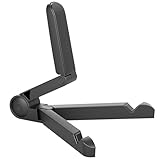
- Versatile Compatibility: Designed to securely hold tablets, iPads, Kindles, and other devices with adjustable grips and foldable legs,offering flexibility for various devices.Could also be used as a Book Stand or a Display Stand Picture Frame for Photos,is simple and easy set-up.
- Sturdy Construction: Made from Premium ABS material this tablet holder is durable in usage,slip pads to keep your portable monitor secure and stable during use, preventing accidental slips or falls.
- Ergonomic Design:Multi Adjustable Capability - Can be easily adjusted (from 0° to 180°) to support vertical and horizontal viewing - perfect for playing games, watching videos, viewing photos, reading, video recording or taking selfies. ensuring a perfect setup for any workspace or environment, in landscape or portrait mode
- Compact and Portable:Lightweight Easily folds into a compact size for convenient storage and portability, making it ideal for on-the-go use or traveling.
- Multi-Purpose Usage: Ideal for use with tablets, e-readers, laptops, and monitors for various tasks.
- Download over reliable Wi-Fi.
- Open the app’s Downloads section and confirm that every episode is complete.
- Select the desired English dub or subtitle track before travelling when the app allows it.
- Start one downloaded episode while online.
- Turn on Airplane Mode and turn off Wi-Fi if it reconnects automatically.
- Close and reopen the app, then play the episode from Downloads.
Do not log out, uninstall the app, clear its data, change accounts or downgrade the subscription after downloading. Those actions can remove downloads or make them inaccessible.
Storage, phones and downloaded-file limitations
How much storage does anime use?
There is no single reliable file-size figure for every service. Storage use varies with episode length, resolution, audio tracks, compression and the app’s download settings. High-quality downloads consume more space than Low or Medium quality.
For a trip, choose Medium or Standard quality unless you have abundant storage, leave several gigabytes free, and download only the episodes you are likely to watch. A long-running series can fill a phone quickly. Check the app’s download-quality setting and the phone’s storage screen before saving an entire season.
Can downloads be moved to another phone?
Normally, no. Downloads are stored on the device used to save them and are controlled by the provider’s app. They do not automatically appear on a second iPhone or Android phone, even when you sign in with the same account. On a replacement phone, reinstall the official app, sign in and download the titles again while online.
Can you open downloaded anime in VLC?
Normally, no. Streaming-service downloads are generally protected, app-controlled files rather than ordinary MP4 videos. They are intended to play only inside the provider’s app. YouTube explicitly says its Premium downloads are encrypted and can only be watched in the YouTube app. Do not trust tools that claim to remove this protection; they may violate the service’s terms, copyright law or your device’s security.
Can Android users save downloads to an SD card?
Do not assume that an anime app supports SD-card storage. Max explicitly says its downloads use internal storage and cannot be saved to an SD card. YouTube documents SD-card support for Android downloads when configured before downloading. For Crunchyroll, HIDIVE, Netflix, Hulu and Prime Video, check the current app and provider documentation rather than moving files manually.
Do these 3 things before closing this tab:
1Clear out junk files and repair common Windows errors2Fix the driver behind crashes, sound loss and screen glitches3Repair Windows errors before they cause bigger problemsWhy the download button is missing
A missing download icon does not automatically mean that your phone is broken. Common explanations include:
- The title has streaming rights but not download rights.
- Your subscription tier does not include offline viewing.
- The title or audio version is not licensed in the US.
- The account is billed through a different provider or channel.
- The app or phone operating system is outdated.
- The device is incompatible.
- There is not enough storage.
- You have reached a plan, account, device or title-specific download limit.
Search for another known-downloadable title. If that title has a download button, the missing option is probably title-specific. Netflix specifically identifies licensing, local availability, provider rights, cost, popularity and seasonality as reasons a title may not be downloadable.
Download troubleshooting
The download is stuck or fails
- Use reliable Wi-Fi and keep the app open long enough for the download to finish.
- Check available phone storage.
- Update the app and iOS or Android.
- Tap Retry if the app offers it.
- Lower the download quality.
- Try downloading one episode rather than an entire season.
- Restart the phone.
- Use cellular data only if you deliberately enable it and understand the data cost.
For Crunchyroll-specific failures, its official troubleshooting page recommends updating, retrying, lowering quality, trying one episode, switching networks, restarting and freeing storage.
The download says complete but will not play offline
- Reconnect to the internet and confirm the account is active.
- Make sure you are using the same account and profile used to download it.
- Open the Downloads section rather than the ordinary title page.
- Check whether the download expired.
- Test again in Airplane Mode.
- If necessary, delete the download and save it again.
Do not clear app data or uninstall the app until you accept that existing downloads will be deleted.
The Tool Desk
Outbyte PC Repair FREERepair Windows errors before they cause bigger problemsFix Now →Outbyte Driver Updater FREEFix the driver behind crashes, sound loss and screen glitchesFind Drivers →Best Value

- 【Perfect Viewing Angle】: This tablet stand features an innovative locking mechanism that allows you to adjust the height and angle. Whether you need a low profile for typing or a higher position for video conferencing, this stand holds its position securely, providing a custom viewing experience for your needs.
- 【Extended Compatibility】: This versatile stand supports a wide range of devices from 4.7 inches up to 16.9 inches, including tablets, iPads, e-readers, and portable monitors. Please note: This stand is not designed for laptops. It’s perfect for multitasking, reading, drawing, or watching videos hands-free.
- 【Sturdy All-Metal Design】: Made with high-quality, durable materials, including a robust all-metal alloy base, this stand ensures stability and long-lasting use. The weighted base and strong support structure prevent your device from tipping or wobbling, even during vigorous use.
- 【Non-Slip Design for Added Security】: Equipped with anti-slip silicone pads on both the base and the device holder, this stand keeps your device securely in place, preventing accidental slips or falls. The soft silicone also protects your device and desktop from scratches.
- 【Portable & Space-saving】: Designed with portability in mind, this stand folds flat for easy storage. It's compact enough to fit into a bag, making it the perfect accessory for traveling professionals or students who need a reliable stand on the go.
The download expired
Reconnect to the internet and attempt to renew or download the title again. Renewal may fail if the title left the service, your plan changed, the title is no longer licensed in the US, or the service has reached a download-renewal limit. Downloading immediately before a trip reduces—but does not eliminate—the risk of expiration.
The subscription, phone or app changed
Changing to a plan without downloads may make existing downloads inaccessible. Cancelling a service does not convert downloaded episodes into owned files; Netflix says cancelling removes downloads and requires a new download if you later restart the account. Replacing the phone, uninstalling the app or clearing app data also normally requires downloading everything again.
Are there genuinely free legal anime downloads?
Free legal anime streaming and free legal offline downloads are different things. Some services may offer ad-supported streaming, but that does not mean they permit downloads. The current documented offline options above generally require a paid plan, while a purchased or rented movie may be downloadable through an eligible app.
Do not install unofficial APKs, torrent clients, browser extensions or “free anime” apps of uncertain origin. They can create copyright, malware, privacy and account-security problems and are not reliable substitutes for an official service’s offline mode.
Recommended Free Tools
Pre-flight checklist
- Install the official app from the Apple App Store or Google Play.
- Update the app and phone operating system.
- Confirm that your plan includes downloads.
- Confirm the exact anime is available in the US.
- Check the download icon on every episode or movie you need.
- Select the desired audio and subtitle options.
- Download over Wi-Fi and leave storage headroom.
- Download a few backup episodes.
- Open the app’s Downloads section and confirm completion.
- Test at least one episode in Airplane Mode with Wi-Fi disabled.
- Do not log out, uninstall, clear app data, cancel or downgrade before travel.
- Pack a charger or battery pack.
Frequently Asked Questions
What is the best app for watching anime offline on an iPhone or Android phone?
Crunchyroll is the best anime-first choice for most US viewers, provided the account has the Mega Fan or Ultimate Fan plan and the specific title displays a download icon. Netflix is the best all-purpose alternative.
Can I watch downloaded anime without Wi-Fi or cellular service?
Yes, eligible downloads are designed for offline playback, but they may expire or require account and license verification. Test one episode in Airplane Mode before travelling.
Can I transfer downloaded anime from an iPhone to an Android phone?
Usually not. Downloads are stored and protected inside the provider’s app on the device used to download them. Install the app on the new phone, sign in and download the titles again.
Can I play streaming-service anime downloads in VLC?
Usually not. These are app-controlled downloads rather than ordinary MP4 files. YouTube specifically says its Premium downloads are encrypted and can only be watched in the YouTube app.
Why can I stream an anime but not download it?
Streaming and download rights are separate. Licensing, US regional availability, the subscription tier, device compatibility, storage, account limits and title-specific restrictions can remove the download option.
Does Funimation still work as a separate anime app?
No. Crunchyroll says the Funimation app and website ended on April 2, 2024. Current recommendations should use Crunchyroll or another active service instead.
The Bottom Line
Choose Crunchyroll for anime-first offline viewing, Netflix for anime plus general entertainment, and HIDIVE for a specific HIDIVE exclusive. Hulu is convenient for existing ad-free subscribers, while Prime Video and Apple TV are better for a particular rental, purchase or channel title. Whichever service you choose, download through its official app, verify the exact US title has a download button, and test playback in Airplane Mode before leaving.
Quick Recap
Product prices and availability are accurate as of the date/time indicated and are subject to change. Any price and availability information displayed on Amazon at the time of purchase will apply.
Free tools Windows power users keep installed
One-click scans. No signup required.




