Free tools Windows power users keep installed
One-click scans. No signup required.
Some links on this page are affiliate links: if you buy through them we may earn a commission, at no extra cost to you.
On iPhone or iPad, open Music → New → Charts. On any device with a browser, visit Apple Music Top Charts. Choose a chart—such as a country’s Daily Top 100, a city or genre chart, or an album chart—to browse its entries. Tap a track to play or preview it; signing in and having the right playback access may be needed for full songs, library features, or downloads. Labels and chart availability can vary by region and software version.
What Apple Music charts show
“Apple Music charts” refers to several kinds of ranked lists, not one universal ranking. Each chart has a scope: it may cover a country or region, the world, a city, a genre, or albums rather than individual songs. Apple’s public charts page currently brings together Daily Top 100 selections, City Charts, albums, and other chart-related material; what appears can change.
- Daily Top 100: A ranked list of songs for a selected country or region. Apple also offers a global chart.
- City Charts: Local playlists, commonly labeled “Top 25: [City].” They offer a city-level view, not a survey of every listener in that city.
- Genre charts: Top songs or videos within a selected category where available. Categories reflect Apple’s catalog classification, which may not match every listener’s idea of a genre.
- Album and music-video charts: Rankings of those formats where Apple offers them.
A chart position tells you where an item appears on that particular list, not how many plays it received. Apple’s public consumer pages do not provide a complete current formula for every chart, so don’t infer a specific stream count or assume all chart types use identical rules. Apple’s 2021 City Charts announcement described those rankings as drawing on plays and local popularity; that description should not be treated as the full methodology for every Apple chart today.
What’s actually slowing this PC down?
Pick the symptom - the matching free tool is one click away.
Find charts on iPhone or iPad
- Open the Music app.
- Tap New, then tap Charts.
- Choose a chart, song, playlist, album, or music video.
- To narrow the view by style, tap All Genres and select a genre.
- Tap an entry to play it, or open its additional controls to add it to your library or share it if those options are shown.
Apple documents this route for iPhone and iPad. The screen layout and labels can differ with region, app version, device, or account. If you don’t see Charts, use the web page below as a fallback.
#1 Best Overall

- LONG BATTERY LIFE: With up to 50-hour battery life and quick charging, you’ll have enough power for multi-day road trips and long festival weekends.(USB Type-C Cable included)
- HIGH QUALITY SOUND: Great sound quality customizable to your music preference with EQ Custom on the Sony | Headphones Connect App.
- LIGHT & COMFORTABLE: The lightweight build and swivel earcups gently slip on and off, while the adjustable headband, cushion and soft ear pads give you all-day comfort.
- CRYSTAL CLEAR CALLS: A built-in microphone provides you with hands-free calling. No need to even take your phone from your pocket.
- MULTIPOINT CONNECTION: Quickly switch between two devices at once.
Use Apple Music charts on the web
- Open music.apple.com/us/new/top-charts.
- Check that you’re viewing the storefront or market you intend to research. The U.S. URL is not the right market for every reader.
- Browse the available Daily Top 100, city, album, genre, or other chart sections, then open a list to inspect its entries.
- Select a song or album to hear it, subject to regional availability and your account’s playback access.
The web player is a practical route from a Mac, Windows PC, or a device where the app’s chart navigation is hard to find. Apple says users can search the catalog and hear previews on the web without subscribing; full on-demand playback, offline downloads, and library features generally require appropriate Apple Music access. See Apple’s web user guide and its page on searching and previewing music. Apple notes that features and services vary by country or region.
Choose a country, city, or genre
For a country or region: Open that market’s chart selection or storefront. The public page exposes markets including the U.S., U.K., Canada, Australia, Japan, and others, but not every market necessarily offers every chart type. If you’re comparing markets, make sure each list is for the intended storefront and chart date.
For a city: Look for a playlist such as Top 25: New York City or another city name in the charts page. The cities shown vary; a chart for a nearby major city may not represent your neighborhood or its listeners. Apple describes City Charts as playlists that can be added to an Apple Music library in its City Charts overview.
Rank #2

- 65 Hours Playtime: Low power consumption technology applied, BERIBES bluetooth headphones with built-in 500mAh battery can continually play more than 65 hours, standby more than 950 hours after one fully charge. By included 3.5mm audio cable, the wireless headphones over ear can be easily switched to wired mode when powers off. No power shortage problem anymore.
- Optional 6 Music Modes: Adopted most advanced dual 40mm dynamic sound unit and 6 EQ modes, BERIBES updated headphones wireless bluetooth black were born for audiophiles. Simply switch the headphone between balanced sound, extra powerful bass and mid treble enhancement modes. No matter you prefer rock, Jazz, Rhythm & Blues or classic music, BERIBES has always been committed to providing our customers with good sound quality as the focal point of our engineering.
- All Day Comfort: Made by premium materials, 0.38lb BERIBES over the ear headphones wireless bluetooth for work are the most lightweight headphones in the market. Adjustable headband makes it easy to fit all sizes heads without pains. Softer and more comfortable memory protein earmuffs protect your ears in long term using.
- Latest Bluetooth 6.0 and Microphone: Carrying latest Bluetooth 6.0 chip, after booting, 1-3 seconds to quickly pair bluetooth. Beribes bluetooth headphones with microphone has faster and more stable transmitter range up to 33ft. Two smart devices can be connected to Beribes over-ear headphones at the same time, makes you able to pick up a call from your phones when watching movie on your pad without switching.(There are updates for both the old and new Bluetooth versions, but this will not affect the quality of the product or its normal use.)
- Packaging Component: Package include a Foldable Deep Bass Headphone, 3.5MM Audio Cable, Type-c Charging Cable and User Manual.
For a genre: On iPhone or iPad, use All Genres within Charts. Genre availability and classification can vary by storefront, and a song’s placement is Apple’s catalog categorization rather than a definitive judgment about its style.
Play, save, share, or download a chart selection
- Play or preview: Open a chart entry and select the track, album, or playlist. Without full playback access, you may only be able to preview it.
- Save a playlist: Use the add-to-library control when it’s offered. Apple specifically describes City Charts as playlists users can add to their library.
- Share: Use the item’s share control to send a chart, playlist, song, or album link. The recipient’s market and access may affect what opens for them.
- Download: Offline listening requires the appropriate Apple Music access and device storage. A chart ranking is not itself a download license; availability can also change if a track leaves the catalog.
Apple lists offline downloads among the features of Apple Music. If you only want to inspect rankings or sample a track, you may not need a paid subscription. Check Apple’s live signup page for current plans or offers rather than relying on a static price: Apple Music subscription.
Apple Music charts, Replay, and Shazam charts are different
| Feature | What it represents | Useful when you want to know |
|---|---|---|
| Apple Music public charts | Rankings scoped to a market, city, genre, or format | What ranks on a particular Apple Music chart |
| Apple Music Replay | Your own listening activity and personal recap | Which music you played most |
| Shazam charts | Tracks identified through Shazam activity | What listeners are discovering or identifying |
Replay is personal, not a public popularity ranking; eligibility depends on having enough qualifying Apple Music listening activity. Shazam rankings measure identification activity, not Apple Music plays. Shazam offers country, city, genre, and other trending views; see Apple’s Shazam chart guide. A song can therefore rank strongly on Shazam while a different track leads an Apple Music listening chart.
Rank #3
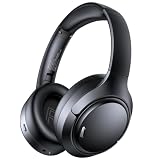
- 45dB Hybrid Active Noise Cancelling & Immersive Sound: Experience focused listening with A18 over-ear Bluetooth headphones featuring hybrid Active Noise Cancelling (ANC) that reduces noise by up to 45dB, helping block out traffic, airplane cabin noise, and office chatter. Equipped with 40mm dynamic drivers, these wireless headphones deliver deep bass, clear mids, and crisp highs—perfect for travel, commuting, work, or relaxing at home
- Up to 120H Playtime & Wired Mode Headphones: Enjoy up to 120 hours of playtime on a single charge, making these Bluetooth headphones ideal for long trips, business travel, and extended daily use. Designed with efficient battery performance, they reduce the need for frequent charging. When needed, switch to wired mode with the included 3.5mm AUX cable for uninterrupted music, movies, or calls
- 6-Mic ENC Noise Cancelling Headphones for Clear Calls: These noise cancelling headphones feature a 6-microphone array with Environmental Noise Cancellation (ENC) to capture your voice clearly while reducing background noise like wind, crowds, and street sounds. Ideal for work calls, Zoom meetings, online classes, or daily phone calls, ensuring stable and natural communication wherever you are
- Comfortable Over-Ear Headphones with Foldable Design: These over-ear wireless headphones feature soft ear cushions and an adjustable, foldable headband for a secure, pressure-free fit during long listening sessions. Perfect for commuting, travel, office work, or workouts. Transparency Mode allows you to hear surrounding sounds without removing your headphones, keeping you aware outdoors
- Bluetooth 6.0 Wireless Headphones with Fast Pairing: Built with advanced Bluetooth 6.0, these wireless over-ear headphones provide fast pairing and a stable connection with iPhone, Android phones, tablets, and laptops. Enjoy low latency and smooth audio for streaming, gaming, video watching, and everyday listening at home, in the office, or on the go
Likewise, don’t compare Apple Music and Spotify positions as if their audiences, market definitions, or chart rules were identical. Spotify explains its own chart eligibility and filtering in its Spotify Charts guide; those rules do not explain Apple’s methodology.
The Tool Desk
Outbyte PC Repair FREEClear out junk files and repair common Windows errorsFree Scan →Outbyte Driver Updater FREEFix the driver behind crashes, sound loss and screen glitchesFind Drivers →Track an artist or research chart history
The consumer charts pages are designed mainly for discovery and listening. They may not show historical positions, peak ranks, or a date-by-date trail. Artists, managers, and researchers can look at Apple’s separate Chart Explorer guide. Apple says Chart Explorer can search by song, artist, or album and filter by storefront, chart type, date, genre, and chart range. Its support material describes more than 4,500 genre, storefront, and city charts, with chart history extending back to July 2015 where relevant history exists. Access and capabilities are part of Apple’s Partner Program context, not a guaranteed consumer feature.
Developers can also consult Apple’s MusicKit API chart documentation for catalog chart requests, including storefront and chart-type parameters. That is a technical route, not the simplest way to check a current Top 100.
Rank #4

- [Immersive Sound Experience & Dual Connectivity] Experience unparalleled sound quality with this wireless Bluetooth speaker's 2 drivers and advanced technology that delivers powerful, well-balanced sound with minimal distortion. Connect two speakers together to create an immersive stereo sound experience and fill any room with powerful sound. Perfect for gaming, music, and movie playback
- [Tough & Weather-Resistant] Engineered to handle rough use and adverse weather conditions, this speaker features a durable design and an IPX5 rating for protection against water splashes and spills. It's an ideal choice for outdoor events, and is perfect for use at parties, at the pool, on the beach, while camping or hiking, and more
- [Long-lasting Playtime & Extended Bluetooth Connectivity] Experience extended playtime with up to 24 hours(50% Vol and light off) per charge and extended wireless range with Bluetooth 5.3, reaching up to 100 feet from your device. The multicolor lights on the speaker can also be turned off with a simple button press to save the battery and adapt to your needs. Keep in mind that the actual playtime can vary depending on volume level, audio content, and usage
- [Vibrant Light Effects] Bring a new level of excitement to your party with the dynamic multi-color light show that syncs to the beat of the music, you can easily customize the light effects to suit your preference by simply pressing the Light button. Make any gathering more memorable with these visually stunning light effects that will elevate the atmosphere
- [Everything You Need] The package includes 1 waterproof Bluetooth speaker (Item Dimensions D x W x H: 7.87"D x 2.76"W x 2.81"H, Weight: 1.28lb), 1 Type-C charging cable, and a quick start guide, all backed by lifetime technical support. The built-in microphone allows for hands-free phone calls and you can also play music from other devices using the AUX jack (not included). It's a perfect gift for men and women. It is also suitable as white elephant gifts for adult, stocking stuffers for men and women, Christmas gifts,birthday gifts, mothers day gifts,fathers day gifts,Valentine's Day,mens gifts,and various anniversary gifts for him.
Troubleshooting
Charts is missing in the app
Confirm you’re looking in New, rather than Home or Library. The tab arrangement can vary by software version, region, or account. Search the app for “Charts,” open the public chart page in a browser, or check that the app and operating system are up to date.
A chart or city doesn’t appear
Check the storefront or country in the page you opened. Not all chart types are available in all markets, and city selections can change. A chart link made for another storefront may show a different selection or fail to open the expected list.
Recommended Free Tools
The chart loads, but a song won’t play
Possible causes include no active subscription, not being signed in to the account with access, regional catalog restrictions, a preview-only listing, content restrictions, or an item that has changed since the chart was shared. Sign in, check the track in your storefront, review content restrictions, or search for the artist or album directly. Apple’s web guide explains that availability varies by region.
Best Value

- Hybrid Active Noise Cancelling: 2 internal and 2 external mics work in tandem to detect external noise and effectively reduce up to 90% of it, no matter in trains or offices.
- Immerse Yourself in Detailed Audio: The noise cancelling headphones have oversized 40mm dynamic drivers that produce detailed sound and thumping beats with BassUp technology for your every travel, commuting and gaming. Compatible with Hi-Res certified audio via the AUX cable for more detail.
- 40-Hour Long Battery Life and Fast Charging: With 40 hours of battery life with ANC on and 60 hours in normal mode, you can commute in peace with your Bluetooth headphones without thinking about recharging. Fast charge for 5 mins to get an extra 4 hours of music listening for daily users.
- Dual-Connections: Connect to two devices simultaneously with Bluetooth 5.0 and instantly switch between them. Whether you're working on your laptop, or need to take a phone call, audio from your Bluetooth headphones will automatically play from the device you need to hear from.
- App for EQ Customization: Download the soundcore app to tailor your sound using the customizable EQ, with 22 presets, or adjust it yourself. You can also switch between 3 modes: ANC, Normal, and Transparency, and relax with white noise.
The chart shows ranks but not historical data
That is a limitation of the consumer-facing chart view, not necessarily a problem with your app. Use Chart Explorer for the professional search and history features Apple describes, where available.
The ranking differs from another service
Each platform’s charts have their own scope and rules. Compare the market, chart type, and date before drawing conclusions; positions across services are not directly interchangeable.
Quick Recap
Product prices and availability are accurate as of the date/time indicated and are subject to change. Any price and availability information displayed on Amazon at the time of purchase will apply.

