VLC can play compatible 360-degree video interactively on Windows, macOS, and Linux desktops. The documented VLC Desktop 3.0 workflow is designed for a stitched equirectangular video: open the file, then drag to change your viewpoint and use the wheel or keyboard to zoom.
It is not a universal solution for raw fisheye footage, every stereoscopic VR layout, or headset tracking. If the file is unstitched or uses a projection VLC does not recognize, export a finished panorama with the camera maker’s software first.
Check the video before opening it
A 360 video records the scene in every direction from a fixed position. It is normally stored as a projection that can be displayed as a viewable sphere. This differs from 3D video, which creates depth for the left and right eyes. A file can be 360, 3D, both, or neither.
VLC’s documented desktop support is for the equirectangular projection. A quick visual check can identify likely formats, although these clues are not guarantees:
Recommended Free Tools
#1 Best Overall
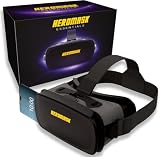
- 😎 VIRTUAL REALITY HEADSET FOR PHONE — Pop your smartphone into the Heromask VR and dive into immersive 360° experiences. Works with your existing mobile phone: no console, no computer, no extra devices needed. Just your iPhone or Android and these goggles. Simple as that.
- 🔍 NEXT-GENERATION HD LENSES — New optical design with improved HD lenses delivering sharper images, less distortion and more vivid colours than previous models. Triple interpupillary adjustment to fine-tune the view for every user. Works with prescription glasses too: don't miss a single detail.
- 📱 COMPATIBLE WITH MOST SMARTPHONES — Works with iPhone and Android. Fits phones with screens up to 16 cm x 8 cm. Compatible with iPhone, Samsung, Xiaomi, Huawei, OPPO and more. Not sure about your model? Drop us a message and we'll confirm compatibility within minutes.
- ✨ PREMIUM MATERIALS AND ALL-DAY COMFORT — Crafted with quality finishes and soft cushioning that sits gently against your face without pressure. Adjustable straps to suit different head sizes. Designed for longer sessions without discomfort. Lightweight yet sturdy: made for the whole family to enjoy, from teens to adults.
- 🎬 3D FILMS, VR GAMES AND 360° EXPERIENCES — Enjoy VR videos on YouTube, virtual reality games from Google Play and the App Store, virtual museum tours, immersive travel and much more. Includes a curated guide to the best VR apps and experiences, handpicked by our team. Technical support in English via WhatsApp: if you need help finding content or setting up your headset, we're here.
| What the image looks like | Likely format | What to do |
|---|---|---|
| Very wide panorama, often close to a 2:1 frame | Stitched equirectangular 360 video | Good candidate for VLC’s interactive mode |
| Two circular or oval lens views | Raw or unstitched fisheye footage | Stitch or render it with the camera manufacturer’s software |
| Two images side by side | Stereoscopic (SBS) VR | Use a stereo/VR-capable player or export a mono version |
| Two images stacked vertically | Over-under stereoscopic video | Use software that supports that eye layout |
| Ordinary 16:9 composition | Flat video, even if recorded by a 360 camera | It has no 360 viewpoint to navigate |
The container and codec matter as well. An .mp4 extension, H.264 encoding, or 4K/8K resolution does not by itself make a file compatible. VLC must be able to decode the video, and the image must be prepared in a projection it can display.
Open a 360 video in VLC
- Download VLC from the official VideoLAN site if it is not already installed. The 360 instructions are in the VLC Desktop 3.0 documentation; menu labels can vary slightly in other builds.
- Launch VLC Media Player.
- Choose Media → Open File, or press Ctrl+O.
- Select the stitched 360 video and choose Open.
- Start playback if it does not begin automatically.
When projection is working, the player shows a movable window into the scene. You should not see the entire panorama stretched across the screen at once.
Look around and zoom
These controls come from VideoLAN’s desktop guide for 360 playback:
Rank #2

- SUPPORT FOR MYOPIA USERS: The reasonable design of the optical lens and the body can pre-vent fatigue and sleepiness, and can support the use of myopia users, reduce deformity and glare to effectively reduce visual fatigue, maintaining 3D reality with a wide field of vision and creating a virtual reality world.
- ADVANCED VR TECHNOLOGY: 360-degree panoramic view, bringing more shocking visual experience and immersive visual impa-ct.Gaming and watching movies with virtual reality headsets work best when your eyes properly align with the screen box. With this device, you can experience the immersive, fun and exciting world of VR, such as 3D movies, skydiving, underwater worlds, panoramic natural scenery, virtual game scenes, etc.
- ADJUSTABLE INTERPUPILLARY DISTANCE: The use of a large lens barrel has a wider field of view, and the interpupillary distance design of the adjustable gear can meet a variety of needs.The pupil distance can be adjusted to get the clearest view.Our optical goggles has the characteristics of an-ti-blue light, effectively protects the eyes, makes the picture clearer, and reduces the feeling of dizziness.
- MORE PORTABLE, MORE COMFORTABLE, MORE LIGHTWEIGHT: Suitable for 4.7-7 inch mobile phones, compatible with more types of large-screen mobile phones. VR Headset weighs as light as its concise appearance, it more portable no matter at home or outdoor. A T-shaped headband will fit different head sizes (both adults and children).
- PERFECT GIFT FOR KIDS & ADULTS: This premium VR headset is the perfect present for father's day, Halloween, Easter, or Christmas. Compatible with smartphones and other mobile phone devices with a 4.7-7” screen to bring you a totally immersive visual 360 degree experience.
| Action | Control |
|---|---|
| Rotate left or right | Hold the left mouse button and drag horizontally |
| Look up or down | Hold the left mouse button and drag vertically |
| Zoom | Use the mouse scroll wheel |
| Zoom in | Page Up |
| Zoom out | Page Down |
| Look up | Up Arrow |
| Look down | Down Arrow |
| Look left or right | Left Arrow or Right Arrow |
If dragging does nothing, try the arrow keys and Page Up/Page Down. A lack of response usually means VLC has not recognized a supported 360 projection, the file is ordinary flat video, or the installed build differs from the documented workflow.
Why the video looks flat or distorted
A long, warped rectangle is often the original equirectangular panorama being shown as ordinary flat video. Other causes include an unsupported projection, missing or unrecognized projection metadata, an unstitched camera file, or a stereo layout that needs separate eye handling.
- Confirm that the source is a finished, stitched equirectangular export rather than a camera preview or raw lens file.
- Open the file in the camera manufacturer’s desktop application and render a standard video export if necessary.
- Prefer a conventional container and codec that VLC can decode.
- Reopen the exported file in VLC.
- Test a known-good equirectangular sample to separate a file problem from a VLC or computer problem.
Do not fix this by merely renaming the file or adding arbitrary metadata. Projection and stereo information must be produced correctly by the camera or editing workflow.
Rank #3

- SUPPORT FOR MYOPIA USERS: The reasonable design of the optical lens and the body can pre-vent fatigue and sleepiness, and can support the use of myopia users, reduce deformity and glare to effectively reduce visual fatigue, maintaining 3D reality with a wide field of vision and creating a virtual reality world.
- ADVANCED VR TECHNOLOGY: 360-degree panoramic view, bringing more shocking visual experience and immersive visual impa-ct.Gaming and watching movies with virtual reality headsets work best when your eyes properly align with the screen box. With this device, you can experience the immersive, fun and exciting world of VR, such as 3D movies, skydiving, underwater worlds, panoramic natural scenery, virtual game scenes, etc.
- ADJUSTABLE INTERPUPILLARY DISTANCE: The use of a large lens barrel has a wider field of view, and the interpupillary distance design of the adjustable gear can meet a variety of needs.The pupil distance can be adjusted to get the clearest view.Our optical goggles has the characteristics of an-ti-blue light, effectively protects the eyes, makes the picture clearer, and reduces the feeling of dizziness.
- MORE PORTABLE, MORE COMFORTABLE, MORE LIGHTWEIGHT: Suitable for 4.7-7 inch mobile phones, compatible with more types of large-screen mobile phones. VR Headset weighs as light as its concise appearance, it more portable no matter at home or outdoor. A T-shaped headband will fit different head sizes (both adults and children).
- PERFECT GIFT FOR KIDS & ADULTS: This premium VR headset is the perfect present for father's day, Halloween, Easter, or Christmas. Compatible with smartphones and other mobile phone devices with a 4.7-7” screen to bring you a totally immersive visual 360 degree experience.
Common playback problems and fixes
| Symptom | Likely cause | Recommended response |
|---|---|---|
| Two fisheye circles | Dual-lens or unstitched source | Stitch and export with the camera software |
| Two side-by-side or top-bottom views | Stereoscopic VR layout | Use a player with stereo projection and eye separation, or export mono |
| Black video | Codec, graphics driver, GPU, or rendering issue | Update drivers, try another video output or software decoding, and test a smaller export |
| Audio plays but video freezes | Decoder or rendering performance problem | Try another codec/export and test different hardware-acceleration settings |
| Jerky playback | High resolution, bitrate, frame rate, codec, or insufficient hardware | Close demanding applications, update drivers, and try a lower-resolution or less demanding export |
| Wrong orientation or visible seams | Camera metadata or stitching error | Correct orientation or stitching in the camera/editor workflow |
| VLC will not open the file | Proprietary container or unsupported codec | Export or convert it to a standard compatible video file |
VideoLAN has demonstrated 8K 360 playback, including an 8K 48-frame-per-second example in the VLC 3.0 announcement. That demonstration is evidence of capability, not a promise that every computer will play every 8K file smoothly. Performance depends on resolution, frame rate, bitrate, codec (including HEVC/H.265 or AV1), GPU decoding, drivers, operating system, and whether the video is stereoscopic. VideoLAN’s libVLC capability page likewise describes hardware-efficient decoding and 360 playback without guaranteeing a particular machine’s result.
Independent reader supportYour contribution helps us test, update, and keep practical guides available for everyone.Does VLC handle VR and 3D 360 video?
The documented desktop workflow provides interactive viewpoint control with a mouse and keyboard. It does not establish a complete VR-headset experience with head tracking, controller input, stereo eye separation, or a headset-specific interface.
VLC may play the underlying video, but stereoscopic 180-degree or 360-degree footage can still appear as two images or with incorrect geometry. A dedicated VR player is a better fit when immersive headset playback is the goal. VLC is also not a stitching, reframing, horizon-correction, or metadata-editing tool.
Rank #4

- 【HD WIDE ANGLE LENS】Double spherical optical lens, restore the real image, more high-definition. High-definition optical multi-layer protection lens.360-degree panoramic view, bringing more shocking visual experience and immersive visual impact.
- 【GOOD EFFECT】Full-screen VR rejects the black box effect. Smaller size allows larger field of view. VR removes the black box frame around to make the field of vision bigger and more comfortable. It no longer feels like watching a movie in a box.
- 【EASY TO USE】Easy to set up and use, place the phone horizontally with reference to the center line, adjust pupil distance and object distance. Vr goggle is adjustable on pupil distance and objects distance with individual lenses for different eye sights.
- 【3D GAMING】Gaming and watching movies with virtual reality headsets work best,(5.5-6.2 inch mobile phone with auxiliary frame is better). Boasting HD optimization and 3D gaming support, you’ll put yourself right into the action with games, movies and more!
- 【WIDE ANGLE LENS】With a 100 degree wide-angle lens, the immersion is better. Myopia within 600 degrees can be viewed with the eye. Compatible with 4.7-7.2 inch mobile phones. Full screen vision, no black box effect when watching movies.
Which tool fits your file?
| Need | VLC | Dedicated VR player | Camera software |
|---|---|---|---|
| Basic local playback | Strong fit | Usually supported | Usually supported |
| Mouse-based viewpoint navigation | Supported in the documented desktop workflow | Often supported | Often supported |
| Stitch raw camera lenses | Not its purpose | Usually not its purpose | Strong fit |
| Stereo eye separation and headset tracking | Do not assume | Stronger fit | Depends on the software |
| Reframing or editing | Not its purpose | Limited | Stronger fit |
| Cost | Free | Varies | Often bundled with or available from the camera vendor |
For the exact desktop procedure and its distinction between 360 viewing and 3D, see VideoLAN’s 360° video playback guide. General platform documentation is available at VideoLAN’s VLC User Documentation.
The Bottom Line
VLC is a good free desktop viewer when your file is a stitched equirectangular 360 video. If you see a flat map, fisheye circles, stereo pairs, or severe stuttering, fix the source format or choose camera or VR software designed for that job.
Quick Recap
Product prices and availability are accurate as of the date/time indicated and are subject to change. Any price and availability information displayed on Amazon at the time of purchase will apply.
Quick wins for a faster PC:
Clear out junk files and repair common Windows errorsFree Scan →Fix the driver behind crashes, sound loss and screen glitchesFind Drivers →Repair Windows errors before they cause bigger problemsFix Now →