Outdated Drivers Are Slowing You Down
One free scan finds every outdated or missing driver and matches the right update for your exact hardware.Free scan · exact hardware matchWindows Errors? Fix Them Before They Spread
Repair common Windows errors and clear accumulated junk for a smoother, more stable PC - no reinstall needed.Free scan · no reinstallSome links on this page are affiliate links: if you buy through them we may earn a commission, at no extra cost to you.
Disney+ is free to install, not free to watch. The official Windows, Android and iPhone/iPad apps cost nothing to download, but the Disney+ catalog requires a subscription. Windows supports streaming but not offline downloads; offline viewing is available on eligible Android phones/tablets and iPhone/iPad devices. Android users should install the Disney-published app from Google Play rather than use an unofficial APK.
Is Disney+ free to download?
The app listings may show Install, Get or Free. That describes the software download only. Disney+ currently requires a paid subscription in the United States, and Disney’s U.S. getting-started information says there is no free trial. Plans, promotions and catalog access can vary by country. Check Disney’s current pricing page before subscribing.
The official Android listing is Google Play’s Disney+ app; the official iPhone and iPad listing is Apple’s Disney+ app. Both are free to install with in-app subscription purchases.
Free tools Windows power users keep installed
One-click scans. No signup required.
Download Disney+ for Windows 10 and Windows 11
Install from the Microsoft Store
- Open the Microsoft Store.
- Search for Disney+.
- Confirm that the publisher is Disney.
- Select Install or Get.
- Open the app and sign in to your Disney+ account.
Disney lists Windows 10 and Windows 11 computers and tablets as supported. Current Windows updates may be required; use Windows Update if the Store cannot install the app. See Disney’s Windows support page.
#1 Best Overall

- Hides behind your TV: The all-new design plugs right into your TV with a simple setup
- Super-fast startup: Start streaming channels like Disney+, Prime Video, HBO Max, Apple TV+, Netflix, Sling, and Hulu in a snap—just turn on your TV
- Long-range Wi-Fi: Enjoy fast, smooth TV streaming in any room with a strong Wi-Fi connection, now up to 2x faster
- No more juggling remotes: Power up your TV, adjust the volume, and control your Roku Streaming Stick with the Roku remote
- Voice search & control: Quickly search, play entertainment, and control your streaming device with the voice remote
Windows does not support Disney+ offline downloads
The Windows app is a streaming interface. Disney’s download guidance excludes computers and Windows 10/11 tablets, so even a download-eligible Premium account cannot save Disney+ movies or episodes for offline playback on a Windows PC or tablet.
If the Store app fails
- Install pending Windows updates and restart.
- Check Microsoft Store sign-in and app-install permissions.
- Retry the Disney-published Store listing.
- Use DisneyPlus.com in a supported browser instead.
- Do not use an old installer or archived package from a third-party site.
Use Disney+ as a Windows web app
A web app gives DisneyPlus.com its own window and Start-menu shortcut. It remains a browser-based experience and does not enable computer downloads.
- Open https://www.disneyplus.com/ in Microsoft Edge and sign in.
- Select the three-dot menu in the upper-right corner.
- Choose Apps, then Install this site as an app.
- Confirm the installation and launch Disney+ from the Windows Start menu or installed-app list.
Edge wording can change between versions; search the menu for Install this site as an app if the option has moved. Disney’s support information is at this help page. macOS and Linux users can stream through DisneyPlus.com in a supported browser, but computer downloads are likewise unavailable. Device availability can vary by territory; consult Disney’s supported-device list.
Rank #2
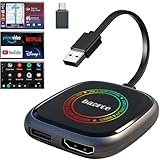
- 💌 Friendly Reminder – Product Compatibility Requirements: 1. Factory-installed wired CarPlay port 2. Vehicle model year 2016 or newer 💗 Not sure if your car is compatible? Just let us know, and we’ll help you check.
- 🚗 Magic AI Box 3.0 Max – Wireless CarPlay & Android Auto Adapter – Instantly upgrade your factory-wired CarPlay or Android Auto to wireless with Magic AI Box 3.0 Max. Enjoy smooth navigation, music, and apps without messy cables.
- 🎬 Car Video Box with Built-in Apps – Stream Netflix, YouTube, Prime Video, and more directly on your car’s screen. Turn every drive into a full entertainment experience.【All streaming apps are officially sourced and legitimate. Please note that you will need to log in with your own personal account to access and watch content.】
- 🔌 HDMI Output for Rear Screens – Magic AI Box 3.0 Max comes with an HDMI output port, allowing you to project videos onto rear-seat displays so your family can enjoy movies on the road.
- 💡 Powerful Expansion Options – Preloaded with Google Play Store, Magic AI Box 3.0 Max makes it easy to update existing apps or download new ones, giving you endless entertainment choices.
Download Disney+ for Android
- Open the Google Play Store.
- Search for Disney+.
- Verify that the developer is Disney.
- Tap Install, then open the app.
- Sign in or create an account through Disney’s official signup flow.
On a supported Android phone or tablet, an eligible plan and title show a Download control. For a movie it appears below the play button; for a series it appears on the episode page. Completed items are available from the app’s Downloads section. The official listing is Google Play.
Can you download a Disney+ APK?
An APK is Android’s installable application package. Disney’s published Android instructions direct users to the device app store; no general official Disney APK download page is identified here. Do not treat APKPure, APKMirror, random file hosts, Telegram files or “modded Disney+ APK” pages as Disney-authorized sources.
- Mirror files may be modified, malicious, obsolete or signed by a different publisher.
- Sideloaded builds can fail because of Android version, architecture, Google Play Services or DRM incompatibility.
- A modified APK cannot legitimately remove a Disney+ subscription, advertising, geographic controls or DRM.
- Outdated packages can expose account credentials and stop updating normally.
If an APK installation has already been attempted, uninstall the untrusted package and reinstall the Disney-published app from Google Play. Do not use APKs, emulators, cracked apps, VPN bypasses or DRM-removal tools to evade Disney’s account controls.
Rank #3

- Our fastest-ever streaming media player - Brings lightning-fast app starts with an octa-core processor and is 2X as powerful as Fire TV Stick 4K Max.
- The newest Fire TV experience (2026) – Our biggest update to Fire TV has a new, modern design that gets you to your entertainment fast. Browse dedicated content categories, pin more of your favorite apps, and get personalized recommendations from Alexa+. Spend less time scrolling, and more time watching.
- Smarter picks with Alexa+ – Getting to what you love has never been easier. Press the voice remote button and talk naturally to find what to watch across your apps, manage your smart home, or dive into virtually any topic.
- Hands-free Alexa with built-in mic and speakers - Control your compatible TV, soundbar, and receivers with your voice, even from across the room.
- Seamlessly navigate between your entertainment - Connect compatible devices and easily go from streaming to your cable box, game console, or webcam.
Download Disney+ for iPhone and iPad
- Open the App Store.
- Search for Disney+ and verify the developer is Disney.
- Tap Get and authenticate with Face ID, Touch ID or your Apple ID password.
- Open the app and sign in.
- Use a title’s Download control when your plan and that title support offline viewing.
The U.S. listing is Disney+ on the App Store, shown as “Free · In-App Purchases.” That label means free installation, not free access to the catalog.
Which Disney+ plans allow downloads?
Disney identifies downloads for Disney+ Premium, Disney+, Hulu Bundle Premium, certain Premium Disney+, Hulu and ESPN bundles, and certain legacy plans. Ad-supported Disney+ plans do not support downloads. If you change to a non-eligible plan, previously downloaded Disney+ content is no longer available. Plan names and bundle availability can change, so verify your account’s current terms at Disney’s download help page and download troubleshooting page.
U.S. prices shown on August 18, 2026
| Plan | Price shown | Disney+ downloads |
|---|---|---|
| Disney+ with Ads | $11.99/month | No |
| Disney+ Premium | $18.99/month | Yes, up to 10 supported devices |
| Disney+ Premium annual | $189.99/year | Yes |
| Disney+, Hulu Bundle Basic | $12.99/month | No |
| Disney+, Hulu Bundle Premium | $19.99/month | Yes |
These are U.S. prices displayed on Disney’s pricing page, not universal rates. Taxes, country, billing provider, promotions and legacy status can change the amount. Premium is described as ad-free, although Disney notes that some live or linear programming may still contain advertising or promotional material. Do not choose Premium solely for Windows downloads: Windows computers and tablets remain excluded.
Rank #4

- ✅ Choose Your Apps, Total Freedom Unlike traditional AI Boxes limited to fixed apps, the AUTOSKY AI Box Lite FLEX lets you choose any 2 streaming apps from a list of 13 supported platforms. Switch apps anytime to match your lifestyle—sports, movies, kids content, or live TV.
- ✅ Wireless CarPlay & Android Auto + Streaming Convert your factory wired CarPlay or Android Auto into wireless, while also projecting streaming apps like Netflix, Hulu, Disney+, Prime Video, ESPN, and more directly onto your vehicle’s screen using WiFi or mobile hotspot.
- ✅ True Plug & Play – Keep All OEM Controls No coding, no modifications, no extra adapters. Simply plug it in and go. Your original touchscreen, steering wheel buttons, knobs, and voice commands continue working exactly as designed by your vehicle manufacturer.
- ✅ Wide Vehicle & Phone Compatibility Compatible with most vehicles equipped with wired CarPlay or wired Android Auto. Works with iPhone 6 and newer, Samsung, Pixel, and other Android phones that support CarPlay or Android Auto technologies.
- ⚠️ Important Compatibility Requirements A touchscreen display is required for streaming apps. Streaming services require an internet connection (WiFi or phone hotspot) and login with your own app subscriptions. This model uses a single WiFi module, so WiFi must be reconnected when switching between wireless CarPlay/Android Auto and streaming apps.
How to watch Disney+ downloads offline
- On an eligible Android or Apple mobile device, open Disney+ and tap Downloads.
- Select a downloaded movie or series episode.
- Press play.
- The download stays on the mobile device used to obtain it; it cannot be transferred to a computer, USB drive or another phone.
- The device must connect to the internet at least once every 30 days.
- Logging out removes downloaded content.
- A download can expire sooner if its title leaves the streaming library.
- Not every title is downloadable, and eligible plans support up to 10 downloaded devices.
Choose download quality
In the Disney+ app, open Profile icon → App Settings → Video Quality or Download Quality. Standard uses the least storage and downloads fastest; Medium is an intermediate option; High uses the most storage and downloads slowest. Exact labels vary by app version, and file size depends on title, runtime, resolution, compression and device.
Independent reader supportYour contribution helps us test, update, and keep practical guides available for everyone.Quick platform comparison
| Platform | Official installation | Streaming | Offline downloads |
|---|---|---|---|
| Windows 10/11 computer | Microsoft Store or DisneyPlus.com | Yes | No |
| Windows 10/11 tablet | Microsoft Store or DisneyPlus.com | Yes | No |
| Android phone/tablet | Google Play | Yes | Yes, with eligible plan and title |
| Android APK | No official APK source identified | Only with a legitimate installation | Same account and device restrictions |
| iPhone/iPad | Apple App Store | Yes | Yes, with eligible plan and title |
| macOS or Linux | DisneyPlus.com | Yes | No computer downloads |
| Web browser | DisneyPlus.com | Yes | No |
| Edge web app | Edge → Apps → Install this site as an app | Yes | No |
Troubleshooting Disney+ installation and downloads
“The app is free, but it asks for payment”
This is expected: installation is free, while streaming requires a subscription.
Recommended Free Tools
There is no Download button
- Confirm you are using an Android phone/tablet or iPhone/iPad, not Windows or another computer.
- Check that the account has a download-enabled plan.
- Verify that the specific title permits downloads.
- Update the app, check storage and retry on a reliable connection.
Downloads disappeared
Common causes are logging out, missing the 30-day internet check, a title leaving the library, changing to a non-download plan or canceling the subscription. Disney lists these cases at its download-issues page.
Best Value

- 4K Ultra HD Resolution: Enjoy your TV in stunning resolution Ultra HD ers four times the resolution of Full HD for greater clarity and detail
- Android TV: With the Android TV operating system you will have access to the best content, download the infinity of applications available through the Google Play Store!
- Voice remote control: Just press the Google Assistant button and ask it to find, play and control content
- Chromecast Built-in: Easily cast movies, shows, and photos from your Android or iOS device to your Android TV
- Easy Setup: Access your Google account and configure the device, language and Wi-Fi network
The Windows app will not install
Update Windows, restart, check Microsoft Store permissions and retry. If it still fails, stream at DisneyPlus.com or install the site through Edge. Avoid third-party installers.
An APK will not install or play
Wrong architecture, incompatible Android versions, a corrupted or modified package, signature conflicts, missing Google Play Services, DRM problems or regional restrictions can all cause failure. Remove the sideloaded package and use Google Play.
Billing through Apple, Google or Amazon
Disney’s current joining guidance says new and returning subscribers may need to subscribe through DisneyPlus.com rather than Apple, Google or Amazon. Existing third-party-billed accounts are not necessarily affected, and management or cancellation follows the original billing provider. See Disney’s joining guidance and account help.
What’s actually slowing this PC down?
Pick the symptom - the matching free tool is one click away.
Quick Recap
Product prices and availability are accurate as of the date/time indicated and are subject to change. Any price and availability information displayed on Amazon at the time of purchase will apply.

