Recommended Free Tools
Some links on this page are affiliate links: if you buy through them we may earn a commission, at no extra cost to you.
There is no single best tool for web research. Use browser bookmarks for durable URLs you will reopen, a read-later app such as Instapaper for articles you intend to read and annotate, and a personal wiki such as Obsidian or Notion for turning sources into linked, durable notes. For serious work, connect the three: capture quickly, read deliberately, then distill only verified claims into your knowledge base.
The short answer: match the tool to the job
Web research has three different jobs that are often mistaken for one. First, you need to keep a pointer to a site or page. Second, you need a comfortable place to read material you cannot handle immediately. Third, you need to explain what the source means and how it relates to everything else you know. Bookmarks, read-later services, and personal wikis are optimized for those different jobs.


Choose browser bookmarks or a bookmark manager when the item is a durable pointer: documentation, a reference page, a vendor portal, a publication home page, or a URL you expect to open repeatedly. Choose a read-later app when you have a reading intention. Instapaper is built around saving, reading, managing, highlighting, and commenting on articles, with offline synchronization to supported devices. Choose a personal wiki when the value lies in your own explanation: linked notes, claims, quotations, evidence trails, and project context.
If you must select one primary tool, use Raindrop.io for a large retrieval-focused link library, Instapaper for a reading-focused queue, and Obsidian for synthesis-heavy projects. Notion is a strong alternative when you prefer a workspace with pages and databases over a file-based Markdown vault.
Popular on Amazon
What each category actually stores
Browser bookmarks and bookmark managers
A bookmark normally stores a URL, title, and location in a folder. That is why it is fast: the browser can save the current page in a click or two, with almost no classification required. Folders, tags, and browser search are enough for a modest collection.
A dedicated manager adds structure when the browser list becomes difficult to navigate. Raindrop.io’s product documentation describes full-text search across saved web pages, PDFs, and YouTube videos, along with annotations, previews, and multiple views. Its help documentation defines a web archive as a copy of a page saved in cloud storage when the page is bookmarked. Those capabilities make a manager more than a list of pointers, although you should still treat the original URL as the primary route to the source.
Read-later apps
A read-later service is a queue for material you intend to consume. Instapaper describes its core action as saving, reading, and managing things found on the internet with one click. Its documented features include folders or queues, highlighting, comments, and synchronization of saved articles and videos to iPhone, iPad, Android, Kindle, Kobo, and Boox e-readers for offline reading. The Instapaper Chrome Web Store extension saves the current tab or a link to an Instapaper account for later offline reading.
Do these 3 things before closing this tab:
1Scan for outdated or missing drivers - takes under a minute2Repair Windows errors before they cause bigger problems3Fix the driver behind crashes, sound loss and screen glitchesThe important distinction is intent. A saved item is not merely “somewhere I might need this”; it is an item you plan to read. A queue therefore needs triage and completion rules, or it becomes another inbox.
Personal wikis and knowledge bases
A personal wiki stores your interpretation alongside the source. You can record a claim, quote the relevant passage, add a source link, connect the note to a project, and explain uncertainty. This is the layer where research becomes reusable knowledge rather than a pile of saved pages.
Also popular on Amazon

- | PRACTICAL | Stitched binding and sturdy cover construction ensures longevity in lab environments.
- | ESSENTIAL | Contains 100 numbered duplicate sets with white (1-part) and yellow (2-part) sheets for accurate record-keeping.
- | EFFICIENT | Micro-perforated duplicate sheet for easy tear-out and distribution.
- | PRECISE | 4 x 4 quad ruling provides ideal structure for charts, graphs, and formulas.
- | VERSATILE | Size 11 x 9-1/4 inches suitable for both academic use and research. Made in Canada.
Notion’s Web Clipper documentation describes saving a page to a chosen workspace or page so you can read or edit it later, build a reading list, and collect references. Obsidian’s help materials describe a broader personal knowledge-base ecosystem built around Markdown notes, Web Clipper, Sync, Publish, and plugins. Obsidian’s Web viewer can open external links in tabs, provide a reader view, and save a web page to the vault; its documentation also cautions that the viewer is not a replacement for a primary browser.
Comparison at a glance
| Dimension | Bookmarks or bookmark manager | Read-later app | Personal wiki |
|---|---|---|---|
| Primary job | Reopen a known URL quickly | Consume saved articles later | Build connected notes and source context |
| Capture friction | Lowest; built into the browser | Low; extension or share action | Moderate; clip, classify, and file into a workspace or vault |
| Reading experience | Usually the original page | Focused reader, queue, progress, and offline options | Workspace reader or embedded page; depends on the app and setup |
| Retrieval | Folders, tags, and search; Raindrop.io adds full-text search and archives | Queue, folders, highlights, and service search | Links, backlinks, page search, and metadata |
| Annotation and synthesis | Light notes at most | Highlights and comments | Deep notes, links, and project structure |
| Preservation | Often only the URL unless a manager archives it | Saved article copy depends on the service | Clipped content or a linked source stored with notes, depending on setup |
| Best fit | Frequently reused references and low ceremony | Long-form reading and offline use | Literature reviews, investigations, and cumulative knowledge |
How to decide in under a minute
- Ask what you will do next. If the next action is “open this URL again,” bookmark it. If it is “read this when I have time,” send it to the read-later queue. If it is “use the evidence in an argument, report, or project,” create a wiki note.
- Ask whether the source itself or your explanation is the durable asset. A frequently visited documentation page is a pointer problem. A conclusion supported by several sources is a synthesis problem.
- Ask whether you need offline access. If you regularly read during travel or away from a connection, a service with documented offline synchronization is more suitable than a bare bookmark.
- Ask how much context you must preserve. A URL may be enough for a low-stakes reference. For consequential work, retain the relevant passage or a page copy with the link so you can verify your interpretation later.
Choose bookmarks when
- You revisit a site, portal, documentation set, or reference URL repeatedly.
- The item is a pointer rather than a reading assignment.
- You want the least possible capture and maintenance overhead.
- Your collection is small enough that folders, tags, and browser search remain effective.
Choose a read-later app when
- You save more articles than you can read immediately.
- You want a focused reading view, progress tracking, highlights, or comments.
- You need to read saved material offline on a phone, tablet, computer, or compatible e-reader.
- You can commit to reviewing and clearing the queue.
Choose a personal wiki when
- You are conducting a literature review, investigation, class project, or long-running analysis.
- You need claims, quotes, source links, and your own reasoning in one place.
- You expect new sources to change, qualify, or contradict earlier findings.
- You want notes to remain useful after the immediate project ends.
The most reliable workflow: three layers with an explicit handoff
A layered workflow prevents each tool from becoming a badly used substitute for the others. The handoff matters more than the brand of app.
1. Capture during discovery
Save a durable reference URL as a bookmark. Send a substantial article, interview, or essay to the read-later queue instead of opening many tabs. If you already know the item contains a claim central to your project, clip it directly into the relevant wiki area and add a short reason for saving it.
2. Triage before reading
Give each saved item a disposition: read, archive as a reference, transfer to a project note, or delete. Do not let every bookmark become a reading task. A queue that contains only material you still intend to read is easier to trust than an unbounded backlog.
3. Read and annotate
Use the read-later app for the reading session. Highlight only passages that support a claim, define a term, provide a number, or reveal a limitation. Add a comment that says why the passage matters; a highlight without context is difficult to reuse.
Also popular on Amazon
4. Distill into the wiki
After reading, create a note in your own words. Include the source title, author or organization when known, publication date when available, the original URL, and the exact passage or location supporting each important claim. Link the note to the project, topic, or question it informs. Keep interpretation separate from quotation so a later reader can tell evidence from analysis.
The Tool Desk
Outbyte Driver Updater FREEFix the driver behind crashes, sound loss and screen glitchesFind Drivers →Outbyte PC Repair FREERepair Windows errors before they cause bigger problemsFix Now →5. Preserve high-stakes sources twice
For legal, investigative, academic, medical, or otherwise consequential work, retain both a retrievable link and the relevant page copy or excerpt in your notes. Links can change or disappear. A saved copy improves later verification, but it does not eliminate the need to check the live source for updates, corrections, or changed context.
Setting up each approach
A practical bookmark system
- Create a small set of action-oriented folders such as “Reference,” “Projects,” and “Read later.” Avoid a deep hierarchy that requires a decision every time you save.
- Use tags or a consistent naming pattern for recurring subjects, formats, or projects.
- Save the canonical page rather than a temporary search result, tracking URL, or session-specific link.
- Once a month, remove dead links, merge duplicate folders, and promote frequently used references to a visible location.
- If full-text search, previews, annotations, or web archives are important, evaluate a bookmark manager that documents those features, such as Raindrop.io.
A disciplined Instapaper queue
- Install the browser extension or use the platform share action to save an article without opening another permanent tab.
- Assign a folder or project label at capture time only when it is obvious; otherwise leave the item in the main queue for later triage.
- Read in the focused view and use highlights for evidence, not for marking every interesting sentence.
- Add comments that state the implication, question, or follow-up needed.
- Sync before going offline and verify that the required device is supported. Instapaper documents offline access on iPhone, iPad, Android, Kindle, Kobo, and Boox e-readers, but exact behavior can depend on the current service and device.
- When finished, either archive the item, delete it, or transfer its durable claims to your wiki. Do not leave completed reading in the active queue.
A source-note template for a personal wiki
Create one note per source or one note per tightly bounded claim, depending on the project. A useful structure is:
- Source: title, author or organization, date, and original URL.
- Question: what research question this source addresses.
- Evidence: exact quotations, figures, definitions, or observations with location details.
- Interpretation: your explanation, clearly marked as analysis rather than quotation.
- Limits: missing context, scope, date, methodology, or unresolved contradiction.
- Connections: links to related source notes, concepts, and project decisions.
In Notion, this structure can live in a workspace page or database, with properties for status, topic, source type, and review date. In Obsidian, the same structure can be a Markdown note connected through links and backlinks. Obsidian’s Web Clipper and Web viewer can help bring pages into the vault, while Sync, Publish, and plugins extend the surrounding knowledge-base workflow. The choice is mainly about working style: Notion favors a centralized workspace experience; Obsidian favors local Markdown files and a link-rich vault.
Notion or Obsidian for research notes?
Notion is the better fit when
- Your research is organized around pages, databases, shared workspaces, and configurable views.
- You want Web Clipper to save a page directly to a chosen workspace or page for later reading or editing.
- You prefer forms, properties, and tables to manage a reading list and reference collection.
Obsidian is the better fit when
- You want Markdown notes in a personal vault with explicit links and backlinks.
- You value local files and a large plugin ecosystem for tailoring research workflows.
- You want Web Clipper, Sync, Publish, and the Web viewer available as parts of one personal knowledge-base system.
Neither tool automatically produces reliable research. Both can become storage dumps if every clipped page is kept without a question, source details, or a written explanation. Pick the environment in which you will consistently record evidence and connect it to decisions.
What’s actually slowing this PC down?
Pick the symptom - the matching free tool is one click away.
Also popular on Amazon

- Perfect bound student notebook.
- 64 pages printed front and back.
- Book dimensions are 9.25 * 11.25 inches.
- Soft Covers in black with "Research Notebook" printed on the cover.
- Helps prepare students for a science vocation.
Offline reading and source preservation
Offline access solves a reading problem, not a citation problem. A read-later app may let you read a synchronized copy without a connection, but the copy can differ from the live page if the publisher edits, removes, or restructures it. Keep the original URL and record the source date when the distinction matters.
Bookmark managers that archive pages provide an additional preservation layer. Raindrop.io’s help documentation describes its web archive as a cloud-stored copy created when a page is bookmarked. Treat an archive as a backup for retrieval, not proof that the archived text is permanently authoritative. For high-stakes claims, retain the relevant excerpt in your research note and check the live source when you publish or make a decision.
For an e-reader workflow, use a service that explicitly supports the device. Instapaper lists Kindle, Kobo, and Boox alongside mobile platforms, but model compatibility and current synchronization behavior should be confirmed before relying on a particular device.
Independent reader supportYour contribution helps us test, update, and keep practical guides available for everyone.Common failure modes and fixes
“I have thousands of bookmarks and cannot find anything.”
Stop adding folders. Create a short set of topic or project collections, merge duplicates, and move article-length items into a read-later queue. If you need to search inside saved pages or PDFs, use a manager whose documentation covers full-text indexing and archives.
“My read-later queue is an endless guilt list.”
Set a weekly triage session. Delete items that no longer answer a live question, archive references that need no reading, and keep only articles you will actually consume. Move durable claims to the wiki immediately after reading instead of saving the same article repeatedly.
Also popular on Amazon
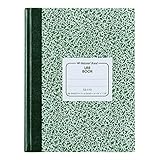
- | PRACTICAL | Green marble flexible cover offers a timeless, classic aesthetic.
- | STURDY | Constructed with center-sewn binding providing durability for field and lab use.
- | COMPREHENSIVE | 96 sheets (192 pages) provide ample space for extensive notes.
- | PRECISE | 5 x 5 quad ruling (5 squares per inch) allows for detailed work and diagrams.
- | VERSATILE | Size of 10-1/8 x 7-7/8 inches is suitable for academic and research use.
“My wiki contains clipped pages but no usable knowledge.”
Require every source note to include a research question, evidence, interpretation, and limits. Clipping is capture; synthesis begins when you explain the source in your own words and link it to a project decision or open question.
“A source changed after I cited it.”
Keep the original URL, the access date, and the relevant excerpt or archived copy. Mark the note if the live page now differs, and revisit the claim before publication or a consequential decision.
“I am trying to use a personal wiki as my browser.”
Use the wiki’s web viewer or reader view for focused research, but retain a primary browser for general navigation. Obsidian’s documentation specifically warns that its Web viewer is not a replacement for a primary browser.
Quick wins for a faster PC:
Clear out junk files and repair common Windows errorsFree Scan →Fix the driver behind crashes, sound loss and screen glitchesFind Drivers →Repair Windows errors before they cause bigger problemsFix Now →Recommended setups by reader type
| Reader | Recommended setup | Reason |
|---|---|---|
| Casual saver | Browser bookmarks; add a manager when folders and search stop working | Most saved items are durable pointers, so extra workflow adds little value at first |
| Heavy article reader | Instapaper or a comparable read-later app | Focused reading, offline synchronization, highlights, and comments fit article consumption |
| Student, journalist, analyst, or investigator | Personal wiki plus a read-later queue | Reading and evidence capture are separate from source synthesis and project context |
| Large mixed-media library | Raindrop.io, optionally paired with a wiki | Its documented full-text search, previews, annotations, and web archives cover pages, PDFs, and videos |
| Dedicated offline reader | A compatible e-reader connected to the chosen read-later service | Instapaper explicitly lists Kindle, Kobo, and Boox support; verify the exact model and current service behavior |
A maintenance routine that keeps the system trustworthy
- Daily: capture without interrupting the work you are doing; avoid opening a new tab merely to remember an article.
- Weekly: process the read-later queue, annotate evidence, and delete material that no longer serves a question.
- Monthly: repair or remove dead bookmarks, merge duplicate tags, and check that archived or clipped pages still contain what you need.
- At project milestones: review source notes for missing dates, URLs, quotations, and limitations; distinguish live facts from your interpretation.
- Before publication or a high-stakes decision: revisit the live source, confirm that the cited passage still supports the claim, and record any material change.
Verdict
Bookmarks win at fast retrieval, read-later apps win at deliberate reading, and personal wikis win at connected understanding. The best web-research system is therefore usually a two- or three-layer stack: bookmark or clip during discovery, read and annotate in a queue, then preserve only durable claims and source context in a wiki. If you want one tool, choose according to the dominant job rather than trying to force every research task into the same container.






Say something about this film