No—not for the complete Olympic stream. The Milan Cortina 2026 Winter Olympics ended on February 22, 2026, so a new Peacock subscription cannot provide live coverage now. During the Games, Peacock’s full event library required a paid Premium or Premium Plus plan. The legitimate ways to watch some coverage without adding a Peacock subscription were a local NBC broadcast received with an antenna, NBC digital access authenticated through an existing pay-TV provider, selected free clips, or a Peacock trial or promotion if one was specifically offered to an eligible account.
First, the date matters: the 2026 Winter Olympics are over
Competition began on February 4, 2026. The Opening Ceremony took place on February 6, and the final day and Closing Ceremony were February 22.
That means there is no current live Olympic broadcast to unlock with a new Peacock account. Replays, highlights, and clips may remain available, but their availability can change. Check the current Olympics section on Peacock or NBC’s Olympic platforms before assuming that a particular event is still there.
Was the full 2026 Olympics available on Peacock for free?
No. NBC Olympics described Peacock Premium or Premium Plus as the service providing the complete Winter Olympics experience: the Opening and Closing Ceremonies, every sport, every competition session, and medal ceremonies. The listed historical price during the Games was $10.99 per month or $109.99 per year.
Do these 3 things before closing this tab:
1Scan for outdated or missing drivers - takes under a minute2Clear out junk files and repair common Windows errors3Fix the driver behind crashes, sound loss and screen glitches#1 Best Overall

- Easy voice search & control: Quickly search across thousands of top channels, play entertainment, control your streaming, and more with your voice
- No more juggling remotes: Power up your TV, adjust the volume, control your Roku device, switch inputs on your Roku TV, and more—all in a tap
- Pre-set channel shortcuts: Pre-set channel shortcuts let you launch popular streaming channels with the push of a button, all without having to scroll
- Simple setup: Simply turn on your Roku device and pull the battery tab on the back of the remote and it should pair automatically
- Works with your Roku device: Roku Voice Remote works with all Roku TV models, Roku audio products, and most Roku players*
In other words, downloading the Peacock app, owning a smart TV, or creating an account did not unlock the full Olympic catalog. The free routes provided either selected NBC programming or access through a service the viewer already paid for; they were not free Peacock Premium subscriptions.
The genuinely free route: receive local NBC with an antenna
For viewers in the United States who lived within range of a local NBC affiliate, the most straightforward no-subscription option was traditional over-the-air television. A compatible indoor or outdoor antenna could receive the NBC broadcast signal without a monthly TV bill or Peacock account.
An indoor HDTV antenna can be useful for this purpose, but it should be understood as equipment for receiving a local broadcast channel—not as a way to obtain Peacock. Reception depends on:
- Distance from the local NBC transmitter
- Terrain and surrounding buildings
- Wall and window construction
- Antenna placement and orientation
- Whether the local NBC affiliate carried the relevant broadcast
Over-the-air NBC coverage was not the same as Peacock’s event-by-event library. NBC’s broadcast schedule featured selected live events and nightly programming, while Peacock carried every sport and competition session. An antenna therefore could provide free NBC Olympic coverage in an eligible market, but it could not guarantee access to a particular curling match, ski run, preliminary round, replay, or medal ceremony.
What’s actually slowing this PC down?
Pick the symptom - the matching free tool is one click away.
NextGen TV, also called ATSC 3.0, was available only in selected cities. Do not assume that an antenna automatically provides 4K Olympic coverage, or that every market broadcasts NBC using the same technology. Check local channel availability and reception before buying equipment.
No additional charge for existing cable, satellite, and telco customers
If you already had a participating cable, satellite, or telecommunications TV subscription, you could authenticate on NBC’s digital platforms, such as NBCOlympics.com, NBC.com, the NBC app, or the NBC Sports app. NBC treated this online access as an included benefit of an eligible pay-TV subscription, with no separate online fee.
This was not free television in the strict sense: the access depended on an existing paid provider account. It also was not free Peacock. The provider login unlocked eligible NBC digital coverage under the terms of that TV subscription.
Rank #2
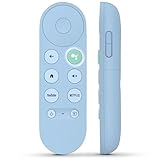
- 【Compatibility Models】Blue Voice Replacement remote for Google TV & Chromecast 4K/HD,for Google TV Streamer(4k),Universal G9N9N, GA01920-US, GA01923-US, GA01919-US, GA02463-US, GA01409-US, GA02464-US
- 【Incompatible Devices】NOT Compatible with Google Chromecast lst Gen, NOT for Google Chromecast 2nd Gen, NOT for Google Chromecast 3rd Gen, NOT for Chromecast Ultra, NOT for Chromecast Audio
- 【Quick Pairing】Pair your new blue remote: ①Press the pairing button on your device; ②Press and hold the"Back" and "Home" buttons simultaneously for 10 seconds until the LED on your new remote starts flashing
- 【Voice Control】Pressing the voice button on the remote, you can use voice to search for specific shows, you can also use voice to control the volume, switch inputs, play music, and get answers on-screen.
- 【Channel Buttons】The replacement remote for Google Chromecast TV , featrues 2 popular streaming buttons ( for NFLX、YouTube) to quick access to the entertainment. Just install 2x AAA batteries to get it to work (batteries are NOT included).
Typical setup
- Install the relevant NBC app or open the NBC Olympic website.
- Choose the sign-in or TV-provider authentication option.
- Select your participating cable, satellite, or telco provider.
- Enter the username and password associated with that provider.
- Confirm that live Olympic content is available before relying on the service.
NBC did not offer a general option to pay NBC directly for NBC live access in place of a participating TV subscription. If your provider was not supported, the login route would not substitute for a Peacock plan.
Recommended Free Tools
Could a Peacock free trial or promotion work?
Possibly, but only if Peacock actually offered it to your account. Peacock’s terms allow the company to offer free trials and promotions from time to time. They do not promise that every new user, returning user, device, email address, or payment method will qualify.
Eligibility and duration can be limited. Peacock may also require a payment method and may evaluate eligibility using information such as the account email address, payment method, or device ID. If the subscription is not canceled before the promotional period ends, the then-current subscription price can be charged.
If a trial or promotion appears, inspect the final checkout screen and record:
- How long the free or discounted period lasts
- Which plan is included
- The price that begins after the offer ends
- The exact cancellation deadline
- Whether the offer applies to live sports and Olympic replays
A trial was therefore a conditional opportunity, not a standing method for watching the Olympics free. Because the 2026 Games have ended, a newly displayed Peacock promotion should not be assumed to include live Olympic coverage.
The Tool Desk
Outbyte Driver Updater FREEFix the driver behind crashes, sound loss and screen glitchesFind Drivers →Outbyte PC Repair FREERepair Windows errors before they cause bigger problemsFix Now →Free clips and highlights are not the full Olympics
NBC’s Olympic websites and apps offered selected highlights, clips, commentary, and digital programming. Those materials could be available without a Peacock subscription or TV-provider login, depending on the item and the current access rules.
Rank #3

- 【Compatible Devices】Universal replacement remote control is compatible with TV brands for Samsung, LG, Vizio, Sony, Hisense, Onn, Sharp, RCA, Element, Westinghouse, Sanyo, Emerson, Philips, JVC, Sceptre, Sansui, Panasonic, Magnavox, Skyworth TV and More Brand Smart TVs. Compatible with of devices, including DVD/Blu-ray players, Media Streaming Players and more!
- 【NOT Compatible Devices】Universal remote is Not compatible with Roku Streaming Sticks, Roku Sound Bar, TLC Sound Bar, Hisense Sound Bar, Anker Sound Bar, Klipsch Sound Bar, All Fire TV, All TV Sticks, All TV Cube, Apple TV, Google Chromecast TV(This product can only be connected and paired via infrared) If you are unsure if our remote control is compatible with your device, please contact us.
- 【Simple Setup】Step 1: Find the device type you need in the code list. Then find and circle all the codes for the brand. Step 2: Press and hold down the (SETUP) button for 3 seconds until the red light on the remote turns on. Step 3: Press and release the (TV/STR/AUD) button on the remote, the red light will blink once and remain on. Step 4: Enter the first 4-digit code from code list. Step 5: Point the remote at the TV, and test the buttons on the remote to see if the TV responds as you would expect. If the buttons don't control the TV, repeat steps 2-4 and enter different code to test. Note:If all the code in the program fails, please check the instructions on page 7 "Automatic Code Search.
- 【Package Included】Package includes 1* Remote Control, 1* User Manual, and 1* Code list. The universal remote control is to use 2 * AAA alkaline batteries(Batteries are not included). Note: Please do not mix old and new batteries or mix different batteries together.
- 【After-Sales Service】We attach great importance to the customer's experience of using remote controls. If you have any questions about your order or product, please contact us and we will get back to you within 24 hours on working days.
That is different from unrestricted live coverage. Full live access through NBC’s digital platforms generally required authentication through a participating TV provider, while the complete Olympic streaming offering was associated with Peacock Premium or Premium Plus. A free clip can confirm that NBC has published a moment or event summary; it does not prove that the full session is available free.
Independent reader supportYour contribution helps us test, update, and keep practical guides available for everyone.Plans and devices that did not solve the problem
Peacock Select
Peacock Select was not an appropriate Olympic-streaming solution. Its plan description excluded live sports, movies, and Peacock Originals, so selecting the cheapest tier did not provide the full Olympic coverage.
Premium Plus
Premium Plus was still a paid plan. It reduced most ordinary ad interruptions, but live sports and events could still include commercial breaks or sponsorship messages. “Mostly ad-free” did not mean free of charge or free of all advertising.
Roku, Fire TV, smart TVs, phones, and computers
Supported hardware could run Peacock, NBC, or NBC Sports apps, but hardware compatibility did not provide credentials for paid content. A Roku or Fire TV device could be useful if you already had the required subscription or TV-provider access; it could not turn Olympic streaming into a free service.
VPNs
A VPN was not an established legitimate U.S. free-viewing method. NBC’s Olympic internet rights applied to the United States and U.S. territories. Attempting to bypass geographic restrictions can also conflict with service terms and may result in unreliable access, blocked playback, or account problems.
Unofficial account sharing
Sharing an account outside Peacock’s terms should not be treated as a recommended free option. Peacock’s terms describe the service as personal, non-commercial use and include conditions concerning accounts, billing, and third-party arrangements. Use only access that you are authorized to use.
Rank #4

- Multi-device control – Operate up to four audio and video devices such as your TV, Blu-ray player, DVD player, cable or satellite receiver, soundbar, streaming media player or other compatible devices
- Best remote code library – Universal remote works with all major brands and supports thousands of the latest audio and video devices (not for use with radio frequency devices like Roku Streaming Sticks and Amazon Fire TV/Sticks)
- Preprogrammed for Samsung TVs – Universal remote’s TV button is preprogrammed for immediate use with Samsung TVs – simply add two AAA batteries (not included)
- Simple setup – Enjoy easy automatic code search and direct code entry programming, as well as master volume control to adjust the audio no matter which device is being used
- Designer finish and ergonomic design – The universal remote’s silver finish adds an extra touch of elegance to any decor while its ergonomic design fits comfortably in hand
Which option was right for which viewer?
| Situation | What it could provide | What it could not guarantee |
|---|---|---|
| You were near a local NBC affiliate and had an antenna | Free over-the-air NBC programming | Every Olympic event, every session, or Peacock’s replay library |
| You already paid for an eligible cable, satellite, or telco TV service | NBC digital access after provider authentication | Access without the qualifying provider subscription |
| Peacock displayed a trial or promotion for your account | Temporary access under the offer’s exact terms | Eligibility for everyone or coverage after the offer ends |
| You only wanted highlights | Selected free clips and commentary | Complete live event coverage |
| You owned a streaming device | A way to run supported apps | Free access to paid Peacock content |
What to check now for replays
- Open Peacock and search its current Olympics or Milan Cortina 2026 collection.
- Check NBC’s current Olympic hub for clips, highlights, and any remaining video.
- Read the access label on each video. “Clip” or “highlight” does not mean the complete event replay.
- If Peacock offers a trial or discount, read the renewal price and cancellation terms before accepting it.
- Do not buy an antenna expecting it to restore Peacock’s archived event library; it is relevant only to current local broadcast reception.
Bottom line
The 2026 Winter Olympics are finished, and there was never a universal free Peacock option for the complete Games. During the event, an antenna could deliver the free NBC broadcast in areas with suitable local reception, and existing pay-TV customers could authenticate on NBC’s digital platforms. A Peacock trial was possible only when explicitly offered to an eligible account. For anything still available now, verify the live catalog and terms directly rather than assuming that a device, cheap plan, VPN, or free account unlocks every Olympic replay.
PC Slower Than It Used to Be?
A free scan shows the junk files, broken settings and background clutter dragging Windows down - then fixes them in one click.Free scan · Windows 10 & 11Crashes, No Sound, or Screen Glitches?
Random freezes, missing sound and display glitches usually trace back to one bad driver. Find and replace yours safely.Free scan · under a minuteFrequently Asked Questions
Can I watch the 2026 Winter Olympics live on Peacock now?
No. The Milan Cortina 2026 Winter Olympics ended on February 22, 2026. Peacock may retain selected replays or clips, but live competition is over and current availability must be checked in the service’s Olympic catalog.
Did Peacock have a free Olympic trial for everyone?
No. Peacock’s terms allow trials and promotions but make them conditional on eligibility, availability, and duration. A payment method may be required, and the subscription can renew at the regular price unless canceled in time.
Can an antenna provide every Olympic event?
No. An antenna can receive eligible local NBC broadcast programming without a Peacock subscription, but NBC’s broadcast schedule was a selection of coverage. Peacock carried the complete event-by-event library.
Can I use a Roku or Fire TV to watch Peacock for free?
No. Roku and Fire TV can run supported Peacock and NBC apps, but the device itself does not unlock paid Olympic content or provide a free subscription.
The Bottom Line
Bottom line: Full Peacock Olympic coverage was not free by default, and the 2026 Games are now over. The legitimate no-additional-Peacock-cost options were local NBC reception with an antenna, NBC access through an existing eligible TV provider, selected free clips, or an account-specific Peacock promotion.
Quick Recap
Product prices and availability are accurate as of the date/time indicated and are subject to change. Any price and availability information displayed on Amazon at the time of purchase will apply.