Free tools Windows power users keep installed
One-click scans. No signup required.
Web radio is radio-style audio delivered over the internet instead of through an AM or FM transmitter. Most services are linear: listeners join a scheduled or curated stream and hear the programme currently playing. Stations may be internet-only, online simulcasts of terrestrial broadcasters, or specialist channels for music, news, sport, religion, education, communities and events.
The technology is accessible. The difficult decisions are usually rights clearance, territorial coverage, audience economics and dependable 24/7 operation. This guide explains the complete chain, the U.S. licensing distinctions, launch choices and the trade-offs between managed platforms and self-hosting.
What web radio includes—and what it does not
“Web radio” and “internet radio” are generally interchangeable in everyday usage. The narrower meaning is a radio-like online channel: programming runs continuously or to a schedule, and a listener tunes in to whatever is on air. The broader online-audio market also includes podcasts, music libraries, personalised services and other on-demand products. The FCC discusses these as distinct parts of online audio, alongside terrestrial and satellite radio (FCC, DA 26-333).
Common web-radio formats
- Internet-only stations: created for online distribution without an AM/FM frequency.
- Simulcasts: an AM or FM station’s programme feed streamed online as a separate digital transmission.
- Linear music channels: live DJs, scheduled shows or automated playlists.
- Spoken-word channels: talk, news, sport, religious, educational, public-service and community programming.
- Personalised radio: algorithmic or user-influenced channels that may sit near the boundary between programmed radio and interactive service.
A listener may access the same station through a browser player, mobile app, smart speaker, radio directory, connected car or third-party aggregator. A website is only one distribution point.
#1 Best Overall

- All-in-One Internet Radio Component: Seamlessly access thousands of global stations via Wi-Fi or LAN, using Skytune, enjoy Podcasts, local FM radio, and stream music from your phone via Bluetooth (Requires external speakers or amplifier—no built-in speaker driver).
- HiFi Integration Ready: Easily connect to your home audio system with stereo line-out or optical output. No built-in speaker—designed as a pure tuner for audiophiles who want flexibility, or if you already have an amplifier or stereo systems to connect with.
- Smart Streaming & Playlist Control: Supports UPnP and DLNA for streaming music from networked PCs or NAS drives. Create and manage playlists or stream directly from your home server.
- Enhanced User Control: Comes with a full-function remote control and 3.2" color screen. Browse stations, set sleep timers, alarms, EQ sound modes, and manage your favorites. Option to display a clock while playing with adjustable dimmer settings.
- Multiple Playback Modes & Alarms: Supports alarm via favorite station, FM, or tone. Sleep timer, kitchen timer, podcast playback with resume function, and remote web control via Skytune website.
Linear radio versus on-demand audio
In a linear or generally noninteractive service, the station determines the sequence and the listener joins in progress. SoundExchange describes this as an experience that mimics broadcast radio, where users generally do not select the exact recording they will hear (SoundExchange Licensing 101).
In an interactive or on-demand service, a user can search for a particular recording, choose a track, replay it or access a catalogue at will. Such services generally fall outside the statutory webcasting licence and need direct agreements with rights holders, according to SoundExchange. The boundary is fact-specific: a skip, like, request feature, archive or personalisation system should be reviewed rather than classified by a slogan.
How a web-radio station works
- Content source: a live microphone and studio, a music library, recorded programmes, an automated playlist or an AM/FM feed.
- Playout and automation: a presenter broadcasts live, software schedules files, or a hybrid system hands control between live and automated output.
- Encoder: audio is compressed into a streamable codec and bitrate and sent to the streaming service.
- Streaming server: the host accepts the station feed and creates listener connections. Managed services may add transcoding, statistics, metadata, recording and failover.
- Distribution: the stream is exposed through an embedded player, apps, directories, smart speakers and vehicle platforms.
- Listener device: a browser, phone, tablet, computer, speaker or car receives a continuous stream and normally starts at the current programme position.
This differs from uploading an MP3 for download: the station is delivering an ongoing transmission, not merely storing a file.
Web radio compared with other audio
| Service | Typical listener behaviour | Programming model |
|---|---|---|
| Web radio | Tune into a live or scheduled channel | Usually continuous and linear |
| Podcast | Choose an episode and play it on demand | Episodic; may be streamed or downloaded |
| On-demand music service | Select a specific recording or album | Interactive catalogue |
| Terrestrial AM/FM | Tune a licensed radio-frequency transmission | Continuous broadcast; may also simulcast online |
| Video livestream | Watch a live programme, often with audio | Live video channel rather than audio-only radio |
A station can combine products—for example, livestream a daily show and publish an edited podcast—but the rights and delivery arrangements should be assessed separately.
Rank #2

- Connect the Grace Link to your traditional stereo or receiver to stream music and more; Total control with the Grace smartphone app, infra-red remote control, or the front panel controls via the 2.8-inch color display (no built in speaker)
- Supports 100,000 Internet radio stations and 100 presets; Built-in apps: Spotify Connect, Pandora, Amazon Music HD, Prime, and Unlimited, iHeartRadio, Radio.com, BBC, NPR, Sleep Sounds, Calm Radio, Shoutcast, Live365, Podcast, SiriusXM (subscription sold separately by SiriusXM), add your favorite station to your my stuff folder
- With Chromecast built-in, you can stream your favorite music from your phone, tablet, or laptop right to your favorite speakers or stereo system. Easily control your Grace Link with hundreds of apps you already know and love from your iPhone, iPad, Android phone or tablet
- Analog and pure digital outputs to connect to your favorite stereo or receiver; Analog inputs to stream your favorite CD or Turntable to any room of your home, to other Grace devices, or any brand Chromecast built-in speaker
- Supports Hi-Res files up to 24-bit/192kHz; Built in 5 band equalizer; Play audio from UPnP / DNLA media servers, Bluetooth 5.0 receiver to play from your phone or transmit to listen on headphones, RJ45 jack and built in dual band Wi-Fi; What's in the box: Grace Link, manual, Infra-red remote control and batteries, 12V 1A power adapter
Why organisations create web-radio stations
Web radio is particularly useful where specificity matters more than mass reach: a genre community, local information service, diaspora or multilingual audience, college, church, sports club, artist network, retailer, event, nonprofit or internal organisation. It can also provide a home for specialist programming that does not fit a mass-market schedule.
What you need before launch
1. Define the format and audience
- Music, talk, news, sport, religious, educational or mixed content.
- Live, automated or hybrid operation.
- Internet-only or AM/FM simulcast.
- Local, national or international audience.
- Free listening, membership or subscription.
- Live-only programming or live plus archives and podcasts.
2. Resolve rights before buying equipment
List the recordings, compositions, programmes, advertisements, jingles and territories involved. Ask whether listeners can select or replay tracks, whether shows will be archived, whether music appears in video, and whether a platform’s licence covers your country and format. A hosting plan may deliver audio without granting permission to use it.
3. Choose an operating model
| Model | What the operator gets | Best fit | Main trade-off |
|---|---|---|---|
| Managed platform | Cloud streaming, scheduling, storage, player, analytics and sometimes licensing | Fast launch and low technical burden | Less infrastructure control and vendor limits |
| Self-hosted | Choice of server, software, integrations and distribution | Technical teams needing control or portability | You own security, uptime, scaling, backups and compliance |
| AM/FM simulcast | Reuses an existing broadcast feed | Terrestrial broadcasters adding online reach | Online transmission has its own rights and reporting analysis |
4. Build production and fallback systems
Plan for a microphone, headphones, mixer or audio interface, encoder, automation software, media library, station IDs, metadata and emergency audio. Maintain a backup playlist, second administrator account, documented restart procedure, backup encoder or computer, licensing records and a way to announce outages.
5. Configure and test the stream
Choose codec, bitrate, listener capacity, primary and backup ingest, player, geographic availability and analytics. Higher bitrate can improve quality but increases bandwidth use and can exclude listeners on weak connections. Test encoder failure, lost internet, silent or clipped audio, bad metadata, empty playlists, listener caps, mobile playback, browser autoplay restrictions and directory delays before launch.
Rank #3
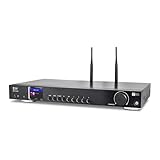
- 17-INCH WIDE FULL-SIZE HI-FI COMPONENT: Designed to fit naturally into a traditional home stereo stack, the WR-50 features a 430 mm / 16.9-inch-wide profile, an aluminum front panel, and a metal housing for a clean, component-style appearance.
- INTERNET RADIO, PODCASTS & FM: Access over 30,000 internet radio stations and podcasts through Wi-Fi or wired Ethernet (RJ45), or enjoy built-in FM radio. External Wi-Fi and Bluetooth antennas support wireless reception.
- EASY AND CONVENIENT WEB MANAGEMENT: Enjoy direct, hassle-free control without relying on a phone. Navigate menus on the crisp 2.4-inch color display using the included full-function IR remote or front control dial. Store up to 150 custom presets or add custom station stream URLs through your web browser.
- VERSATILE CONNECTIVITY & BLUETOOTH 5.0: Connect to your audio system through optical (Toslink), coaxial S/PDIF, or stereo RCA outputs, and use the front 3.5 mm headphone jack for private listening. Bluetooth 5.0 lets you stream audio from a smartphone or tablet.
- UPnP/DLNA & USB MEDIA PLAYBACK: Stream your digital audio collection from compatible NAS drives or PC media servers using UPnP/DLNA, or play locally stored music from a USB flash drive connected to the front-panel USB port.
Do web-radio stations need music licences?
For U.S. operators, there are at least two important copyright layers. A qualifying digital performance of a sound recording may be covered by a statutory licence administered by SoundExchange (SoundExchange service-provider information). The underlying musical work—songwriting and publishing—can involve separate permissions and organisations. SoundExchange is not a universal clearance for composition, reproduction, synchronisation, territory, direct-label, podcast or archive rights.
When direct agreements may be necessary
- The service is interactive or on demand.
- The programming falls outside statutory webcasting conditions.
- Recordings, archives, videos, advertisements or podcasts need additional rights.
- The service reaches territories not included in a licence package.
- Negotiated restrictions apply to particular recordings or catalogues.
U.S. 2026 figures for specific categories
SoundExchange’s 2026 commercial-webcaster page lists $0.0025 per performance for nonsubscription transmissions and $0.0032 per performance for subscription transmissions, with a $1,000 annual minimum per station or channel and a $100,000 cap for services with more than 100 channels. New services beginning on or after February 1 generally pay the minimum within 45 days after the end of the month in which streaming starts (SoundExchange commercial webcaster).
For a commercial broadcaster whose business materially includes FCC-licensed AM/FM stations, SoundExchange lists a different 2026 minimum signal: $1,100 per station or channel, capped at $110,000 above 100 channels (SoundExchange commercial broadcaster).
Qualifying noncommercial educational webcasters have separate rules. The current eCFR text lists an $800 annual minimum for 2026 under stated threshold conditions; a separate $100 proxy fee may apply when an eligible reporting waiver is used (37 CFR §380.21). Educational eligibility includes a connection to an accredited primary, secondary or post-secondary institution and substantial student staffing (SoundExchange noncommercial educational webcaster).
The Tool Desk
Outbyte PC Repair FREEClear out junk files and repair common Windows errorsFree Scan →Outbyte Driver Updater FREEFix the driver behind crashes, sound loss and screen glitchesFind Drivers →Rank #4

- Listen to Thousands of Radio Stations from Around the World With Clear Reception - More than 25,000+ internet radio stations categorized by Location, Genre and Most Popular. Discover radio shows you love. Thousands of free rock, jazz, news and talk shows to choose from! All you need is a WiFi internet connection. Add your own favorite stations by submitting a valid URL to Skytune.
- Bluetooth receiving included so that you can send audio from a smartphone or tablet to the CC WiFi 3 Internet Radio. A 5dBi external antenna is included for best 2.4 Ghz Wi-Fi reception and distance within your home.
- Great Audio With Full Voice Clarity – Includes a line-out which can be used for remarkable results with an amplified speaker system or any AM, FM stereo receiver for superior audio. An adjustable equalizer (Line Out and Headphone) for advanced users centered at 105, 300, 850, 2400 and 6800 Hz plus an adjustable 3D setting for depth. Settings can be adjusted to your ear.
- Great Bedside Radio – It’s small and easy to use. Comes with a clock, dual alarm, sleep timer (15, 30, 45, 60, 120, 150, and 180 minutes) and stereo headphone jack. The included large sized remote control gives you quick access to preset stations. Presets: first 10 presets using the remote buttons, 100+ in sequence list.
- Additional Features – Adjustable Backlight, 5-volt AC adapter and USB to radio power cord included. Weight: 1 lbs. 2.6 oz. Size: 6.5” W x 3.9” H x 3.9” D. 2 Year limited warranty. U.S. based tech support.
Licensing rules vary by country, service type, programming model, rights involved and distribution method. These U.S. figures are not global rates or legal advice. Confirm eligibility and current terms with the relevant rights organisations or qualified counsel before launch.
Independent reader supportYour contribution helps us test, update, and keep practical guides available for everyone.How much does web radio cost?
There is no meaningful single “average” price. Budget for several layers:
- Hosting and bandwidth: server capacity, concurrent listeners, listening hours and overages.
- Rights: statutory fees, composition licences, direct agreements and reporting.
- Production: microphones, interfaces, studio furniture, processing and backup equipment.
- Software: playout, automation, website, player and analytics.
- Distribution: apps, directories, smart speakers and connected-car integrations.
- People: presenters, producers, technical support, promotion and compliance work.
Live365’s pricing page displayed on August 16, 2026 listed plans from $59/month (1,500 listening hours and 30 GB storage) to $999/month (20,000 hours and 500 GB), with overages shown at $0.05 per listened hour. It describes core licensing coverage for the United States, Canada and Mexico, subject to conditions including accurate metadata; UK coverage is separate (Live365 broadcaster pricing; Live365 licensing coverage). Prices, taxes, billing terms and inclusions can change.
Radio.co’s pricing page displayed on August 16, 2026 listed Lite at $35/month, Standard at $59, Plus at $139 and Premium at $199, with different storage, listener, bandwidth, quality, app and distribution limits. A 14-day trial was shown; some features and developer accounts are separate (Radio.co pricing). These are technical platform prices, not universal music-rights clearance.
Quick wins for a faster PC:
Fix the driver behind crashes, sound loss and screen glitchesFind Drivers →Clear out junk files and repair common Windows errorsFree Scan →Best Value

- Internet wireless Wi-Fi radio: simply connect the radio to your internet network to access an extensive number of world’s radio channels, powerful and stereo output with rich sound.
- FM radio: Ordinary FM band without internet access. Can display radio texts if available.
- Bluetooth & UPnP/ DLNA Compatible: Play your preferred music or podcast using Bluetooth (such as Spotify or other audio streaming services) or UPnP/DLNA compatible device, also support Micro SD card.
- Personalize your favourite list up to 99 presets: Easy to manage favourites from FM and Internet radio in ONE list via 3 quick preset or remote control. Free to add new audio stream URL.
- Option to display the time when radio is playing, the backlight is adjustable, can be totally off / Multi-languages menu display / Remote control.
Choosing a platform
Live365: bundled managed model
Live365 suits a small operator seeking hosting, automation, distribution, licensing coverage and royalty reporting in one service. It is less attractive when the station is talk-only, needs complete infrastructure control, uses interactive or archived content, or serves territories outside the package.
Radio.co: broad station-management toolkit
Radio.co offers cloud scheduling, live broadcasting, analytics, station pages, apps and smart-speaker support (Radio.co platform). Confirm music rights, territories, archives, podcasts and add-ons separately.
Airtime Pro
Airtime Pro is another managed scheduling and broadcasting option. Check its current plan structure and whether licensing is separate on the official page before committing (Airtime Pro pricing).
Self-hosted or open-source stack
Self-hosting can provide custom integrations and portability, but “free software” does not mean free operation. Add servers, bandwidth, monitoring, backups, security, updates, player development, technical labour and rights administration to the budget.
Recommended Free Tools
Live, automated or hybrid?
- Live: strongest for personality, call-ins, breaking news and community interaction, but dependent on presenters and reliable connectivity.
- Automated: efficient for scheduled music or repeatable programming, but requires carefully maintained playlists, metadata and fallback audio.
- Hybrid: combines scheduled output with live intervention and is often the practical choice for a station that runs continuously.
Common mistakes
- Confusing a streaming subscription with copyright permission.
- Assuming internet-only means free of regulation or platform rules.
- Treating an AM/FM simulcast as legally identical to the terrestrial transmission.
- Ignoring extra rights for archives, podcasts, downloads, video or replay.
- Exceeding listener or listening-hour limits without modelling overage costs.
- Assuming U.S. licensing covers the world.
- Supplying incomplete or inaccurate track metadata.
- Building only a website player when listeners expect apps, directories or smart speakers.
- Running a 24/7 station from one computer and one internet connection.
Is web radio worth starting?
It is a strong format when the station has a clearly defined audience, cultural or local role, specialist expertise or an owned community. It is a harder proposition as a generic mass-market music service competing only on song access. The most durable stations connect the stream with sponsorships, memberships, events, newsletters, podcasts, education or direct community relationships.
Use this decision rule: choose managed hosting for speed; choose a licensing-inclusive service when rights administration is the main barrier; choose self-hosting only if you can operate infrastructure and compliance yourself; and treat licensing scope, geography and archive policy as launch prerequisites rather than afterthoughts.
Quick Recap
Product prices and availability are accurate as of the date/time indicated and are subject to change. Any price and availability information displayed on Amazon at the time of purchase will apply.