The Tool Desk
Outbyte PC Repair FREEClear out junk files and repair common Windows errorsFree Scan →Outbyte Driver Updater FREEScan for outdated or missing drivers - takes under a minuteDriver Scan →Start by recording the complete Netflix code, including any text in parentheses, and the device showing it. A code such as ui-800-3 (123456) is not necessarily treated the same way as plain ui-800-3. Netflix’s own troubleshooting pages are code-, device-, browser-, and symptom-specific, so the full variant matters.
There is no official Netflix table proving which errors occur most often. The codes below are the recurring, high-utility categories covered by Netflix’s current troubleshooting documentation: network failures, stale app data, browser DRM problems, unsupported devices, mobile playback errors, downloads, and TV display-path failures.
| # | Preview | Product | Price | |
|---|---|---|---|---|
| 1 |

|
Tengchi RCA to HDMI Converter, AV to HDMI Adapter | $13.99 | Buy on Amazon |
| 2 |
|
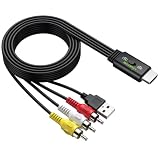
LiNKFOR HDMI Male to 3RCA Male Converter Cable, 1080P PAL/NTSC Supported | $16.65 | Buy on Amazon |
| 3 |

|
GINGIN RCA to HDMI Converter, AV to HDMI Converter for... | $14.99 | Buy on Amazon |
First, identify what kind of Netflix failure you have
Before changing settings or buying equipment, answer four questions:
- What is the complete error code, including parentheses, letters, numbers, and the exact message?
- Does the problem affect one title or every title?
- Does it affect one device or every device on the same network?
- Are you watching through a TV app, streaming stick, game console, phone, tablet, or web browser?
These details narrow the diagnosis. A problem with one title may be title- or feature-specific. A problem on every device may point to the home network, an account issue, or a Netflix service problem. A problem only in a browser is more likely to involve cookies, extensions, protected-content playback, or browser DRM components.
#1 Best Overall
- RCA Female to HDMI Video Converters Adapter : The cable is used to convert analog composite input to HDMI 1080p output, displayed on a 1080p HD TV/TV/monitor.
- Input ports: 1xRCA Female (Yellow, White, Red), Output ports: 1xHDMI 1.3 1080p. NOT support 3D and 4K, NOT support HDMI Converts to AV
- AV to HDMI Converter: Plug and Play, Easy to Install and Operate, Powered by External USB Cable. Note: Please hook up the USB power cable (included) to 5V 1Apower source during use (not included power supply ).
- Support PAL, NTSC3.58, NTSC4.43, SECAM, PAL/M, PAL/N standard TV formats input. For PS2,PS3,Xbox,N64,STB, VHS, VCR, DVD Players and other devices with standard composite AV input.
- You Will Get : 1x RCA Female TO HDMI Converter, 1xHDMI cable, 1xUSB cable, 1xUser Manual. ONE YEAR WARRANTY - if you are not satisfied for any reason whatsoever, do not hesitate to contact us .
| What you see | Likely category | Codes and symptoms covered here |
|---|---|---|
| Netflix cannot connect or times out | Network, DNS, Wi-Fi, VPN, or proxy | NW-2-5, NW-3-6, tvq-st-103 |
| The app will not open or has stale information | App/device data or network state | UI-800-3, UI-113 |
| A device cannot play a title or feature | Compatibility or certification | tvq-pb-101 (E130), tvq-pb-101 (E104) |
| Playback fails in Chrome, Firefox, or Safari | Browser settings, extensions, or DRM | M7111-1331, M7701-1003, M7703-1003, F7701-1003, S7701-1003 |
| Playback fails on a phone or tablet | Device data, region, app, or download state | 5.7, -11800, 10013, -103 |
| The TV shows black or blank video | HDMI, HDCP, input, adapter, receiver, or display path | Black-screen and blank-screen symptoms |
Do these low-risk checks before troubleshooting a specific code
Netflix repeats a small group of safe first steps across many error pages. They are worth trying before a factory reset or a change to advanced network settings.
- Restart the affected device completely. Power it off, wait briefly, and turn it back on. Leaving a device in sleep or standby is not always the same as a full restart.
- Test another internet app. Open a different streaming or web app on the same device. If that also fails, the Netflix app may not be the main problem.
- Check Netflix’s connection path. Open
Fast.comin a browser, or use a Netflix app network check if the device provides one. This tests the connection to Netflix rather than only the link between your device and router. - Restart the modem and router. Unplug the network equipment for about 30 seconds, reconnect it, wait for internet service to return, and then restart the streaming device.
- Restore unusual network settings. Temporarily turn off a VPN or proxy. If you configured custom DNS or other custom connection settings, restore the device or router to its default settings instead of changing DNS values at random.
- Refresh the app or account session. Sign out of Netflix and sign back in. Update the Netflix app, browser, device software, and—where the device-specific instructions call for it—reinstall the app.
Do not begin with a factory reset. A reset can remove apps, saved settings, Wi-Fi credentials, and other data. If it becomes necessary, make sure you know the Wi-Fi password and Netflix sign-in details first.
Network and connection error codes
NW-2-5: the device took too long to connect
NW-2-5 usually indicates that the device or home network could not establish a connection to Netflix quickly enough. It is primarily a connectivity diagnosis, not evidence that your Netflix account is broken.
Try these steps in order:
- Open another internet-connected app on the same TV, streaming player, or console.
- Run the device’s built-in connection test, if available.
- Restart the device fully.
- Restart the modem and router, then wait for the connection to stabilize.
- Move a Wi-Fi device closer to the router or reduce interference where practical.
- Try another network only as a diagnostic test, such as a phone hotspot. Do not assume a hotspot is a suitable permanent streaming connection.
Hotel, apartment, school, public, cellular, satellite, and hotspot networks can behave differently from a normal home broadband connection. Shared networks may restrict streaming, require a sign-in page, or become congested. If other apps also have trouble, or the code remains after a network restart, ask the internet service provider whether there is an outage, congestion, or a routing problem.
What’s actually slowing this PC down?
Pick the symptom - the matching free tool is one click away.
If your device and router support it, test Netflix over a wired Ethernet connection. This is an optional diagnostic and stability measure, not a guaranteed cure: an ISP outage, DNS problem, unsupported device, or Netflix account issue will not be repaired by a cable.
NW-3-6: network or DNS settings are blocking Netflix
NW-3-6 means a network issue is preventing the device from reaching Netflix. Netflix’s guidance specifically calls out custom connection settings, VPNs, proxies, and custom DNS.
First restore the normal connection path:
- Disconnect a VPN or proxy and retry Netflix.
- Restore custom DNS settings to the device, router, or ISP default.
- Restart the modem, router, and streaming device.
- Try the device on a different network to determine whether the problem follows the device or stays with the home network.
Do not change DNS blindly. If you use a managed network, parental-control system, ad blocker, private relay, or custom router configuration, changing it may create new problems. Ask the ISP or device manufacturer to check whether the network can reach Netflix endpoints including secure.netflix.com, appboot.netflix.com, uiboot.netflix.com, and fast.com.
tvq-st-103: a supported streaming device cannot communicate with Netflix
tvq-st-103 is another network problem, but the exact steps depend on the device. Restart the device and home network, verify that other apps can connect, and restore default connection settings if they were customized.
On some Amazon Fire TV devices, Netflix’s device-specific instructions include reloading or reinstalling Netflix. On Wi-Fi devices, improving the connection or moving the device may help. If the code persists, contact the ISP, particularly if other devices have connectivity issues too.
App data, device information, and support-status errors
UI-800-3: refresh stored Netflix information
Plain UI-800-3 generally means that information stored on the device needs to be refreshed, although a network problem can produce the same code. Start with a full device restart and a modem/router restart. Then sign out of Netflix and sign back in.
If that does not work, restore default network settings. Some devices also offer an option to clear the Netflix app’s data or reinstall Netflix; use those steps only when the instructions for your particular device recommend them, because clearing data removes the local session and preferences.
Pay attention to the suffix. Netflix documents UI-800-3 (207006) separately. That variant typically points toward a DRM problem and may require the manufacturer’s help, a firmware or software update, or restoration of the device. Search for the full code shown on screen rather than applying the plain UI-800-3 checklist to every variant.
PC Slower Than It Used to Be?
A free scan shows the junk files, broken settings and background clutter dragging Windows down - then fixes them in one click.Free scan · Windows 10 & 11Crashes, No Sound, or Screen Glitches?
Random freezes, missing sound and display glitches usually trace back to one bad driver. Find and replace yours safely.Free scan · under a minuteUI-113: device data, network, or support status
UI-113 can mean that device data or the network is preventing Netflix from working. It can also indicate that the device is no longer supported.
- Restart the device completely.
- Check that the Netflix app and device software are up to date.
- Sign out of Netflix and sign in again.
- Restart the home network.
- On another device connected to the same network, try opening Netflix.com. This helps separate a device problem from a network problem.
Netflix says an SDK version of 4.1.5 or below indicates that the app or device software cannot be updated by the manufacturer to meet current technical requirements. In that case, reinstalling the app is unlikely to make obsolete hardware compliant; a different supported device is required.
If Netflix confirms that the hardware is unsupported or uncertified, the practical fix is a supported Netflix streaming device. Verify current Netflix compatibility, the device’s software support, your TV’s available input, and any plan or regional requirements before buying. Avoid choosing a model solely because it is inexpensive or because it can install other streaming apps.
Compatibility and certification errors
tvq-pb-101 (E130): the device cannot play that title or feature
tvq-pb-101 (E130) means the device does not support streaming the selected title or feature. Older devices may still play ordinary shows and movies while lacking support for newer capabilities such as livestreaming or podcasts.
Try another title once, but do not treat that as a permanent solution if the device is outdated. If the app or device software can no longer be updated, Netflix recommends using a newer supported device.
tvq-pb-101 (E104) or tvq-pb-101 (1.10.5005): the device is not Netflix-certified
This is different from E130 even though the first part of the code is the same. tvq-pb-101 (E104), also displayed as tvq-pb-101 (1.10.5005), means the device is not certified for Netflix and cannot be used to watch Netflix shows or movies.
Rank #2
- All-in-One HDMI to AV Converter : Built-in 5ft (1.5m) HDMI male to RCA male cable. Converts digital HDMI signals to RCA (AV/composite) video and stereo audio, connecting modern devices to old RCA TVs
- NTSC/PAL Switch : Includes a professional NTSC/PAL toggle. In the US or Canada, set to NTSC to avoid black and white, flickering, or rolling images. For other regions, use PAL. Instantly match your TV’s standard for stable, true-to-life color
- Wide Compatibility : Easily connect HDMI devices like laptops, Blu-ray players, set?top boxes, PS4, and Xbox to any RCA TV using this hdmi to av adapter. NOTE: For 4K devices (PS4), please lower output resolution to 1080p or 720p- not support 4K or 3D
- 1080P Stable Transmission with 5ft Cable: Built-in smart chip supports HDMI input up to [email protected] 1.5m integrated cable gives ample reach. Included USB power cable to steady voltage to prevent black screens or signal loss
- Plug and Play: No software or drivers needed. NOTE: This is a one way converter (HDMI → RCA). Perfect for streaming devices to old TVs, but cannot reverse an old VCR or game console to a modern HDMI TV. Please check your setup before buying
Contact the device manufacturer if you believe the device should be certified or needs an official firmware update. Otherwise, the reliable solution is a different supported device. A factory reset, DNS change, or app reinstall cannot turn uncertified hardware into certified hardware.
Browser error codes: settings, extensions, and DRM
Browser playback depends on more than an internet connection. Netflix also needs the browser to allow protected content and load the correct content-decryption components. Use an official, up-to-date browser installation and avoid troubleshooting in an old bookmark or an unusual private-browsing configuration.
Recommended Free Tools
M7111-1331: browser settings or a mobile-only plan
M7111-1331 can result from browser settings that interfere with playback. It can also appear when the Netflix plan permits viewing only on a mobile phone or tablet rather than in a desktop browser.
If the issue is browser-related, open Netflix directly instead of using an old bookmark and disable unnecessary Chrome extensions, especially extensions that modify pages, privacy controls, scripts, or media playback. If the plan is mobile-only, changing browser settings will not add desktop-browser viewing; check the plan and use a permitted device or plan.
M7701-1003: Chrome protected content or Widevine
M7701-1003 generally means Chrome settings are blocking protected playback or the browser needs an update. Work through this sequence:
- Update Chrome from its About page and relaunch it.
- In Chrome settings, search for protected content and allow sites to play protected content.
- Open
chrome://components, find Widevine Content Decryption Module, and select Check for update if that option is available. - Temporarily test Netflix with unnecessary extensions disabled.
- If the component will not update or Chrome remains damaged, reinstall Chrome from the official Chrome download source.
Do not treat disabling all security software as a universal fix. Security products, managed-device policies, or privacy extensions can block browser components, but removing protection can expose the computer. If this is a work or school computer, ask the administrator to check the policy instead.
M7703-1003: Chrome component, security, cookie, or profile problem
M7703-1003 on a computer usually indicates that a browser component needs updating or that a security setting or program is blocking it. Netflix’s documented remedies include clearing Netflix cookies or site data and creating a new Chrome profile.
To refresh site data, open Chrome settings, search for site data or cookies, find data associated with netflix.com, remove it, restart Chrome, and sign in again. The exact menu wording can differ by Chrome version. If the error continues, create a temporary new browser profile and test Netflix there. A working new profile points toward an extension, corrupted preference, or profile-specific setting rather than a Netflix account problem.
F7701-1003: Firefox Private Browsing or DRM settings
F7701-1003 can occur when Firefox Private Browsing is enabled, browser settings prevent playback, or Firefox needs updating.
- Close the Private Browsing window and open a normal Firefox window.
- In Firefox Settings, under Privacy & Security, make sure browser history is enabled rather than configured to erase everything immediately.
- In Firefox Settings, under General, allow Play DRM-controlled content.
- Update Firefox and allow its content plugins or components to update.
- Use an official Firefox installation rather than an altered or unofficial browser package.
S7701-1003: Safari Private Browsing
S7701-1003 generally means Safari is in Private Browsing mode. Turn off Private Browsing on the iPad or Mac, open a normal Safari window, and reopen Netflix. If that does not resolve the issue, update the operating system and Safari where applicable before moving to broader network troubleshooting.
Do these 3 things before closing this tab:
1Repair Windows errors before they cause bigger problems2Fix the driver behind crashes, sound loss and screen glitches3Clear out junk files and repair common Windows errorsPhone and tablet playback errors
5.7: Android or Samsung device data
Android error 5.7, often shown with There is a problem playing the video, occurs when data stored on the phone or tablet prevents playback.
Turn the device off and on again. On Samsung devices, Netflix also documents resetting system settings without deleting personal files. On current Samsung software, this is typically found under Settings > General management > Reset > Reset all settings, although menu names vary by model and Android version. Read the confirmation screen carefully: choose the option that resets settings, not one that erases the device.
-11800: stale information on an Apple device
Error -11800 is often accompanied by A problem occurred while playing this item or Cannot play title. It generally means that information on the Apple device needs to be refreshed.
- Apple TV: restart the device and restore default connection settings if the network configuration has been altered. If DNS appears to be involved, ask the ISP for assistance rather than guessing at DNS values.
- iPhone or iPad: restart the device and update the Netflix app. If the app itself is damaged or outdated, follow Netflix’s device-specific reinstall guidance.
10013: VPN, proxy, region, account, or app state on iPhone/iPad
Error 10013 on an iPhone or iPad may appear with a message saying that a title is unavailable in the current region. A VPN or proxy can make Netflix detect a different location, but Netflix also documents app-update, inactive-account, and account/device situations under this code.
- Turn off any VPN, proxy, or similar traffic-routing service and retry the title.
- Open
Fast.comand check the location reported for the connection. If it appears inconsistent with your actual location, contact the network provider or VPN service. - Update the Netflix app.
- Confirm that the Netflix account is active and that the device is permitted under the account and plan.
- Reset network settings only if necessary. This removes saved Wi-Fi networks and other network preferences, so have the Wi-Fi password ready.
A title may be unavailable in a particular region for legitimate catalog reasons. Turning off a VPN can fix an incorrect location signal, but it cannot make every title available in every country.
-103: a downloaded title cannot connect
-103 on an iPhone or iPad usually indicates that a connectivity problem occurred when the title was downloaded. The most direct remedy is to delete that download and download the title again while connected to a reliable network.
Rank #3
- RCA to HDMI Converter: Converts analog RCA composite (Yellow, White, Red) input to HDMI 720P/1080P (60HZ) output, displayed on smart TV, projector and HDTV monitor. Making video come alive, giving the most realistic HD visual experience. Important Note: RCA inputs for HDMI output only!
- Easy to Use: GINGIN Mini RCA to HDMI Adapter need no extra driver, portable, flexible, just plug and play. Please hook up the USB power cable (included) to 5V 1A power adapter during use.
- Widely Used: This AV to HDMI Adapter is widely applied to PS1, PS2, PS3, Xbox, N64, WII, STB, VHS, VCR, DVD Players and other devices with standard composite AV input.
- Broad Compatibility: This Audio Video to HDMI Converter supports source formats of PAL, NTSC3.58, NTSC4.43, SECAM, PAL/M, PAL/N standard TV. Provide advanced signal processing with great precision, colors, resolutions, and details.
- Package&After-sales Service: Package Include: 1*CVBS to HDMI Converter, 1*USB Power Cable(2.6ft/0.8m), 1*HDMI Cable(3.3ft/1m), 1*Male RCA Cables(3.3ft/1m), 1*User Manual. We provide 18 months after-sales service and 30 days no hesitate money back.
If the redownload repeatedly fails, test the connection, update Netflix, and check available device storage. The code is associated with the downloaded copy, so repeatedly pressing Play on the same damaged or incomplete download is less useful than replacing it.
Independent reader supportYour contribution helps us test, update, and keep practical guides available for everyone.Black screen, blank screen, or no video
A black screen is a symptom rather than one universal Netflix code. It can occur alongside a displayed error, after an app fix, or when the device-to-TV video path cannot complete its HDMI or HDCP handshake.
Quick wins for a faster PC:
Repair Windows errors before they cause bigger problemsFix Now →Scan for outdated or missing drivers - takes under a minuteDriver Scan →Work through the physical connection in this order:
- Confirm that the TV is set to the HDMI input used by the Netflix device.
- Unplug and firmly reconnect both ends of the HDMI cable.
- Try another HDMI port on the TV.
- Connect the streaming device directly to the TV, bypassing an AV receiver, soundbar, switch, or capture device.
- Try a different supported HDMI cable.
- Restart both the source device and the TV.
- Check whether an adapter is compatible with the device, TV, resolution, and HDCP requirements.
HDCP is the protection system used when digital content travels from a device to a TV, usually over HDMI or DVI. Netflix requires a compatible protected connection for playback. An incompatible receiver, adapter, port, or cable can therefore produce a black screen even when the Netflix app and internet connection are working normally.
If the cable path is suspect, try a different HDMI cable. Buy only after checking the device and TV requirements; a new cable will not solve an incorrect input, a failed HDMI port, an unsupported device, or a receiver that cannot pass the required signal.
For phone- or tablet-to-TV viewing, use a supported HDMI adapter and confirm the connection type. Netflix documents compatibility requirements for certain Lightning adapters and for USB-C or Thunderbolt video connections. An adapter that charges a device is not automatically capable of carrying a protected Netflix video signal.
Free tools Windows power users keep installed
One-click scans. No signup required.
How to decide whether the problem is Netflix, your network, or your device
If another app also fails
Focus on Wi-Fi, the router, the ISP, or a captive-portal sign-in page. Restart the network, test another device, and contact the ISP if the issue continues.
If Netflix works on another device on the same network
The affected device, its app, its software version, or its local settings are more likely responsible. Update, sign out and back in, reinstall only when recommended, and check whether the device is still supported.
If Netflix fails on every device but other internet services work
Check the account, plan, VPN or proxy, regional location, and Netflix service status. Sign in through another device or browser. If the account is active and the problem is consistent across devices, contact Netflix.
If only one title fails
Try another title. A one-title failure may reflect title availability, a feature the device cannot support, or a problem with the downloaded copy. Codes such as tvq-pb-101 (E130) require particular attention to device and feature compatibility.
If video is black but menus and audio work
Prioritize the TV input, HDMI cable, HDMI port, adapter, receiver, and HDCP path. Network troubleshooting is less likely to help when the Netflix interface loads normally but video cannot reach the screen.
Who should you contact when the fixes fail?
| Contact | Use them for |
|---|---|
| Internet service provider | Outages, DNS resolution, routing, congestion, public/shared-network restrictions, and inability to reach Netflix endpoints. |
| Device manufacturer | Firmware updates, SDK or certification status, factory-reset instructions, HDMI ports, adapters, receivers, display hardware, and device-specific software. |
| Netflix | Account status, plan limitations, title availability, service-side problems, and code-specific guidance after network and device checks. |
When contacting support, provide the complete code, exact message, device model, app or browser version, whether other apps work, whether another device works on the same network, and which steps you already tried. That information prevents support from repeating unrelated fixes.
What not to do
- Do not call these codes a verified frequency ranking. Netflix publishes troubleshooting pages, not a public incident-frequency table.
- Do not treat a parent code as a complete diagnosis. The suffix in codes such as
UI-800-3can change the remedy. - Do not change DNS values blindly. Restore defaults or get help from the ISP or device manufacturer.
- Do not factory-reset first. It can remove apps, data, saved settings, and Wi-Fi credentials.
- Do not buy hardware before confirming the failure path. An Ethernet cable, HDMI cable, adapter, or replacement streaming player is useful only in the circumstances that match its problem.
- Do not assume an old device can be made compatible by reinstalling Netflix. Unsupported or uncertified hardware may require replacement.
Netflix’s instructions change as devices, browsers, apps, plans, and technical requirements change. For a code with a suffix, search the Netflix Help Center using the full code and the affected device before taking an irreversible step.
Frequently Asked Questions
Why does Netflix show the same error code with different numbers in parentheses?
The parenthetical suffix can identify a different technical condition. Netflix specifically advises searching the complete code, such as ui-800-3 (123456), rather than assuming that every UI-800-3 variant has the same fix.
Quick wins for a faster PC:
Scan for outdated or missing drivers - takes under a minuteDriver Scan →Repair Windows errors before they cause bigger problemsFix Now →Can a Netflix error code mean my account is broken?
Sometimes, but many codes are caused by the device, browser, network, or display connection. Test another device on the same network, check whether the problem affects one title or every title, and verify the account or plan when the code points to account or browser limitations.
Should I change my DNS to fix Netflix NW-3-6?
Not blindly. NW-3-6 can involve custom DNS, VPN, proxy, or routing settings, but the safest first step is to restore defaults and ask the ISP or device manufacturer to check the connection to Netflix endpoints.
Will a factory reset fix Netflix UI-800-3 or UI-113?
It may be included in device-specific troubleshooting, but it should be a last resort. A reset can remove apps, saved settings, and Wi-Fi credentials, and it cannot fix an uncertified or permanently unsupported device.
Why is Netflix black while other TV menus work?
The likely problem is the video path between the streaming device and TV: the selected input, HDMI cable, HDMI port, receiver, adapter, or HDCP compatibility. Connect the device directly to the TV and test another supported port or cable.
What’s actually slowing this PC down?
Pick the symptom - the matching free tool is one click away.
The Bottom Line
The fastest route to a Netflix fix is not trying every suggestion at random: record the full code, identify the device, determine whether one title or all titles are affected, and then troubleshoot the matching category. Restart first, verify the network, remove VPN or custom-connection complications, refresh app or browser state, and check device support before considering a reset or replacement.
Quick Recap
Product prices and availability are accurate as of the date/time indicated and are subject to change. Any price and availability information displayed on Amazon at the time of purchase will apply.




