Recommended Free Tools
If you want free programming on a Fire TV Stick, start with Pluto TV for the closest thing to a traditional live-TV guide and Tubi for free movies and TV shows on demand. Also check Prime Video’s free-with-ads programming, where Amazon’s former Freevee content now appears, and the built-in Fire TV Channels destination for short-form news, sports highlights, music, cooking, gaming, and other topical feeds.
If you want free programming on a Fire TV Stick, start with Pluto TV for the closest thing to a traditional live-TV guide and Tubi for free movies and TV shows on demand. Also check Prime Video’s free-with-ads programming, where Amazon’s former Freevee content now appears, and the built-in Fire TV Channels destination for short-form news, sports highlights, music, cooking, gaming, and other topical feeds.
All four options are generally supported by advertising. “Free” means no paid subscription is normally required; it does not mean commercial-free. Channel lineups, individual titles, live events, and app availability can change by country, device, licensing agreement, and date.
Quick comparison
| Service | Best for | What to expect | Separate app? |
|---|---|---|---|
| Pluto TV | Live-TV-style channel surfing | A large, changing lineup of free linear channels plus on-demand movies and shows | Yes |
| Tubi | Free movies and TV series | A large on-demand catalog, with live-TV sections and selected live events | Yes |
| Prime Video free with ads | Amazon’s integrated free programming | Free-with-ads movies, shows, and long-form FAST channels, including programming formerly associated with Freevee | No separate Freevee app |
| Fire TV Channels | Quick clips and topical viewing | Short-form playlists and feeds covering news, sports highlights, music, lifestyle, cooking, gaming, and entertainment | Usually built into the Fire TV experience |
1. Pluto TV: best for free live-TV-style channel surfing
Choose Pluto TV first if you want to turn on the television and browse a guide instead of selecting a particular movie. Its service combines free live channels running on schedules with an on-demand library of movies and television shows. It is available on Amazon Fire TV devices.
PC Slower Than It Used to Be?
A free scan shows the junk files, broken settings and background clutter dragging Windows down - then fixes them in one click.Free scan · Windows 10 & 11Outdated Drivers Are Slowing You Down
One free scan finds every outdated or missing driver and matches the right update for your exact hardware.Free scan · exact hardware match#1 Best Overall

- Compatibile with TV Stick ( 3rd Gen), TV Stick 4K (1st / 2nd Gen / Select / Plus), TV Stick 4K Max (1st / 2nd Gen), TV Cube(2nd/3rd Gen), TV Stick Lite( 1st / 2nd Gen)
- Compatible with Omni, Ember, Insignia, Toshiba, Pioneer Smart TVs that support voice commands
- This remote is compatible with streaming devices and smart TVs, and the pairing methods differ. Please refer to the instructions for pairing
- Voice Function: Use voice commands to find your favorite content faster than ever before
- Package Contents: 1 Replacement Voice Remote, 1 User Manual (Batteries not included: requires 2 AAA)
Pluto TV is the closest of these options to the familiar cable experience: open the guide, scan categories, and watch whatever is currently playing. It is useful for background viewing, news and entertainment browsing, and discovering programs without committing to a specific title.
Pluto TV describes its lineup as containing hundreds of free channels, but the exact number and channel names are not permanent. Licensing changes and regional differences can affect what appears on your Fire TV Stick. Do not assume that a particular local station, sports league, movie, or series will be available just because it appears in an older channel list.
- Best for: live-style browsing and casual channel surfing.
- Weakness: the schedule and catalog are controlled by Pluto TV, so you may have to wait for a program rather than play it immediately.
- Important limitation: availability varies by location, and Pluto TV is not a guaranteed replacement for local broadcast television or every premium sports channel.
2. Tubi: best for free movies and TV shows
Choose Tubi if on-demand viewing matters more than a traditional channel guide. Tubi offers thousands of free movies and TV shows and supports Amazon Fire TV. Its catalog includes programming from major studios and distributors, although the exact selection changes over time and by region.
Unlike a scheduled linear channel, Tubi normally lets you choose a title and start watching it when you are ready. That makes it the better first installation for viewers looking for a documentary, film, series, or specific genre rather than something to leave playing in the background.
Quick wins for a faster PC:
Fix the driver behind crashes, sound loss and screen glitchesFind Drivers →Repair Windows errors before they cause bigger problemsFix Now →Tubi also includes live-TV sections and can carry selected live events. Those events should be treated separately from the general service: a particular broadcast may require an account, work only in certain countries, or be limited to supported devices. Tubi’s standard service does not require a paid subscription or credit card, but the Fire TV platform may occasionally request account or payment-card verification during installation. That platform request does not turn Tubi into a paid service.
Rank #2
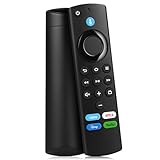
- Compatible With: This stick remote control compatible with Smart TV (3rd gen), TV stick (2nd gen/3rd gen), TV Stick 4K (1st / 2nd Gen), TV stick lite, TV stick 4K max, Smart TVs cube (1st gen/2nd gen/3rd gen)
- Not Compatible With: This replacement remote not compatible with Smart TVs (1st and 2nd gen), not compatible with Smart TV stick (1st gen), not compatible with Smart TVs edition smart TVs
- Voice Function Supported: Navigate content easily via voice. You can search, run apps, control playback and switch cable TV with simple voice prompts. Shortcut buttons allow quick access to your commonly used apps
- Easy Pairing: This replacement voice remote requires pairing prior to use. Press and hold the HOME button for 10 to 15 seconds until the LED flashes rapidly. Then wait 30 to 60 seconds while the remote enters pairing mode
- Package Contents: 1 Replacement Remote (Batteries Excluded) & 1 User Manual. Our customer service team is always here to help with any problems
- Best for: choosing a movie or show and watching it immediately.
- Weakness: the catalog is not a substitute for every current cinema release, premium series, local station, or live sporting event.
- Important limitation: special live programming can have separate geographic, account, and device restrictions.
3. Prime Video’s free-with-ads area: Amazon’s replacement for Freevee
If you are looking for Freevee, look inside Prime Video instead. Amazon deprecated Freevee as a separate destination in early 2025 and incorporated its free programming into Prime Video. The old Freevee name may still appear in older articles, screenshots, or search results, but readers should not be instructed to install a separate current Freevee app.
Amazon makes eligible free-with-ads programming available to both Prime and non-Prime viewers. In Prime Video, this can include free movies and shows as well as long-form FAST channels—scheduled channels that stream continuously rather than waiting for the viewer to select an individual episode.
Amazon has described the service as containing hundreds of long-form FAST channels from more than 150 publishing partners, along with Amazon-owned channels. Treat those figures as time-sensitive platform information rather than a permanent promise: the selection and total count can change.
This is the most convenient choice for people who already use Prime Video and want to keep free programming in the same interface. It is less useful if you want a completely separate app with a clearly distinct catalog, because Amazon’s free and paid content now coexist within Prime Video.
- Best for: using Amazon’s own interface to access free scheduled channels, movies, and shows.
- Weakness: Prime Video also presents paid rentals, purchases, and subscription titles, so not everything shown in search results is free.
- Important limitation: look for the free-with-ads or included-with-ads designation before starting a title.
4. Fire TV Channels: best for short-form topical feeds
Check Fire TV Channels when you want something immediate without installing and comparing another streaming app. Amazon includes this destination in the Fire TV experience, and its programming is organized into more than 900 short-form playlists and feeds.
Rank #3

- “Alexa, find my remote.” - Use a device with Alexa, the Alexa app or Fire TV app and Alexa Voice Remote Pro will emit a ring. No searching cushions.
- Backlit for your convenience - Navigate movie night with a motion-activated backlight that illuminates buttons in dimly-lit rooms.
- Two customizable buttons - Create your own shortcuts to favorite channels, apps, or any Alexa commands.
- Dedicated headphone button - A new shortcut to the on-screen Bluetooth menu that lets you pair your wireless headphones fast.
- Integrated TV controls - Control power, volume, plus surf live TV with dedicated channel buttons all from one remote.
The selection focuses on topical viewing rather than a conventional cable-style grid. Categories can include sports highlights, lifestyle, music videos, news and topical updates, entertainment, cooking, and gaming. It is particularly useful for brief viewing sessions: catching up on clips, putting on music videos, checking highlights, or sampling a subject before choosing a longer program.
Fire TV Channels should not be described as a full replacement for local broadcast television. Amazon’s own description emphasizes curated short-form feeds, not guaranteed local affiliates, complete live newscasts, or full-length coverage of every event.
Do these 3 things before closing this tab:
1Repair Windows errors before they cause bigger problems2Fix the driver behind crashes, sound loss and screen glitches3Clear out junk files and repair common Windows errors- Best for: quick clips, topical updates, highlights, and lightweight browsing.
- Weakness: it is not the same experience as a full live-TV guide or an on-demand movie library.
- Important limitation: the feeds and their visibility can change with Fire TV software, region, and content availability.
Which free Fire TV option should you install first?
- You want a channel guide: install Pluto TV first.
- You want movies and series: install Tubi first.
- You already use Amazon’s interface: open Prime Video’s free-with-ads or Live TV areas.
- You want news clips, sports highlights, music videos, or short topical content: check Fire TV Channels.
- You want the broadest free setup: use all four. They overlap, but their viewing styles are different enough that keeping more than one is worthwhile.
How to install Tubi or Pluto TV on a Fire TV Stick
- From the Fire TV home screen, open Find or the app-search option.
- Search for Tubi or Pluto TV.
- Select the official app in the results.
- Choose Get, Download, or the equivalent installation button.
- Open the app after installation.
- Register or sign in if the app offers that option. Check the on-screen terms for the current account requirements.
Tubi says its service itself is free, although Amazon may request device-account or payment-card verification as part of the Fire TV app-installation process. Read the screen carefully and distinguish an installation verification request from a paid subscription or rental.
How to find free channels in Prime Video
- Open Prime Video on the Fire TV Stick.
- Look for areas labeled Free, Free with Ads, or Live TV. The exact labels can vary by Fire TV software and account region.
- Before playing a title, confirm that it is marked as free with ads or otherwise included at no additional charge.
- Do not assume that a search result is free merely because it appears in Prime Video. Prime Video also lists rentals, purchases, and subscription channels.
Can these apps appear in the Fire TV Live tab?
Sometimes. Fire TV can surface compatible apps with live or linear programming in its Live tab, but that visibility depends on the app’s integration and the software on the particular Fire TV device. Installing an app does not guarantee that every one of its channels will appear in the Live tab.
If a service is missing from the Live tab, open it from Apps or the home screen instead. The absence of a Live-tab tile does not necessarily mean the app is unavailable or that its programming has disappeared.
Rank #4

- 【Applicable Models】New replacement voice remote compatible with Fire Smart TV Stick 4K Max(1st / 2nd Gen), Fire Smart TV Stick 4K(1st / 2nd Gen), Fire Smart TV Stick(1st / 2nd / 3rd Gen), Fire Smart TV Cube(1st / 2nd / 3rd Gen), for Fire Series Smart TVs, 2/4 Series Smart TVs, for Fire Smart TVs:LF711/LF621U/LF421U/LF221U/C350/A810U/A710U/M550/V35 series, for Fire Smart TVs:F30/F20/F50/DF710/DF711/DF310/DF510/DF311/DF620 series, for Fire Smart TVs PN450/PN651/PN851/PN951 series etc.
- 【One Replaced More Remote Control】Replacement remote control for Fire TV Stick Voice Remote(2nd Gen/3rd Gen/Lite/Lite 2nd Gen) and for Fire TV remote control(NS-RCFNA-21, CT-95018, CT-RC1US-21, NS-RCFNA-19,CT-RC1US-19) etc.
- 【Not Compatible with】Not compatible with Roku stick, Not for Roku stick 4k, Not for Roku stick 4k+, Not for Roku streaming stick 4k, Not for Roku streaming stick 4k+, Not for Insignia tv, Not for Toshiba tv, Not for Hisense tv, Not for TCL tv.
- 【Activate Voice Function】The remote control comes with manual, please follow the instructions to pair and activate the voice function. Easy and intuitive, the voice remote lets you control your favorite content with your voice(batteries not included)
- 【Customization Buttons】The remote control includes 4 shortcut buttons and 2 customization buttons, press and hold 1 or 2 to program customization buttons, you can instantly access your favorite streaming services, eliminating the need for multiple steps.
What “free” does—and does not—mean
These services are usually free to watch with advertising. Expect commercial breaks, sponsored placements, or other advertising-supported interruptions. A newer Fire TV Stick does not remove those advertisements and does not unlock paid movies, premium channels, or restricted sporting events.
The free status applies to eligible content, not automatically to every item inside an app. A service may show paid rentals beside free titles, and a live event may have different rules from the service’s ordinary catalog. Regional licensing can also mean that a title or channel available in the United States is missing elsewhere.
The safest expectation is: the exact channel lineup changes, and some content is available only in certain countries or on certain devices.
Do you need a newer Fire TV Stick?
No. The free services are provided by the apps and platforms, not created by the hardware. If your existing Fire TV Stick can install and run the relevant apps, upgrading will not turn paid programming into free programming or guarantee a larger catalog.
If your television does not already have Fire TV built in, the Fire TV Stick 4K Max is a direct hardware option for accessing the Fire TV app ecosystem. Think of it as the device that provides the interface and app access—not as a package that includes every channel or removes advertising. App availability, regional restrictions, and title entitlements remain separate.
What these services cannot guarantee
- Every local broadcast station or local news channel
- Every live sporting event or sports league
- Permanent access to a particular movie, series, or channel
- Commercial-free viewing
- Access to content licensed in another country
- Free access to every title displayed inside Prime Video or another app
For dependable local broadcast channels, an over-the-air antenna may be more appropriate, but reception depends on location, antenna placement, and local station coverage. For premium sports and newly released films, a paid service may still be required.
Frequently Asked Questions
What is the best free channel app for a Fire TV Stick?
Pluto TV is the best choice for a live-TV-style guide, while Tubi is better for selecting free movies and TV shows on demand. Prime Video’s free-with-ads area is convenient for Amazon users, and Fire TV Channels is best for short clips and topical feeds.
Best Value

- Compatible with Streaming Devices (2018-2026): TV stick 4K Max (1st, 2nd Gen), TV stick 4K (1st, 2nd Gen, Plus, Select), TV stick (HD, 3rd Gen), TV cube (3rd Gen), TV stick lite (1st, 2nd Gen)
- Compatible with Smart TVs: works seamlessly with Insignia, Toshiba, Omni, 2-Series and 4-Series smart TVs with voice control
- Incompatible Devices: Not compatible with TV stick (1st, 2nd Gen), soundbar or other receiver
- Voice Control Features: Quickly search content, launch apps, and adjust volume using voice commands for hands-free convenience
- Instant Access Shortcuts: 4 pre-programmed buttons provide one-tap access to popular streaming apps and channels
Can you watch Prime Video’s free channels without Prime?
Yes, eligible Prime Video free-with-ads programming is available to non-Prime viewers as well as Prime members. Check each title’s label because Prime Video also includes paid rentals, purchases, and subscription content.
Are free Fire TV Stick channels ad-free?
No. These services are generally advertising-supported, so free viewing normally includes commercial breaks or other advertising. A newer Fire TV Stick does not remove the ads.
What’s actually slowing this PC down?
Pick the symptom - the matching free tool is one click away.
What happened to Freevee on Fire TV?
Freevee was deprecated as a separate destination in early 2025. Its eligible free movies, shows, and FAST-channel programming was incorporated into Prime Video, so readers should look there rather than search for a current standalone Freevee app.
The Bottom Line
Pluto TV is the best free live-TV-style choice, Tubi is the best free on-demand choice, Amazon’s former Freevee programming now lives inside Prime Video, and Fire TV Channels is useful for short-form topical feeds. They are generally ad-supported, and their catalogs and availability can change by region and licensing agreement.
Quick Recap
Product prices and availability are accurate as of the date/time indicated and are subject to change. Any price and availability information displayed on Amazon at the time of purchase will apply.




