Some links on this page are affiliate links: if you buy through them we may earn a commission, at no extra cost to you.
Stable Audio 2.0 was Stability AI’s April 3, 2024 upgrade to its generative-audio product. It extended generation to audio tracks of up to three minutes, added audio-to-audio transformation, and offered 44.1 kHz stereo output. Those advances made it more useful for developing music, ambience, and sound-design ideas—but “up to three minutes” did not mean a finished song on demand, and the hosted model was not downloadable at launch. In the current product lineup, Stability AI’s API documentation also lists Stable Audio 2.5, so 2.0 is best understood as an important product release, not the newest model listed today.
What Stable Audio 2.0 introduced
Stability AI announced Stable Audio 2.0 on April 3, 2024, positioning it as a move beyond the short clips and loops associated with early text-to-audio tools. The company said the model could create structured tracks with an intended intro, development, and outro, with a maximum advertised duration of three minutes. It also added the ability to guide generation with an uploaded audio sample, rather than relying only on a text prompt.
The word “structured” describes the product’s intended capability, not a guarantee. A longer generation can still repeat itself, drift away from the prompt, introduce unwanted instruments, or lack the musical development a creator expects. Nor does a three-minute output automatically amount to a polished, vocal-led commercial song.
At launch, Stability AI described the web product as free to try and said API access would follow. API availability came later: the company’s release notes record the Stable Audio 2.0 API launch on March 21, 2025.
#1 Best Overall

- [XLR Mic Input] One XLR microphone input interface is set on the gaming audio mixer, which is great to up your audio quality with your XLR setup. The XLR mixer is a stepping stone to upgrade your live streaming. Audio mixer offered built-in 48V phantom power which opens up more choices for mics. Directly use it with your condenser microphone but do not solve added peripherals. (NOT available for USB mic)
- [Individual Channel Control] Gaming audio mixer for one mic recording with smooth volume slider fader take your streaming recording to a whole new level with full pleasure. Four independent channels set on the DJ mixer give audio volume of the MICROPHONE, LINE IN, HEADPHONE, and LINE OUT channels individual control. Configurable on the PC audio mixer instead of just operating on your game or streaming software.
- [Mute and Monitor] The front mute and monitor buttons but not at the back, make it easier to get the audio interface use. Ability to mute audio, the audio mixer for streaming prevents background noise from damaging your live broadcast. Real-time feedback between speaking and hearing will not distract your attention, which encourage you to speak more confidently. The sturdy-built control button allow you to operate freely and easily during live streaming.
- [Sound Effects] The computer sound mixer supports four pre-recorded customized button that can be recorded and activated at the press of button to post production. 6 kinds of voice changing modes change your output style. 12 auto tune changes the tone of your voice. The podcast mixer being able to add different and fun effects is a huge bonus for your streaming or game voice.
- [Controllable Vibrant RGB] RGB button on the audio mixer DJ meets different live streaming themes. Lights on the video mixer is vibrant but not harsh on your eyes. Flowing or frozen RGB color rotation in a decent pace presents a greatly strong impression as a "light show" to your audience. Even a streaming equipment accessory will not be dull looking when video production.
Stable Audio 1.0 compared with 2.0
| Area | Earlier Stable Audio positioning | Stable Audio 2.0 launch claim |
|---|---|---|
| Typical use | Short clips and loops | Longer, more complete musical arrangements |
| Maximum advertised duration | Earlier coverage described up to 90 seconds | Up to three minutes |
| Input | Text prompts | Text prompts and uploaded audio for transformation |
| Structure | Fragments or loops | Stability AI said generations could have an intro, development, and outro |
| Output specification | High-quality audio | Up to 44.1 kHz stereo |
| Sound-design scope | Music and short audio clips | Music, effects, textures, environments, and variations |
The headline improvement was not just a longer duration setting. Longer outputs offered more room for a beginning, a change in energy, and an ending, while audio-to-audio opened a route to transform an existing idea. But neither duration nor sample rate guarantees arrangement quality or precise control over every element.
What audio-to-audio transformation does
In an audio-to-audio workflow, a user supplies an audio sample and describes the desired transformation in text. The model then generates a variation informed by both. That can be useful for exploring a new style or texture without starting from a blank prompt.
- Choose a sample you own or are otherwise authorized to process.
- Upload it and describe the direction you want, such as a change in instrumentation, genre, mood, or sonic texture.
- Generate and review variations, then decide whether any are useful as a starting point for further production.
Possible applications include developing a backing track from a hummed or played idea, exploring a different treatment of a rough rhythm, creating alternate sound-design elements, or turning a source recording into an ambience bed. These are illustrative use cases, not a promise that a particular prompt will produce a specific result.
“Transform any song” is not a safe description of the feature. Stability Audio’s terms restrict uploads to material the user has the right to process, and the company said it used Audible Magic content-recognition technology to screen uploaded audio for copyrighted material. A screening system is a safeguard, not permission to upload a recording you do not have rights to use.
Music, effects, and textures
Stability AI presented Stable Audio 2.0 for music and sound-design work, including melodies, backing tracks, stems or single-instrument material, effects, ambient textures, crowds, city environments, and instrumental variations. This breadth makes the product relevant not only to musicians but also to video creators, filmmakers, and game teams looking for a draft atmosphere or sound idea.
Rank #2
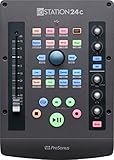
- 2 transparent XMAX Class A mic preamps to capture every detail plus 2 high-headroom instrument/line inputs to record guitar, bass, and your favorite synths
- Single touch-sensitive, 100 mm long-throw, motorized fader
- Transport and innovative Session Navigator controls make mixing and controlling DAWs quick and easy along with seamless, native support for Studio One (Studio One Artist included) and compatible with Logic Pro X, Cubase, Ableton Live, and Pro Tools via MCU and HUI
- DAW Recording Software Included – Studio One Artist and Ableton Live Lite
- Over $1,000 of computer recording software and plug-ins – Studio Magic Software Suite
These example prompts show the kind of natural-language direction a creator might give; they are illustrative, not verified recipes:
- “Slow cinematic ambient bed, low strings, distant percussion, gradual build, wide stereo space.”
- “Upbeat acoustic groove with live-sounding drums, handclaps, warm guitar, and a clear intro and outro.”
- “Dense urban street ambience at night, passing traffic, distant voices, no music.”
The launch materials emphasize music, effects, samples, and textures. They do not establish that the model reliably produces intelligible vocals, convincing dialogue, or clean, professionally separated multitrack stems. If those are essential, treat them as requirements to verify rather than assumed capabilities.
What 44.1 kHz stereo tells you—and what it does not
A sampling rate of 44.1 kHz is common in music production and distribution. Stereo means two-channel output rather than mono. These specifications describe the output format; they are not a quality grade. Audio at 44.1 kHz can still have artifacts, muddy arrangements, unstable transients, or unwanted sounds. A creator should listen critically and expect to edit, mix, or replace material where needed.
How the generation technology was described
Stability AI’s launch explanation describes an autoencoder and a diffusion transformer. At a high level, an autoencoder compresses audio into a latent representation. Diffusion then progressively refines noise in that compressed space, while the transformer helps model relationships across longer sequences. Working in a compressed representation helps make longer audio generation more practical than operating directly on every waveform sample.
This is a high-level product explanation, not a complete architecture specification or a reproducible model description. It should not be mistaken for a research paper or a downloadable model card.
Rank #3

- Tactile Control, Visual Feedback: LCD keys, touch strip, and dials for audio, video, lighting, and more; Know that your command has been executed
- Fully Customizable: Use as an audio mixer, studio controller, production console, etc
- Multi Actions, Smart Profiles: trigger multiple actions at once or sequentially, automatically switch between interface configurations for different apps
- Powerful Plugins: Elgato Wave Link, Camera Hub, Control Center, OBS, Twitch, YouTube, Twitter, Discord, Spotify, Philips Hue, and many more
- Stream Deck App and Store: drag and drop setup, download plugins, icons, thousands of royalty-free tracks, SFX, and more; Regular updates and new plugins frequently added
Training data, uploads, and rights are separate questions
Stability AI said Stable Audio 2.0 was trained exclusively on licensed material from the AudioSparx music library. The company described a dataset of more than 800,000 audio files, including music, effects, instrument stems, and related text metadata. It also said AudioSparx artists could opt out and that it intended to compensate creators. These are the company’s claims about training-data provenance.
Quick wins for a faster PC:
Clear out junk files and repair common Windows errorsFree Scan →Fix the driver behind crashes, sound loss and screen glitchesFind Drivers →That does not settle every rights question a creator may face. Consider three separate issues:
- Training data: what material the company says it used to train the model.
- Your uploads: whether you have the necessary rights to submit a sample for processing. Licensed training data does not authorize you to upload someone else’s recording.
- Your generated output: whether your account tier and applicable terms allow your intended use. Training-data claims do not automatically make every output copyright-free or suitable for every commercial purpose.
Stable Audio’s FAQ distinguishes uploaded audio from generated audio in its training policy: it says uploaded audio is not included in training, while generated audio may be used to improve or train models. Check the current FAQ and terms for the scope of those policies before submitting sensitive material or building a workflow around them.
Can you use Stable Audio 2.0 commercially?
Commercial use depends on the applicable license, not simply on having generated a file. The current pricing page distinguishes Personal, Creator, and Enterprise licensing. It describes the Creator license as supporting commercial projects and music releases for individuals, while Enterprise is aimed at organizations and broader commercial deployments. The terms distinguish non-commercial use on the Basic tier from commercial uses on Pro and state that commercial products exceeding 100,000 monthly active users require an Enterprise Tier license.
Plans and terms can change. Before releasing music, placing generated audio in a monetized video or game, or embedding it in a commercial product, check the current plan terms for your account and use case. Do not assume that a free or basic account includes commercial rights, or that a commercial-capable plan removes all legal uncertainty around a particular output.
Free tools Windows power users keep installed
One-click scans. No signup required.
Rank #4

- Provides a single touch-sensitive, 100 mm long-throw, motorized fader for writing fades and automation in real-time.
- Large 360-degree push-button encoder allows you to edit and mix with greater efficiency and speed.
- Equipped with 24 buttons covering 40 different functions such as transport controls, channel record-enable, enable/disable looping, automation behavior selection, and more. Also contains user-definable function buttons.
- Innovative Session Navigator section makes mixing and controlling DAWs quick and easy.
- Comes with over $1000 worth of recording software including Studio One Artist (for which it has seamless & native support), Ableton Live Lite, and Studio Magic plug-in suite.
Hosted access, not downloadable weights
Stable Audio 2.0 was offered as a hosted service; its weights were not released for download at launch. That matters for users who need local or offline generation, private deployment, or direct control over a model. The name “Stable Audio” should not lead readers to assume that 2.0 worked like an open downloadable model.
Stable Audio Open is a separate open-weights model associated with Creative Commons training data. It is relevant for local experimentation, but it is not simply a downloadable edition of Stable Audio 2.0 or a drop-in substitute for the same hosted product.
Independent reader supportYour contribution helps us test, update, and keep practical guides available for everyone.Using the Stable Audio 2.0 API
Stability AI’s API reference documents this text-to-audio endpoint for Stable Audio 2.0:
POST https://api.stability.ai/v2beta/audio/stable-audio-2/text-to-audioRequests use a Stability API key in the authorization header and multipart/form-data. The documented inputs include prompt, output_format, seed, steps, duration, cfg_scale, and model. For the 2.0 endpoint, the reference lists MP3 or WAV output, a default of 50 steps within a 30–100 range, and a default cfg_scale of 7 within a 1–25 range.
What’s actually slowing this PC down?
Pick the symptom - the matching free tool is one click away.
Here is an illustrative Python request using the documented endpoint and parameter names. The prompt is an example, not a tested recipe:
Best Value

- 【Adjustable Width for Compact Music Gear】Expands from 6.6" to 10.6" wide to fit many compact MIDI controllers, synthesizers, samplers, drum machines, audio interfaces, effects pedals, and desktop production gear. Please verify device dimensions before purchase.
- 【30° Ergonomic Viewing Angle】The angled design elevates your equipment for easier access to knobs, buttons, pads, and displays. Helps create a more comfortable workflow for music production, recording, streaming, and live performance setups.
- 【Stable Support with Non-Slip Protection】Features non-slip rubber pads on contact points and base surfaces to help keep equipment securely positioned. The front stopper helps prevent accidental forward movement during everyday use.
- 【Space-Saving Studio Organization】Raises gear off the desktop to free up valuable workspace and create a cleaner setup. Ideal for home studios, DJ stations, podcast desks, streaming environments, and music production workstations.
- 【Lightweight PETG Construction & Easy Assembly】Made from durable PETG material for reliable support of compact desktop equipment while remaining lightweight and easy to reposition. Includes installation hardware and can be assembled in minutes.
import requests

api_key = "sk-MYAPIKEY"

response = requests.post(
    "https://api.stability.ai/v2beta/audio/stable-audio-2/text-to-audio",
    headers={
        "authorization": f"Bearer {api_key}",
        "accept": "audio/*",
    },
    files={"none": ""},
    data={
        "prompt": (
            "Cinematic ambient music with low strings, soft piano, "
            "subtle percussion, gradual development, and a restrained outro"
        ),
        "output_format": "mp3",
        "duration": 30,
        "model": "stable-audio-2",
    },
)

if response.status_code == 200:
    with open("output.mp3", "wb") as file:
        file.write(response.content)
else:
    raise RuntimeError(response.text)
The API reference’s listed default credit calculation is 17 + 0.06 × steps: 20 credits at 50 steps and 23 at 100. It also lists a rate limit of 150 requests per 10 seconds and says failed generations are not charged. These are time-sensitive API-documentation values; check the current reference before estimating costs or setting production limits.
Common API failures include malformed or unsupported parameters (400 or 422), content flagged by screening (403), and exceeding the stated rate limit (429). The API documentation currently covers multiple Stable Audio generations, including 2.0 and 2.5, and also contains references to 3.0. For implementation, follow the exact endpoint and model identifier for the version you intend to use rather than assuming every feature described on the broader page applies to 2.0.
Where Stable Audio 2.0 sits now
The launch story is historical. Stability AI’s current API documentation lists both Stable Audio 2.0 and Stable Audio 2.5; it describes 2.0’s text-to-audio and audio-to-audio workflows and up-to-three-minute 44.1 kHz stereo output, while 2.5 is listed as a newer model with additional capabilities, including audio inpainting. Check the documentation for the model and endpoint currently available to your account before choosing one for a new project.
Recommended Free Tools
Who is it for?
- Musicians and producers: useful for rapid ideation, arrangement sketches, and variations, but not a replacement for a DAW or fine-grained instrument and track control.
- Video creators and sound designers: potentially useful for exploring background music, ambience, and effects. Review generated material carefully before delivery.
- Game teams: can help prototype environmental beds and soundtrack ideas; commercial deployment rights and consistency requirements need checking.
- Developers: the API offers a hosted integration path, but costs, rate limits, account access, and changing model documentation are operational considerations.
- Researchers and privacy-sensitive users: the hosted 2.0 product was not downloadable at launch. Stable Audio Open is a separate option to investigate if open weights are the priority.
Stable Audio 2.0’s genuine advance was combining longer, structured audio generation with audio-guided transformation. Its practical limits were just as important: three minutes was a ceiling rather than a guarantee of a finished arrangement, natural-language prompting did not provide precise production control, uploads required rights, commercial permissions depended on the license, and the product was hosted rather than locally downloadable.
Quick Recap
Product prices and availability are accurate as of the date/time indicated and are subject to change. Any price and availability information displayed on Amazon at the time of purchase will apply.

