Some links on this page are affiliate links: if you buy through them we may earn a commission, at no extra cost to you.
Odio was a real free internet-radio player for Windows, macOS, and Linux, but its current desktop availability is unclear. Historical versions offered station browsing, country and language filters, favorites, recent stations, and light or dark themes. Today, searches for “Odio” also lead to a separate Raspberry Pi and Debian-based audio-streaming project at odio.love.
That distinction matters: the original app should be treated as a historical desktop product, not as a reliably available current download. The newer odio project is open-source and useful for self-hosted audio systems, but it is not a simple Windows or macOS radio player.
What was Odio?
The original Odio was a graphical internet-radio listening application. It was designed to help desktop users discover and play online radio stations—not tune terrestrial FM broadcasts, operate a broadcast station, or host live programming.
The Tool Desk
Outbyte PC Repair FREEClear out junk files and repair common Windows errorsFree Scan →Outbyte Driver Updater FREEScan for outdated or missing drivers - takes under a minuteDriver Scan →Historical coverage described versions for Windows, macOS, and Linux, with Linux distribution provided through an AppImage. The software was notable for presenting internet radio through a clean, relatively lightweight interface rather than requiring users to manage stream URLs manually.
#1 Best Overall

- 【 AM/FM/Shortwave Radio 】: DSP anti-jamming chip, effectively improve the radio sensitivity. Supports ultra-wide signals in both FM (88-108 MHz) and AM (530-1710 kHz) and SW (2.8-22 MHz) frequency bands. Telescopic antenna provides strong signal reception, perfectly receiving all frequency bands in your area, you can easily listen to music, news, traffic information, food news and other programs and know the world.
- 【 Clear 5W Speaker 】: The AM/FM radios for home are portable radios with the enhanced reception and sounds, you can listen to the radio in clear, allowing you to enjoy music, talk and sports news.
- 【 Easy to Use 】: The portable small radio has AM/FM/SW button so you can switch the channels at will, and with a handy large channel tuner and the volume buttons, the AM FM SW radio is easy to use, and great for seniors.
- 【 Intuitive Operation for All Ages 】 Our battery operated radio brings you back to the nostalgia of simpler times with its user-friendly design. Effortlessly tune in to your preferred station by the function buttons. It's a portable FM radio for all ages, ensuring everyone can relish the joy of radio time.
- 【2 Options for Charging 】 Battery operated radio with two ways of charging, makes sure never worry about power. You’ll need DC 5V USB when in bedroom, kitchen or office. The built-in rechargeable battery is a great addition to your emergency or camping kit.
Odio was not a music-streaming subscription service and was not intended to replace radio-broadcast automation or encoder software. Anyone looking to create their own live station needs a separate broadcasting platform.
Features of the original desktop app
Historical reviews reported these features:
- Browsing stations by country
- Filtering by language, tags, or genres
- Saving favorite stations
- Viewing recently played stations
- Light and dark interface themes
- Playback through internet-radio streams
Its limitations were just as important. Contemporary coverage described a modest station catalog, limited station metadata or RDS-style information, and no particularly convenient way to add arbitrary custom streams. Availability also depended on the station directory and on whether individual broadcasters kept their streams online.
These are historical descriptions from approximately 2018–2019. They should not be read as a promise that an old copy will work unchanged today. See the historical coverage from Funky Space Monkey and LinuxLinks for the period feature set.
What’s actually slowing this PC down?
Pick the symptom - the matching free tool is one click away.
Is the original Odio still available?
There is no clearly verified, maintained official desktop download that should be recommended today. Historical pages mention old GitHub releases, including a reference to version 1.4.0, and an AppImage for Linux. Those links are too old to treat as current distribution channels.
Rank #2

- BATTERY RADIO PERFECT FOR CAMPING, SEVERE WEATHER, OR POWER OUTAGES: Use with batteries or plug--radio comes with an AC adaptor, and also takes 4 batteries (AA/LR6/R6)
- EARPHONE/ HEADPHONE COMPATIBLE: Plug in any headphones with a 3.5 millimeter jack for privacy as you listen to this small portable radio
- EASY-TO-SEE DESIGN: This AM FM radio features a large dial with a fluorescent pointer that allows for easy viewing, even in the dark
- SMOOTH TUNING: This Panasonic battery powered radio includes a digital tuner with AFC (Auto Frequency Control) that enables easy and stable tuning
- SIMPLE, EASY-TO-USE FM/AM RADIO PORTABLE WITH HIGH QUALITY SOUND: Portable handheld radio with digital tuner has a simple, easy-to-use interface, with antennas that pick up both AM and FM signals
AlternativeTo reported that Odio had been rebranded as Strimio and was unavailable as of 2020. That is useful status context, but it does not prove that every archived installer is malicious or that no copy exists anywhere. It does mean readers should not assume that a download page found through a search engine is an official, supported release.
Old installers may launch yet fail because station directories, stream URLs, codecs, TLS certificates, or desktop dependencies have changed. Avoid third-party mirrors unless you can independently verify the publisher, file integrity, and provenance.
If you already possess an old Linux AppImage, the generic execution pattern is:
chmod +x odio-*.AppImage
./odio-*.AppImage
This is not a verified current Odio installation method. Failure may result from missing FUSE support, obsolete bundled libraries, Wayland or X11 integration issues, an untrusted binary, or a dead station endpoint.
Rank #3

- Large Speaker Ensures Clear Loud Sound: DreamSky portable radio comes with big high performance speaker which provides loud and great sound quality that can easily fill a room. Listening to music, NPR, news, sports games & talk shows is definitely a great enjoyment with this shortwave am fm radio.
- Strong Reception with High Low Tone: the transistor radio with long range transistor antenna pulls in strong and crisp clear AM radio, FM radio and SW shortwave radio despite of nowhere. High and low tone selection brings you different audio enjoyment while with the earphone jack, you are able to listen to your favorite radio broadcasts without distraction nor bothering others.
- Large Smooth Analog Dials Easy to Use: the controls of this small radio are solid and simple at a glance, simply rotate the big volume knob and tuning wheel, then relax and enjoy the moment! Looking for an old-school entertainment and small gifts for your parent, dad, mom, uncle, aunt, your loved one, the elderly, seniors and kids? This handheld radio is your choice!
- Digital LCD Time Display with Backlight: with the large digital display on the digital radio, you can see exactly what station you tune to without having to guess. Screen backlight helps you see clock time and station clearly in the dark. Time format of this clock radio is 12Hr and 24Hr optional.
- AC Adapter or Battery Operated Radio for Home and Outdoor: the digital fm radio supports two power sources, either plug in the radio for indoor use while in kitchen, doing cleaning, cooking or reading without having to depend on batteries in stock, or using 4 AA alkaline batteries (not included) while working outside, doing yard work, walking the dogs, camping, hiking, beaching, drive in theaters etc. During power cut, the battery radio helps to let go of boredom and isolation, while emergency like bad storm or hurricane strikes, the small portable radio keeps you connected with the ourside world.
The current odio project is different
The current project at odio.love is an open-source audio-streaming platform for Raspberry Pi and Debian-based Linux systems. It turns a computer and connected audio hardware into a network audio streamer. It is related by name, but it is not the old cross-platform desktop Odio radio player.
Depending on the setup, current odio supports or integrates with:
- Bluetooth input and output
- AirPlay 2
- Spotify Connect
- UPnP/DLNA
- MPD
- Snapcast multi-room audio
- CD and USB playback
- Web radio through components such as MPD and upmpdcli
- Local web and PWA control
- Home Assistant integration
- A documented REST API
It is best understood as a self-hosted control and audio-integration layer, not as a universal music-catalog browser. You may still use Spotify, MPD, UPnP, or other source-specific clients to find and control content.
Quick wins for a faster PC:
Clear out junk files and repair common Windows errorsFree Scan →Fix the driver behind crashes, sound loss and screen glitchesFind Drivers →Who should use current odio?
It suits readers who own a Raspberry Pi or Debian-based computer and want to connect an amplifier, older speakers, or a whole-home audio system to network sources. It is particularly relevant for Linux users, Home Assistant installations, multi-room audio, and people comfortable maintaining a self-hosted system.
Rank #4

- Strong Reception and Clear Loud Sound: the portable radio pull in both AM/FM signals despite you live in the middle of nowhere. Big loud speaker provides crisp clear sound quality, no static or cross-talk. An earphone jack enables you to enjoy your favorite show without distraction.
- Super Easy to Operate: the radios portable am fm is simple and easy to use. With the smooth and large analog dial, tuning in your favourite music, NPR, sports and news etc just takes seconds, makes an ideal am fm radio for seniors and elderly.
- AC Plug in Radio and Battery Powered Radio: the small radio supports two power souces, you can either use it as an am fm radios for home with the included adapter or take it for outdoor activities with 4 AA alkaline batteries (not supplied).
- Versatile Radio for Various Needs: the portable am fm radio with best reception serves as a great companion in occasions like home, kitchen, bedside, doing yard work; for power outage as emergency kit like hurricanes or storms; for outdoor use, like walking, jogging, camping etc.
- Ideal Small Gifts: pick up DreamSky transistor radio portable as a present to your loved one, gift it to your mom on Mother's Day, to your dad on Father's Day, to your parents or grandparents, to your husband, to your wife and kids on Christmas, Thanksgiving Day, Birthday.
It is a poor match if you simply want a one-click radio app for Windows, a native macOS player, a phone application, or a hosted service with vendor-managed support. “Free and open source” also does not mean zero cost: you may need a Raspberry Pi, power supply, storage, network connection, DAC, amplifier, and speakers.
Independent reader supportYour contribution helps us test, update, and keep practical guides available for everyone.Installing the current project
Raspberry Pi image
The project documents a Raspberry Pi Imager workflow:
- Install Raspberry Pi Imager.
- Open its options or content-repository area.
- Use the project manifest URL:
https://github.com/b0bbywan/odios/releases/latest/download/odio.rpi-imager-manifest - Select the desired image.
- Configure the hostname, Wi-Fi or network, SSH, and user settings.
- Flash the SD card, boot the Pi, and follow the project’s setup instructions.
Check the current repository documentation first. Supported Raspberry Pi models, architectures, operating-system releases, and image options can change.
Windows Errors? Fix Them Before They Spread
Repair common Windows errors and clear accumulated junk for a smoother, more stable PC - no reinstall needed.Free scan · no reinstallCrashes, No Sound, or Screen Glitches?
Random freezes, missing sound and display glitches usually trace back to one bad driver. Find and replace yours safely.Free scan · under a minuteDebian or Ubuntu installation
The project documents this installer command:
curl -fsSL https://github.com/b0bbywan/odios/releases/latest/download/install.sh | bashPiping a remote script directly to a shell is convenient but creates a supply-chain risk. Security-conscious users should inspect the script first, use a pinned release where available, and follow the repository’s package or verification instructions.
Best Value
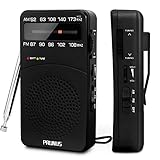
- 【Portable Design】You can hold mini radio by one hand. it's small enough to put it in emergency kit. This FM AM radio measures 2.7* 5* 1.1inch with weight only 4.2oz (without batteries), close to the size of iPhone 7. More importantly, thanks to its back clip and lanyard, transistor radio is pretty easy to carry around whether it’s clipped to pocket or carried with lanyard. Now, take it for morning exercise, stroll or a break in park, together with a piece of brisk music or a great radio show.
- 【Easy to Use】 After busy work, sometimes it’s nice to take a nap with a simple battery radio. Designed with three control buttons - tuning knob, volume knob, band/power switch button, am fm portable radio is quite easy to operate. The tuning indicator, on the other hand, reminds you of available radio stations. See, how simple it is.
- 【Excellent Signal Reception】FM: 87-108 MHz, AM:520-1730 kHz; I guess a small radio with excellent signal reception definitely can capture your heart, right? Our handheld radio is the right one. It’s not only equipped with 16.5 inch long 360° adjustable antenna, but built in advanced DSP chip. No matter which city or even a remote area you’re in, you can get the local stations easily.
- 【Perfect Sound quality】 With built-in magnetic speaker featured as clear sound playing, you could share the moment filled with various baseball games, talk shows, classical musics and news with your friends. Meanwhile, the music of one often speaks directly to one’s heart. So it’s fabulous to enjoy your favorite musics in your own world with plugging your earphones to 3.5mm earphone jack on the pocket radio am fm.
- 【Convenient Indicator】The AM/FM radio powered by 2*AA batteries (not included in package).The red battery indicator will tell you if the battery still has power and if it needs to be replaced. Also, when you are about to receive a station, the signal indicator will turn green, which will tell you that you need to adjust the knob amplitude less to help you find that station, very convenient.
API package installation
The API repository documents an APT-based route:
curl -fsSL https://apt.odio.love/key.gpg | sudo gpg --dearmor -o /usr/share/keyrings/odio.gpg
echo "deb [signed-by=/usr/share/keyrings/odio.gpg] https://apt.odio.love stable main" | sudo tee /etc/apt/sources.list.d/odio.list
sudo apt update
sudo apt install odio-api
systemctl --user enable --now odio-api.service
The documented local interface is http://localhost:8018/ui. Recheck the API repository before using these commands because package names, signing instructions, ports, and repository paths may change.
Why internet-radio playback can fail
A radio application depends on broadcasters and third-party directories. A station may go offline, change its URL, switch codec or container, require HTTPS, block particular countries, stop publishing metadata, or work in a browser while failing in an embedded player.
Duplicate listings and stale directory entries are also common. A failure to play one station does not necessarily mean the application itself is broken.
Recommended Free Tools
The old Odio app’s reported difficulty with manually adding stations is a meaningful limitation. If you already have an M3U, PLS, MP3, AAC, Ogg, or HLS stream URL, a general player such as VLC may be more practical.
Best alternatives today
| Need | Best direction | Why |
|---|---|---|
| Current desktop radio app | ZENDER | Its official site lists Windows, Linux AppImage, and macOS downloads and advertises a free basic version. |
| Open-source on-demand music | Nuclear | Designed for music discovery and playlists rather than radio-directory browsing. |
| Configurable general audio player | foobar2000 | A mature freeware player with internet-radio and network-audio capabilities. |
| Raspberry Pi or whole-home audio | Current odio | Strongest fit for self-hosted Linux audio, Home Assistant, Bluetooth, AirPlay, and multi-room use. |
| One known stream URL | VLC or another media player | Simple when you do not need a station directory. |
ZENDER’s site currently advertises an optional one-time Pro upgrade, but pricing should be checked on its live page before purchase. Likewise, hardware and any competing platform subscription costs should be verified for your region.
Quick Recap
Which Odio option is right for you?
- Want the historical desktop experience? Treat the original Odio as discontinued or uncertain, and do not rely on an unverified mirror.
- Want a current Windows, macOS, or Linux radio app? Start by evaluating a maintained desktop alternative such as ZENDER.
- Want open-source music playback? Consider Nuclear, while remembering that it is not primarily a radio-directory application.
- Want a Raspberry Pi audio hub? Explore current
odioand budget for the required hardware and Linux maintenance. - Want to broadcast your own station? Choose dedicated radio automation, encoding, and streaming software instead; Odio is primarily for listening.
Download safely
- Prefer the project’s official site, repository, or documented package source.
- Do not mistake an archived release for a supported current version.
- Check signatures, checksums, release provenance, and permissions where provided.
- Be cautious with old AppImages and installers from download mirrors.
- Remember that free software does not make radio content, internet access, or hardware free.
Product prices and availability are accurate as of the date/time indicated and are subject to change. Any price and availability information displayed on Amazon at the time of purchase will apply.

