Do these 3 things before closing this tab:
1Clear out junk files and repair common Windows errors2Scan for outdated or missing drivers - takes under a minute3Repair Windows errors before they cause bigger problemsSome links on this page are affiliate links: if you buy through them we may earn a commission, at no extra cost to you.
You can watch a VHS tape without owning a VCR, but you cannot play the cassette directly in a modern TV, computer, HDMI adapter, or USB capture device. The tape needs a compatible playback machine—a VCR or, for some formats, a camcorder—or a transfer service that supplies one. For one or two important tapes, a professional transfer is usually the simplest route; for several healthy tapes, borrowing a VCR and capturing them yourself can make sense.
Choose a route based on the tape and what you want to do
| Your situation | Practical route |
|---|---|
| One or two important, healthy full-size VHS tapes | Use a professional transfer service, or borrow a working VCR for a one-time viewing. |
| Several healthy tapes and a willingness to troubleshoot | Borrow or buy a working VCR, then capture its output to a computer. |
| VHS-C cassette | Use a compatible VHS-C camcorder, or a VHS-C adapter in a VCR. |
| Moldy or visibly damaged tape | Do not put it in an ordinary player; contact a specialist. |
| Immediate viewing on a modern TV | Connect a VCR to the TV, using an AV-to-HDMI converter if needed. |
| Playback equipment is unavailable locally | Check a library, media lab, local transfer business, or mail-in service. |
The distinction matters: a converter changes a signal, and a capture device records one. Neither reads the magnetic tape. Elgato, for example, lists VCRs and camcorders as sources for its Video Capture hardware: Elgato’s supported video sources.
Identify the cassette before finding a player
Full-size VHS
The large cassette used for rental movies and many home recordings needs a VHS VCR, a VHS/DVD combo deck, or specialized compatible playback equipment.
VHS-C
VHS-C is a smaller cassette format used in camcorders. It can often be played in a standard VCR with a mechanical VHS-C adapter, but the adapter is not a player: the VCR still moves the tape and reads it. The Library of Congress identifies VHS-C as a cassette format in its videorecording format description; a transfer provider also describes the adapter route on its VHS transfer page.
#1 Best Overall

- 【Video to Digital Converter】Effortlessly convert and store analog video and audio signals into digital formats, Recording resolution up to 1080P 30Hz. Supports AV/RCA (CVBS+R/L), S-Video, and AUX inputs. Plug and play, No PC, Software, Driver Needed. NOTE: This is a Converter/Recorder/Capture box only, can NOT play with any tapes and DVDs independently.
- 【USB/SD Card for Storage】Equipped with a 3.0" preview LCD and built-in speaker. No capacity limitation for the USB drive or TF card (not included). Enables direct playback of recorded videos and audios, as well as preview snapshots on the capture box. For high-capacity USB storage devices, please ensure using its own power supply.
- 【Video & Audio Format】Store video in MP4 format or audio in MP3 format. Supports NTSC-M/J 3.58, NTSC 4.43, PAL B/G/H/I/D (PAL/N) standard TV formats input. Audio sampling rate up to 48KHz with uncompressed 2-channel LPCM digital audio output. Setup Reminders: Ensure either CVBS R/L (AV input) or AUX-IN (3.5mm) is properly connected. In settings (HOME -> Settings), verify Video-IN-Volume and AUX-IN-Volume are unmuted for the selected input.
- 【Broad Compatibility】Supports recording and digitizing video for VHS, VCR, DVR, DVD, Hi8, camcorders, Mini DV, Cassette Tape Player, and retro gaming consoles.
- 【What You Get】Video Recorder x1(Players Not included, Such as VHS, VCR, Camcorder, VHS, VCR, DVR, DVD, Cassette, Hi8, Mini DV Players, Camcorder, Gaming Consoles ), Power Adapter with USB type A to C Cable x1, Remote Control (2*AAA Batteries Not Included) x1, AV Cable x1, 3.5mm Audio Cable x1, User Manual x1 with a hassle-free 2-year warranty and lifetime technical support. Reach out to our friendly customer service for any questions.
S-VHS and other camcorder tapes
S-VHS looks much like VHS, but an S-VHS deck may be needed for the intended playback quality; do not assume every ordinary VHS player will handle every recording well. Video8, Hi8, Digital8, MiniDV, Betacam, and other camcorder formats are not VHS. Use a compatible player for the exact format rather than forcing a cassette that happens to look similar into a VCR.
Ways to watch without owning a VCR
Use a compatible camcorder
A VHS-C camcorder is often the most direct player for VHS-C. Some specialized camcorders also play full-size VHS, but a camcorder is not compatible just because a cassette fits. Identify the format and model, find its power supply or a usable battery, then connect its composite video and audio outputs to a TV or capture device. Start with a brief test and stop if the tape squeals, wrinkles, sheds debris, or jams.
Borrow or rent a VCR
Ask friends or family, a library, a community college, a maker space, a used-electronics shop, or a local video-transfer business. A unit that powers on is not necessarily safe or functional: worn belts, dirty heads, damaged rollers, poor tracking, and faulty tape transports can all cause problems. Test it with a nonessential tape first, not the only copy of an important recording.
Connect a VCR to a modern TV
If the TV has matching composite AV inputs, connect the VCR’s yellow video cable and red/white audio cables to them. If the TV has only HDMI, use an AV-to-HDMI converter:
Rank #2

- AV TO USB Converter: Capture videos and audios from VHS, VCR, Hi8, DV tapes to a PC, with the help of our USB Video Converter. Save room while digitizing your favorite old memories
- Quality Capture Card: Our USB Video Capture Card converting anolog RCA composite input into HD 720P USB output and capturing audio without any sound card. Advanced signal processing technology provides you with great precision, colors, resolutions, and details.
- Plug and Play: Automatically install the driver once you hook up this RCA to USB Converter to a PC. No external power is needed. User-friendly and easy to operate
- Wide Compatibility: The Video Capture Card can work with video devices with RCA connector or S-Video connector, such as VHS, VCR, Hi8, camcorder, compatible with Windows and Mac OS. Support video formats like NTSC, PAL, and support brightness, contrast, hue, and saturation control
- Note: The Video Converter is used with acquisition software. We recommend OBS Studio or PotPlayer for Windows, and QuickTime Player for Mac. They can be downloaded for free online. Please operate according to the steps in User Manual or contact us if you have any questions
VHS tape → VCR → composite RCA cables → AV-to-HDMI converter → TV
Power the converter, select the right TV input, and confirm it accepts the VCR’s regional signal. This connection is for viewing, not file capture; a converter may also introduce scaling, latency, or compatibility issues.
Use a capture device for a computer, phone, or tablet
To make a digital file, the typical chain is:
VHS tape → VCR or compatible camcorder → video-capture device → computer → video file
You need a working playback machine, analog cables, a capture device, compatible drivers and software, and enough storage. Composite video is common; some decks and capture devices also support S-Video, with audio carried separately. Check the capture device’s inputs, operating-system support, regional video standards, audio capture, and return policy before buying. USB devices vary in driver support, and some do not work with generic webcam software. Elgato says its Video Capture device is not UVC, so its own software or drivers may be required: Elgato Video Capture manual.
Rank #3

- 【No Computer Needed-Standalone VHS to Digital Converter】Convert analog video and audio to digital MP4 with up to 1080P resolution-no computer,no software,or no drivers required.Just connect your VHS,VCR,Camcorder,or Hi8 player and press record to preserve precious memories.One-click recording, the simplest option for a beginner. Note:This converter box does not play tapes or DVDs independently;a working VCR or camcorder is required.
- 【4"LCD Preview & Large-Capacity USB/TF Storage】Built-in 4-inch preview screen and speaker let you watch recordings in real time.HDMI output connects to your TV or monitor for shared viewing.Supports USB drives and TF cards up to 512G each (not included).Files may auto-split by length or size with no impact on playback quality.
- 【Multi-Function Recording & Smart System Settings】 The high-performance video converters supports independent video recording (S‑Video/CVBS) and audio recording (R/L/AUX), plus screenshot and timed recording. Resolution can be set to 1080P or auto-detect (NTSC/PAL compatible), with multiple output formats available. This vcr to digital converter also includes a built-in USB/TF speed test function for stable recording with your vhs player and mini dv player.
- 【Wide Compatibility with Vintage Video Devices】 As a full-featured vhs to digital converter, it digitizes video and audio from vhs player, vcr player, mini dv player, DVD players, DVRs, camcorders, Hi8, retro game consoles, tapes, and more. (Note: Working vcr player, camcorder, or tapes are required).
- 【Complete Accessories & Reliable After-Sales Support】 Package includes: 5V/1A power adapter, USB‑A to Type‑C cable, AV cable, AUX cable, user manual, and remote control. Converter Built with an ABS plastic shell for a lightweight and durable design. Size: 6.5" x 2.83" x 1.04", making it easy to install and store. Includes 2-year warranty and lifetime technical support. If you have questions about using it, contact us anytime and we will reply within 24 hours.
Ask a library, media lab, or local business
Some libraries and community organizations lend equipment or provide digitization stations; availability and rules vary by location. Search the library website for “memory lab,” “VHS digitization,” “media conversion,” “video transfer,” or “equipment lending.” Ask whether you must bring a VCR, computer, blank drive, or reservation. A Library of Congress feature describes a public-library archiving program using a VCR, capture hardware, and a library computer: Library of Congress: Digital Archiving at the Public Library.
When a professional transfer is the better choice
For one or two valuable tapes, a damaged cassette, or a reader who does not want to troubleshoot, a transfer service supplies playback equipment and delivers a file or other output. Ask what the quoted price includes: digital download, USB drive, DVD, cloud access, shipping, tape return, inspection, repair, restoration, and turnaround can be separate. Confirm that the provider accepts the cassette’s format and region, and ask what happens if it cannot be played.
As displayed on August 16, 2026, Capture’s service page showed $39.99 per VHS tape while its order page showed $34.98 per tape; these are differing page prices, not a guaranteed final total. Its pages list downloadable files and optional USB, cloud, repair, or higher-resolution processing. Check the current checkout total and terms: Capture VHS transfer and Capture order page. Kodak Digitizing lists VHS and VHS-C services with DVD or digital-output options and an approximate four-to-six-week turnaround after receipt of its box; confirm current timing and deliverables when ordering: Kodak VHS conversion and Kodak VHS-C conversion.
Free tools Windows power users keep installed
One-click scans. No signup required.
“HD” or “4K” delivery describes an output or processing option, not detail recovered from the original tape. Upscaling changes the file dimensions; it cannot recreate information that was never recorded or has been lost.
Rank #4

- This Video Capture Card Can transfer video and audio from VHS, VCR, DVD, Hi8, DV tapes, camcorders, or other video source devices with RCA or S-Video interfaces to your PC or Mac synchronously.
- Convert analog RCA/S-Video audio and video signal input to high-definition 1080P/30fps USB-A/USB-C output, digitize and save your good memories with your friends and family on your computer, share with your friends and family, leaving precious memories
- Plug and play, easy to operate, just connect the RCA or S-Video interface of your video recorder to the USB-A/USB-C interface of your computer or notebook and it can be used without any driver. Note: It needs to be used with the acquisition software
- Compatible with USB-A/USB-C interfaces, not limited by computer interfaces, compatible with Windows and Mac OS, supports NTSC, PAL and other video formats, and supports brightness, contrast, hue and saturation control
- Note: This video converter needs to be used with capture software, which can be downloaded free of chargge . We recommend OBS Studio or PotPlayer for Windows and QuickTime Player for Mac. Please feel free to contact us if you need technical support.
DIY digitization: a careful workflow
Gather and check the equipment
- A working VCR or format-matched camcorder.
- A capture device that accepts the player’s video and audio outputs.
- Composite RCA cables, or S-Video plus separate audio cables if both devices support it.
- A computer with supported drivers and capture software, plus available storage.
- Optional external storage for a separate backup.
Elgato’s documentation lists composite or S-Video input and several video standards, but compatibility depends on the playback equipment and regional version: supported sources and formats. Its manual lists H.264 and MPEG-4 capture at 640×480 with AAC audio, and says captured files are saved in the Movies folder on Mac or Videos folder on Windows: manual and capture details.
Capture the tape
- Inspect the cassette for mold, a broken shell, loose tape, or other visible damage. If it looks compromised, stop and contact a specialist.
- Confirm the format and whether the recording is NTSC, PAL, or SECAM. A mismatch can cause a rolling, monochrome, or unstable picture.
- Test the player using a nonessential tape. Check that it loads, plays, rewinds, and ejects normally.
- Connect the player’s video and audio outputs to the capture device, then connect that device to the computer.
- Install the manufacturer’s current driver and capture software. Select the correct input and TV standard.
- Start recording in the software, then press Play on the VCR or camcorder. Watch and listen for the first few minutes for sync problems, dropped frames, or missing channels.
- Monitor the transfer, especially with long-play recordings, which can be more sensitive to tracking. Stop if the cassette squeals, wrinkles, sheds, or jams.
- Save the file with a meaningful name, check that it plays from beginning to end, and make separate backups.
File size depends on capture settings. Elgato’s published examples range from about 728 MB for 60 minutes of H.264 video to about 1.1 GB for 60 minutes of MPEG-4: Elgato’s storage examples. Elgato also publishes system requirements; check the current requirements for your computer before purchasing: Elgato Video Capture system requirements.
Independent reader supportYour contribution helps us test, update, and keep practical guides available for everyone.Troubleshoot common playback and capture problems
No picture, rolling picture, or wrong colors
- Check that the TV or software is using the selected input and that the yellow RCA cable is in the video jack.
- Check for a damaged cable, poor connection, or tracking problem on the deck.
- Confirm the tape’s NTSC, PAL, or SECAM standard matches the player and capture settings. Elgato documents a PAL/SECAM setting issue with some NTSC tapes played through European equipment: Elgato’s NTSC playback guidance.
- If only one tape has problems, the tape itself may be damaged or recorded in a format the player does not handle well.
Audio or video is missing
Check the red and white audio connections, the selected software input, and the VCR’s output ports. Test the cables and player with another nonessential tape if available.
The Tool Desk
Outbyte Driver Updater FREEScan for outdated or missing drivers - takes under a minuteDriver Scan →Outbyte PC Repair FREEClear out junk files and repair common Windows errorsFree Scan →The computer does not detect the capture device
Check the manufacturer’s driver and operating-system support, USB connection, adapter or hub, and computer privacy permissions. Connect the hardware as its manual directs. A non-UVC device may not appear as a generic camera.
Best Value
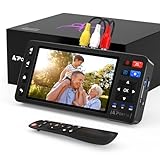
- 【Simple VHS to Digital Conversion】Easily convert your old VHS, Hi8, Mini DV, DVD, or camcorder footage into MP4 files—Connect, record, and preserve your memories in Full HD 1080p at 60fps.
- 【5-Inch HD LCD Preview Screen】Built-in 5" high-definition screen for real-time preview and playback—See what you’re recording instantly and ensure every moment is captured perfectly.
- 【Customizable Image Settings】Adjust brightness, contrast, and saturation directly from the screen for the best image quality. Fine-tune colors and lighting to make every frame vivid and clear.
- 【Flexible Storage Options】Save your videos directly to USB flash drives, TF cards, portable HDDs, and SSDs. Flexible storage ensures longer recording sessions and easy file transfers.
- 【Format & Device Compatibility】Supports AV (CVBS) and S-Video video inputs with R/L stereo audio and PAL, NTSC, and SECAM formats—compatible with VHS players, VCRs, DVRs, DVD players, camcorders, and retro gaming consoles.
The picture distorts on a commercial tape
Some commercial tapes use copy protection. Playback may work while a recording produces unstable brightness, distorted color, or other artifacts. Laws vary by jurisdiction; do not assume you may bypass protection. Home movies and self-recorded tapes are the clearest cases for DIY transfer.
Protect tapes and files
Do not play visibly moldy tapes in an ordinary VCR: contamination can affect the machine and other cassettes. Do not force a damaged tape into a player, pull tape out by hand, or clean it with household chemicals. Photograph the cassette and label, describe the damage honestly to a specialist, and ask whether it handles mold, broken shells, snapped tape, or sticky-shed problems. The Library of Congress warns that dirt, moisture, and heat can damage videotape and that debris can interfere with playback or damage machinery: Library of Congress: Care of Recorded Media.
After a transfer, keep the original cassette. Save a convenient viewing copy, such as MP4/H.264, and maintain at least two copies on separate storage devices or locations; a single USB stick should not be the only copy. Use a filename or accompanying note that records the tape identifier, people, event, and approximate date. Store tapes and drives away from heat, moisture, dust, and direct sunlight. The Library of Congress notes that VHS is suitable for viewing but image resolution can degrade significantly when copied to another generation: Library of Congress television study.
Check before you borrow or buy equipment
- Does the player support the tape format and regional standard?
- Can you test it with a nonessential cassette and return it if it damages tapes or fails?
- Does it have composite RCA or S-Video output, and does your TV or capture device accept that input?
- For a capture device, are its drivers and software supported on your current computer?
- For a service, are the quoted fee, shipping, output, cloud access, repair, and tape return clearly specified?
- Will the provider handle VHS-C, PAL, SECAM, or damaged tapes, and what file format will it deliver?
A standalone recorder can avoid a computer, but it still needs a VCR or camcorder as the source. PORTTA’s documentation says its device requires a separate VCR, camcorder, or DVD player: PORTTA VD10 product information. Likewise, bundled capture products do not eliminate the playback machine: Roxio Easy VHS to DVD describes a workflow using a VCR or camcorder connected through its capture device.
Quick Recap
Product prices and availability are accurate as of the date/time indicated and are subject to change. Any price and availability information displayed on Amazon at the time of purchase will apply.

