Recommended Free Tools
Preserve family records in two stages: stabilize and store the physical originals, then make digital copies with a method that will not damage them. A scan captures information for access and backup; it does not preserve the paper, emulsion, ink, or album structure. Keep the original protected even after a successful scan.
For ordinary, sound items being shared with relatives, a carefully chosen flatbed scanner can be adequate. Fragile, valuable, stuck, oversized, or badly damaged material should be assessed by a photograph conservator or a digitization provider with conservation expertise before anyone tries to flatten, separate, repair, or feed it through equipment.
Start with condition, not equipment
Scanning is not the first preservation step. Old newspapers and many clippings are acidic, brittle, and prone to rapid deterioration. Photographs can crack, stick to glass, adhere to one another, or suffer damage from unsuitable sleeves, adhesives, pressure, and light. Family letters, certificates, albums, and other papers may have folds, tears, attachments, fasteners, or enclosures that make routine handling unsafe.
Make a quick condition assessment for every item or group before opening an album or placing anything on a scanner. Record what is present, where it came from, and any information that could be lost if an attachment is removed. The Library of Congress digitization assessment treats tears longer than 0.5 cm as a condition concern; that figure is a screening aid, not a universal rule that makes shorter tears safe to handle.
What’s actually slowing this PC down?
Pick the symptom - the matching free tool is one click away.
#1 Best Overall

- Brand Background: Lineco is a leading and trusted brand for archival quality art, photography, and framing supplies
- Preservation: Our box can storage your photos and important documents. It is used by professional photographers to house prized photos, albums, and scrapbooks
- Premium Quality: Lineco storage boxes are manufactured in USA. This box is made with 60 point board and lined with acid-free archival quality and lignin-free
- Drop front design: Created with metal edge construction on the corners, adding great durability and strength. The lid does come off and it has a drop-front design, meaning it's super easy for you to storage your items in and out
- Overall Size: 9.75" x 12.75" x 3" for 9x12 Documents, Newspapers, Certificates, Pictures, Important Delicate Prints, and Old Pictures
Check for these warning signs
- Photographs stuck to glass, another photograph, a page, or a plastic sleeve.
- Paper that is brittle, flaking, powdery, cockled, badly creased, or torn.
- Folds, loose fragments, staples, paper clips, pins, tape, glue, or other attachments.
- Albums with pages that cannot open without bending the spine or stressing photographs.
- Oversized sheets or newspapers that cannot lie fully supported on the scanner bed.
- Unknown coatings, unusual photographic processes, or material with monetary, historical, or strong personal value.
Do not remove a stuck photograph, cut away a mount, peel tape, dismantle an album, or force a fragile sheet flat merely to obtain a cleaner image. Those actions can destroy information that a scan cannot recover.
Protect originals while you handle them
Newspapers and clippings
Support a newspaper or clipping across its full area as you move it. Turn pages slowly and avoid dragging a brittle sheet across a table. The Library of Congress gives an emphatic instruction: “Never feed an original newspaper through a copier automatically!” Rollers and automatic feeders can catch a torn edge, pull a weak sheet apart, or crease material that cannot be repaired.
For a flatbed scan, lay the newspaper flat on the bed and use only light hand pressure where necessary. Do not press down hard to overcome cockling or a fold. If the item will not lie safely, stop and use a preservation-aware service rather than improvising a clamp, weight, or adhesive.
Newsprint should not be treated as a permanent display object. Make a facsimile for framing or exhibition and keep the original in protective storage. A copy can be replaced; the original newspaper cannot.
Photographs
Never use pressure-sensitive tape or glue to repair or mount a photograph. For loose prints, the Library of Congress recommends polyethylene or polypropylene sleeves in a binder, or photo corners that secure a print to an album page without attaching adhesive to the image. Storage products should pass the Photographic Activity Test (PAT), identified in ISO 18916.
If a photograph is stuck to glass or another photograph, do not pry, soak, heat, or pull it free. The Library of Congress warns that separation may be difficult or impossible without serious damage. Put the item aside in its current state and consult a photograph conservator.
Documents, albums, and family papers
Use a preservation-quality box for albums and papers, and keep pages supported rather than stacked under heavy objects. Handle documents with clean, dry hands and turn pages by an edge or corner that is sound. Do not infer suitability from the word “archival.” The term is not legally defined. Products marketed that way should be acid-free, lignin-free, and buffered, with the manufacturer’s material information available.
Rank #2
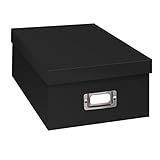
- Solid black only
- Heavy duty storage box
- Metal identification plate
- Index cards included
- Photo safe: acid free
For paper products, the Library of Congress defines acid-free as pH 7 or higher. Buffering adds an alkaline substance that neutralizes acids and helps counter acids introduced later. That description concerns the storage material; it does not mean that an acidic newspaper or photograph has been made safe simply by putting it in a box.
The Tool Desk
Outbyte PC Repair FREEClear out junk files and repair common Windows errorsFree Scan →Outbyte Driver Updater FREEFix the driver behind crashes, sound loss and screen glitchesFind Drivers →Light and display
Light damage is cumulative and irreversible. The Library of Congress states that all photographs exposed to light eventually suffer irreversible light damage, even behind UV-filtering glass. If an image has personal, monetary, or historic value, display a facsimile and store the original in an appropriate dark environment. The same principle applies to fragile newspaper pages and documents whose inks or paper are already unstable.
Choose storage by material properties
Storage should reduce contact, pressure, light, moisture, dust, and harmful chemicals while keeping items supported. A stable indoor location is preferable to places with large swings in temperature or humidity, such as attics, garages, sheds, or damp basements. Keep collections away from plumbing leaks, direct sunlight, heating appliances, and food or other sources of pests.
| Material | Preferred protection | Important qualification |
|---|---|---|
| Photographic prints | Polyethylene or polypropylene sleeves, or photo corners; use products that pass PAT (ISO 18916). | Do not use pressure-sensitive tape or glue on the photograph. |
| Albums | A preservation-quality box with suitable environmental conditions; retain the album structure when it is part of the object. | Do not dismantle pages or separate stuck photographs without conservation advice. |
| Documents and paper files | Acid-free, lignin-free, buffered folders or boxes from a supplier that states the material properties. | “Archival” by itself is not a legal specification; acid-free means pH 7 or higher in the Library of Congress definition. |
| Newspapers and clippings | Full support in protective storage, with light exposure minimized; use a facsimile for display. | Newsprint is often acidic and brittle, so avoid repeated handling and automatic feeding. |
Keep labels and descriptive notes with the collection, but do not write directly on a photograph or fragile paper unless a conservator has approved the method. If a box contains several folders or envelopes, identify the contents in a way that lets a future user locate an item without repeatedly opening every package.
Decide whether to scan at home or use a service
The right choice depends on condition, size, handling risk, desired quality, and what you need the files to do. A home scanner is not automatically inferior, and a service is not automatically safer. Evaluate the specific object and the provider’s preservation practices.
| Situation | Home flatbed may fit | Preservation-aware service is safer |
|---|---|---|
| Condition | Sound, flat photographs or documents with no loose fragments or attachments. | Stuck photographs, severe tears, flaking, brittle newsprint, warped albums, or material that cannot lie safely. |
| Handling | You can support the whole item and place it without force. | Opening, separating, flattening, or feeding the item would create pressure or traction. |
| Size and structure | The complete item fits on the bed without bending. | Oversized sheets, bound volumes, unusual formats, or items whose pages cannot open safely. |
| Output | Family sharing, reference, and ordinary personal access. | Projects requiring conservation assessment, specialized capture, or a documented preservation workflow. |
| Original value | A replaceable or stable item where a handling mistake would not cause major loss. | Unique, historically important, monetarily valuable, or irreplaceable material. |
| Transport | No shipping is needed. | If a provider is used, a local provider can reduce transport risk, particularly compared with shipping a collection overseas. |
Ask a provider how it supports originals, whether it will refuse unsafe work, what file formats and descriptive metadata it supplies, how it handles color and cropping, and how it returns the physical collection. A provider that advertises only fast throughput but cannot explain safe handling is a poor fit for fragile family material.
Prepare a safe scanning workspace
Use a clean, uncluttered surface large enough to support the object. Keep food, drinks, pens, loose clips, and abrasive materials away from the scanner. Clean the scanner glass according to the equipment instructions and let it dry completely before placing an original on it. Arrange a temporary holding area for items that have already been scanned so that originals and digital copies do not become mixed.
Rank #3

- Brand Background: Lineco is a leading and trusted brand for archival quality art, photography, and framing supplies
- Preservation: Our box can storage your photos and important documents. It is used by professional photographers to house prized photos, albums, and scrapbooks
- Premium Quality: Lineco storage boxes are manufactured in USA. This box is made with 60 point board and lined with acid-free archival quality and lignin-free
- Drop front design: Created with metal edge construction on the corners, adding great durability and strength. The lid does come off and it has a drop-front design, meaning it's super easy for you to storage your items in and out
- Overall Size: 9.75" x 12.75" x 3" for 9x12 Documents, Newspapers, Certificates, Pictures, Important Delicate Prints, and Old Pictures
Before opening a box or album, assign a simple identifier to each item or page. The identifier can be a family collection code and a sequence number; it does not need to be elaborate. Photograph or note the order of album pages, envelopes, and attachments when that order carries meaning. Preserve captions, inscriptions, dates, names, and locations as descriptive information rather than relying on the image alone.
Scan without damaging the original
1. Inspect before every capture
Look for a loose corner, a fold that will catch on the lid, a paper clip, a detached fragment, or a page that is stuck to the next one. Remove only loose, harmless debris that can be lifted without contact with the image or writing. If the item needs force to lie flat, stop and change the plan.
Quick wins for a faster PC:
Clear out junk files and repair common Windows errorsFree Scan →Scan for outdated or missing drivers - takes under a minuteDriver Scan →Repair Windows errors before they cause bigger problemsFix Now →2. Place the item with full support
Use the scanner bed for a loose sheet or print that can rest flat safely. Support a large newspaper or document as you move it so its own weight does not create a tear. Do not close the lid against a raised object, force an album spine open, or use a heavy book as a flattening weight.
3. Select settings for the intended use
There is no single resolution that is correct for every family object. The useful setting depends on the source, the smallest detail that must remain legible, the size of the original, and whether the file is for close study, printing, or casual sharing. Resolution by itself does not determine quality.
For a preservation-oriented master, the Library of Congress Recommended Formats Statement, 2025–2026 edition, favors the highest available resolution without rescaling or interpolation, high bit depth where available, an identified color space, and uncompressed images. Treat that as a reference for making a robust master, not as a mandatory household specification for every scan.
Do not use interpolation to create a larger file and assume that it adds detail. If you are uncertain, make a small test capture of representative text, fine lines, and a photograph’s tonal areas, inspect it at full size, and choose a setting that records the information you actually need without making handling unsafe.
Crashes, No Sound, or Screen Glitches?
Random freezes, missing sound and display glitches usually trace back to one bad driver. Find and replace yours safely.Free scan · under a minutePC Slower Than It Used to Be?
A free scan shows the junk files, broken settings and background clutter dragging Windows down - then fixes them in one click.Free scan · Windows 10 & 114. Capture color and tone consistently
Use a color mode that matches the item: color for color photographs and documents, and grayscale or color when that better preserves paper tone, faded ink, annotations, or stains that help identify the original. Keep the color space identified in the file or its metadata when the software permits. Avoid automatic “enhancements” that clip highlights, erase faint writing, sharpen edges aggressively, or remove marks that may be part of the historical record.
Rank #4

- Scrapbook storage box for scrapbooks, papers and supplies
- Made from acid Free material
- Sturdy construction; metal nameplate
- Archival, photo safe; acid, lignin and PVC Free
- Outside Dimensions: 14-3/4"D x 13"W x 3-3/4"H. Inside Dimensions: 14-1/2"D x 12-3/4"W x 3-1/2"H"
5. Make a high-quality master
Save an untouched master before cropping, rotating, retouching, or adding captions. TIFF is a preferred raster format in the Library of Congress 2025–2026 Recommended Formats Statement; JPEG2000, PNG, and JPEG/JFIF are also listed among preferred raster formats for digital still images. For a master, favor an uncompressed file when your equipment and storage allow it, along with the highest practical resolution and available bit depth that were selected without interpolation.
Keep the original capture even if it includes a narrow border or a slight scanner shadow. Create a separate working copy for rotation, cropping, color adjustment, or dust removal. Never overwrite the only capture with an edited version.
6. Inspect the file before moving on
Open the file at full size and check all edges, corners, small type, handwritten notes, page numbers, captions, and the back of the object when it contains information. Look for clipped borders, focus or motion problems, color casts, glare, dust, banding, and missing folds or attachments. Compare the digital image with the physical item before returning it to storage.
Free tools Windows power users keep installed
One-click scans. No signup required.
If a defect comes from the scanner rather than the original, clean the glass, reseat the item, and rescan. If the defect reflects an unsafe fold, raised attachment, or fragile surface, do not keep repeating the attempt; seek advice instead.
7. Produce access copies
Keep the high-quality master separate from smaller copies used for email, messaging, websites, or phones. Access copies can be resized or saved in a convenient format without changing the master. This two-level approach makes sharing easier while preserving a file from which new copies can be made later.
Independent reader supportYour contribution helps us test, update, and keep practical guides available for everyone.Organize files and descriptive information
A digital image without context quickly becomes an unidentified picture. For each item, preserve as much of the following information as is known:
- Title or a short description of what the item shows.
- Creator, photographer, author, or issuing organization, when known.
- Date or an honest date range, with uncertainty marked rather than guessed.
- Place, people, event, and relationship to the family collection.
- Original identifier, box or album location, and page or envelope order.
- Notes about inscriptions, stamps, cropping, missing sections, or visible damage.
- The capture date, scanner or service used, and the master and access-copy relationship.
Use a consistent filename that remains readable without special software, such as a collection code, sequence number, and brief subject. Keep the descriptive record in a separate text, spreadsheet, or catalog file as well as in embedded metadata when the format and software support it. Do not put private family information in a public access copy unless everyone who needs to consent has agreed.
Best Value

- Premium Materials: Acid-free, BPA-free, and PVC-free, making it suitable for long-term photo storage. The high-quality recyclable PP plastic won't yellow or crack over time, helping preserve your photos safely
- Large Capacity: Packed with 1pcs 13.8"x 8.9”x4.8" outer box size and 16pcs 6.5" x 4.6" x 0.9” inner boxes. Each inner box can hold up to 100 4"x6" picture, and a total of about 1600
- Versatile Use: Ideal for bulk storage of large collections like trading cards, index cards, stickers, seeds, diamond arts, crafts, keepsakes, classroom, offices must haves
- Easy Categorization: Transparent plastic lets you quickly identify which cards are in each compartment without opening them. Comes with writable label stickers for easy categorization of different photo by category or date
- Double Buckle& Handle Design: Lifewit photo storage boxes has secure buckle closures on both the inner and outer boxes. The buckles are designed to keep dirt out and prevent the lids from opening accidentally. And the outer case comes with a handle for easy transport
Maintain more than one copy of the digital files, and keep at least one copy separate from the computer used for scanning. Periodically open a sample of masters and access copies so that a silent storage failure does not remain undiscovered. Preserve the descriptive file with the images; an image-only backup is difficult to interpret after the original owner is gone.
Match file formats to their roles
| Role | Practical choice | Why |
|---|---|---|
| Long-term master | Uncompressed raster capture when feasible; TIFF is listed as a preferred raster format by the Library of Congress. | Retains a high-quality source for future derivatives; preserve the capture before edits. |
| Alternative preferred raster | JPEG2000 or PNG, depending on the software and workflow. | Both appear in the Library of Congress preferred raster list; confirm that your tools preserve the needed metadata and color information. |
| Easy-to-share copy | JPEG/JFIF or another format supported by the recipient’s devices. | Small, convenient copies can be regenerated from the master. |
| Descriptive record | A readable catalog, spreadsheet, or text record plus embedded metadata where supported. | Keeps names, dates, identifiers, and context connected to the image. |
The format list is guidance for digital still images, not a promise that one extension solves every preservation problem. Keep the capture settings, color information, and descriptive context with the file so a future custodian can understand what was made and why.
Item-specific decisions
Photographs in albums
Scan a page only if the album opens without stressing the binding or photographs. Include the page context when captions, arrangement, or decorative elements provide meaning, then make additional captures of individual prints when the page structure obscures faces or writing. Do not peel a photograph from a page simply to obtain a straight-on scan.
Letters, certificates, and documents
Capture every page, envelope, seal, reverse, and attachment that carries information. Preserve the original order and note whether a page is blank, because a blank page can establish sequence or protect an image from contact. If a seal, ribbon, fold, or raised element prevents safe flat capture, document it in the metadata and use a provider with suitable equipment rather than pressing it down.
Newspaper pages and clippings
Support the sheet fully, capture the complete page or clipping including its edges, and retain a readable access copy for family sharing. If the clipping was removed from a larger page, record the source, date, page number, and any surrounding text that identifies it. Do not run the original through an automatic copier or feeder.
When professional conservation help is necessary
Contact a photograph conservator when a photograph is stuck to glass or another photograph, when separation could cause loss, or when the image has severe damage. Seek a preservation-aware digitization provider for fragile, valuable, oversized, unusual, or bound material that cannot be safely handled on household equipment.
Describe the collection before sending anything: material types, approximate quantity, dimensions, condition, attachments, and the intended use of the files. Ask whether the provider can preserve the original, create a high-quality master and access copies, supply descriptive metadata, and return items in their original order. If shipping is unavoidable, ask about packing and insurance; a local provider can reduce transport risk, especially compared with sending a collection overseas.
Troubleshoot common failures without escalating damage
| Problem | Likely cause | Safe response |
|---|---|---|
| Edges or captions are missing | The item was cropped or positioned too close to the bed edge. | Rescan with the full object supported and leave a modest border; verify the result before storing the original. |
| Fine writing is unreadable | The selected resolution, focus, bit depth, or lighting does not preserve the smallest detail. | Make a controlled test at a higher available setting without interpolation, and compare the result. Do not flatten a fragile page to improve sharpness. |
| Colors look wrong | Scanner glass, software corrections, or an unidentified color space altered the capture. | Clean the glass, disable destructive automatic corrections, identify the color space, and retain the unedited capture. |
| A page will not lie flat | Binding, cockling, a fold, or an attachment is resisting the scanner. | Do not use force or heavy weights. Capture what is safe and consult a preservation-aware provider. |
| A photograph will not release from glass or another photo | The photographic surfaces have adhered. | Stop pulling and obtain conservator advice; removal may be impossible without serious damage. |
| The file is huge and difficult to share | A high-quality master is being used as an access copy. | Keep the master intact and export a smaller derivative for sharing. |
A preservation-first standard for family projects
A successful project leaves the physical collection stable, the digital master faithful to the source, and the family context understandable to someone who did not create the files. Inspect before handling, choose storage materials by their actual properties, avoid light and pressure, use a flatbed only when the item can be supported safely, and escalate uncertain or fragile cases. The result is not merely a folder of scans; it is a connected record in which originals, masters, access copies, and descriptive information can remain useful for generations.
Quick Recap
Product prices and availability are accurate as of the date/time indicated and are subject to change. Any price and availability information displayed on Amazon at the time of purchase will apply.






Say something about this film