Outdated Drivers Are Slowing You Down
One free scan finds every outdated or missing driver and matches the right update for your exact hardware.Free scan · exact hardware matchPC Slower Than It Used to Be?
A free scan shows the junk files, broken settings and background clutter dragging Windows down - then fixes them in one click.Free scan · Windows 10 & 11Some links on this page are affiliate links: if you buy through them we may earn a commission, at no extra cost to you.
To host a documentary screening with the director present, secure written permission for the specific film and event, book an accessible room with dependable projection and sound, confirm the director’s practical terms, promote only with approved materials, and run a moderated conversation that gives the audience time to participate. A personal streaming subscription, a purchased copy, free admission, or an educational purpose generally does not create public-screening permission on its own.
Rights, fees, access materials, venue rules, and filmmaker availability depend on the film, territory, distributor, and event terms. Use the sequence below as an operating plan, then verify every term with the rights holder, venue, and guest.
Start with the film and the event you are actually planning
Before you announce a title, write a one-page event brief. Rights contacts will need the details, and the same information will shape your venue, budget, publicity, and moderator plan.
Quick wins for a faster PC:
Clear out junk files and repair common Windows errorsFree Scan →Scan for outdated or missing drivers - takes under a minuteDriver Scan →- Film title, director, and the exact version or format you want to show.
- Proposed date and backup date.
- Venue, city, and country or territory.
- Expected audience and whether attendance is open, invited, or limited to a class or organization.
- Admission terms: free, donation, ticketed, or another arrangement.
- Whether the event includes a live, remote, or recorded director appearance.
- Screening start and end times, including the discussion.
- Accessibility requirements, such as captions, an audio description track, step-free access, reserved seating, or interpretation.
Keep this brief attached to every rights and guest conversation. If the date, venue, territory, admission model, or format changes, ask whether the written permission still covers the event.
Popular on Amazon
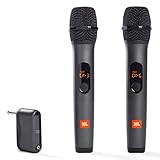
- HIGH Vocal Quality & JBL Original Pro Sound - The crystal clear clarity of JBL wireless microphones means they won't stuck, delay or distort. Your voice will sound on point, with the back of the amazing JBL Original Pro sound.
- RECHARGEABLE DUAL CHANNEL UHF WIRELESS RECEIVER - No need to fly alone, unless you want to take center stage, of course. Connect two wireless microphones together and hear both voices mixed seamlessly through the speaker for up to 6 hours of playback.
- PLUG AND PLAY - When you want to be heard, you want to be heard now. JBL wireless microphones have a super simple setup. Simply turn on the receiver and wireless microphone and you're ready to go instantly.
- MICROPHONES COME WITH REPLACEABLE AA BATTERIES - JBL wireless microphones come with easy-to-replace AA batteries, so put your slot all night long.
Do I need a license to show a documentary?
For a public or group screening, assume that you need permission unless the rights holder has clearly granted the required rights. American University’s guidance for U.S. university events says public-performance rights generally apply to group screenings outside a private home, including free, educational, and invited events. Acceptable proof may include a signed license, written authorization from the rights holder, or a distribution agreement that expressly permits public screening. The university’s guidance is not a substitute for legal advice in every venue or jurisdiction.
UK government guidance likewise says permission is generally needed for public showings whether or not tickets are sold. The type of permission depends on what is shown and where, and a local premises licence or other requirement may also apply. Do not treat U.S. and UK rules as one worldwide rule; check the law and venue requirements where your event takes place.
A director’s attendance does not grant screening rights. Ask the rights holder or authorized distributor to confirm, in writing, that the permission covers the particular film, date, venue, territory, audience, admission terms, and media format. Save the signed agreement and all clarifying emails with your event records.
What usually is not enough
- A personal subscription to a streaming service.
- A retail disc or digital purchase intended for private viewing.
- A free event, classroom discussion, or nonprofit status by itself.
- An invitation from the filmmaker without confirmation from whoever controls the screening rights.
- A licence for a different date, location, territory, or event.
These situations may be compatible with a licence, but they do not establish one. The actual rights document controls.
Choose a licensing route and compare the terms
You normally have three practical routes: request permission from the film’s rights holder, use a title whose distributor offers the required event rights, or select a film already available through an institutional screening programme. Choose by scope and reliability rather than by headline price.
| Route | Questions to verify | Trade-offs |
|---|---|---|
| Direct rights-holder or authorized distributor request | Who owns the rights in your territory? Is the grant for one event or recurring use? Which date, venue, audience, admission model, and format are covered? | Can fit a specific film and event, but response times, fees, and available formats vary. |
| Distributor programme with established screening terms | What files, captions, press materials, attribution language, and filmmaker-contact help are included? Are paid events priced differently? | May simplify administration; title availability and territory restrictions still apply. |
| Film with rights already bundled for your setting | Does the existing agreement cover a public event, your audience, and the planned admission terms? | Can reduce paperwork, but the underlying agreement may be limited to a particular institution or use. |
For every route, ask for the permitted territory, screening date, venue, audience size or type, admission terms, number of showings, file or print format, captioning or access options, promotional rules, cancellation terms, and any reporting or credit requirements. A documentary-specific toolkit for THE TEST, for example, states that its licence is for a specified event and cannot automatically be transferred to another date, location, or event. Treat that as an example of why you must read the actual contract, not as a universal rule.
Also popular on Amazon
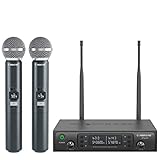
- ENHANCED SIGNAL RELIABILITY – One-touch Auto Scan quickly finds the least-interference frequency for your environment, helping reduce interference between channels. Once paired, your settings are retained after a normal power cycle, with no need to re-sync each time you power on. The lock function keeps your selected frequency from being changed by accident, and 2 x 100 selectable UHF frequencies support multi-set operation of up to 16 transmitters at the same time.
- PREMIUM WIRELESS PERFORMANCE: Dual UHF cordless mic system with selectable frequency. Channel 1: 536.57 - 561.32 MHz (100 frequencies). Channel 2: 562.37 - 587.12 MHz (100 frequencies). The microphone wireless employs PLL frequency synthesized technology to provide hassle-free sound transmission, minimum dropouts, and maximum feedback rejection. Smooth and quick IR synchronization. Long range operation for this microfono inalambrico set of 290 ft – 328 ft line of sight
- REFINED SOUND CLARITY: With specially tuned EQ, the dynamic microphone delivers an output frequency response curve with fuller low frequencies, bright high frequencies, and a balanced midrange. Employing a cardioid polar pattern, the microfonos inalambricos professional ensures precise sound pickup and effectively rejects ambient noise. Additionally, the replaceable mic wireless head design extends product lifespan and ensures ongoing optimal performance
- DURABLE METAL CONSTRUCTION: Built with a sleek metal design, the UHF mic receiver and wireless professional microphone not only offer a premium look and feel but also ensure extended durability and an enhanced user experience. Moreover, the handheld microphone's mute function provides added convenience and flexibility, allowing for quick control during performances. Suitable cordless microphone for church, wedding, karaoke, DJ gigs, public speaking, etc
- BOX CONTENTS: 1 x dual channel wireless metal receiver for long operation, 2 x UHF handheld microphone wireless,1 x 1/4’’ audio cable, 1 x 6.5 mm to 3.5 mm adapter, 1 x power adapter, 2 x antenna, 2 x anti-rolling ring, 4 x AA battery for 16 hrs long hour use, 1 x user manual, 4 x rubber feet. You can conveniently source all necessary components from our store, enabling the quick and efficient setup of your system according to your specific needs
National Film Board of Canada example
The National Film Board of Canada (NFB) asks hosts to request films at least three weeks before an event. After confirming the event details, its team supplies the appropriate film file and relevant information. Most of its collection is available at no cost for events that are free or donation-based with a free option; paid screenings may incur rental fees. The organizer covers venue, staffing, and print costs. The NFB can facilitate contact with a filmmaker, while any honorarium is the event organizer’s responsibility. Outside Canada, licensing may be required and fees may apply. Recheck the terms for the chosen title and territory before relying on them.
Build a backward plan from the event date
Work backward from the screening rather than treating the licence, venue, guest, and publicity as separate projects.
- Set the event brief. Decide the title, purpose, audience, date range, location, admission model, expected attendance, and whether the conversation is live or remote.
- Contact the rights holder. Send the complete brief and ask for written permission and the permitted technical format. If you are using the NFB, allow at least three weeks for its request process.
- Hold a venue conditionally. Make the booking subject to rights confirmation if possible. Obtain the room’s capacity, accessibility information, staffing rules, load-in times, projector and sound inventory, and insurance or premises requirements.
- Invite the director. Confirm availability, time zone, travel or virtual connection, honorarium, expenses, arrival time, and whether the director will stay for audience questions.
- Test the media. Receive the authorized file or other approved format, test it in the actual room, and keep a backup playback plan that remains within the licence.
- Prepare access and moderation. Confirm captions or other supplied access options, appoint a moderator, draft opening questions, and establish how audience questions will be queued.
- Publish promotion. Use only approved stills, logos, synopsis language, and attribution. Include the event format, access information, start time, and admission terms.
- Reconfirm. In the final week, reconfirm the rights scope, film file, guest arrival or connection, venue access, staffing, microphones, captions, and emergency contacts.
Select a venue that supports both the film and the conversation
A room that works for a presentation may fail as a cinema or discussion space. Visit it at the planned time of day and assess the complete experience from the audience’s seats.
| Venue type | Potential strengths | Checks before booking |
|---|---|---|
| Community centre | Local reach and potentially lower rental cost. | Projection distance, blackout capability, sound reinforcement, seating comfort, and staffing. |
| Theater | Purpose-built projection, sightlines, and sound. | Discussion seating, microphone handoff, rental hours, accessibility, and whether outside files are accepted. |
| Library or school | Established audience, familiar staff, and possible AV equipment. | After-hours access, safeguarding or supervision rules, room capacity, and public-event policies. |
| Gallery or cultural venue | Strong fit for an arts audience and related programming. | Ambient light, acoustics, chairs, power, projection surfaces, and a quiet place for the Q&A. |
Confirm step-free routes, accessible toilets, reserved wheelchair spaces, sightlines for seated and standing attendees, hearing support, and a quiet area if the subject matter may be distressing. Tell the venue the event includes a post-film discussion so it can plan lighting, chair placement, and microphone access.
What equipment do I need for a film screening?
Start with the authorized media format and the room, then verify each link in the playback chain. The rights holder or distributor should tell you which file or delivery method is permitted.
Screening checklist
- Approved film file or physical media, plus a permitted backup playback option.
- Projector or display that can show the supplied format at the room’s intended screen size.
- Screen or suitable projection surface with no distracting light or obstructions.
- Playback computer or media player, with the correct adapters and cables.
- Amplified speakers or the venue’s cinema sound system, tested at audience level.
- Power distribution and cable management that do not create trip hazards.
- House and work lights that can be controlled separately for the film and discussion.
- Caption display or other accessibility equipment supplied for the title, where available.
- Handheld microphone for audience questions when the room or audience size makes speech difficult to hear. The 2025 National Fentanyl Awareness Day screening guide specifically recommends considering one.
- Separate microphone or seat microphone for the moderator and director if the room requires it.
Play several minutes of the film in the actual room before doors open. Check dialogue, music, black levels, captions, aspect ratio, focus, and whether the first frame starts cleanly. Test the microphone while the film system is running so you can catch hum, feedback, or a missing input. Keep a written contact for the venue technician and a simple plan for pausing, restarting, or moving the conversation if equipment fails.
Also popular on Amazon

- Wireless Freedom: With a 200 foot operating range (line of sight), it can move freely during performances, suitable for indoor and outdoor activities such as home karaoke, church, wedding, conference, speech, and small stage performances. Reliable signal, no need to worry about sound being cut off during use.
- Stable Signal & Strong Anti-Interference: wireless transmission boasts stronger anti-interference performance and zero audio delay than traditional Bluetooth mics. It delivers stable signal transmission up to 40 meters, supporting free movement during singing, hosting and stage performances. No sudden sound cutoff or signal loss in crowded indoor and outdoor scenarios, solving the common signal instability and stuttering issues of ordinary wireless microphones.
- Plug and play and multi compatibility: Insert the receiver into an audio device with a 6.35mm or 3.5mm microphone jack. Then turn on the receiver and wireless microphone, they will automatically pair. Compatible with devices with 6.35mm (1/4 inch) or 3.5mm (1/8 inch) microphone interfaces, such as party speakers, singing machines, amplifiers, PA systems, audio interfaces, truck speaker systems, dome speaker systems, etc. (AUX interface not applicable)
- Clear and rustic voice amplifier equipped with a high-sensitivity professional heart-shaped dynamic capsule, picking up clear, pure, and complete sound for greater gain, while eliminating annoying background noise and a certain degree of howling. No radiation, anti whistling, anti-interference, constant frequency, distortion<0.2%. High quality and excellent audio performance.
- You will receive: 2 handheld microphones, 1 x receiver with 6.35mm plug(Two versions are randomly shipped), 1 x 3.5mm adapter, 2 anti slip rings, 2 x microphone covers, 1 x manual. (Note: This system is not compatible with mobile phones, computers, or tablets.)
How do I invite a director for a Q&A?
Make the invitation specific enough for the director to decide quickly. Explain why this audience is a fit, what the event is trying to accomplish, and exactly what participation involves.
Information to include
- Film title, event purpose, date, venue, city, and time zone.
- Expected audience and whether the event is free, donation-based, or ticketed.
- Screening length and the proposed Q&A length.
- Whether the appearance is in person, live online, or another format.
- Arrival, sound check, or connection time.
- Honorarium, travel booking, accommodation, local transport, and reimbursement terms.
- Who will moderate and whether questions will be collected in advance.
- Accessibility arrangements and any sensitive subject matter.
- Recording, photography, livestreaming, or press plans, if any.
Ask the director to confirm availability in writing. A guest may agree to speak while a separate rights holder controls the film, so keep the screening permission in its own file and do not represent the invitation as a licence.
Concise invitation template
Subject: Invitation to discuss [Film title] on [date] in [city or online]We are planning a screening of [Film title] for [audience/community] on [date]. The film would start at [time], followed by a moderated [length]-minute conversation and audience questions. The event will be [free/donation-based/ticketed] at [venue] or online. We can offer [honorarium] and cover [agreed travel or other expenses]. Would you be available, and are there access, travel, recording, or discussion requirements we should plan for?
Promote the event without creating rights problems
Do not publish until the screening permission is confirmed. Then use the film’s approved title, synopsis, stills, trailer, credits, and attribution language. Distributors may require a particular credit line or logo. The NFB says it can provide electronic press-kit materials for many recent titles and asks hosts to acknowledge it in promotion.
Every listing should state the date, doors and screening times, venue or access link, admission terms, accessibility information, and whether the director’s participation is confirmed or subject to change. Avoid promising a live appearance until the guest has accepted and the format has been tested. If the event is donation-based, explain whether a free option is available where that affects the licence terms.
Use registration only when it helps you manage capacity, access requests, reminders, or question collection. Registration is optional; it does not replace a screening licence or venue approval.
Also popular on Amazon

- EXCEPTIONAL SOUND QUALITY: Each microphone features a high-quality dynamic cardioid cartridge that precisely captures sound and rejects unwanted noise. Designed to minimize feedback and interference, they ensure smooth sound pickup and transmission. This results in clear, robust, and true audio, ensuring exceptional sound quality for any event. Delivering reliable, high-fidelity sound, these cordless microphone capture every moment with clarity, ensuring they're heard exactly as they should be
- BEYOND-EXPECTATION WIRELESS PERFORMANCE: 4-channel UHF microfono inalambrico set features fixed frequencies at 541.9 MHz, 546.3 MHz, 561.6 MHz, and 568.65 MHz, ensuring an ultra-stable signal and eliminating unwanted distortion. The professional microphone receiver features an LCD screen that displays frequency and has individual volume controls for precise vocal balancing. Enjoy up-to-260 ft freedom of movement compared to wired mics
- BUILT FOR INSTANT WIRELESS: This wireless DJ microphone system features a memory switch that retains your last settings, enabling quick setup without reconfiguration. Snap-on BNC antennas ensure quick and secure connections, making setup and dismantling fast and effortless. These user-friendly designs together with fixed frequency circuitry make this rackmount wireless microphone set a plug-and-go unit, ideal for home users with fixed setups or sound engineers prepping venues quickly
- BUILT TO LAST: With a sturdy all-metal construction, the quad-channel UHF wireless microphone receiver with 4 XLR outputs and handheld mics with cardioid pollar pattern are designed for heavy-duty use against drop, mist, and dust. This professional wireless microphone for singing is suitable for a wide range of events such as home parties, church, weddings, speeches, conferences, small performances, and karaoke, ensuring dependable performance
- BOX CONTENTS: 1 x 4-Channel UHF wireless receiver, 4 x UHF handheld microphone wireless, 2 x Antennas, 1 x Power adapter, 1 x 6.5 mm to 3.5 mm cable adapter, 1 x 1/4’’ audio cable, 1 x Users manual, 4 x Anti-rolling rings, 4 x Rubber feet, 8 x AA batteries for long hour operation (up-to-8 hours). NOTE: This microphone system requires an amp/speaker for sound output and is not intended for multiset operation
Use a clear, flexible run of show
Publish a simple schedule for staff and share the discussion expectations with the director and moderator. The 2025 National Fentanyl Awareness Day guide gives one example: arrivals at 5:30, welcome at 5:35, film at 5:45, panel and Q&A at 6:15, and close at 7:00. That is an example schedule, not a universal duration.
The Tool Desk
Outbyte Driver Updater FREEFix the driver behind crashes, sound loss and screen glitchesFind Drivers →Outbyte PC Repair FREEClear out junk files and repair common Windows errorsFree Scan →- Doors and settling: Welcome attendees, handle access needs, and explain where to sit, find restrooms, and ask for assistance.
- Brief welcome: State the event purpose, housekeeping, access information, and any content note. Keep it short so the film starts on time.
- Screening: Start the authorized file and monitor sound, captions, and room conditions.
- Transition: Bring up discussion lighting, seat the director and moderator, and give the audience a moment to settle.
- Framing: The moderator introduces the director, explains the conversation format, and names the respectful-participation expectations.
- Opening questions: Begin with prepared prompts that invite the director’s process and choices.
- Audience questions: Explain how to queue, use the microphone, or submit written questions. Leave enough time for more than one audience voice.
- Close: Share relevant resources or a discussion guide, thank the director and attendees, and explain any feedback or next-step activity.
How do I moderate a post-film Q&A?
Your job is to create a useful exchange, not to conduct a second interview or let one participant dominate. Share the event purpose, audience, timing, and sensitive topics with the director in advance.
Opening prompts
- What first led you to this subject?
- How did access to the people or places in the film shape the story?
- What changed during production?
- How did you decide whose perspective, moments, or context belonged in the final edit?
- What do you hope audiences carry into their own communities?
- What question about the film remains open for you?
Tailor every prompt to the actual documentary. Do not assume facts about the production, ask the director to speak for an entire community, or press for private information. Where the subject affects people in the room, acknowledge that impact and allow a participant to decline an answer.
Moderation moves that work
- Open with a short frame, then invite the director to answer without interruption.
- Ask one concise question at a time and follow up only when it adds new information.
- Give a time warning before the final question so the close is not abrupt.
- Invite questions from different parts of the room and alternate between submitted and spoken questions.
- Rephrase a long or unclear question without changing its meaning.
- Redirect questions that demand confidential details, generalize about a whole community, or become hostile.
- Use a microphone for audience questions when anyone may struggle to hear.
A useful redirect is: “Let’s keep this to the film and the director’s experience. Could you ask about the choice you noticed in the scene?” If a question concerns a personal experience in the audience, offer an appropriate resource or a private conversation after the event rather than asking the director to resolve it publicly.
Build accessibility into the event, not as an afterthought
Ask the distributor what access materials exist for the specific title. The NFB says accessibility options are available for most of its films, but availability remains title-specific. Confirm captions, audio description, transcript access, interpretation, and any player limitations before promotion.
What’s actually slowing this PC down?
Pick the symptom - the matching free tool is one click away.
- Provide clear information about step-free entry, seating, toilets, hearing support, and caption availability.
- Reserve seats with unobstructed sightlines and keep routes clear of cables and equipment.
- Light the moderator and director without washing out the screen or captions.
- Repeat audience questions into the microphone before the director answers.
- Offer a written or online way to submit questions for people who cannot use the microphone.
- Plan a quiet space or a clearly communicated option to leave and return if the subject matter is intense.
Day-of checks and recovery plans
Before doors open
- Verify that the written licence, film file, venue address, guest contact, and staff phone numbers are accessible offline.
- Run the film far enough to confirm picture, sound, captions, and playback controls.
- Test every microphone, spare batteries, lighting cue, and audience-question route.
- Place reserved seating, signage, programme credits, and resource sheets.
- Brief the welcome host, technician, door staff, moderator, and accessibility support person.
If something fails
- Film will not play: Stop rather than switching to an unapproved copy. Call the rights or technical contact and use only a backup expressly permitted by the licence.
- Captions are missing: Pause before the screening, explain the issue, and determine whether an approved accessible version can be supplied. Do not promise access the file cannot deliver.
- Director is delayed: Start the film only if the rights and schedule still allow it, and have the moderator prepare a revised discussion or audience-resource segment.
- Remote connection drops: Follow the agreed contingency, such as a brief break, audio-only participation if acceptable to the guest, or a moderated close without implying the director answered questions they did not receive.
- Audience questions cannot be heard: Move the microphone, repeat each question, and use written submissions.
Close the event and document what you learned
End with a concrete next step: a discussion guide, a relevant community resource, a follow-up meeting, or a way to continue the subject responsibly. Thank the director, venue staff, volunteers, accessibility workers, and audience.
Afterward, save the final attendance count, rights document, invoices, access notes, technical issues, and feedback. Ask the rights holder whether any attendance report, credit confirmation, or media takedown is required. If you plan another screening, treat it as a new rights question unless the written agreement expressly permits recurring use.
Quick Recap
Common mistakes to avoid
- Advertising before written screening permission is settled.
- Assuming nonprofit, educational, free, or donation-based status removes the need for permission.
- Using a licence for the wrong date, venue, territory, or event.
- Booking a room without checking sightlines, sound, lighting, captions, and discussion seating.
- Inviting the director without agreeing honorarium, travel, timing, recording, and cancellation terms.
- Letting the moderator’s prepared questions consume the audience’s opportunity to participate.
- Using unapproved promotional copy, images, or attribution.
- Buying equipment before checking what the venue already supplies, especially microphones and playback hardware.






Say something about this film