Netflix does not impose a general limit on how many compatible devices can be used with an account. The restriction most viewers mean is the number of devices that can watch simultaneously, and that number is set by the membership plan.
Netflix does not impose a general limit on how many compatible devices can be used with an account. You can sign in on multiple televisions, phones, tablets, computers, game consoles, and streaming players. The important restriction is different: your Netflix plan controls how many devices can watch at the same time.
In the United States, the current plans allow either two or four simultaneous streams. Netflix also sets a separate limit for the number of devices that can store offline downloads. Profiles, household rules, and extra-member accounts are separate controls and do not simply add more screens to the main subscription.
How many devices can watch Netflix at once?
For U.S. plans, the simultaneous-stream limits are:
Recommended Free Tools
#1 Best Overall

- 【Bidirectional HDMI Switcher】This HDMI Switch offer 3 HDMI Ports, so you could connect two HDMI sources to one HDMI display, or connect one HDMI source to toggle between two displays.( NOTE: ONLY one of the display would work at a time! ) With 2 LED indicators, you can easily know which port is active from the LED light.
- 【4K High Resolution】Support 4k@60Hz and backward compatible with 2k/1080p. Enjoy 3D visual and experience immersive scenery as cinema. Note: please use standard HDMI 2.0 Cable, the total length of hdmi cable is no more than 3M if you need to get vivid 4K video.(HDMI Cable is not included.)
- 【Fast and Stable Transmission】This aluminum HDMI AB Switcher not only support high bandwidth 3.4Gbps data transmission, but also ensure stable and high-definition display of audio and video, reduce data transmission loss and improve signal transmission efficiency.
- 【Broad Compatibility】 HDMI Splitter Switcher compatible for most standard HDMI port devices. Support Input: computer, XBox 360, XBox One, PS3 / PS4 ,Blu-Ray DVD player etc. Output: HD-Ready or Full HD TVs, monitors, projectors etc.
- 【No External Power Needed】 This 4k HDMI Switch Box is easy to use, no external power is required, just simply press the button on the HDMI switch box to make shift of input or output source. It comes with lifetime technical support & friendly customer service and would solve your problem within 12 hours. So just feel free to contact us by message-centre if you encounter any problem while during the use.
| Netflix plan | Watching simultaneously | Devices with downloads | Other relevant details |
|---|---|---|---|
| Standard with ads | 2 supported devices | 2 supported devices | 1080p; advertising-supported; some titles may be unavailable |
| Standard | 2 supported devices | 2 supported devices | Ad-free; 1080p; 1 extra-member slot |
| Premium | 4 supported devices | 6 supported devices | Ad-free; 4K/HDR; up to 2 extra-member slots; spatial audio |
The U.S. prices listed with these plans are $8.99 per month for Standard with ads, $19.99 for Standard, and $26.99 for Premium. Prices, taxes, plan availability, extra-member eligibility, and package-based offerings can vary by country and billing arrangement. The former Basic plan has been discontinued in the referenced U.S. plan information, so older articles may show options that are no longer available there.
These figures describe simultaneous viewing, not the total number of devices that can be associated with the account. A second television does not consume a permanent “device slot”; it matters only when it is being used, or when it is subject to a separate download limit.
The three Netflix device limits people often confuse
1. Devices signed in to the account
Netflix does not publish a general cap on the number of compatible devices you may use with an account. You can move between supported smart TVs, streaming sticks, phones, tablets, computers, game consoles, cable boxes, and other equipment by signing in to Netflix on each device.
That does not mean every piece of hardware will work indefinitely. Netflix compatibility depends on the device, its operating system or firmware, the Netflix app or supported browser, and sometimes the plan. Some older televisions and streaming devices may no longer support Netflix, and a small number of devices may not be supported on every plan.
Free tools Windows power users keep installed
One-click scans. No signup required.
2. Devices watching at the same time
This is the limit that produces the familiar “Too many people are using your account right now” or “Your Netflix account is in use on too many devices” message. If all the screens allowed by the plan are active, starting another stream will fail even if the account has been used on dozens of different devices over time.
Rank #2
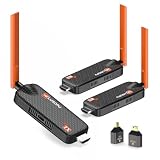
- 【Multi-Screen Sync for Home & Business】WELUSOPU wireless HDMI transmitter and 2 receivers support 1-to-6 multi-display casting, allowing you to stream synchronized 4K video to multiple rooms simultaneously. Perfect for home theaters, churches, sports bars, restaurants, classrooms, garages, security monitoring, backyards, and conference rooms. No messy HDMI runs, no signal lag, synchronized for any large venue.
- 【656FT Long Range & 0.1s Latency】Take your content further with our 656FT (200m) long-distance wireless solution. Equipped with dual 5dBi high-gain antennas and 5.8G/2.4G dual-band technology, this wireless HDMI splitter penetrates interference with ease. With an ultra-low 0.1s latency, it ensures your high-stakes business presentations, outdoor events, or security monitoring stay perfectly in sync. One less thing to worry about when the stakes are high.
- 【Vivid 4K Input & 1080P Immersive Vision】Our wireless HDMI transmitter supports 4K source input and delivers crystal-clear 1080P @60Hz HD output to your displays. Paired with high-fidelity stereo sound, it creates an immersive cinematic experience for movie nights, business presentations, or outdoor camping setups.
- 【Upgraded Cooling Chip & Reliability】Built for endurance. Featuring an upgraded heat-dissipation chip, this wireless HDMI extender effectively resolves overheating and signal drop issues common in standard models. Enjoy uninterrupted 24/7 streaming for digital signage, long-duration conferences, or continuous security surveillance.
- 【[True Plug & Play Efficiency】Simplify your workflow in seconds. This true "Zero Configuration" design requires no apps, no Bluetooth, and no WiFi passwords. Simply plug the TX into your laptop and the RX into your TV for instant screen sharing. Perfect for business travelers and on-the-go presenters who need to pitch to clients without fumbling with messy cables or complex network setups.
Stop playback on one of the other devices and close Netflix there. Netflix may take a short time to register that the stream has ended. If four screens are already active, upgrading to Premium is the plan-level change that raises the simultaneous limit to four; buying another streaming stick or television does not.
After an interruption, Netflix can occasionally continue treating a playback session as active for a while. Its help guidance says a playback-related active-stream error may clear on its own and can sometimes take up to two hours.
3. Devices holding offline downloads
Download capacity is separate from streaming capacity. In the U.S. plan information, Standard with ads and Standard allow downloads on two supported devices, while Premium allows downloads on six supported devices.
The Tool Desk
Outbyte Driver Updater FREEScan for outdated or missing drivers - takes under a minuteDriver Scan →Outbyte PC Repair FREERepair Windows errors before they cause bigger problemsFix Now →A tablet that has downloaded documentaries for a flight can count toward the download-device allowance even while nobody is watching Netflix on it. This is why changing the device currently streaming will not necessarily fix a “too many download devices” error.
When the download limit is reached, use Netflix’s Manage Download Devices controls to identify a device and remove its downloaded titles. Removing the downloads from an old phone or tablet can make room for another device. The number of individual titles you can download may also be affected by the plan and by restrictions attached to particular titles.
Rank #3

- 【Newly Upgraded LED Display】Wireless HDMI Transmitter and Receiver is designed with newly upgraded LED display,you can know the Connection Status & Signal Strength & Power Supply Status in real time.The connection status, signal status, output status and power status are all clearly visible, making it easier to solve connection problems.
- 【Plug & Play 5-Second Connection】 The wireless HDMI Transmitter does not require Applications, Bluetooth, Wi-Fi or complex settings. Just insert the Transmitter and Receiver into the corresponding devices, wait for 5 seconds, and you can enjoy the smooth mirroring of the screen, truly achieving Plug-and-Play. Save your time simply and effectively and make your work more efficient.
- 【Up To 6 Screens Expand Simultaneously】The HDMI Transmitter and Receiver can seamlessly stream video and audio simultaneously to 2 displays. Up to 6 screens or TVS can be connected at the same time. You can add more Receiver (Receiver ASIN:) as needed.Whether it's for a home theater, bar, restaurant, multimedia classroom, conference room, church, or any space that demands multi-screen interaction, this is your ideal choice.
- 【165FT/50M Wireless Stable Transmission】This Ultra-Long-Range stable splitter utilizing 2.4G and 5G dual-band chip, a 60Hz high refresh rate, and high-gain external antennas, the signal is stronger and more stable, extending the transmission range up to 165FT/50 meters in line of sight,latency reduces to less than 0.1s.Keep your office or living room tidy while wirelessly sharing with multiple TVs. (Note:Transmission distance and speed may be affected by crossing through solid walls.)
- 【1080P HD Output Low Latency】Our 4K wireless HDMI Transmitter and Receiver support 4K input and true 1080P@60HZ HD output. Ideal for screen casting in business meetings, live sports, classrooms, presentations, speech, bars, restaurants, or immersive home theaters, bringing you a stable, high-definition immersive audio-visual enjoyment.
Do Netflix profiles increase the number of screens?
No. A Netflix account can have up to five individual profiles. Profiles separate recommendations, viewing history, maturity settings, and personal preferences, but they do not provide five simultaneous streams.
For example, a household may create profiles for two adults and three children, but a Standard plan still supports only two screens watching at once. On Premium, the household can use up to four simultaneous streams, regardless of whether those streams are using four profiles or fewer.
What about Netflix Household and watching while traveling?
Netflix accounts are intended for people who live together in one household. The household rule is different from the simultaneous-screen limit. A device outside the usual household may prompt a “not part of the Netflix Household” message or require verification.
Netflix provides temporary travel verification and procedures for updating the household. Those steps confirm that an authorized subscriber is using the account; they do not create additional streams or turn a two-screen plan into a four-screen plan. Do not treat household verification as a method for bypassing Netflix’s account arrangements.
Do extra members get another Netflix device allowance?
An extra member is a separate account arrangement paid for by the account owner, where the option is available. It is not simply another profile on the main account.
Rank #4

- Connect 1 HDMI Source To 2 Displays: Display your favorite films, TV shows, video games or image presentations on 2 separate HD displays from 1 HDMI source.
- 4K and Blu-Ray 3D Quality: Our splitter supports 4KHD and Blu-Ray 3D quality, along with other HD and Standard Definition formats.
- Works With Multiple Devices: Connect your cable boxes, streaming devices, Blu-Ray/DVD players, laptop/desktop computers, satellite TV boxes, Projectors and more to get the most out of your entertainment experiences.
- Crisp Audio Playback Support: Support multiple audio playback options including Dolby 7.1, DTS, DTS-HD Master Audio, Dolby True HD, Stereo and Mono.
Netflix’s extra-member guidance limits an extra member to one profile, watching on one supported device at a time, and downloading on one supported device at a time. The U.S. Standard plan permits one extra-member slot, while Premium permits up to two, subject to eligibility, location, and package restrictions.
Quick wins for a faster PC:
Repair Windows errors before they cause bigger problemsFix Now →Scan for outdated or missing drivers - takes under a minuteDriver Scan →Because extra-member rules and availability vary, check the options shown in the account’s membership settings rather than relying on an old plan comparison. An extra member should also follow Netflix’s permitted account arrangement; it is not a general-purpose way to share one subscription with unlimited people in different homes.
Can a new streaming device give you more Netflix streams?
No. A streaming player adds another way to open Netflix on a television, but it does not alter the membership plan’s simultaneous-screen allowance.
If a television lacks a Netflix-capable app, a compatible streaming player can still be useful. Netflix lists Amazon Fire TV/Stick among its supported TV streaming-device families. One example is the Fire TV Stick 4K Max, a 4K Fire TV streaming device with a remote. It can provide a Netflix-capable endpoint for a compatible television, but it cannot make a two-stream subscription support a third or fourth viewer.
Internet speed and device count are different problems
A plan may permit several simultaneous streams while the home network struggles to deliver them reliably. Netflix’s stated recommendations are at least 3 Mbps for HD, 5 Mbps for Full HD, and 15 Mbps for UHD/4K. For a household watching several streams, the connection also has to serve phones, computers, game consoles, video calls, and other traffic.
Do these 3 things before closing this tab:
1Scan for outdated or missing drivers - takes under a minute2Repair Windows errors before they cause bigger problems3Fix the driver behind crashes, sound loss and screen glitchesBetter Wi-Fi can reduce buffering or improve picture stability when the problem is weak coverage, interference, or an overloaded router. A Wi-Fi router or mesh Wi-Fi system may help distribute a stable connection around a larger home, but networking equipment does not raise Netflix’s account limit. It improves the path between your devices and the internet; only the plan determines the number of permitted simultaneous streams.
How to fix a “too many devices” Netflix error
- Read the exact message. “Too many people are using your account” usually points to the simultaneous-stream limit. “Not part of the Netflix Household” concerns household verification. A download-device message concerns offline downloads rather than live viewing.
- Stop playback elsewhere. Ask anyone watching to stop the program, then close Netflix on that device. A brief delay before the account recognizes the change is normal.
- Review recent device activity. Look for an old television, hotel-room device, phone, or browser session that was left signed in. If you see an unfamiliar device or suspect unauthorized use, sign it out and change the Netflix password.
- Use download management for download errors. Go to Netflix’s download-device management area and remove downloads from an old or unused device. Replacing the device that is currently streaming will not remove another device’s download registration.
- Verify the household when prompted. If the message concerns the Netflix Household, follow Netflix’s verification or household-update procedure. Do not confuse successful verification with permission for another simultaneous stream.
- Wait if the error follows a crash or interrupted playback. A session can remain temporarily active after playback fails. Retry after closing the app on other devices; Netflix says some playback-related errors may take up to two hours to clear.
- Upgrade only if the limit is genuinely too low. A plan with more simultaneous screens is the appropriate solution for a household that regularly needs more streams. A new TV, streaming stick, HDMI cable, or router cannot increase that allowance.
If Netflix plays but the picture stutters or looks wrong
Buffering, low resolution, distorted video, or intermittent playback is usually a device, connection, or cable problem—not an account device-count problem. First test the connection and the affected device. Check that the streaming player is receiving a strong network signal, restart the player and router if appropriate, and confirm that the television is set to the expected input and resolution.
Best Value

- 【4K@60Hz High Resolution Image Display】This aluminum HDMI 2.0 switch supports up to 4K@60Hz resolution and backward compatibility up to 4K@30Hz, 25601440@120Hz, and 19201080@240Hz. Perfectly adapted to 3D, UHD, and HDCP2.2 signals. Provide you with a visual feast and an amazing gaming experience.
- 【5 In 1 Out HDMI Switcher 】This aluminum HDMI splitter 5 in 1 out supports connecting 5 HDMI devices (gaming consoles, TV box, DVD player etc.) to 1 HDMI display. Switch 5 HDMI sources to a single display, reduce the mess of cable connection on your TV. All Ports On the Same Side-Conveninent for Cablening.
- 【Convenient Remote Control & Manual Switch】Enjoy the ultimate convenience with the IR remote control and manual switch. Effortlessly switch between gaming devices from the comfort of your couch or bed with the remote control (Control range is within 33Ft). A manual switch lets you switch among 3 devices at any time with a flick of a button. LED indicates will tell you which port is active. (Note: HDMI cables are not included)
- 【Fast and Stable Transmission】Industry-leading IC chip provides high bandwidth 18Gbps transmission. USB Powered design ensures stable video transmission and better performance. No frames or images are lost, making your game run smoothly. Please keep this HDMI switcher always connected with a power source when using (USB cable included, Power adapter NOT included).
- 【Wide Compatibility】HDMI Splitter supports most devices with standard HDMI interface. Input compatible with PC, Computer, Macbook, Xbox 360, Xbox One, PS4/5, Blu-Ray DVD, Chromecast, Nintendo Switch, etc. Output compatible devices: HD-Ready or Full HD TVs, projectors, monitors, etc.
For a TV-connected device, inspect the HDMI connections. Netflix specifically identifies the device and video cable as possible causes of picture problems, so trying a different compatible HDMI port or a replacement HDMI cable can be a reasonable diagnostic step. An HDMI cable can correct a display connection problem; it cannot fix a “too many people” account error or increase the number of Netflix streams.
Quick examples
- Four family members want to watch four documentaries at once: Premium is the U.S. plan in the supplied comparison that supports four simultaneous streams. Four profiles are not required, and four separate streaming devices alone would not be enough on Standard.
- Someone watches on a TV while another person uses a phone: That uses two simultaneous screens. It fits either U.S. Standard plan, assuming both devices are supported and no other stream is active.
- A downloaded film on a tablet blocks a new download: This is a download-device limit, not a live-stream limit. Manage the old device’s downloads.
- A new streaming stick still shows “too many people”: The stick added hardware, not a stream allowance. Stop another stream or choose a plan with more simultaneous screens.
- A traveler sees a household message: This is a location or household-verification issue, not proof that the plan has run out of screens. Follow Netflix’s travel or household instructions.
The practical answer
You can use Netflix on as many compatible devices as you need in ordinary use; there is no general published cap on signed-in devices. The number that matters for family viewing is the simultaneous-stream allowance: two screens on the U.S. Standard with ads and Standard plans, or four on Premium. Offline downloads have their own device allowance, profiles do not add streams, household verification does not add streams, and new hardware cannot upgrade the plan.
Frequently Asked Questions
How many devices can be signed in to Netflix?
Netflix generally does not set a published overall cap on compatible devices used with an account. The plan limits simultaneous viewing instead.
How many people can watch Netflix at once?
The current U.S. comparison lists two simultaneous streams for Standard with ads and Standard, and four for Premium. Availability and limits can vary by country or billing package.
Do five Netflix profiles mean five people can watch at the same time?
No. Five profiles personalize recommendations and settings, but they do not provide five simultaneous streams.
Can buying another TV or streaming stick increase Netflix streams?
No. A streaming stick or smart TV adds another access point, but only the Netflix plan determines the number of simultaneous streams.
Is the Netflix download limit different from the streaming limit?
Yes, Netflix sets a separate download-device allowance. The U.S. comparison lists two download devices for Standard with ads and Standard, and six for Premium.
The Bottom Line
Bottom line: Netflix limits simultaneous viewing, not the total number of compatible devices you can use. In the U.S., the current plans allow two simultaneous streams on Standard with ads or Standard and four on Premium. Downloads, profiles, household verification, and extra members follow separate rules.
Quick Recap
Product prices and availability are accurate as of the date/time indicated and are subject to change. Any price and availability information displayed on Amazon at the time of purchase will apply.