“VR travel” is not one format. BRINK Traveler places you inside selected 3D-scanned landscapes; Wander browses Street View imagery; TriptoVR supplies narrated tours; National Geographic Explore VR turns destinations into short expeditions; Google Earth VR provides a free, globe-scale PC experience; and YouTube VR offers an enormous, uneven library of 360-degree and VR180 video. The right choice depends on whether you want visual presence, geographic breadth, a guide, activities, or free variety.
None reproduces weather, smell, terrain, spontaneous encounters, or the complete social reality of a physical trip. They are visual and spatial approximations that can preview a journey, support teaching, revisit meaningful places, or make distant landmarks accessible from home.
Quick comparison
| Experience | Best for | Platform and hardware | Format | Geographic breadth | Interactivity | Price signal | Main limitation |
|---|---|---|---|---|---|---|---|
| BRINK Traveler | Photorealistic natural landmarks | Standalone VR and other versions; see official platform information | 3D-captured environments | Curated and limited | High | About $14.99 on Quest Store DB, observed August 16, 2026; verify the live regional store | Only a few metres of walkable area at each location |
| Wander | A particular street, city, or neighbourhood | Meta Quest | Google Street View panoramas | Very broad where imagery exists | Medium | About $9.99 on Quest Store DB, observed August 16, 2026 | Static, sometimes old or distorted imagery |
| TriptoVR | Narrated sightseeing | VR edition; check current device support | Guided 360-degree tours | 100+ destinations claimed on its site | Low to medium | Seven-day free trial advertised; subscription price should be checked at signup | Less free exploration than a globe or map |
| National Geographic Explore VR | Short educational expeditions | Quest compatibility and price can change; check the live Meta listing | Interactive activities in real locations | Small, curated catalog | High | About $9.99 on Quest Store DB, observed August 16, 2026 | Limited replay and destination count |
| Google Earth VR | Free globe-scale exploration | SteamVR on a VR-capable Windows PC | 3D globe, terrain, and Street View | Very broad | High | Free on Steam | Requires a suitable PC, headset, and broadband |
| YouTube VR | Free variety and discovery | Quest 2, Quest Pro, Quest 3, Pico 4, Apple Vision Pro, and other supported devices | User and professionally produced 360/VR180 video | Extremely broad | Usually passive | Free app; advertising or paid media may apply | Quality and labeling vary sharply |
Prices and platform support are time- and region-sensitive. Treat the figures above as dated observations, not permanent prices.
1. BRINK Traveler: the strongest sense of being inside a natural landmark
BRINK Traveler is the pick for visual realism. It uses 3D-captured environments rather than trying to map every street on Earth. The official Android XR listing describes 54 environments, a walkable area of a few metres at each site, solo and multiplayer use, a virtual guide, an AI travel assistant, and downloadable locations of roughly 500 MB each. Examples include the Dolomites, Pulpit Rock, Horseshoe Bend, Arches National Park, Cappadocia, and Bryce Canyon: Google Play listing.
#1 Best Overall
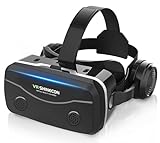
- 【2026 New Popular Design】This VR headset is the latest version, offering significantly improved comfort and focus accuracy. The Oculus Quest is too expensive for VR beginners. VR COCERKET is the most cost-effective VR headset on the market, ideal for beginners looking to explore the VR 3D world. It is compatible with almost all models, including 16/15/14/13 Plus, Sony, Samsung, Motorola, and more. It works with almost all smartphones with screen sizes between 4.7 and 7.2 inches. You can easily adjust it to fit different smartphone sizes.
- 【High Sound Quality Headphones】 Compared to VR goggles on the market, it is the best feature of having high quality headphones. Stereo headsets for a more realistic immersive 3D environment. These headphones feature a 42mm large aperture driver for immersive sound quality and clear footsteps from the movie monsters and enemies. In addition, the headset angle can be adjusted up/backward, so you can adjust it to your best angle.
- 【120 degree ultra wide angle, 1080P high resolution, aspherical optical lens】Our VR goggles adopt high quality PMMA aspherical optical lens, and adopts blue light cutting function and magnetic radiation protection, reducing eye fatigue. Our VR goggles, 120 degree wide angle viewing experience, you can change your living room into a 3D cinema or view the virtual world without turning the neck too much (don't forget to remove the film inside of the lens when using).
- 【Multi-function button and compatible with Android and iOS systems】 VR glasses do not require a Bluetooth controller. They are as easy to use as products equipped with controllers. Operation is extremely simple; just press the button on the VR glasses. In addition, the product comes with two data cables for Android and Apple devices, so you can choose according to your mobile phone (Bluetooth controller not included).
- 【Ergonomic Design and Superior Heat Dissipation】 VR headsets require prolonged use, so they are equipped with safety cushioning materials to protect your nose, face, head, and neck. Even after extended use, they leave no marks. The ergonomic three-axis adjustable headband design ensures comfort during extended use, offering exceptional elasticity and adjustability. It fits snugly on your head, eliminating concerns about slipping or falling off. The front cover features a magnetic attachment design, providing excellent heat dissipation and high breathability. When using a smartphone, heat is effectively dissipated from the interior, preventing blurred vision.
Photogrammetric scenery gives rocks, cliffs, and terrain more convincing depth than a conventional flat panorama. You can move around and inspect a captured place, making it especially effective as a first VR demonstration. It is not a globe, however, and “walkable” does not mean an unrestricted hike. Each environment is a compact scan, often quiet and static rather than a living, changing ecosystem.
Who should choose it
- People who want a landmark to feel spatially present.
- Families or friends demonstrating VR together.
- Users who prefer exploring to watching a film.
Trade-offs
- The catalog is far smaller than Wander, Google Earth VR, or YouTube VR.
- Downloaded locations consume meaningful headset storage.
- Some users may run out of new places after several sessions.
Quest Store DB recorded approximately $14.99 on August 16, 2026; a BRINK Traveler/FLY bundle was observed at $19.99 versus $24.98. Check the live store before buying: app price record and bundle record.
2. Wander: visit almost any mapped street or city
Wander is the breadth-first option for standalone Quest owners. It uses Google Maps Street View content, letting you search for cities, landmarks, neighbourhoods, former homes, or places you plan to visit. A university immersive-field-trip guide characterizes it as a static-image Street View viewer: guide PDF.
This makes Wander excellent for personal memory, geography lessons, and trip planning. It is less cinematic than a 3D scan: panoramas can be stitched, faces and plates blurred, loading depends on the internet, and imagery may be years old. The app uses Google Street View content but should not be described as an official Google app; see the store record for that qualification: Quest Store DB.
Quick wins for a faster PC:
Repair Windows errors before they cause bigger problemsFix Now →Scan for outdated or missing drivers - takes under a minuteDriver Scan →Best uses
- Check the exact surroundings of a hotel, trailhead, or attraction.
- Revisit a childhood address or former holiday location.
- Jump between cities without buying separate destination apps.
Quest Store DB recorded approximately $9.99 on August 16, 2026. The official Meta listing is here; confirm regional availability and price before purchase.
Rank #2

- Upgraded Switch VR headset: The headset is upgraded with adjustable lens, viewing window is improved by 20% and higher definition, you can adjust switch lens left/right and forward/backward to allow the image to align for you, which will bring you a batter immersive visual experience. Switch VR headset would be big surprise for your friend, family or yourself.
- Designed for Switch & Switch OLED: The upgraded swith VR headset is compatible with nintendo switch and nintendo switch OLED version, not for switch lite vertion. When using, we recommend to remove joy cons because it would be more light weight for you.
- Support Certain VR Games: Turn on VR mode and experience Super Mario Odyssey, Breath of the Wild, Super Smash Bros, Spice and Wolf, Captain Toad, LABO VR or other Switch VR games, and you can also watch VR videos on youtube through Switch. (Please note: Set the game to VR mode before playing.)
- Premium Material: The VR goggle for Switch & Switch OLED is made of EVA and Polyester Lycra materials, super light weight and durable, which help your skin breath and decrease the pressure when playing VR games.
- Fun for everyone:The adjustable head strap of VR switch headset fits everyone’s head. Even though wearing myopia glasses, the glass-friendly VR switch goggle is available. If you have any questions, please feel free to contact us, We will reply you within 24 hours!
3. TriptoVR: a guided documentary-style tour
TriptoVR suits viewers who want a narrator and context rather than an empty landscape. Its official site advertises more than 100 destinations, an interactive 3D globe, guided narration, weekly new locations, and a seven-day free trial: TriptoVR.
Choose a destination and the service supplies information about history, culture, and notable places. That structure works well for families, schools, non-gamers, and anyone previewing a real holiday. It is more passive than BRINK Traveler or Google Earth VR, and a 360-degree tour is not the same as a fully modelled, freely walkable environment.
Subscription caution
The public page captured for this article advertised the trial but did not expose a reliably verifiable subscription amount. Check the live signup screen, cancellation terms, supported headset, and current destination count before starting. “100+ destinations” and “new destination weekly” are current marketing claims that can change.
Outdated Drivers Are Slowing You Down
One free scan finds every outdated or missing driver and matches the right update for your exact hardware.Free scan · exact hardware matchPC Slower Than It Used to Be?
A free scan shows the junk files, broken settings and background clutter dragging Windows down - then fixes them in one click.Free scan · Windows 10 & 114. National Geographic Explore VR: an activity-based expedition
National Geographic Explore VR is the best choice when travel should feel like an activity. Rather than simply looking around, you take the role of an explorer and complete tasks associated with real destinations, including Antarctic exploration and Machu Picchu-related content. Educational material describes that explorer-and-activity structure: educational PDF.
Its polished production and clear objectives are useful for children, students, family demonstrations, and people who find passive 360 video dull. The same design limits its scope: it is a short, curated expedition, not an expanding world or a virtual vacation simulator. Once activities are completed, replay value may be lower than in a map application.
Rank #3

- Precision Cleaning - Premium microfiber material effortlessly removes fingerprints, dust, oil, and water stains from glasses, lenses, screens, and jewelry without scratches or residue. Ideal for delicate surfaces like smartphones, cameras, and sunglasses
- Scratch-Safe Design - Ultra-soft, non-abrasive fibers protect sensitive optics (telescopes, VR headsets) and electronics. Properties prevent dust re-attachment for crystal-clear results every time
- All-in-One Portable Kit - Includes 5.9x 7.1” cleaning cloths + 6 with carabiner clips. Attach to keys, backpacks, or camera bags for instant access at home, work, or travel
- Smart Pull-Out Storage System - Pouches keep cloths dust-free between uses. Quick-release button design allows access while protecting cloths from dirt
- Reusabley - Durable for 500+ uses. Compact size fits in pockets, cases, or gear bags—perfect for hikers, gamers, office workers, and daily eyewear users
Quest Store DB recorded approximately $9.99 and compatibility with Quest 1, Quest 2/Pro, and Quest 3/3S during the August 16, 2026 research period: listing. Older hardware support and price can change, so the live Meta listing controls.
5. Google Earth VR: the free PC globe
Google Earth VR is the most powerful free option if you already have a VR-ready Windows computer. It lets you fly over terrain, inspect city layouts, visit landmarks, and use selected cinematic tours. Google announced its Steam availability as free: Google announcement. The current Steam page lists SteamVR support, broadband internet, and minimum graphics around a GeForce GTX 970 or Radeon R9 Fury class: Steam listing.
Its strength is scale. You can understand where a mountain range sits relative to a city, fly across a coastline, then drop into available Street View. That differs fundamentally from Wander: Google Earth VR is a PC globe simulator, while Wander is a standalone-friendly panorama browser. Imagery quality and availability vary, and occasional Street View problems are reported by users in the Steam community rather than established as universal product behaviour: community forum.
Hardware decision
A standalone Quest without a capable computer cannot simply install the Steam version. You need a compatible PC VR headset or a supported PC-to-standalone setup, adequate graphics performance, broadband, and a comfortable play area.
Independent reader supportYour contribution helps us test, update, and keep practical guides available for everyone.6. YouTube VR: the free catalogue
YouTube VR is the best place to sample immersive travel before buying anything. It is a platform, not a curated tour: professional productions, museums, national parks, independent creators, ordinary flat videos, and mislabeled uploads all share the same search results.
Rank #4

- SUPPORT FOR MYOPIA USERS: The reasonable design of the optical lens and the body can pre-vent fatigue and sleepiness, and can support the use of myopia users, reduce deformity and glare to effectively reduce visual fatigue, maintaining 3D reality with a wide field of vision and creating a virtual reality world.
- ADVANCED VR TECHNOLOGY: 360-degree panoramic view, bringing more shocking visual experience and immersive visual impa-ct.Gaming and watching movies with virtual reality headsets work best when your eyes properly align with the screen box. With this device, you can experience the immersive, fun and exciting world of VR, such as 3D movies, skydiving, underwater worlds, panoramic natural scenery, virtual game scenes, etc.
- ADJUSTABLE INTERPUPILLARY DISTANCE: The use of a large lens barrel has a wider field of view, and the interpupillary distance design of the adjustable gear can meet a variety of needs.The pupil distance can be adjusted to get the clearest view.Our optical goggles has the characteristics of an-ti-blue light, effectively protects the eyes, makes the picture clearer, and reduces the feeling of dizziness.
- MORE PORTABLE, MORE COMFORTABLE, MORE LIGHTWEIGHT: Suitable for 4.7-7 inch mobile phones, compatible with more types of large-screen mobile phones. VR Headset weighs as light as its concise appearance, it more portable no matter at home or outdoor. A T-shaped headband will fit different head sizes (both adults and children).
- PERFECT GIFT FOR KIDS & ADULTS: This premium VR headset is the perfect present for father's day, Halloween, Easter, or Christmas. Compatible with smartphones and other mobile phone devices with a 4.7-7” screen to bring you a totally immersive visual 360 degree experience.
Google documents support for 360-degree and VR content, with filters for 360°, VR180, 4K, 3D, and captions: YouTube VR help. Supported devices include Meta Quest 2, Quest Pro, Quest 3, Pico 4, and Apple Vision Pro: device availability.
The Tool Desk
Outbyte PC Repair FREEClear out junk files and repair common Windows errorsFree Scan →Outbyte Driver Updater FREEFix the driver behind crashes, sound loss and screen glitchesFind Drivers →How to find worthwhile footage
- Open YouTube VR and search for a destination plus
VR180,360,3D, or8K. - Try searches such as
360 Antarctica,VR Machu Picchu,underwater 360, ornational parks 360. - Use the 360° or VR180 filter where available.
- Prefer videos clearly labelled for a headset and test the highest available quality.
- Use captions for narrated travel films and abandon videos that look like flat cinema content.
VR180 usually provides stronger stereoscopic depth but a narrower field of view than 360-degree video. Compression, camera placement, audio, advertising, and creator skill can make the quality inconsistent. The app is generally free, although advertising or paid media may apply.
Which experience should you choose?
- For the most convincing landmark presence: BRINK Traveler.
- For a specific street, home, or city: Wander.
- For narration and cultural context: TriptoVR.
- For children, students, and goal-based play: National Geographic Explore VR.
- For free globe-scale exploration with a gaming PC: Google Earth VR.
- For free experimentation and the widest variety: YouTube VR.
If you have no gaming PC, begin with YouTube VR, then choose among the standalone editions of BRINK Traveler, Wander, TriptoVR, and National Geographic Explore VR according to whether you prefer scenery, maps, narration, or activities.
Setup tips for a better virtual trip
- Clear enough floor space for room-scale apps and use seated mode when available.
- Use stable Wi-Fi for Street View, globe imagery, and streaming video.
- Download locations when an app supports offline storage, while checking the space each file uses.
- Use headphones for narration and spatial audio.
- Take a break every 20–30 minutes, especially during artificial flying or fast movement.
- If you are motion-sensitive, avoid rapid locomotion and begin with a stationary panorama or seated tour.
- Check the exact headset edition before purchase; platform support is not universal.
What VR travel can—and cannot—replace
These experiences can preview a destination, support geography and history lessons, help someone revisit a meaningful place, or provide visual access when physical travel is difficult. They cannot supply real temperature, smells, terrain underfoot, unscripted human contact, or guaranteed current conditions. The most honest expectation is a useful sense of presence and scale—not a complete substitute for being there.
Quick Recap
Product prices and availability are accurate as of the date/time indicated and are subject to change. Any price and availability information displayed on Amazon at the time of purchase will apply.