The Sonos / Spotify Vinyl Emulator is a community Raspberry Pi project that lets you choose music by tapping physical album cards or objects containing NFC tags. A USB NFC reader connected to the Pi reads the tag, a Python script interprets its contents, and node-sonos-http-api sends the playback command to a Sonos room.
It recreates vinyl’s tactile ritual—not vinyl’s analog sound. You still use digital streaming, but ordinary playback can be screen-free once the system is configured.
What the project actually does
Each album card, token, cassette case, toy, or custom object carries an NFC tag. The tag stores a playback reference such as a Spotify album URI. When the object is placed on the reader, the Raspberry Pi sends the corresponding command to a chosen Sonos room.
Album card or object
        ↓
NFC tag
        ↓
USB NFC reader
        ↓
Raspberry Pi
        ↓
vinylemulator Python script
        ↓
node-sonos-http-api
        ↓
Sonos speaker or system
        ↓
Spotify or another supported service
This is an independent maker project, not an official Sonos feature. The original implementation was created by Mark Hankinson and documented on Hackster, in Raspberry Pi Magazine, and in the vinylemulator GitHub repository.
The Tool Desk
Outbyte PC Repair FREERepair Windows errors before they cause bigger problemsFix Now →Outbyte Driver Updater FREEFix the driver behind crashes, sound loss and screen glitchesFind Drivers →#1 Best Overall

- Mini Vinyl Record Player Design: Transform any metal surface into a nostalgic listening corner. Crafted with a premium clear acrylic frame, this magnetic music box replicates a classic retro turntable. The built-in LED light glows softly during playback, adding warm ambiance to your space
- Tap-to-Play Jukebox Experience: Experience the tactile joy of a physical jukebox! Equipped with smart NFC technology, this player automatically recognizes each miniature vinyl disc. Simply place a disc on the sensor area to instantly trigger and change your favorite tracks or custom playlists
- DIY Your Own Soundtracks: Designed for ultimate personalization, this programmable music player lets you upload your own audio files. Easily load your favorite songs, personalized voice notes, or heartfelt audio messages to create a completely custom listening experience.
- Transform Your Metal Spaces: Its strong magnetic base guarantees it stays put on fridges, dorm lockers, or office cabinets. Turn any blank metal wall into a nostalgic gallery corner while keeping your daily reminders and sweet notes organized.
- Complete Audio Decor Set: This ultimate 9-piece bundle includes everything you need for setup: 1 magnetic music player frame, multiple customizable NFC music discs, and a charging cable. It makes a uniquely thoughtful anniversary, birthday, or holiday gift for vinyl lovers and music fans
Why it is called a “vinyl emulator”
The word “vinyl” describes the interaction rather than the audio technology. You browse a visible collection, select one item deliberately, and start an album or playlist without opening a phone app. Cards can be collected, rearranged, displayed, and handed to another person.
The project does not reproduce vinyl mastering, surface noise, record wear, turntable mechanics, or analog distortion. It does not give you ownership of the music, and it does not automatically provide offline playback. The actual audio remains a digital stream delivered through Sonos and the relevant music service.
That distinction matters. The appeal is the physical ritual and the reduction of screen interaction, especially for families, children’s rooms, classrooms, libraries, and Sonos owners who already have speakers.
What you need
- Raspberry Pi 3 Model A+ or Raspberry Pi 4, although a smaller board may be possible with additional compatibility work.
- Power supply and microSD card.
- A Sonos speaker or Sonos system.
- An ACR122U-class USB NFC reader.
- NTAG213 NFC tags.
- A local network connecting the Raspberry Pi and Sonos system.
- A computer or phone for writing tags.
- Optional printed album artwork, card stock, cassette cases, Lego pieces, wooden tokens, or a custom enclosure.
The original Hackster guide estimated roughly £50–60 for the essential electronics in 2020. That is historical context, not a current US build price. The Raspberry Pi 4 product page currently lists the board from $35 before storage, power, reader, tags, enclosure, and shipping. An existing Sonos system makes the project considerably more attractive; buying Sonos solely for this experiment changes the economics substantially.
Do these 3 things before closing this tab:
1Scan for outdated or missing drivers - takes under a minute2Repair Windows errors before they cause bigger problems3Fix the driver behind crashes, sound loss and screen glitchesImportant compatibility warnings before you build
The original instructions are old
The project was published on May 6, 2020. Its documentation includes Python 2.7-era output and assumptions about Raspberry Pi OS, Node.js, npm, and PM2 that may not apply unchanged to a current installation. Treat the commands below as the documented reference path, not a guarantee of plug-and-play operation.
ACR122U readers can vary
The project repository specifically warns that newer ACR122U readers may not work with the nfcpy library used by the original Python code. “ACR122U” is therefore not a sufficient compatibility guarantee. Check the seller’s hardware revision and be prepared to test the reader or use the alternative node-sonos-nfc library.
Internet and accounts still matter
The Pi and Sonos must communicate on the same local network, while playback generally depends on an active streaming account, service integration, catalog availability, and regional licensing. A physical card can stop working if an album disappears, a playlist changes ownership, or a track is unavailable in your country.
Rank #2
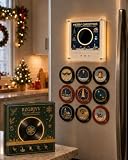
- 256MB STORAGE & PRELOADED MUSIC: Comes with music already installed and 256MB built-in storage for saving more compatible audio files, so you can start listening right away and add your own songs anytime
- PROGRAM YOUR OWN MUSIC: Personalize this magnetic music box with songs, voice recordings, greetings or meaningful audio files, making the programmable mini record player a creative way to build custom playlists and turn favorite sounds into physical keepsakes
- 9 MINI VINYL RECORDS: Includes 9 colorful programmable mini vinyl records labeled A-I for easy organization, giving you multiple NFC discs to assign different songs or audio files while creating the playful look of a tiny retro record collection
- MAGNETIC FRIDGE DISPLAY: The magnetic base lets this jingle vinyl player fridge decor attach to compatible metal refrigerators, lockers and cabinets, transforming unused metal surfaces into a compact listening corner while keeping the player easy to reach
- RETRO LED AMBIANCE: A clear acrylic frame, miniature turntable styling and built-in LED lighting give this mini vinyl record player a nostalgic visual effect, creating warm decorative lighting for kitchens, dorm rooms, bedrooms, offices and music-themed spaces
Screen-free does not mean setup-free
Initial configuration, troubleshooting, account setup, and tag programming require a computer or phone. The screen-free experience begins after the system and cards are working.
Outdated Drivers Are Slowing You Down
One free scan finds every outdated or missing driver and matches the right update for your exact hardware.Free scan · exact hardware matchWindows Errors? Fix Them Before They Spread
Repair common Windows errors and clear accumulated junk for a smoother, more stable PC - no reinstall needed.Free scan · no reinstallHow the software is arranged
The Python code reads NFC data and translates it into commands. The separate node-sonos-http-api project acts as an HTTP bridge for controlling Sonos from a Node.js-capable device such as a Raspberry Pi. The playback reference is stored directly on the NFC tag rather than in a database on the Pi.
That design has a useful advantage: the card can survive a Raspberry Pi reinstallation and remain portable between compatible installations. The trade-off is that editing a collection means rewriting tags, and portability still depends on another compatible reader, software stack, and playback system.
A reliable build sequence
Use one test album first. Do not print or program an entire collection until manual Sonos playback, NFC reading, and the emulator all work independently.
1. Install Git
sudo apt install git2. Install and test the Sonos HTTP API
The original guide downloads the bridge with:
git clone https://github.com/jishi/node-sonos-http-api.git
cd node-sonos-http-api
Follow the current repository README for the appropriate Node.js and npm setup and startup command. Do not assume that an old npm command is still correct for the current checkout.
Once the service is running, test it from a browser or another device on the local network. The original guide uses a request like:
http://PI_IP:5005/ROOM_NAME/playpauseFor example:
http://192.168.4.102:5005/Dining%20Room/playpauseReplace the IP address and room name with your own values. Names containing spaces need URL encoding or the syntax required by the current API version.
Rank #3
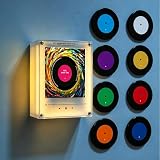
- 【Material and Dimension】: This music player frame is made from high-quality clear acrylic, featuring a square design with dimensions of approximately 11135cm (rotating model) or 11133cm (non-rotating model), offering a sleek and modern look for displaying physical media.
- 【Dynamic LED Effects】: The standard version includes built-in LED light, adding a vibrant visual to your music experience. It creates a captivating ambiance, making it a standout decorative piece even when not in use.
- 【9 Pre-Labeled NFC Music Discs】: The set comes with 9 NFC discs (labeled A-I) in assorted colors (Blue, White, Purple, Yellow, Green, Red, Orange, Deep Blue, Pink). Each disc is pre-configured to play a full-length song, providing instant access to 9 complete tracks.
- 【Complete Ready-to-Use Package】: Includes the acrylic frame player, 9 NFC discs, a 128MB memory card, and a charging data cable—everything you need to set up and enjoy your music right away.
- 【Note on Music Files】: Due to shipping restrictions, no pre-loaded music files are included. You must manually transfer your desired songs (under 128MB total) to the memory card. Basic instructions for file transfer are provided. Customization of disc labels is not supported.
3. Keep the API running
The historical tutorial uses PM2:
sudo npm install -g pm2
pm2 status
pm2 start npm -- start
pm2 startup systemd
pm2 save
pm2 startup systemd prints a machine-specific command. Run the generated command rather than copying an example from another system. Because PM2 is primarily a Node.js process manager, validate Python process behavior on your current OS before relying on it for the NFC reader. A native systemd service may be more maintainable for a long-running Python process.
4. Test Spotify playback manually
Before introducing NFC, send a direct playback request:
http://PI_IP:5005/ROOM_NAME/spotify/now/spotify:album:ALBUM_IDProceed only when the Pi can reach Sonos, the room name is correct, the API is running, the account can play the album, and playback starts. This isolates network, Sonos, account, and URI problems before NFC is added.
5. Download the emulator
git clone https://github.com/hankhank10/vinylemulator.gitConfigure the target room in usersettings.py:
sonosroom = "Dining Room"Use the exact Sonos room or zone name shown by your system, including spaces and capitalization where relevant.
Spotify data: URI, not ordinary web link
The emulator expects Spotify URIs rather than standard browser URLs.
spotify:album:ALBUM_ID
spotify:track:TRACK_ID
spotify:user:spotify:playlist:PLAYLIST_ID
The playlist format is especially important. The project documents spotify:user:spotify:playlist:PLAYLIST_ID; simply writing a modern-looking standard playlist URI may not work with this project’s API path.
The original instructions describe the Spotify desktop app as the easiest way to obtain a URI:
Rank #4

- Fridge Magnet Music Player with 9 NFC Discs: This Christmas vinyl player features a built-in speaker that works with nine interchangeable NFC induction discs – the mini vinyl record player plays festive songs without a phone, Wi-Fi, app, or subscription, making it a unique addition to holiday decor
- Magnetic Music Box with Acrylic Turntable Design: A white acrylic enclosure, clear shell, gold turntable styling, and holiday artwork give this magnetic vinyl music box the collectible look of a mini vinyl record player – the music refrigerator magnets set doubles as both a decorative piece and a functional player
- Refrigerator Magnet Record Player Attachment: The built-in magnetic back attaches this record player for fridge display to fridge doors, metal lockers, magnetic boards, and other compatible surfaces – the magnetic fridge record player requires no hooks or screws for easy placement
- Mini Vinyl Records for Holiday Songs: Swap the nine colorful NFC induction discs to change holiday songs – this magnetic vinyl player for fridge turns into interactive Christmas decor for kitchens, parties, and seasonal home styling, with each disc offering a different festive tune
- Custom MP3 via USB-C Cable: Connect the included USB-C cable and load one MP3 file into each numbered folder – place the corresponding vinyl-style NFC disc on the player to enjoy your chosen track without Wi-Fi, app, or subscription, making this vinyl record storage music set a personalized holiday music box
- Open the album, track, or playlist.
- Open the three-dot menu.
- Choose Share.
- Choose Copy Spotify URI.
Spotify’s labels and menu locations can change between desktop versions. If you only have a web URL such as:
https://open.spotify.com/album/ALBUM_IDthe corresponding album form is:
spotify:album:ALBUM_IDWrite the first NFC tag
The original workflow uses NFC Tools and an ACR122U reader connected to a computer:
- Place a blank NTAG213 tag on the reader.
- Open NFC Tools and choose Write.
- Select Add a record → Text.
- Paste a payload such as
spotify:album:ALBUM_ID. - Write the tag.
- Remove it and test it again.
Choose Text, not URL or URI. This is one of the easiest mistakes to make. The original project expects the Spotify string as a text record.
Free tools Windows power users keep installed
One-click scans. No signup required.
Attach the programmed tag to a printed album sleeve, card, cassette case, wooden token, Lego disc, toy, or custom 3D-printed object. Keep the tag close to the reader and away from metal or other shielding.
Install and test NFC support
The original instructions use:
pip install -U nfcpy
python -m nfc
Do not assume these commands will work unchanged on a current Raspberry Pi OS installation. The tutorial’s example shows nfcpy 1.0.3 under Python 2.7.16, which demonstrates how old that environment is. Current Python versions, virtual environments, package permissions, USB access, and reader revisions may require adjustments.
When the reader works, run the emulator test:
python vinylemulator/readnfc.pyThe expected sequence is straightforward: the program waits for a tag, displays the data when the tag is detected, sends a request to the Sonos API, and starts the selected album or track.
Independent reader supportYour contribution helps us test, update, and keep practical guides available for everyone.Starting the system after reboot
The historical guide suggests:
pm2 start vinylemulator/readnfc.py
pm2 save
Check the result with:
pm2 status
pm2 logs
For a dependable installation, consider a native systemd service with an explicit working directory, service user, Python environment, restart policy, and network dependency. This is particularly useful when the API and NFC reader start at different times, when USB hardware appears late, or when the network is not ready at boot.
What’s actually slowing this PC down?
Pick the symptom - the matching free tool is one click away.
Best Value

- 🎄 Festive Christmas Music Player:Bring holiday cheer to your home with a retro vinyl player-inspired fridge magnet. Its charming Christmas design adds a nostalgic musical touch to refrigerators, desks, kitchens, offices, and holiday displays.
- 🎵 NFC Music Playback Without Your Phone: Simply place a programmed vinyl-style disc on the player to enjoy your favorite music with a fun, interactive experience. NFC technology makes switching between different songs quick and easy.
- 💿 9 Programmable Vinyl-Style Discs: Includes 9 miniature record-style discs that can be programmed with your favorite songs, Christmas music, family memories, or special messages. Create a personalized collection for every holiday moment.
- ✨ Retro Design with LED Light: The miniature record-player design combined with a soft LED glow creates a cozy vintage atmosphere, making this more than a functional music player—it's also an eye-catching Christmas decoration for your home.
- 🎁 Unique Christmas Gift for Music Lovers:A fun and memorable gift for music fans, couples, family members, friends, and vinyl lovers. Perfect for Christmas, stocking stuffers, anniversaries, birthdays, or anyone who enjoys personalized music and nostalgic decor.
Beyond Spotify
The repository documents several payload families, although service integrations and authentication behavior can change independently of the emulator:
| Prefix | Purpose |
|---|---|
spotify: |
Spotify album, track, or playlist |
tunein: |
TuneIn station |
bbcsounds: |
BBC Sounds station |
apple: |
Apple Music album, track, or playlist |
amazonmusic: |
Amazon Music album, track, or playlist |
room: |
Change the target room |
command: |
Send a Sonos API command |
favorite: or favourite: |
Play a Sonos favorite, depending on implementation |
Examples documented by the project include:
spotify:track:4LI1ykYGFCcXPWkrpcU7hn
spotify:album:4hW2wvP51Myt7UIVTgSp4f
spotify:user:spotify:playlist:32O0SSXDNWDrMievPkV0Im
command:playpause
command:mute
command:next
command:volume/50
command:shuffle/on
Room-specific cards and command cards can turn the collection into a physical control panel, but test each command against the current Sonos and bridge versions.
Troubleshooting
The reader is detected but tags fail
- Run
python -m nfcand read the exact error. - Disconnect and reconnect the reader.
- Try a known-compatible tag.
- Move the tag away from metal or shielding.
- Check USB power and permissions.
- Review udev rules if the device is visible but inaccessible.
- Consider node-sonos-nfc if the reader is a newer ACR122U revision.
The tag reads but music does not play
Check in this order: whether node-sonos-http-api is running; whether the Pi can open its port; whether the manual playback URL works; whether the room name is exact; whether the URI is correctly formatted; whether the account is entitled to play the content; whether the album is available in the country; and whether another device is interrupting playback.
Playback goes to the wrong room
Correct sonosroom in usersettings.py. A tag can also use the project’s room-related support, but the target name still has to match the Sonos zone.
It works until reboot
Inspect pm2 status and pm2 logs. Common causes include an unregistered startup command, the wrong working directory, different Python paths at boot, the API starting after the reader, delayed networking, or delayed USB power. A systemd service with explicit paths and restart behavior can resolve these issues more cleanly.
Privacy and security
The emulator repository says it can send anonymous usage statistics containing an anonymized Raspberry Pi UUID, startup events, NFC payloads, and interpreted commands. NFC payloads may reveal albums, playlists, or household actions. Review usersettings.py and disable the statistics feature if you do not want those events sent.
Keep the Sonos HTTP API on a trusted local network. Do not expose its port directly to the public internet without authentication, firewalling, and a clear understanding of the consequences.
Alternatives and design choices
- Phone-based NFC: simpler, but not genuinely screen-free and dependent on mobile operating-system behavior.
- Sonos favorites: can reduce dependence on service-specific URI formats, but requires maintaining the favorites inside Sonos.
- A database on the Pi: allows centralized editing and metadata, but makes the collection dependent on Pi storage. The original tag-based design favors portability.
- Another speaker platform: the concept could be adapted to a platform such as Google Chromecast if a suitable API or library is available.
- Child-focused player: use large cards, curated playlists, volume limits, and command-only tags, while configuring parental controls and explicit-content filtering separately.
Is it worth building?
This is a strong project for an existing Sonos owner who enjoys Raspberry Pi administration, NFC experiments, and making physical album artwork. It is especially compelling when the goal is intentional, shared, screen-light listening rather than maximum convenience.
Quick wins for a faster PC:
Clear out junk files and repair common Windows errorsFree Scan →Scan for outdated or missing drivers - takes under a minuteDriver Scan →It is a poor fit for anyone seeking a finished commercial product, official support, guaranteed reader compatibility, offline playback, or actual vinyl sound. The system has several moving parts—Linux, Python, Node.js, USB hardware, local networking, Sonos, and a streaming service—and any one of them can require maintenance.
Product prices and availability are accurate as of the date/time indicated and are subject to change. Any price and availability information displayed on Amazon at the time of purchase will apply.