This guide covers modern electric Victrola products—suitcase players, all-in-one music centers, automatic turntables, Bluetooth models, and Stream/Sonos turntables. It does not cover antique wind-up Victrolas, which use different mechanisms.
Most silent Victrolas are not permanently broken. Start with reversible checks: select the vinyl input, raise the volume, remove the stylus guard, lower the tonearm, loosen the transport screw as the manual specifies, inspect the belt, choose the correct speed, and test a clean record. Identify the exact model first because controls, belts, reset commands, and replacement styli differ widely.
Ten-minute diagnostic checklist
- Find the model number. Check the rear label, underside, manual, or purchase record. Download the matching instructions from Victrola’s owner-manual library.
- Check power. Reseat the adapter or cord, verify the switch and indicator, and try a known-good outlet.
- Select vinyl mode. Choose Phono, Turntable, Vinyl, or the model’s equivalent instead of Bluetooth, radio, CD, cassette, or USB.
- Raise volume. Temporarily unplug headphones, RCA cables, and external speakers.
- Remove the stylus guard. Turn the player off before inspecting the cartridge.
- Lower the tonearm. On manual models, move it over the record and lower it gently. On cueing models, lower the cue lever fully.
- Check the transport screw. Loosen it exactly as the manual describes; do not remove it unless instructed.
- Inspect platter and belt. On belt-drive models, confirm the belt is around the platter’s inner rim and motor spindle.
- Set speed. Match 33⅓, 45, or, where supported, 78 RPM. Use the 45 adapter for applicable 7-inch singles.
- Test a known-good record. Clean the record and inspect the stylus before concluding that the player has failed.
If wireless audio is involved, first test the built-in speakers or a wired output. That separates a turntable fault from a Bluetooth, Wi-Fi, or Sonos problem.
Nothing powers on
- Reseat both ends of the power cable or adapter and check the power switch.
- Try another outlet, then retry with all external audio cables disconnected.
- If there is still no indicator or response, do not open the cabinet. Use Victrola customer care or warranty service.
Victrola’s FAQ recommends unplugging a nonresponsive unit and leaving it disconnected for approximately six to eight hours before trying again. That is Victrola’s stated procedure, not a universal electronics rule.
What’s actually slowing this PC down?
Pick the symptom - the matching free tool is one click away.
#1 Best Overall
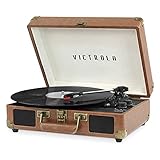
- THREE SPEED BELT-DRIVEN TURNTABLE - This 3-speed (33 1/3, 45, 78 rpm) suitcase record player features UPGRADED PREMIUM SOUND QUALITY and sits on sound isolating feet that prevent vibration. It is perfect for your living room, bedroom or office.
- TAKE YOUR TUNES ANYWHERE - Housed in a vintage suitcase with an easy carry handle, Victrola's blend of retro and contemporary design give you the ultimate flexibility to listen to music where you want and how you want – a great choice for vinyl lovers. Clean only with a dry cloth
- EXPANDED CONNECTION OPTIONS - Stream smartphone audio through the turntable’s built-in Bluetooth speakers. Easily connect external speakers via the stereo RCA outputs, or use the Line input for non-Bluetooth devices like a CD player. For personal listening, connect your headphones to the headphone jack.
- NO STEREO SYSTEM OR EXTRA EQUIPMENT REQUIRED. Get it up and running in minutes. Retro looks combined with the convenience of modern technology makes this affordable record player ideal for beginners & vintage enthusiasts
- ALL THE CONTROLS YOU NEED - Features an Input select knob, Power/Volume Knob & an Auto stop switch that stops spinning records once the record is finished playing.
The platter will not spin
Confirm the operating mode
Some models start when you move the tonearm; others require a Start/Stop control or an automatic mechanism. Select turntable mode and check the model manual before assuming a motor fault.
Release the transport screw
A screw fitted for shipping can restrain the platter or motor assembly. Victrola says an incorrectly adjusted screw can cause playback problems and humming. Direction and the required “floating” position vary by model, so do not keep turning it by guesswork.
Check the belt
- Remove the record and slipmat.
- Turn the platter only in the manner permitted by the manual.
- Look for a belt looped around the platter’s inner rim and the motor spindle.
- Refit a displaced belt without stretching, twisting, oiling, or contaminating it.
- Replace the slipmat and test.
This is also the procedure highlighted for Stream models in Victrola’s Stream troubleshooting guide. If the belt is correctly fitted but the motor remains still, clicks, stalls, or smells hot, stop. Victrola directs motor and drive-belt problems to technical support rather than recommending cabinet disassembly.
The platter spins but there is no sound
Input, volume, and output routing
Make sure the unit is in record-player mode and turn the main volume up. Disconnect headphones and external equipment for the test. For wired speakers, match red RCA plugs to red jacks and white plugs to white jacks; incorrect plug-to-jack matching can prevent the connection from working.
Rank #2

- THREE SPEED BELT-DRIVEN TURNTABLE - This 3-speed (33 1/3, 45, 78 rpm) suitcase record player features UPGRADED PREMIUM SOUND QUALITY and sits on sound isolating feet that prevent vibration. It is perfect for your living room, bedroom or office.
- TAKE YOUR TUNES ANYWHERE - Housed in a vintage suitcase with an easy carry handle, Victrola's blend of retro and contemporary design give you the ultimate flexibility to listen to music where you want and how you want – a great choice for vinyl lovers. Clean only with a dry cloth
- EXPANDED CONNECTION OPTIONS - Stream smartphone audio through the turntable’s built-in Bluetooth speakers. Easily connect external speakers via the stereo RCA outputs, or use the Line input for non-Bluetooth devices like a CD player. For personal listening, connect your headphones to the headphone jack.
- NO STEREO SYSTEM OR EXTRA EQUIPMENT REQUIRED. Get it up and running in minutes. Retro looks combined with the convenience of modern technology makes this affordable record player ideal for beginners & vintage enthusiasts
- ALL THE CONTROLS YOU NEED - Features an Input select knob, Power/Volume Knob & an Auto stop switch that stops spinning records once the record is finished playing.
Tonearm and cueing
The stylus must actually enter the groove. On a manual player, move the arm over the lead-in groove and lower it slowly. On a cueing model, lower the lever completely. Never force the stylus down by hand; that can damage the stylus, cartridge, or record.
Stylus guard, dirt, and wear
Check for a clear or colored protective cap. With the player off, remove dust using a suitable stylus brush or manufacturer-approved compressed air, moving in the recommended direction rather than scrubbing sideways across the cantilever. Victrola gives an approximate stylus life of 50–300 playing hours, depending on the unit, record condition, and use; 78-RPM playback increases wear. A worn or bent stylus can produce faint, muffled, distorted, skipping, or silent playback.
Rule out the record
Try another clean record. Inspect the first disc for a damaged lead-in groove, residue, warping, or visible groove damage. Handle records by their edges and label, clean them with a lint-free cloth or suitable record method, and store them vertically in a cool, dry place, as Victrola advises.
Sound is faint, muffled, or distorted
- Clean the stylus and test a clean record.
- Confirm the record-player input rather than an unsuitable amplifier or auxiliary input.
- Check RCA seating and any external amplifier or speaker input selection.
- On advanced models, verify cartridge seating, tracking force, and anti-skate settings using the exact manual.
Do not continue playing records with a visibly bent or damaged stylus. Victrola warns that a severely degraded stylus can damage records.
Do these 3 things before closing this tab:
1Repair Windows errors before they cause bigger problems2Fix the driver behind crashes, sound loss and screen glitches3Clear out junk files and repair common Windows errorsRank #3
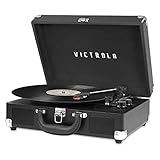
- THREE SPEED BELT-DRIVEN TURNTABLE - This 3-speed (33 1/3, 45, 78 rpm) suitcase record player features UPGRADED PREMIUM SOUND QUALITY and sits on sound isolating feet that prevent vibration. It is perfect for your living room, bedroom or office.
- TAKE YOUR TUNES ANYWHERE - Housed in a vintage suitcase with an easy carry handle, Victrola's blend of retro and contemporary design give you the ultimate flexibility to listen to music where you want and how you want – a great choice for vinyl lovers. Clean only with a dry cloth
- EXPANDED CONNECTION OPTIONS - Stream smartphone audio through the turntable’s built-in Bluetooth speakers. Easily connect external speakers via the stereo RCA outputs, or use the Line input for non-Bluetooth devices like a CD player. For personal listening, connect your headphones to the headphone jack.
- NO STEREO SYSTEM OR EXTRA EQUIPMENT REQUIRED. Get it up and running in minutes. Retro looks combined with the convenience of modern technology makes this affordable record player ideal for beginners & vintage enthusiasts
- ALL THE CONTROLS YOU NEED - Features an Input select knob, Power/Volume Knob & an Auto stop switch that stops spinning records once the record is finished playing.
Skipping, repeating, or a jumping tonearm
- Clean the record and stylus and test a different disc.
- Put the player on a firm, level surface away from vibration. Victrola notes that a slanted surface can cause skipping.
- Recheck the transport screw and inspect for a warped or damaged record.
- Use tracking-force or anti-skate adjustments only when the model actually provides them.
On Stream turntables, a song that repeatedly loops can result from excessive anti-skate. Victrola instructs owners to reduce that setting gradually until the loop stops. Do not apply this advice to models without an anti-skate control.
Tiny Vinyl exception
Victrola says 4-inch Tiny Vinyl albums work on most players only when automatic-off is disabled. They will not play on Automatic or Stream turntables. An arm returning to its rest on those models can therefore be expected behavior, not a failed motor.
The record plays too fast or too slowly
Confirm the disc’s rated speed and set the selector accordingly: normally 33⅓ or 45 RPM, and 78 RPM only on models that support it. Some Victrola products select 78 by pressing both 33 and 45 controls, but that is model-specific; the manual controls.
Use the 45 adapter when the record requires it. If every record is consistently fast or slow after the correct setting, inspect belt placement and the transport screw. A slipping belt, motor-speed fault, or control failure is possible. Do not adjust hidden speed potentiometers on an under-warranty unit.
Windows Errors? Fix Them Before They Spread
Repair common Windows errors and clear accumulated junk for a smoother, more stable PC - no reinstall needed.Free scan · no reinstallOutdated Drivers Are Slowing You Down
One free scan finds every outdated or missing driver and matches the right update for your exact hardware.Free scan · exact hardware matchRank #4

- 6-in-1 ENTERTAINMENT CENTER – With vintage looks on the outside & modern features inside, listen your way; vinyl records, CDs, cassettes, AM/FM radio or stream music from your smartphone via Bluetooth or 3.5 mm Aux/headphone jack.
- NO STEREO SYSTEM OR EXTRA EQUIPMENT REQUIRED. Get it up and running in minutes. Retro looks combined with the convenience of modern technology make this record player a great value - ideal for beginners & vintage enthusiasts alike.
- THREE SPEED BELT-DRIVEN TURNTABLE – This 3-speed (33 1/3, 45, 78 rpm) record player features UPGRADED PREMIUM SOUND QUALITY with minimum vibrations. It is perfect for your living room, bedroom or office and a great choice for vinyl lovers.
- EXPANDED CONNECTION OPTIONS – Extend the sound by connecting external speakers or an amplifier via the RCA Line outputs (cable included). For personal listening, plug your headphones into the headphone jack.
- ALL THE CONTROLS YOU NEED – Features an input select knob, power button, volume knob, FM tuner, play/pause/fast forward/rewind buttons, program & repeat buttons, open/close button for CD tray, eject switch for cassettes - everything is right there.
Hum, buzz, or mechanical noise
Mechanical hum
- Move the player to a sturdy, level surface.
- Separate it from speakers and other vibration sources.
- Check that the transport screw is correctly loosened and that the platter or belt is not rubbing.
Electrical hum
- Reseat RCA plugs and test with external equipment disconnected.
- Keep phones and other electronics away from the audio chain.
- Where possible, power the turntable, amplifier, and speakers from the same outlet to reduce ground-loop variables.
For Stream models, Victrola also lists dust on the record or stylus and a loose removable headshell as possible causes; turn the unit off and reseat the headshell if that model uses one.
Bluetooth works—or appears to—but there is no audio
“Bluetooth” does not describe one universal direction. A Victrola may accept phone audio as Bluetooth input, transmit vinyl to headphones or speakers as Bluetooth output, or use Wi-Fi to send vinyl to Sonos. A Bluetooth button alone does not prove that the product supports Bluetooth output; check the product page or manual for Bluetooth-Out or VinylStream.
- Place the Victrola and receiver close together for initial pairing.
- Put the receiver in pairing mode and disconnect previously paired devices.
- Re-enter Bluetooth mode on the Victrola.
- Test the built-in speakers or wired output.
- Power-cycle both devices and repeat the model-specific pairing procedure.
Victrola Stream will not play through Sonos
Victrola says Stream turntables work with both Sonos S1 and S2. Use this order:
- In the Victrola Stream app, select the turntable, open About turntable, and choose Check for Update.
- Update Sonos in the Sonos app.
- Confirm the turntable and Sonos system use the same network.
- Select a default Sonos speaker or group and enable autoplay if automatic playback is expected.
- Ensure the target speakers are powered on and online.
- Force-close and reopen both apps.
- Return the tonearm to its rest, then begin playback again to retrigger autoplay.
- If needed, perform the model-specific soft reset.
- Reboot a Sonos speaker by disconnecting power for 10 seconds and reconnecting it.
- Factory-reset only as a last resort; network settings and speaker assignments must be configured again.
Victrola’s Stream troubleshooting page and guide describe different reset timings: one lists a five-second soft reset and 15-second hard reset, while the guide summarizes a 10-second factory-reset command. Follow the timing and illuminated-knob confirmation shown for your exact model and current app/manual.
The Tool Desk
Outbyte PC Repair FREEClear out junk files and repair common Windows errorsFree Scan →Outbyte Driver Updater FREEFix the driver behind crashes, sound loss and screen glitchesFind Drivers →Best Value

- 6-IN-1 MUSIC CENTER – The Victrola Century pairs mid-century modern design with a 3-speed turntable, Bluetooth, VINYLSTREAM output, CD player, cassette player, and 3.5 mm aux input for versatile playback options
- BUILT-IN STEREO SPEAKERS – Enjoy rich, room-filling sound with built-in, custom-tuned speakers engineered for premium audio performance without the need for external components
- BLUETOOTH INPUT – Stream music directly from your smartphone or tablet via Bluetooth, eliminating clutter and cables for a seamless setup
- VINYLSTREAM BLUETOOTH OUTPUT - Stream your favorite records directly to Bluetooth-enabled speakers or headphones with integrated VINYLSTREAM Bluetooth output
- PRIVATE & EXPANDABLE LISTENING – Use the built-in headphone jack for solo sessions, or connect to external systems through the RCA output for enhanced flexibility
Wobbling platter or record
A warped record can look like a defective platter. Victrola says some platter movement may be normal when playback is otherwise unaffected. If wobble changes pitch, makes the stylus jump, or is severe with multiple records, place the unit level, record a short video, and contact support. Do not bend or shim the platter.
Replacing the stylus safely
- Identify the exact model and serial number.
- Check Victrola’s needle and cartridge category and the compatibility note for that model.
- Turn the player off and unplug it.
- Use the replacement procedure in the model manual.
- Do not buy a needle merely because it looks similar.
For example, Victrola’s ITNP-S1 three-pack is listed for selected Journey, Liberty, Hawthorne, Quincy, and other models at its product page, while ITNP-LC1 covers a different group including various Aviator, Empire, Century, and Navigator products at its product page. Both pages impose model or serial-number restrictions. If the cartridge, tonearm wiring, or stylus assembly is damaged, contact Victrola instead of forcing a replacement.
Repair, return, or replace?
Use support or warranty service when
- The player is within its return or warranty period.
- The fault may be a setup issue, displaced belt, contaminated stylus, or configuration error.
- The model has a documented compatible stylus.
- The motor, tonearm, platter, and cabinet appear physically intact.
Replacement may be sensible when
- The motor, amplifier, tonearm wiring, or cartridge has failed.
- Parts are unavailable or repair labor approaches the value of an inexpensive all-in-one player.
- You want better tracking, lower noise, or modular external speakers rather than merely restored playback.
Built-in speakers are convenient but can transmit vibration into the turntable. External wired speakers improve placement flexibility while adding cable, amplifier, grounding, and input variables. Bluetooth output is convenient but adds pairing and possible latency. A conventional RCA connection is usually the simplest diagnostic path.
Symptom-to-action table
| Symptom | Most likely cause | First action | If it fails | Stop and contact support when |
|---|---|---|---|---|
| No power | Outlet, adapter, switch, or internal fault | Try a known-good outlet and reseat power | Use Victrola support | There is no indicator or response after safe checks |
| Power but no spin | Mode, transport screw, or belt | Confirm Start/Stop behavior and inspect belt | Follow the model manual | Belt is fitted but motor stalls, clicks, or overheats |
| Spin but no audio | Input, tonearm, stylus, or record | Select vinyl mode, lower arm, remove guard, test another record | Check RCA, headphones, and speakers | Stylus or wiring is visibly damaged |
| Skipping or looping | Dirty/warped record, stylus, vibration, or anti-skate | Clean, level, and test another disc | Adjust anti-skate only where provided | Multiple clean records skip or pitch varies |
| Wrong speed | Incorrect selector, belt, or motor control | Match 33⅓/45/78 to the record | Inspect belt and consult manual | All records remain consistently fast or slow |
| Hum or buzz | Vibration, RCA seating, or ground loop | Use a sturdy surface and reseat connections | Test a common outlet and isolate equipment | Noise persists with basic setup or hardware is hot |
| Wireless failure | Wrong Bluetooth direction, pairing, app, or network | Test built-in speakers or wired output | Re-pair, update, and verify network | Factory reset would be required without the correct model procedure |
The Bottom Line
Work from the outside in: power, mode, volume, tonearm, stylus, transport screw, belt, speed, record, then wireless or external output. If those checks do not restore playback—or reveal a hot motor, damaged stylus, failed wiring, or persistent speed fault—stop experimenting and use Victrola’s model-specific support path.
Quick wins for a faster PC:
Clear out junk files and repair common Windows errorsFree Scan →Fix the driver behind crashes, sound loss and screen glitchesFind Drivers →Quick Recap
Product prices and availability are accurate as of the date/time indicated and are subject to change. Any price and availability information displayed on Amazon at the time of purchase will apply.