Do these 3 things before closing this tab:
1Scan for outdated or missing drivers - takes under a minute2Repair Windows errors before they cause bigger problems3Fix the driver behind crashes, sound loss and screen glitchesPeacock does not currently have a verified universal three-month free trial. As of August 12, 2026, its official plan information lists paid subscriptions, while a separate targeted annual promotion had already expired. Older three-month codes should be treated as historical unless Peacock accepts one and displays the full offer at checkout.
The useful Peacock tips are knowing where to check legitimate promotions, choosing the right plan for movies and kids’ programming, setting up a Kids profile with a PIN and canceling through the correct billing provider.
Is there a current three-month Peacock free trial?
Short answer: No universal three-month Peacock free trial was verified as of August 12, 2026. Peacock’s official plan information shows paid monthly and annual subscriptions, not a standard three-month trial available to everyone.
Peacock does sometimes run targeted promotions. However, an older article, coupon page or social-media post is not proof that a three-month code still works. Before entering payment details, open Peacock’s official plans or checkout page and confirm that the offer is attached to your account or available in your region. The checkout screen should show the promotion, its expiration date, the plan it applies to and the price that will renew afterward.
Recommended Free Tools
#1 Best Overall

- Easy voice search & control: Quickly search across thousands of top channels, play entertainment, control your streaming, and more with your voice
- No more juggling remotes: Power up your TV, adjust the volume, control your Roku device, switch inputs on your Roku TV, and more—all in a tap
- Pre-set channel shortcuts: Pre-set channel shortcuts let you launch popular streaming channels with the push of a button, all without having to scroll
- Simple setup: Simply turn on your Roku device and pull the battery tab on the back of the remote and it should pair automatically
- Works with your Roku device: Roku Voice Remote works with all Roku TV models, Roku audio products, and most Roku players*
An official Peacock terms page documented a separate email-based annual promotion that ran from June 11 through July 10, 2026. It was limited to intended recipients, required a valid payment method, applied to U.S. residents and excluded current Premium and Premium Plus subscribers. That promotion had expired by the time of this research, so it should not be presented as a current three-month trial. See the official Peacock offer terms for the documented promotion.
How to check an offer safely
- Open Peacock’s official plans page or begin checkout from Peacock’s website.
- Sign in if the promotion may be tied to your account, email address or region.
- Read the complete terms, including the end date, eligible plan, renewal price, payment requirement and eligibility restrictions.
- Do not rely on an old promo code unless Peacock accepts it and displays the complete discount before payment.
- Write down the renewal date and the company that will bill you. That information determines where you must cancel.
What about partner trials and bundles?
Existing memberships and channel platforms have sometimes been reported as possible routes to Peacock access, including Instacart+, Walmart+ and Amazon Prime Video Channels. These are partner arrangements, not proof of a current direct Peacock three-month trial. Trial length, plan level, eligibility and availability can change.
If you investigate Peacock through a partner membership, read the partner’s current terms before enrolling. Confirm that Peacock is actually included, whether the benefit is a trial or an ongoing bundle, what happens when the introductory period ends and which company controls billing. A Peacock account can show access even when the partner—not Peacock—controls renewal and cancellation.
Current Peacock plans and prices
The following U.S. prices and plan descriptions were listed in the research checked on August 12, 2026. Streaming prices, catalogs and plan benefits are changeable, so verify the checkout total before subscribing. Peacock presents the annual options as 12 months for the price of 10.
| Plan | Monthly price | Annual price | What it includes |
|---|---|---|---|
| Select | $7.99 | $79.99 | TV favorites from NBC, Bravo and related programming. It excludes sports, movies and Peacock Originals. |
| Premium | $10.99 | $109.99 | TV, movies, live sports and events, and Peacock Originals, with advertising. |
| Premium Plus | $16.99 | $169.99 | The Premium catalog with no ads subject to limited exceptions, plus downloads and other features. |
Premium Plus is not completely free of advertising. Peacock says ads can still appear in channels, live sports and events, and some programs. If your main goal is family movie night, do not assume that the Select plan includes movies; check the plan label for the specific title or upgrade requirement. The official Peacock Kids page is also a useful place to review the current family catalog.
How to find kids’ shows and movies on Peacock
Open Peacock’s dedicated Kids area rather than searching the entire service. The page organizes programming into sections such as:
Rank #2
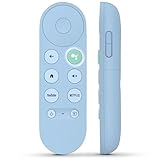
- 【Compatibility Models】Blue Voice Replacement remote for Google TV & Chromecast 4K/HD,for Google TV Streamer(4k),Universal G9N9N, GA01920-US, GA01923-US, GA01919-US, GA02463-US, GA01409-US, GA02464-US
- 【Incompatible Devices】NOT Compatible with Google Chromecast lst Gen, NOT for Google Chromecast 2nd Gen, NOT for Google Chromecast 3rd Gen, NOT for Chromecast Ultra, NOT for Chromecast Audio
- 【Quick Pairing】Pair your new blue remote: ①Press the pairing button on your device; ②Press and hold the"Back" and "Home" buttons simultaneously for 10 seconds until the LED on your new remote starts flashing
- 【Voice Control】Pressing the voice button on the remote, you can use voice to search for specific shows, you can also use voice to control the volume, switch inputs, play music, and get answers on-screen.
- 【Channel Buttons】The replacement remote for Google Chromecast TV , featrues 2 popular streaming buttons ( for NFLX、YouTube) to quick access to the entertainment. Just install 2x AAA batteries to get it to work (batteries are NOT included).
- Babies
- Animated comedy
- Animated action and adventure
- Kids TV Shows A–Z
- Kids Movies A–Z
The catalog changes, and availability can vary by time, location and plan. The following are examples observed in Peacock’s Kids area during research, not a permanent promise that every title will remain available.
Preschool viewing
For younger children, examples include Barney, Blippi, The Wiggles, Curious George, Baby Einstein and Caillou.
Animated comedy
Comedy-oriented options include Shrek, Garfield and Friends, Curious George and LEGO Jurassic Park: The Unofficial Retelling.
Adventure and action
Adventure examples include Dragons: The Nine Realms, Dragons: Riders of Berk, Spirit & Friends, Cleopatra in Space and Megamind Rules!.
Family movie night
Titles listed among family-movie examples include The Super Mario Bros. Movie, Minions, Shrek, Despicable Me 2, Puss in Boots: The Last Wish and The Lorax. Check the title page before planning a movie night because licensing and plan eligibility can change.
How to create a Kids profile and restrict profile switching
Peacock supports Kids profiles and profile-based maturity settings. A Kids profile is restricted to content in Peacock’s Kids section rated PG or lower. The associated ratings are TV-Y, TV-Y7, TV-Y7-FV, TV-G, G, TV-PG and PG. The account holder or main profile cannot itself be a Kids profile.
What’s actually slowing this PC down?
Pick the symptom - the matching free tool is one click away.
Rank #3

- 【Compatible Devices】Universal replacement remote control is compatible with TV brands for Samsung, LG, Vizio, Sony, Hisense, Onn, Sharp, RCA, Element, Westinghouse, Sanyo, Emerson, Philips, JVC, Sceptre, Sansui, Panasonic, Magnavox, Skyworth TV and More Brand Smart TVs. Compatible with of devices, including DVD/Blu-ray players, Media Streaming Players and more!
- 【NOT Compatible Devices】Universal remote is Not compatible with Roku Streaming Sticks, Roku Sound Bar, TLC Sound Bar, Hisense Sound Bar, Anker Sound Bar, Klipsch Sound Bar, All Fire TV, All TV Sticks, All TV Cube, Apple TV, Google Chromecast TV(This product can only be connected and paired via infrared) If you are unsure if our remote control is compatible with your device, please contact us.
- 【Simple Setup】Step 1: Find the device type you need in the code list. Then find and circle all the codes for the brand. Step 2: Press and hold down the (SETUP) button for 3 seconds until the red light on the remote turns on. Step 3: Press and release the (TV/STR/AUD) button on the remote, the red light will blink once and remain on. Step 4: Enter the first 4-digit code from code list. Step 5: Point the remote at the TV, and test the buttons on the remote to see if the TV responds as you would expect. If the buttons don't control the TV, repeat steps 2-4 and enter different code to test. Note:If all the code in the program fails, please check the instructions on page 7 "Automatic Code Search.
- 【Package Included】Package includes 1* Remote Control, 1* User Manual, and 1* Code list. The universal remote control is to use 2 * AAA alkaline batteries(Batteries are not included). Note: Please do not mix old and new batteries or mix different batteries together.
- 【After-Sales Service】We attach great importance to the customer's experience of using remote controls. If you have any questions about your order or product, please contact us and we will get back to you within 24 hours on working days.
Set up the child’s profile
- Sign in to Peacock in a web browser or on a mobile device.
- Open the account’s profile-management controls and choose the option to add a profile.
- Select the Kids profile option rather than creating another unrestricted adult profile.
- Choose the available maturity grouping: Little Kids, Older Kids or Family.
- Save the profile, then switch into it when the child is watching.
Peacock says maturity settings and profile-PIN settings are managed through a web browser or mobile device rather than directly on a TV. If the television displays a QR code, scan it and finish the change on the phone or computer it opens.
Add a four-digit profile PIN
Use profile settings to add a four-digit PIN to the adult or other protected profile. The PIN helps stop a child from switching from the restricted Kids profile to a less-restricted profile. It is an access control for profiles, not a guarantee that every program is appropriate for every child, so parents should still review titles and ratings.
Keep the PIN private. If a child knows it, the protection is substantially weaker. Also remember that a Kids profile does not make every title on the Kids page permanently available: the catalog and plan requirements can change.
How to watch Peacock on a television
Peacock supports Fire TV and Fire Tablet devices running Fire OS 6 or later. On a compatible Fire TV or Firestick, the official installation path is:
Quick wins for a faster PC:
Clear out junk files and repair common Windows errorsFree Scan →Fix the driver behind crashes, sound loss and screen glitchesFind Drivers →Repair Windows errors before they cause bigger problemsFix Now →- Open Find on the Fire TV home screen.
- Select Appstore.
- Search for Peacock.
- Choose the Peacock app and select Get.
- Open the app.
- Sign in to an existing account or choose a plan.
Before buying hardware, check the exact Fire TV model, television input, home network and Peacock compatibility requirements in Peacock’s supported devices and platforms help page.
Independent reader supportYour contribution helps us test, update, and keep practical guides available for everyone.How to cancel Peacock before it renews
Cancel through the company that bills you. Signing out, deleting the Peacock app, removing the device or stopping playback does not cancel a subscription.
Rank #4

- Multi-device control – Operate up to four audio and video devices such as your TV, Blu-ray player, DVD player, cable or satellite receiver, soundbar, streaming media player or other compatible devices
- Best remote code library – Universal remote works with all major brands and supports thousands of the latest audio and video devices (not for use with radio frequency devices like Roku Streaming Sticks and Amazon Fire TV/Sticks)
- Preprogrammed for Samsung TVs – Universal remote’s TV button is preprogrammed for immediate use with Samsung TVs – simply add two AAA batteries (not included)
- Simple setup – Enjoy easy automatic code search and direct code entry programming, as well as master volume control to adjust the audio no matter which device is being used
- Designer finish and ergonomic design – The universal remote’s silver finish adds an extra touch of elegance to any decor while its ergonomic design fits comfortably in hand
If Peacock bills you directly
- Log in to your Peacock account.
- Select Cancel All Subscriptions.
- Follow the confirmation steps.
- Keep the cancellation confirmation email.
Peacock states that cancellation prevents renewal at the end of the current subscription term. It generally does not provide refunds or credits for previous payments unless the law requires one. If you are using a promotional offer, cancel early enough to account for the renewal date shown in the offer terms.
If a third party bills you
Subscriptions purchased through Amazon, Apple, Google Play, Roku, Xfinity, Verizon or another provider generally must be canceled through that provider. This also applies to many partner promotions and channel subscriptions. Check the payment method shown in your Peacock account, then check the relevant partner’s subscription settings.
Peacock’s cancellation help page explains the third-party billing rule. Do not assume that canceling inside Peacock, deleting the app or removing Peacock from a streaming device has stopped the partner’s recurring charge.
A practical Peacock checklist
- Trial: No universal three-month offer was verified as of August 12, 2026.
- Promotion: Trust a code only when official checkout accepts it and shows its full terms.
- Price: Compare Select, Premium and Premium Plus based on whether you need movies, sports, Originals, downloads or fewer ads.
- Kids: Use the dedicated Kids area and check the title’s current availability and plan requirement.
- Controls: Create a Kids profile, select its maturity grouping and protect adult profiles with a four-digit PIN.
- Devices: Confirm support before buying a streaming stick or attempting installation.
- Cancellation: Cancel with Peacock or the third-party billing provider before the renewal date, and save the confirmation.
Frequently Asked Questions
Does Peacock currently offer a three-month free trial?
No universal three-month trial was verified as of August 12, 2026. Peacock may offer targeted promotions, so check the official checkout page for an offer attached to your account or region and read the renewal terms before paying.
Will deleting the Peacock app cancel my subscription?
No. Deleting the Peacock app, signing out or removing a streaming device does not cancel billing. Cancel directly with Peacock or through Amazon, Apple, Google Play, Roku, Xfinity, Verizon or whichever partner bills the subscription.
What can children watch on a Peacock Kids profile?
A Kids profile is limited to content in Peacock’s Kids section rated PG or lower, with maturity groupings of Little Kids, Older Kids and Family. The catalog and plan eligibility can still change, so check individual titles.
The Bottom Line
Peacock had no verified universal three-month free trial as of August 12, 2026. Check official checkout for account-specific promotions, use the Kids area and profile controls for family viewing, and cancel through the company that bills you.
Quick Recap
Product prices and availability are accurate as of the date/time indicated and are subject to change. Any price and availability information displayed on Amazon at the time of purchase will apply.