Some links on this page are affiliate links: if you buy through them we may earn a commission, at no extra cost to you.
Yes, viewers have reported subtitle-position problems on Max, but the symptoms appear device-specific—not a confirmed service-wide bug. Older reports describe subtitles sitting too high on Android TV and NVIDIA Shield; reports from May 2026 describe subtitles shifting left or losing their center alignment on some Samsung TVs. Max’s help pages explain how to select subtitle tracks and change their appearance, but do not document a general control for moving subtitles vertically. If the usual app and device checks do not help, testing another device and reporting the exact setup are the most useful next steps.
What “subtitle positioning” can mean
Reports about subtitles being “out of place” can describe different problems. Horizontal alignment, vertical placement, and captions that move during a scene are separate behaviors, with different possible causes.
| What you see | What it may indicate |
|---|---|
| Text is consistently too high | A layout issue in the Max app on that device, an interaction with device caption settings, or a display setting. |
| Text is left-aligned, pushed to an edge, or clipped | A possible app/platform rendering problem. Samsung TV users reported this kind of behavior in May 2026, but those reports are not an official diagnosis. |
| Captions move nearer to speakers or away from graphics | Potentially intentional positioning or metadata in a closed-caption track. Movement alone does not prove a bug. |
| Text is too large or has an intrusive box | More likely an appearance or caption-style setting than a position control. |
| Only one title has the problem | The title’s subtitle track or authoring may be involved. |
| Text is part of the picture itself | It may be burned into the video and cannot be moved with subtitle settings. |
It also helps to distinguish ordinary subtitles from closed captions (CC). CC tracks may include speaker labels, sound descriptions, or positioning information. Forced subtitles—used for selected dialogue or on-screen text—may be supplied differently from a title’s main track. If a line appears in exactly the same place as part of the video image and cannot be switched off independently, it may be open, or burned-in, text.
Free tools Windows power users keep installed
One-click scans. No signup required.
Is this a confirmed Max bug?
There are reports, but the evidence does not establish one continuous defect affecting every subscriber or device. An Android TV/NVIDIA Shield discussion from October 2021 described subtitles appearing too high and asked for a vertical-position option (user report). In May 2026, Samsung TV users reported subtitles becoming left-aligned, partially cut off, or no longer centered, including after attempts such as restarting or reinstalling the app (user report). A separate Sky Community post described off-center subtitles in the HBO Max app on Sky Q (community report).
#1 Best Overall

- BONUS ACCESSORIES INCLUDED – Comes with a zippered storage case, microfiber cleaning cloth, and neck strap for easy travel and lens care.
- READ SUBTITLES MORE EASILY – Great for movies, streaming shows, and live sports when on-screen text is difficult to read.
- WATCH TV CLEARLY FROM ACROSS THE ROOM – 2.1X magnification helps bring television screens into clearer focus from approximately 10 feet to infinity.
- GREAT FOR SPORTS, THEATER & TRAVEL – Ideal for sporting events, concerts, cruises, dorm rooms, and long-distance viewing.
- ADJUSTABLE FOCUS – Fine-tune each lens for your preferred viewing distance and clarity.
These are useful accounts of what viewers experienced, not proof of the underlying cause. They also describe different symptoms and devices: the older report is specifically about subtitles too high, while the newer Samsung reports focus on alignment. Max’s published guidance does not identify a known, service-wide positioning defect or announce a fix.
Can you move Max subtitles lower?
Max documents how to choose a subtitle or closed-caption track and adjust appearance—such as font, size, color, and opacity—on supported devices. The available options vary by platform, and some devices use their own system caption settings. The cited Max instructions do not document a general “vertical position,” “subtitle offset,” or “move down” setting. See Max’s subtitle and caption instructions.
Rank #2

- *Makes your TV-screen appear twice as big.; For myopia ; Refraction : 0~-3; Recommended observation distance: 3Meter
- *New: easy grip, focusing wheel.; 2.1X magnification of the screen.Maximize your screen with special TV-glasses.
- *Maximize your screen with special TV-glasses,Makes your TV-screen appear twice as big
- *This is a kind of TV glasses, very modern, suitable for the visual range of 0 to 300 degrees with the myopic crowd watch , with in/out into the TV image, close to the TV image distance function, and clear images natural distortion, your eyes will not easy fatigue.
- *Perfect for reading, Watching, Research, electronics repair,Jeweler Appraisal, Etc.
Changing the text size may make captions less distracting, and changing color or background opacity may improve readability. Neither change necessarily moves the text baseline. Max also notes that settings changed on one device may not carry over to another, so a web-player or phone setting may not affect the TV app.
Troubleshoot in this order
- Check which track is selected. While playing a title, open the speech-bubble Audio and Subtitles menu and try an ordinary subtitle track instead of CC, or the reverse. Max documents this menu for selecting available tracks. If only one track moves or jumps, that is an important clue.
- Turn subtitles off and back on. This may refresh the selected track. It is a quick check, not a guaranteed fix for a layout defect.
- Restore the caption style to default. If your TV, streaming device, or Max app has style controls, reset them before changing one setting at a time. Device-specific instructions and options are covered in Max’s caption-appearance guidance.
- Update Max and the device software. Max recommends keeping both current. On Samsung TVs, its troubleshooting page gives these example paths: for the app, Home > Apps > Settings > Updates; for the TV, Settings > Support > Software Updates > Update Now. Menu labels can vary by model and software version. See Max’s troubleshooting steps.
- Sign out, then restart the TV or streaming device. Reopen Max and sign back in. A restart can clear a temporary playback state; it does not establish that the underlying position problem is fixed.
- Reinstall the Max app if your device allows it. Try this once if the earlier checks fail. It is not a dependable cure: some May 2026 Samsung reports described the problem persisting after reinstalling.
- Compare another title, service, and device. Use the same Max account and title on another supported device if possible. Also try another streaming service on the same TV. If Max is misaligned only on one device while another app displays captions normally, that points toward a Max-client or platform interaction—but does not establish root cause.
- Check the picture-size setting. A TV’s zoom or picture-size mode can crop the image and make normally positioned subtitles seem too high or partly hidden. Return the picture to a standard fit-to-screen mode and compare.
Device-specific checks
Android TV and NVIDIA Shield
Android TV has system caption preferences, although the menu path varies by Android version and device. Google documents paths such as Settings > Device Preferences > Accessibility > Captions; on some versions, captions appear directly under Settings > Accessibility. The Android TV accessibility guide and Android Developers’ caption-settings documentation describe system options. They can affect caption appearance, but may not override how the Max app positions its text. Google’s Google TV community guidance likewise notes that position can depend on the app.
Rank #3

- Japanese Drama
- English Subtitle
- Region Free
Samsung TV
If subtitles are left-aligned or clipped, compare more than one Max title and another app on the same TV. The May 2026 reports make a Max-on-Samsung interaction plausible for affected setups, but do not show that all Samsung models or regions are affected. If updates, a restart, and a style reset make no difference, report the issue rather than repeatedly reinstalling.
Google TV, Chromecast, Apple TV, Roku, and web
System settings and app rendering can interact differently across platforms. A comparison on another device can help isolate the problem, but settings do not necessarily transfer between a browser, phone, TV, or streaming box. Casting also adds another playback path—the sending device and receiving device may not render captions the same way—so compare with direct playback on the TV or box where possible.
Rank #4

- Galilean design offers a bright, wide field of view (20º) and 2.1x magnification
- Individually focusable objective lenses to compensate for +/- 3D of spherical correction or allow for adjustment of focal length from 10' to infinity
- Eschenbach PXM optics and flexible plastic temples allow for light weight (only 49 grams - or 1.7 ounces!) with an extremely comfortable fit!
- Attractive, modern, hi-tech frame.
- Frosted objective lens housing eliminates distracting reflections
When is moving text normal, and when is it suspicious?
Some caption tracks reposition text to identify a speaker or avoid graphics and on-screen text. That can be intentional. Check a standard subtitle track against CC before deciding that every movement is an app defect.
A rendering problem becomes more plausible if text is clipped or pushed against an edge, the same fault appears across many titles, it began suddenly without a settings change, or ordinary subtitles behave differently from CC. If one title alone is affected, its track or authoring is a stronger possibility. If only Max on one device is affected while the same title looks normal elsewhere, report it as a device-specific Max playback issue.
Best Value
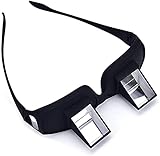
- CHANGAR Universal and Myopia Usable: Used for both youngsters and old people,great for the bedridden and hospital patients
- Benefit for Health: Valuu High Definition Lazy Glasses help you read books and watch TV shows without direct contact and moving your head. Prevents from neck pain, radiation and eyestrain
- Super Convenient: This High-qualified Optical Glasses is in a light weight which can be carried all around easily. And It has the similar shape as the ordinary one. You can wear the prism glasses only or wear it over your ordinary glasses (include prescription glasses).
- High Quality Glasses: Valuu Lazy Glasses are made by High Definition glasses and high quality reflecting prism which bring Clear and bright image, enable people in a supine position to see object in the front
- Lifetime Warranty: Valuu Lazy Glasses guarantees you that you will be definitely satisfied with it! If there is any problem on quality defects, we will solve it for you immediately!
What to send Max support
Include enough detail to distinguish a track or title issue from a device-specific rendering problem. A screenshot or short video can show alignment or clipping; avoid sharing anything that exposes account information.
Device and model:
TV or streaming-device OS/firmware:
Max app version:
Country/region:
Title, episode, and timestamp:
Subtitle language and track type: subtitles or CC
Exact symptom: too high / left-aligned / cut off / jumping
Does it happen with every title?
Does another app display captions normally?
What updates, resets, or restarts have you tried?
Max’s troubleshooting page covers updating, signing out, restarting, and reinstalling. If the issue persists, use Max’s support options for your region and include the details above. For viewers who rely on captions, clipped or misplaced text can make dialogue difficult to follow; there may be no user-side way to force a vertical offset if the particular app does not offer one. In that case, another playback device or a different subtitle track may be the only immediate workaround.
Quick wins for a faster PC:
Repair Windows errors before they cause bigger problemsFix Now →Fix the driver behind crashes, sound loss and screen glitchesFind Drivers →Clear out junk files and repair common Windows errorsFree Scan →Quick Recap
Product prices and availability are accurate as of the date/time indicated and are subject to change. Any price and availability information displayed on Amazon at the time of purchase will apply.

