The Tool Desk
Outbyte Driver Updater FREEFix the driver behind crashes, sound loss and screen glitchesFind Drivers →Outbyte PC Repair FREERepair Windows errors before they cause bigger problemsFix Now →Double Thumbs Up is Netflix’s “Love this!” rating. It tells Netflix that you especially enjoyed a movie or series and want more closely related recommendations on the profile you used. It is a personal recommendation signal—not a public review, a five-star score, or literally two separate likes.
What Double Thumbs Up means
Netflix introduced Double Thumbs Up globally on April 11, 2022, as a third rating choice alongside thumbs up and thumbs down. Netflix’s English interface labels the choices I like this, Love this!, and Not for me. Labels and placement can vary by language, device, and interface version.
| Netflix control | What you are telling Netflix | When to use it |
|---|---|---|
| Thumbs down | “Not for me.” | You want to reduce closely related suggestions, while understanding this is not a guaranteed permanent block. |
| Thumbs up | “I like this.” | You enjoyed the title and may want similar recommendations. |
| Double Thumbs Up | “Love this!” | You especially loved it and want Netflix to look for more specific connections. |
Netflix says a normal thumbs up supports similar suggestions, while Double Thumbs Up signals that you are “really into” a title. For example, loving Bridgerton could encourage recommendations connected to its cast or Shondaland productions, not just more shows with the same genre label. See Netflix’s launch explanation at About Netflix.
How to give a title a Double Thumbs Up
The control is attached to the selected profile’s rating. Netflix changes layouts periodically, so the icon may not be in exactly the same place on every television, streaming stick, game console, browser, or app.
What’s actually slowing this PC down?
Pick the symptom - the matching free tool is one click away.
#1 Best Overall

- You don’t need to change the Music with your fingers. This bluetooth remote control can scroll the pause/play Music APP. Next Prevtrack,Volume yp or down,mute etc. Of course, it is a good helper for you to take selfie or videos.
- capture stunning photos&video remotely with easy - Say goodbye to blurry photos. Eliminate camera shake for razor crisp photos every time. Snap photos and Start/Stop video recording with the click of a button.
- 【!!!You must read it if your device is Iphone or Ipad etc. IOS system devices】!!! TThe" Home "button not fit for Ios System like iphone ipad itouch.
- It is follow ergonomic. Comfortable hand feeling. Pleasant sound of silicone keypad built-in light strength pot piece .High grade acrylic panel. Standby time more than one year
- There is a call answer and end button
Smart TV or streaming device
- Open Netflix and select the profile you want to use.
- Open the movie or series information page.
- Find the thumbs or rating control near options such as Play, My List, or the title details.
- Select the rating control.
- Choose Double Thumbs Up or Love this!.
Return to browsing after saving the rating. The exact remote sequence depends on the device and its current Netflix interface.
Netflix.com in a browser
- Go to Netflix.com and sign in.
- Choose the correct profile.
- Open the title’s details page.
- Select the thumbs or rating icon.
- Choose the two-thumbs-up option.
Netflix specifically identifies Netflix.com as a place where ratings can be saved. Its current instructions are in the Netflix Help Center.
Android or iPhone
- Open the Netflix app and select a profile.
- Open the movie or series details.
- Tap the thumbs or rating control.
- Tap Love this! (the Double Thumbs Up choice).
Reporting from August 2023 said Netflix also exposed rating controls during playback or end credits on mobile. That placement depends on the app version and device, so use the title details page if you do not see the control while watching.
What happens after you use it?
Netflix records the rating on the profile that submitted it and uses it as one input in personalization. It may make recommendations more concentrated around a title’s genre, cast, creators, themes, or related viewing patterns. Netflix continually updates recommendations and personalizes the rows on your home screen, including which rows appear, which titles they contain, and their order.
PC Slower Than It Used to Be?
A free scan shows the junk files, broken settings and background clutter dragging Windows down - then fixes them in one click.Free scan · Windows 10 & 11Outdated Drivers Are Slowing You Down
One free scan finds every outdated or missing driver and matches the right update for your exact hardware.Free scan · exact hardware matchRank #2

- Works with All Samsung Smart TVs: Our Smart TV remote is designed to work with All Samsung Smart TV models without any setup. This includes Samsung 4K UHD, LED, QLED, Curved, Flat Screen, DLED TVs, and more
- Includes Hotkeys for Top Streaming Services: Our remote for Samsung TV comes with dedicated hotkeys for Netflix, Hulu, and Prime Video. No more searching through endless menus. Simply press the button and start streaming your favorite shows
- Simple Setup: Our Smart TV remote is easy to set up. Simply insert batteries and start using it. No need for any additional setup or programming
- Compact and Ergonomic Design: Our remote is designed with a compact and ergonomic design, making it comfortable to hold and use. It also has a sleek and modern look that enhances the overall aesthetics of your TV
- Universal Control: Our remote can control not only your Samsung TV but also other devices like Blu-ray players, soundbars, and cable boxes. This allows you to manage all your devices with a single remote
A Double Thumbs Up is not an override command. Netflix also considers viewing history, titles started and completed, how long you watched, genres, title information, language preferences, device, time of day, and the behavior of members with similar tastes. Recent engagement can outweigh older preferences, and the catalog available in your country and plan limits what can be offered. Consequently, a visible change may be gradual or limited to particular rows rather than appearing everywhere at once. Netflix describes these factors in How Netflix’s Recommendations System Works.
Is it two likes, or a public score?
No. Double Thumbs Up is a distinct “love” category, not two independently counted thumbs-up votes. Netflix has not published a numerical multiplier such as “twice the weight,” so do not expect it to carry precisely double the influence of one thumbs up.
The rating is primarily for your profile’s recommendations. It is not a public review, an average score other subscribers can inspect, or a replacement for IMDb or Rotten Tomatoes. Netflix replaced its star interface with thumbs in 2017 partly because people misunderstood stars as universal quality scores; the explanation is in About Netflix’s “Goodbye Stars, Hello Thumbs”.
Choosing the right rating
Use Double Thumbs Up when you truly want more of that kind of experience
- You loved the title rather than merely finishing it.
- You want Netflix to notice a favorite cast member, creator, franchise, tone, or theme.
- You are fine with recommendations becoming more closely related to it.
Use one thumbs up for a title you liked but do not want to emphasize
- You enjoyed it as a one-off.
- You are unsure whether you want many similar titles.
- You liked the format but not every theme, pacing choice, or subject.
Use thumbs down when it is not for you
Thumbs down helps Netflix understand what you are not interested in, but it is not a guaranteed “never show this again” filter because other signals still matter.
Rank #3

- Only equipped with the most important buttons
- Maximum readability thanks to XL buttons
- Pre-programmed, ready to use
- Can be used with any TV
Double Thumbs Up versus My List
These controls serve different purposes:
- Double Thumbs Up tells Netflix what you love and helps train recommendations.
- My List saves a title so you can find it later.
You can use both: rate a favorite to improve personalization and add it to My List if you want a reminder. Netflix’s current homepage guidance explains the saved-content experience at Netflix Tudum.
Does it affect every profile on the account?
The intended effect is profile-based. Rate titles from the profile whose recommendations you want to improve. If several people watch on one profile, their ratings and viewing behavior can muddy the results; a child’s profile may also have different controls and recommendations.
- Use separate profiles for household members.
- Check the profile name before rating.
- If someone else has been using your profile, creating a separate profile is generally a cleaner reset than trying to counteract mixed signals with a few new ratings.
Double Thumbs Up does not change the Netflix catalog, unlock a title, or force the same preferences onto every profile.
Independent reader supportYour contribution helps us test, update, and keep practical guides available for everyone.How to change a rating
Open the same title’s rating control again and select another choice if the interface offers it. If your television or streaming device does not expose the change, use Netflix.com or the current Netflix app, then confirm that you are editing the intended profile. Netflix’s official rating guidance covers saving ratings but does not provide one correction path that is identical on every device.
Recommended Free Tools
Rank #4
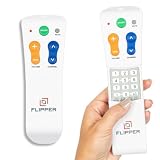
- Designed for Seniors & Dementia - Flipper was created specifically to help seniors, elderly loved ones with Dementia or Alzheimer's, and anyone with low or impaired vision regain independence and full control of their entertainment. Born from a founder's personal mission to help his father with Alzheimer's access his favorite content, Flipper gives seniors back their independence and gives caregivers the peace of mind that comes from simplicity and control.
- Large Color-Coded Buttons & Simple 4-Button Design - On/Off in green, Volume Up/Down in orange, Channel Up/Down in blue, and Mute in gray—no complicated menus or overwhelming options that confuse seniors and cause frustration. The face shows only four buttons for everyday use, with additional hidden buttons that slide to reveal for customizing favorites. Every button is oversized and tactile with clear labeling, making it incredibly easy to see and feel even with arthritic hands, low vision, or dexterity challenges. This is a functional remote designed specifically around what seniors actually need to enjoy TV without stress or mistakes.
- Works with All TV Types on Basic Functions - One remote controls both your TV and cable or satellite box so you'll finally eliminate the remote clutter and confusion. Compatible with all major TV brands including Sony, Samsung, LG, Vizio, Toshiba, Panasonic, Insignia, and Hisense, plus Xfinity, Spectrum, DirecTV, Dish, AT&T, TiVo, and other major providers. Also works with compatible soundbars and IR devices, a truly universal remote for traditional setups where most seniors spend their time watching TV.
- Customize Up to 25 Favorite Channels - Pre-program your loved one's favorite channels and let them easily cycle through with just the channel buttons. Set it once and they'll never have to navigate through hundreds of unwanted channels or struggle to remember numbers. An ideal solution for caregivers who want to give their loved ones independence while avoiding frustration, and works perfectly for seniors who want their favorite shows at their fingertips without the complexity of searching or memorizing.
- Does Not Work with Streaming Apps - Flipper works with the basic functions on all TVs including Smart TVs (power, volume, and channels) but cannot navigate streaming apps like Netflix, YouTube, Prime Video, Hulu, Roku, Google TV, Apple TV, or Fire TV since it has no navigation buttons for app menus. Make sure your setup uses traditional broadcast, cable, or satellite for primary viewing. Requires two AA batteries (not included).
Changing a rating does not guarantee that every related recommendation disappears immediately. Netflix may still be responding to recent viewing, completion, browsing, and other activity.
Why recommendations may not change much
- One rating is only one signal among many.
- Recent viewing can outweigh older ratings.
- Starting, abandoning, finishing, replaying, or browsing titles supplies additional evidence.
- Netflix may connect titles through cast, creators, themes, language, or audience behavior rather than a single genre.
- Your region and plan determine which titles are available to recommend.
- Recommendations are predictions, not a manually controlled playlist.
Double Thumbs Up missing? Try these fixes
- Open the title details page. The control may be hidden elsewhere in the current device layout.
- Try Netflix.com or the current mobile app. These are explicitly supported places for saving ratings.
- Update Netflix and the device operating system. Older app versions can expose fewer controls.
- Try another supported device. Older or limited hardware may not show every rating option.
- Check the profile type. Child profiles and restricted interfaces can differ.
- Sign out and back in. This can clear a temporary app-state problem.
- Check the title and rollout. Controls can vary by content type, device, and interface rollout.
- Contact Netflix support if the option is absent on both the web and app versions.
Netflix notes that some older devices may still display stars instead of thumbs. The same help page also cautions that controls are not identical across every device: How to rate TV shows and movies.
The Bottom Line
Use Double Thumbs Up selectively for titles you genuinely love. It is Netflix’s strongest available preference signal—“Love this!”—for the profile you are using, but it has no published 2× weighting, does not create a public score, and cannot guarantee a particular recommendation.
Quick Recap
Product prices and availability are accurate as of the date/time indicated and are subject to change. Any price and availability information displayed on Amazon at the time of purchase will apply.
Quick wins for a faster PC:
Scan for outdated or missing drivers - takes under a minuteDriver Scan →Repair Windows errors before they cause bigger problemsFix Now →Fix the driver behind crashes, sound loss and screen glitchesFind Drivers →