Quick wins for a faster PC:
Scan for outdated or missing drivers - takes under a minuteDriver Scan →Clear out junk files and repair common Windows errorsFree Scan →Fix the driver behind crashes, sound loss and screen glitchesFind Drivers →Sony movie credits are redeemed inside the SONY PICTURES CORE app—not through Sony Rewards, the PlayStation Store, or a separate coupon page. To use them, register the eligible BRAVIA TV from the TV itself, let Sony add the promotional credits to your account, then select an eligible movie and confirm the redemption.
Before you start
- An eligible Sony BRAVIA model
- A supported territory: the current cited offer covers the United States, Puerto Rico, and Canada
- An internet-connected TV
- The latest available version of the SONY PICTURES CORE app
- A Sony account belonging to the person who will use the credits
- At least 18 years of age, or the age of majority where you live
Not every Sony BRAVIA qualifies. Eligibility, the number of credits, registration deadlines, and catalog availability depend on the specific promotion and territory. Check Sony’s current SONY PICTURES CORE promotion terms before relying on an older model list or offer.
Phase 1: Claim the movie credits
- Connect the eligible BRAVIA TV to the internet.
- Update SONY PICTURES CORE through the TV’s available app store. Sony requires the current app version for redemption.
- Open SONY PICTURES CORE on the eligible TV.
- Choose Sign up, Create account, or Sign in.
- Use the Sony account you intend to keep using. Avoid claiming the benefit under a temporary or incorrect account.
- Accept the promotion terms, Terms of Use, Terms of Service, and Privacy Policy.
- Complete registration on the eligible TV. Registering only on another device may not claim the television promotion.
Under Sony’s current promotion terms, the movie credits and the included streaming package are added automatically after successful registration. Check the confirmation email and the account area in SONY PICTURES CORE to confirm that the benefit has appeared.
Phase 2: Redeem a movie
- Open the SONY PICTURES CORE movie catalog.
- Select a title marked as eligible for purchase or credit redemption.
- Check whether the title is a Normal Movie or a Premium Movie.
- Select the purchase, redeem, or add-to-library option shown on the movie page.
- Review the number of credits required and confirm the redemption.
- Open My Library, Collection, or the equivalent library section to verify that the movie was added.
Button names can differ by BRAVIA model, app version, and territory. Treat the movie’s current detail page and confirmation screen as authoritative rather than relying on an old screenshot or list of menu labels.
Crashes, No Sound, or Screen Glitches?
Random freezes, missing sound and display glitches usually trace back to one bad driver. Find and replace yours safely.Free scan · under a minuteWindows Errors? Fix Them Before They Spread
Repair common Windows errors and clear accumulated junk for a smoother, more stable PC - no reinstall needed.Free scan · no reinstall#1 Best Overall

- Enjoy Blu-ray Disc movies in Full HD as well as DVD discs
- Upscale your DVDs to near HD quality
- Easy set-up with included HDMI cord
- Boot up in less than a second with super quick start mode
- Keep things simple with the new user-friendly interface
How many credits does a movie cost?
| Movie category | Credits required |
|---|---|
| Normal Movie | 1 |
| Premium Movie | 2 |
Sony describes Normal Movies as a selection of at least 300 titles. Premium Movies may be titles available during premium exhibition windows. Not every film in the catalog is necessarily eligible for credit redemption, and a title’s category or availability can change.
How many credits came with your TV?
Under Sony’s current promotion terms, qualifying televisions receive 5, 10, or 15 movie credits. The exact amount is model-specific. Sony’s published examples include selected BRAVIA models from the XR, A, X, Z, and S ranges, but the list is promotion-specific and should not be generalized to every television with a similar model name.
Verify the exact model number on the TV, box, receipt, or product settings, then compare it with Sony’s current offer terms. The cited promotion requires registration by February 23, 2028.
When do Sony movie credits expire?
Under the current cited promotion:
- 5-credit offers: expire 12 months after Sony adds them to the SONY PICTURES CORE account.
- 10- and 15-credit offers: expire 24 months after Sony adds them to the account.
The clock starts when the credits are added, not necessarily when you purchased the TV. Record the award date from the confirmation email or account information. A redeemed movie may be watchable until February 23, 2030 under the current terms, but that date and all promotional conditions are subject to Sony’s Terms of Service and may change for future offers.
Rank #2

- See the unrivalled visual clarity of 4K Ultra HD Blu-ray
- Play almost any disc and file format including DVDs
- Stunning picture with 4K upscaling up to 60p
- Easy set-up with included HDMI cable
- Listen to music from multiple formats
Credits and the streaming package are different benefits
The included streaming package is not the same as movie credits. Credits add selected movies to your SONY PICTURES CORE library. The streaming package provides temporary access to a selected catalog.
Under the current promotion, the streaming period varies by model and is either 12 or 24 months. When that period ends, access to that package’s catalog ends. Movies redeemed with credits are governed separately by the service terms, so do not assume that a streaming title has been added to your library simply because you watched it.
Where can you watch a redeemed movie?
Use the same Sony account in SONY PICTURES CORE. Sony says the account can be used on eligible BRAVIA TVs and PlayStation consoles. This is account portability, not a guarantee that the service works on every phone, browser, smart TV, or streaming device. Check current device compatibility before signing in elsewhere.
If your credits do not appear
- Check the exact model. Confirm that the TV appears in the current promotion terms.
- Confirm the registration method. The promotional registration must be completed on the eligible BRAVIA TV.
- Check the account. Make sure the TV is signed in to the Sony account used during registration.
- Update the app. Install the latest SONY PICTURES CORE version through the TV’s app store.
- Restart both devices. Close the app, restart the TV, and reopen SONY PICTURES CORE.
- Allow synchronization time. Check the confirmation email and account balance again after the registration has processed.
- Sign out only when necessary. Confirm the account email and password first so you do not accidentally switch accounts.
- Contact support. Provide Sony or SONY PICTURES CORE support with the TV model, purchase information, Sony account email, and registration date.
Common reasons a redemption fails
The movie costs two credits
The title may be a Premium Movie. Check the movie page before confirming; Premium Movies require two credits rather than one.
The Tool Desk
Outbyte PC Repair FREEClear out junk files and repair common Windows errorsFree Scan →Outbyte Driver Updater FREEFix the driver behind crashes, sound loss and screen glitchesFind Drivers →Rank #3
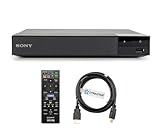
- REGION-FREE PLAYBACK FOR BLU-RAY & DVDS - NO RESTRICTIONS: Plays Blu-ray region A, B, & C; Plays standard DVDs from ANY REGIONS 0, 1, 2, 3, 4, 5, 6, 7, 8, giving you unlimited access to movies and shows worldwide
- BLU-RAY & DVD PLAYBACK - Make the most of your HDTV. Blu-ray disc playback delivers exceptional Full HD 1080p video performance along with stunning hi-definition sound. Sony Blu-ray players also play DVDs, so there is no need to replace your old DVD collection. Not only that, DVD Upscaling delivers exceptional image quality with 1080p up scaling via HDMI.
- FULL HD 1080P BLU-RAY PERFORMANCE WITH UPSCALING FOR NORMAL DVDS: Experience exceptional picture quality and immersive sound with Blu-ray disc playback, delivering Full HD 1080p resolution for a theater-like experience at home. Breathe new life into your DVD collection with 1080p upscaling, enhancing standard-definition content to near-HD clarity via HDMI.
- COMPACT, RELIABLE DESIGN: The Sony BDP-S1700 is sleek and space-saving, making it an ideal addition to your home entertainment setup
- DYNASTAR HDMI CABLE INCLUDED: This bundle includes a premium Dynastar 6FT HDMI cable for superior connectivity, a US power plug, region-switching instructions, and a remote control for easy setup and use. Dynastar is a Registered trademark of 220-electronics
The title is unavailable
A movie may no longer be included, may be unavailable in your territory, or may not qualify for credit redemption. Catalogs and promotional eligibility can change, so rely on the current detail page rather than an old qualifying-title list.
The TV was bought used or given away
Do not assume that unused credits transfer with a television. Sony describes the offer as non-transferable and not for sale or resale. Eligibility can also depend on purchase documentation, registration status, and whether the original owner already claimed the benefit.
You want more credits
The current promotion says additional promotional credits cannot be purchased as part of the offer. Do not buy “Sony credits” from a reseller or assume that credits can be converted into another Sony benefit.
You want a refund or cash value
These are promotional entitlements, not cash-equivalent Sony Rewards points. Under the cited terms, they have no cash or refund value.
Rank #4

- Play Media from External Storage: Plug in an external hard drive to these compact DVD players for TVs to share your favorite movies, photos, and more on a large screen
- Multi-Connectivity DVD Blu Ray Player: HDMI-CEC and USB connectors; interfaces with multiple file formats in video (MKV/MP4) and audio (MP3/FLAC/ALAC/DSD/ WAV)
- Compact Size: Space-saving design allows this Bluray/DVD player for tv to fit neatly in narrow spaces and on thin racks. Dimensions: Approx. 9 5/8" W x 1 1/2"H x 6 7/8"D
- High-Quality Picture Resolution: With full HD support, BD84P-K Panasonic DVD players beautifully up-converts images to high-definition image quality (1080p) video, rendering your favorite movies in fine detail
- High-Resolution Audio Playback: Hear clear, superior audio from this Blu-Ray DVD player in action, adventure, dialogue, and music with Dolby Digital sound for DVDs, CDs, and compatible external files
How to choose between Normal and Premium Movies
A Premium Movie may be worthwhile if it is the title you actually want, but it uses two credits. Normal Movies stretch the balance further and may provide more total films. Before choosing, check the expiration date: an unused credit that expires has no value.
Redeem immediately if your credits are close to expiring or if you want a currently eligible title. Waiting can make sense if you are reserving credits for a movie you expect to watch, but Sony does not guarantee that future releases will become eligible or that current titles will remain available.
What “library” access means
A redeemed film is added to your SONY PICTURES CORE library, but it should not be described as unlimited ownership independent of the service. Access remains subject to SONY PICTURES CORE’s Terms of Service, account status, territory, supported devices, and the applicable promotion period.
For the official model list, regional rules, registration deadline, and current expiration conditions, use Sony’s SONY PICTURES CORE promotion page.
Free tools Windows power users keep installed
One-click scans. No signup required.
Best Value
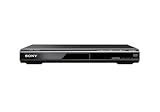
- Multi-format DVD and CD media playback
- Control TV functions using the multi-brand remote
- Upscale DVDs to near HD quality via an HDMI output
- Pic Navi title/chapter viewer and high-speed search function
Frequently Asked Questions
Are Sony movie credits the same as Sony Rewards points?
No. They are promotional SONY PICTURES CORE entitlements for adding eligible movies to your service library.
Can I redeem the credits on PlayStation?
Claim the television promotion on the eligible BRAVIA TV first. Afterward, Sony says the same account can be used on eligible PlayStation consoles, subject to current device and service support.
Can I use the credits on a phone or computer?
The account may work on supported devices, but Sony’s offer requires initial registration on the eligible BRAVIA TV. Device support varies.
Can I transfer credits to another account or service?
No. The cited promotion describes the credits as non-transferable and does not allow conversion to services such as Apple TV, Google TV, or Amazon.
Do these 3 things before closing this tab:
1Scan for outdated or missing drivers - takes under a minute2Clear out junk files and repair common Windows errors3Fix the driver behind crashes, sound loss and screen glitchesWhat happens if I change TVs?
The benefit remains associated with the Sony account and promotion terms, not automatically with a replacement TV. Keep using the account that received the credits and check current device support.
Quick Recap
Product prices and availability are accurate as of the date/time indicated and are subject to change. Any price and availability information displayed on Amazon at the time of purchase will apply.




