The Tool Desk
Outbyte PC Repair FREEClear out junk files and repair common Windows errorsFree Scan →Outbyte Driver Updater FREEFix the driver behind crashes, sound loss and screen glitchesFind Drivers →The best place to get a free Kindle book depends on what you mean by free. Amazon, BookBub, Freebooksy, and The Fussy Librarian point to temporary $0.00 Kindle promotions. Project Gutenberg, Standard Ebooks, Baen’s Free Library, and other public-domain or open-access collections offer more stable free reading. Libby, Open Library, and Internet Archive provide loans rather than permanent ownership.
Some sources deliver directly to Kindle; others provide EPUB or PDF files that you send through Amazon’s Send to Kindle service. The guide below separates those options so you can find a legal, Kindle-compatible book without mistaking a temporary deal, library loan, scanned PDF, or permanent download for something else.
Quick answers: which free Kindle book site should you use?
| What you want | Best places to start | What to expect |
|---|---|---|
| Immediate Kindle Store downloads | Amazon Kindle Store | Check that the individual Kindle price is $0.00. Promotions can end. |
| Classic literature with Kindle files | Project Gutenberg, Standard Ebooks, epubBooks | Mostly public-domain books; country-specific copyright rules still matter. |
| Free science fiction and fantasy | Baen Free Library | A selected group of publisher-authorized titles, not the entire Baen catalog. |
| Library books on Kindle | Libby and OverDrive | Primarily a U.S. public-library workflow, with eligibility and waitlists varying by library. |
| Hard-to-find historical or scholarly books | Google Books, HathiTrust, Internet Archive, Open Library | Access may be full-view, PDF download, browser-only, or a time-limited loan. |
| Free contemporary ebook deals | BookBub, Freebooksy, The Fussy Librarian | Discovery and alert services that link to retailer listings. Verify the price immediately. |
| Academic and policy nonfiction | MIT Press Open Access and National Academies Press | Many titles are EPUB or PDF files rather than ordinary Kindle Store purchases. |
For documentary viewers, the scholarly and public-domain sources are especially useful for history, science, technology, politics, biographies, and original texts behind a film. For the simplest one-click experience, start with the Amazon Kindle Store. For the cleanest classic editions, start with Standard Ebooks or Project Gutenberg.
21 legitimate sources for free Kindle books
1. Amazon Kindle Store
Amazon’s Kindle Store is the most direct source because the book is already being offered in Kindle format. Its Top 100 Free area is useful for browsing, but the ranking and selection are dynamic. A book can be free because it is permanently priced at $0.00, temporarily discounted by its publisher, or independently published as a promotion.
What’s actually slowing this PC down?
Pick the symptom - the matching free tool is one click away.
#1 Best Overall

- A digital notebook for all your writing needs - Replace your stack of notebooks with a single device purpose-built for writing, reading, and thinking. No notifications or social media.
- With AI tools to transform your notes - Convert messy handwriting into readable font, summarize your notes, and change their length and tone with built-in AI notebook tools.
- Feels like pen on paper - See, feel and hear your thoughts meet the page with every stroke of the Premium Pen. No need to set up or charge, just start writing.
- Easily import and mark up documents - Import documents and PDFs using Send to Kindle, and mark them up directly on the page.
- Capture insights as you read – Just start writing on a book's page and Active Canvas will create space for your notes. Expand the margins to add more notes, or collapse them to see the original page.
To check a title, search Amazon with the Kindle Store selected, open the individual book page, and look for the Kindle edition and its displayed price. Confirm that it says $0.00 immediately before completing the download. Do not rely only on a search result, an old article, or a “free” label on a third-party website.
Best for: direct downloads, current bestsellers on promotion, independently published books, and books that are not public domain. Limitation: availability, regional pricing, and promotional periods can change quickly.
2. Project Gutenberg
Project Gutenberg offers more than 75,000 free ebooks, with its strongest coverage in classic literature and other works that are in the public domain in the United States. Many title pages offer dedicated Kindle or older Kindles downloads, as well as EPUB and plain-text versions.
For a newer Kindle, Project Gutenberg recommends downloading an EPUB3 file and using Send to Kindle when a dedicated Kindle file is not the best option. Its EPUB and Kindle files are DRM-free, so you can download the file directly from the site rather than relying on an unknown mirror.
Quick wins for a faster PC:
Repair Windows errors before they cause bigger problemsFix Now →Scan for outdated or missing drivers - takes under a minuteDriver Scan →Clear out junk files and repair common Windows errorsFree Scan →Best for: novels, poetry, essays, plays, history, and other classics. Watch out for: a work’s U.S. public-domain status does not automatically establish its status in every country. A newer translation, introduction, cover, annotation, or edited version may also have separate copyright protection.
3. Standard Ebooks
Standard Ebooks produces carefully proofread and professionally typeset editions of public-domain books. Its editions generally have better typography, covers, semantic structure, navigation, and formatting consistency than many basic public-domain transcriptions.
Download the EPUB or Kindle-compatible file from the individual book page. If the site does not provide the exact file type you want, send the EPUB through Amazon’s Send to Kindle workflow. This is one of the best choices when you know which classic you want but care about a polished reading experience.
Best for: readers who want high-quality editions of classics rather than merely the quickest available text. Limitation: its catalog is limited to public-domain works and its copyright assumptions should still be checked for your country.
Do these 3 things before closing this tab:
1Scan for outdated or missing drivers - takes under a minute2Repair Windows errors before they cause bigger problems3Fix the driver behind crashes, sound loss and screen glitches4. Internet Archive
Internet Archive contains a very large collection of digitized books and other historical material. The access method depends on the individual item. Some books can be downloaded; others are available through controlled digital lending and must be read or borrowed under the item’s restrictions.
Do not assume that every book on Internet Archive is a permanent, DRM-free Kindle download. Open the item page and look for the available file formats and borrowing instructions. A downloadable EPUB or PDF can potentially be sent to Kindle, while a controlled loan may require the Internet Archive’s own reading or return process.
Best for: older books, scans, out-of-print material, historical documents, and discovery. Limitation: scans may be less comfortable on a small Kindle, and access conditions vary substantially from item to item.
5. Open Library
Open Library is a catalog and lending interface associated with Internet Archive. Borrowable editions are commonly available in BookReader, PDF, or EPUB formats, depending on the title.
Its loans are temporary: a one-hour loan is generally intended for browsing, while a fully borrowable book generally has a 14-day loan period. That makes Open Library useful for reading a hard-to-find book without buying it, but it is not equivalent to downloading an unrestricted file that you keep forever.
Best for: discovering and borrowing books that are difficult to obtain elsewhere. Limitation: lending availability, file format, and borrowing controls apply; do not attempt to bypass them or strip protection from a loan.
6. Libby and OverDrive
Libby and library websites powered by OverDrive let eligible public-library users borrow ebooks. In the United States, some eligible Kindle Books can be sent to a Kindle device after you borrow them.
Rank #2
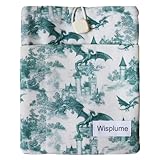
- Three Size Options for Wide Compatibility: Available in Large (suitable for devices up to 9.8x8 INCH/25x20.5CM or books up to 9.8x7.5x1.5INCH/25x19x4CM), Medium (suitable for devices up to 20x15.5CM/7.8x6.1INCH), and Small (suitable for devices up to 7x5.3INCH/18x13.5CM), compatible with almost all e-readers on the market.
- Functional Front Pocket: Includes a devided front pocket to neatly store small essentials like bookmarks, AirPods, chargers, sticky notes, and pens.
- Secure Closure Design: Equipped with a square resin button and elastic loop to keep your eReader or book safely tucked inside, preventing slips.
- Lightweight&Protective: Features durable padding that cushions the device against everyday bumps and scratches, without adding unnecessary bulk for easy portability.
- Dual Use & Gifting Potential: Doubles as a compact book bag for daily use; also makes a perfect gift for book lovers, teachers, students, or on-the-go readers—blending practicality and charm.
The usual process is to sign in with a participating library card, search for a title, borrow it, choose Kindle as the reading preference when that option is offered, and finish the handoff through Amazon. The loan then follows the library’s lending period rather than becoming a permanent purchase.
Windows Errors? Fix Them Before They Spread
Repair common Windows errors and clear accumulated junk for a smoother, more stable PC - no reinstall needed.Free scan · no reinstallOutdated Drivers Are Slowing You Down
One free scan finds every outdated or missing driver and matches the right update for your exact hardware.Free scan · exact hardware matchKindle delivery is primarily a U.S. library workflow. Availability depends on your library’s licenses, the title’s format, waitlists, geographic rules, and device support. Picture books, read-alongs, graphic novels, and some other formats may not offer Kindle delivery even when they are available in Libby.
Best for: current nonfiction, popular books, audiobooks, and library-funded reading at no additional charge. Limitation: you need a participating library card, and the title may have a waitlist or may only work inside the Libby app.
7. ManyBooks
ManyBooks combines public-domain books with free and discounted contemporary ebooks. It can be useful when you want to browse by genre or find a less prominent classic in several formats.
ManyBooks says readers need a free account to download. On the individual title page, select an available format, check the displayed price, and review whether the book is public domain, publisher-authorized, free for a promotion, or merely discounted. You can also read some titles online.
Free tools Windows power users keep installed
One-click scans. No signup required.
Best for: genre browsing and finding multiple ebook formats. Limitation: the catalog is mixed, so do not assume every listing is permanently free, DRM-free, or suitable for Kindle without checking the title details.
8. Google Books
Google Books is a powerful discovery tool with more than 10 million books available to read or download in some form. Full access usually applies to public-domain books or titles that rights holders have made free.
For a public-domain book, Google Books may provide a PDF download. In-copyright books generally offer only snippets or authorized previews rather than a complete free ebook. A downloaded PDF can be sent to Kindle, but a scanned PDF may behave more like a page image than a reflowable ebook.
Best for: locating public-domain books, historical scans, and scholarly material when you know a title or author. Limitation: a Google Books result is not automatically a full free download; inspect whether the page says Full view, offers a download, or only provides a preview.
9. HathiTrust Digital Library
HathiTrust provides full-view access to many public-domain and Creative Commons works. Whether you can read or download a complete book depends on its rights status, your location, and whether you are signed in through an eligible institution.
Most downloadable files are PDFs rather than Kindle-native ebooks. That is perfectly workable for research or occasional reading, but scanned pages can be awkward on a small screen and may not support adjustable font sizes. Send the PDF to Kindle only when the layout is acceptable for your purpose.
Best for: scholarly books, historical sources, older editions, and public-domain research. Limitation: access and download permissions vary by rights status and geography.
10. Baen Free Library
Baen’s official Free Library is one of the strongest legal sources for free science fiction and fantasy. Baen makes selected titles available to read online or download in several digital formats.
The collection is a publisher-authorized selection, not a free version of the complete Baen catalog. Use the official Baen domain and follow the format links on the individual title page.
Best for: science fiction, fantasy, military science fiction, and genre discovery. Limitation: the free selection is limited and can change; do not confuse it with third-party copies of books that are not listed in the Free Library.
Rank #3

- Great value – Includes Kindle (2024 release), Kindle Fabric Cover, and 9W Power Adapter-up to a $162 value.
- Effortless reading in any light - Read comfortably with a 6“ glare-free display, adjustable front light-now, 25% brighter at max setting-and dark mode.
- Escape into your books - Tune out messages, emails, and social media with a distraction-free reading experience.
- Read for a while - Get up to 6 weeks of battery life on a single charge.
- Take your library with you – 16 GB storage holds thousands of books.
11. epubBooks
epubBooks focuses primarily on public-domain classics and offers EPUB and Kindle formats without DRM. It is a useful alternative to Project Gutenberg when you want a more curated presentation or a particular classic in a convenient Kindle format.
Check the title page for the available file and rights information. As with every public-domain repository, copyright rules can differ by country, especially for works that entered the public domain at different times in different jurisdictions.
Best for: DRM-free classic fiction and straightforward Kindle downloads. Limitation: it is not a source for most modern copyrighted novels.
12. Feedbooks Public Domain
Feedbooks Public Domain has offered curated public-domain ebooks in EPUB, Kindle, and PDF formats, with an emphasis on clean, portable editions.
Because website structure and catalog availability can change, confirm the individual title’s current download options rather than assuming that every historical listing is still active. If a Kindle file is not available, an EPUB can normally be sent through Amazon’s current personal-document workflow.
Best for: classic books in multiple portable formats. Limitation: verify the live title page, file type, and rights status before downloading.
13. BookBub
BookBub is a free discovery and alert service, not a permanent ebook repository. It sends personalized recommendations for free and discounted books and links to retailer pages such as Amazon’s Kindle Store.
When BookBub lists a free Kindle deal, follow the link immediately, open the Amazon product page, and confirm that the Kindle edition still costs $0.00. BookBub explicitly warns that free promotions are temporary. The book may return to its normal price after the publisher’s scheduled deal ends.
Best for: finding temporary deals in preferred genres without checking Amazon manually. Limitation: the alert is not a guarantee that the book remains free when you click it.
14. Freebooksy
Freebooksy curates free Kindle and other retailer promotions, with genre filters and email recommendations. It is particularly useful for contemporary indie fiction, including romance, mystery, fantasy, science fiction, horror, and young adult books.
Recommended Free Tools
Freebooksy states that prices can change without notice. Treat every listing as a lead: follow it to the retailer, select the Kindle edition, and verify the final displayed price before downloading. A title may be free in one country or on one retailer but not another.
Best for: genre-specific contemporary promotions. Limitation: it is a deal-alert service, not a library of permanent free files.
15. The Fussy Librarian
The Fussy Librarian offers personalized free-ebook newsletters and links readers to retailer listings. Its author guidance explains that readers can follow the Amazon link and choose the Kindle option when the promotion is available.
Use it in the same way as BookBub and Freebooksy: select your genres, open the retailer listing promptly, and verify the price and geographic availability. Promotions can be limited by date, retailer, genre, or country.
What’s actually slowing this PC down?
Pick the symptom - the matching free tool is one click away.
Best for: personalized discovery of free promotional ebooks. Limitation: the newsletter does not turn a temporary retailer promotion into a permanent download.
Rank #4
- Like-New Amazon Kindle Scribe 16GB is refurbished, tested, and certified to look and work like new and comes with the same limited warranty as a new device. Like-New Amazon devices may be packaged in generic Amazon-branded boxes.
- Kindle Scribe - A Kindle and a notebook, all in one. Redesigned flush-front display with uniform white borders and upgraded Premium Pen, feels like writing on paper.
- Write in books – Start writing on the page and Active Canvas will create space for your notes. Expand the margins to add more notes, or collapse them to see the original page.
- Built-in notebook - Create meeting notes and to-do lists, or journal all in one place. Convert handwritten notes to text and email them to yourself or your contacts.
- Notebook summaries - Summarize your notes, change their length and tone, and refine your writing with built-in AI notebook tools.
16. MIT Press Open Access
MIT Press Open Access provides free scholarly books in areas such as technology, design, philosophy, social science, and related academic fields. Depending on the title, files may be offered as EPUB, MOBI, PDF, or another digital format.
These are open-access books, not necessarily books listed as free Kindle purchases in Amazon’s store. Download the format offered by the publisher and send it to Kindle if appropriate. EPUB is usually the better choice for reflowable text; PDF may preserve a complex layout but can be harder to read on a small screen.
Best for: serious nonfiction and research connected to science, culture, technology, and society. Limitation: format availability varies by title, and some files may be designed primarily for computers or tablets.
17. National Academies Press
National Academies Press offers many free research reports and books, especially in science, medicine, engineering, public policy, education, and technology. Free downloads are commonly PDFs, while specially formatted Kindle editions may be sold for some titles.
This is an excellent legal source for authoritative background reading, but a free PDF is not always the same experience as a reflowable Kindle ebook. Send the PDF to Kindle when you are comfortable with possible layout limitations, or read it on a larger screen if it contains charts, tables, or scanned pages.
Best for: reports and evidence-based nonfiction behind documentary topics. Limitation: free does not always mean Kindle-formatted.
18. University-press open-access catalogs and repositories
University presses and institutional repositories sometimes release books under Creative Commons or other rights-holder permissions. MIT Libraries’ open-access guidance explains the basic model: supported works may be freely read, downloaded, and shared under their stated license.
PC Slower Than It Used to Be?
A free scan shows the junk files, broken settings and background clutter dragging Windows down - then fixes them in one click.Free scan · Windows 10 & 11Outdated Drivers Are Slowing You Down
One free scan finds every outdated or missing driver and matches the right update for your exact hardware.Free scan · exact hardware matchSearch a university press’s official open-access catalog, then read the license and download instructions for the individual title. Do not assume that every university-press book is free, that every PDF can be redistributed, or that every title has a Kindle edition.
Best for: academic books, humanities scholarship, social science, and specialized nonfiction. Limitation: catalogs, licenses, and available formats differ from one institution to another.
19. Public-domain library catalogs and digitization repositories
Large catalogs such as Google Books, HathiTrust, Internet Archive, and Open Library are worth checking when you know the name of a classic, historical text, biography, or original source but cannot find a clean Kindle edition. Their breadth often exceeds the selection of curated ebook stores.
The trade-off is inconsistency. You may find a searchable EPUB, a high-quality PDF, a page-image scan, a browser-only preview, or a temporary loan. Compare editions when possible: an OCR-heavy scan may be historically valuable but less pleasant to read than a proofread public-domain ebook from Standard Ebooks or Project Gutenberg.
Free tools Windows power users keep installed
One-click scans. No signup required.
20. Publisher free libraries and sample collections
Some publishers maintain official free libraries, launch collections, or promotional pages. Baen’s Free Library is a clear example. Other publishers may offer a free short story, a first-in-series book, a preview, or a complete promotional ebook from their own domain.
Use the publisher’s official website and look for a clear rights-holder statement. A retailer sample is not the same as a complete book, and a third-party mirror is not trustworthy merely because it uses the book’s title and cover. Check the file type and whether the publisher authorizes downloading and sharing.
Best for: discovering authorized samples, introductory books, and genre promotions. Limitation: there is no single complete directory, and offers can be withdrawn.
21. Author and rights-holder websites
Authors sometimes offer a permanently free novel, short story, reader magnet, or public-domain adaptation directly from their own websites. This can be one of the safest ways to obtain a modern free ebook when the author or rights holder clearly provides the file.
Quick wins for a faster PC:
Repair Windows errors before they cause bigger problemsFix Now →Fix the driver behind crashes, sound loss and screen glitchesFind Drivers →Best Value

- Unique Design: Designed with a stylish and attractive retro moth pattern, this padded book sleeve features a fashionable aesthetic. Ideal for 6‑7 inch e‑readers and paperbacks, perfect for book lovers to show personal style while protecting reading essentials
- Effective Protection: Built‑in soft inner lining plus thickened padded outer layer, this ereader pouch effectively buffers bumps, scratches and dust. The double‑layer structure offers all‑round protection for your reading devices, keeping them safe during daily carry and outdoor use
- Suitable Size: Measured 7.87*6.89 inches, this lightweight book sleeve fits most 6‑7 inch e‑readers and regular paperbacks. Compact and portable for commuting, travel, school and outdoor reading, easy to slip into backpacks, handbags without extra bulk
- Multi‑Purpose Storage: Not only an ereader protective bag, it also stores small reading supplies like bookmarks, reading glasses, pens and earbuds. Works well as a mini tablet pouch, daily storage bag for women, great multi‑functional reading accessory for bookworms
- Thoughtful Gift: It can be used as a birthday gift for friends, a graduation gift and back-to-school gift for students, a Thanksgiving gift for mother and teacher, or a Halloween, Christmas and New Year gift for book lovers, bringing fashion and practicality to every reading fan’s daily life
Look for an official author domain, a direct download, and an explicit statement that the author is making the book available. EPUB files can usually be sent to Kindle through Amazon’s supported Send to Kindle workflow. Do not treat a file found through a random search result as authorized simply because it is free.
Best for: author-authorized giveaways and bonus fiction. Limitation: availability is scattered, and each author controls the format, territory, and duration of the offer.
Independent reader supportYour contribution helps us test, update, and keep practical guides available for everyone.How to send a free EPUB or PDF to Kindle
Amazon’s current Send to Kindle workflow supports EPUB, PDF, DOC, DOCX, TXT, RTF, HTML, and several image formats. This is the bridge between a legitimate free ebook site and a Kindle device or Kindle app when the source does not provide a direct Kindle download.
- Download from the rights holder, library, or established repository. Save the file to your computer or phone. Do not use a password-protected or encrypted file unless the source specifically explains a supported Kindle process.
- Check the format and layout. Choose EPUB when you want reflowable text and adjustable font sizes. Use PDF when preserving a fixed page layout, charts, tables, or scans matters more. A PDF may be less comfortable on a small Kindle.
- Open Amazon’s Send to Kindle page or app. Sign in to the Amazon account used by your Kindle. The official web workflow is available at Send to Kindle. Upload the supported file and select the destination device or Kindle library when the interface presents that choice.
- Use the approved-email option if preferred. Amazon’s account settings include a list of approved personal-document email addresses. Add your sending address under the personal-document settings, then email the file as an attachment to the Kindle address associated with your account.
- Sync the Kindle. Connect to Wi-Fi and use the device’s sync option. The document should then appear in the Kindle library or in the destination selected during upload. Kindle apps can receive the same personal document when the account and delivery settings allow it.
Project Gutenberg specifically recommends EPUB3 for newer Kindles when a direct Kindle file is not available. Avoid renaming an arbitrary file extension or starting with old conversion advice such as changing every file to MOBI. Amazon’s current supported personal-document list emphasizes EPUB and the other formats above, while older Kindle generations and older conversion workflows may behave differently.
The Tool Desk
Outbyte PC Repair FREEClear out junk files and repair common Windows errorsFree Scan →Outbyte Driver Updater FREEScan for outdated or missing drivers - takes under a minuteDriver Scan →What kind of free book are you getting?
Permanent public-domain or open-access copy
Project Gutenberg, Standard Ebooks, epubBooks, some Feedbooks titles, public-domain entries in Google Books and HathiTrust, MIT Press Open Access titles, and many National Academies Press downloads can provide files you keep. “Permanent” still depends on the source’s license and your country’s copyright rules.
Temporary retailer promotion
Amazon, BookBub, Freebooksy, The Fussy Librarian, and some ManyBooks listings may point to books that are free only for a limited period. The safe habit is to verify the price on the final retailer page at the moment you download. A book that was free yesterday may be paid today.
Library or controlled digital loan
Libby, OverDrive, Open Library, and some Internet Archive items let you read without buying the book, but the access expires or is controlled. You are borrowing the book, not acquiring an unrestricted file. Returns, expiration dates, waitlists, and format limits are part of the service.
Free PDF rather than Kindle ebook
Google Books, HathiTrust, MIT Press, National Academies Press, university repositories, and digitization archives frequently provide PDFs. Send to Kindle can make those files available on a Kindle, but it cannot turn a page-image scan into a fully reflowable ebook. For dense reports, a tablet or computer may provide a better experience.
Copyright and safety checklist
- Use the official domain. Prefer the publisher, author, library, public-domain repository, or recognized retailer rather than an unexplained mirror.
- Read the rights statement. “Free” may mean public domain, Creative Commons, open access, a library loan, a temporary promotion, or an author-authorized giveaway.
- Check your country. A book may be public domain in the United States but still protected elsewhere. Translations, introductions, annotations, cover art, and modern editions can have separate rights.
- Verify the complete book. A sample, preview, excerpt, or first chapter is not a full ebook.
- Inspect the file before sending it. Avoid files that are password-protected, encrypted, executable, or bundled with unrelated software.
- Do not bypass loan controls or DRM. A library loan or controlled-access book should be read under the service’s terms.
- Check the retailer price again. Deal-alert pages are useful, but the retailer’s live listing controls the price you will receive.
Do you need to buy a Kindle?
No. You can read Kindle Store books through the Kindle app on a compatible phone, tablet, or computer, and many EPUB or PDF sources can be read in other ebook apps. A dedicated device becomes useful if you read frequently, want a distraction-free screen, or regularly use library and personal-document workflows.
If you want dedicated hardware for this use case, a Kindle Paperwhite e-reader is a natural option to compare with the Kindle app. It is not required for any of the sources above, and model availability, specifications, and pricing should be checked at the time of purchase. Existing Kindle owners may also want a protective Kindle case or a compatible USB-C charging cable, but accessories are optional and do not affect whether a book is legally free.
A practical search workflow
- Start with the type of book. Use Gutenberg, Standard Ebooks, epubBooks, or Feedbooks for classics; Baen for science fiction and fantasy; Libby for current library holdings; and MIT Press or National Academies Press for serious nonfiction.
- Search the direct Kindle sources next. Check Amazon, then use BookBub, Freebooksy, or The Fussy Librarian for temporary promotions in your preferred genres.
- Search the broad catalogs for difficult titles. Try Google Books, HathiTrust, Internet Archive, and Open Library for older or scholarly works.
- Compare editions. Choose a proofread EPUB when possible. Use a scanned PDF when the original page design or historical appearance matters.
- Verify legality, price, and format. Confirm the rights statement and the final price before downloading.
- Send the file to Kindle only when necessary. Use EPUB for ordinary text and PDF for fixed-layout documents, then sync the device.
Frequently Asked Questions
Are free Kindle books really free?
Sometimes. A $0.00 Kindle Store listing may be a permanent free title or a temporary promotion. Public-domain and open-access files are generally more stable, while Libby, Open Library, and Internet Archive may provide loans rather than permanent ownership. Always verify the live price and access terms.
Can I send a free PDF or EPUB from Google Books or Project Gutenberg to Kindle?
Usually, if the file is an unencrypted supported format and the source permits downloading. Amazon’s Send to Kindle workflow supports EPUB and PDF among other formats. EPUB normally gives a more reflowable reading experience; scanned PDFs may retain fixed pages and be harder to read on a small Kindle.
Can I keep a book borrowed through Libby or Open Library?
No. These services provide loans. Libby loans expire according to your library’s rules, and Open Library commonly offers one-hour browsing loans or 14-day full loans. Do not treat a temporary loan as a permanent DRM-free download.
Why is a book listed as free but not free when I open it?
Retailer promotions can end, and prices can vary by country, edition, or retailer. BookBub, Freebooksy, and The Fussy Librarian are discovery services, so the Amazon or other retailer product page is the final authority on the current price.
The Bottom Line
For the fastest legal Kindle download, check Amazon and confirm the title is $0.00. For permanent classics, use Project Gutenberg, Standard Ebooks, epubBooks, or another reputable public-domain source. For library access, use Libby or OverDrive; for difficult historical and scholarly material, try Google Books, HathiTrust, Internet Archive, or Open Library. When a source provides EPUB or PDF instead of a Kindle file, use Send to Kindle—but check the rights, format, country availability, and whether you are receiving a loan or a file you can keep.
Quick Recap
Product prices and availability are accurate as of the date/time indicated and are subject to change. Any price and availability information displayed on Amazon at the time of purchase will apply.
Do these 3 things before closing this tab:
1Scan for outdated or missing drivers - takes under a minute2Repair Windows errors before they cause bigger problems3Fix the driver behind crashes, sound loss and screen glitches