Free tools Windows power users keep installed
One-click scans. No signup required.
“Hum Along and Midomi Recognizes Your Song” was the headline of a January 26, 2007 VentureBeat story about a new music-search service: Midomi let people sing or hum a tune to look for a song match. The idea was simple—search with the melody when you do not know the title, artist, or lyrics. Today, SoundHound and Google’s Song Search explicitly support humming; Shazam is chiefly intended to identify a recording that is playing.
What was Midomi?
Midomi launched in beta in January 2007 as a music-search service built around a familiar frustration: remembering a tune but not knowing what it was called. Instead of typing words into a search box, a user could sing or hum a melody into a microphone and ask the service to find a likely match. Contemporary coverage described it as a way to “name that tune.”

In the headline, “recognizes your song” means identifying the song a person is trying to reproduce. It does not mean identifying the singer or determining who owns or wrote the music. A contemporary roundup of the launch coverage is available at Techmeme.
How did humming-based search work?
The basic idea is to compare a vocal performance with musical information associated with songs in a catalog. A service can capture the sound through a microphone, analyze features such as pitch movement, rhythm, timing, and melodic contour, and rank songs that might fit. It then offers candidates rather than proving a match.
#1 Best Overall
- The microphone captures the user’s humming or singing.
- The service derives musical characteristics from the performance.
- Those characteristics are compared with indexed song representations.
- The service ranks possible matches and returns candidate titles or recordings.
This is different from searching for a recording that is already playing. Audio fingerprinting can match characteristics of the actual recording; query-by-humming must tolerate a melody performed in a different key, tempo, or voice. Midomi’s precise 2007 implementation is not established by the available contemporary coverage, so it would be misleading to assign it a particular algorithm or architecture. SoundHound’s current product information describes its music-recognition technology and large music database at SoundHound.
Did Midomi become SoundHound?
Midomi is now closely associated with SoundHound, whose current consumer app and help materials use the SoundHound name. SoundHound’s official music page still references Midomi.com, supporting a relationship between the brands, but that alone does not establish that a standalone Midomi browser experience remains available everywhere. The current product and help pages are primarily branded SoundHound; see SoundHound’s music page.
Rank #2

- Ideal for speech-to-text professionals, court reporters, investigators, and sound studios.
- Premium moisture proof microphone for consistent performance
- Specifically designed to achieve perfect accuracy rates with any type of speech recognition software. Works with any type device, smartphone, tablet, computer, recorder
- Andrea USB adapter is highly recommended for use with computers using speech recognition software
- Two cord - two plug model for professionals that require a backup microphone
Some secondary accounts give a specific rebranding date and a timeline for the Midomi website, but those dates are not confirmed by the cited first-party pages. The safe takeaway is that the modern humming-search option is SoundHound, not a guaranteed separate Midomi service.
How to find a song by humming today
Use SoundHound for a dedicated hum search
- Install and open the SoundHound app.
- Activate its song-identification control, then hum or sing a recognizable phrase. SoundHound’s help page documents voice prompts such as “What song am I humming?” and “Start a hum search.”
- Review the candidate result. If it is wrong, try a longer or more distinctive phrase, such as the chorus.
- Check the song page for lyrics, a preview, or available listening options.
SoundHound’s official instructions are at Identifying and Playing Songs. Its U.S. App Store listing also describes singing or humming to identify a tune.
What’s actually slowing this PC down?
Pick the symptom - the matching free tool is one click away.
Rank #3
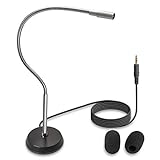
- UNPARALLELED QUALITY: Increased microphone clarity with 3.5mm connection for mono and stereo jack.
- UNI-DIRECTIONAL CARDIOID MICROPHONE – Superior noise canceling microphone that focus on your voice and suppresses unwanted noise from the sides and back.
- GOOSENECK DESKTOP MICROPHONE – 16” adjustable gooseneck microphone that doesn’t drop overtime that provides accurate sound reproduction suitable for all digital audio applications.
- STATE OF THE ART DESIGN – Provides clear and superior quality audio with a 7 ft. cable that prevents and eliminate RF interference caused by onboard chipsets.
- VERSATILE USE – Suitable for conference rooms, SKYPE, ZOOM, Pod Cast, Speech recognition program and a variety of other application.
Use Google Song Search for a quick alternative
- Open the Google app and tap the microphone icon.
- Choose Search a song.
- Hum, whistle, or sing the melody, then review the potential matches.
Google’s documented iOS instructions are at Song Search for iPhone and iPad. Google also documents the feature for Android; exact labels and placement can vary by device, app version, language, and region. Its Android help page is here. Google describes the output as potential matches, not guaranteed identification.
Use Shazam when the recording is playing
- Open Shazam and tap its identify button while the actual song is audible.
- Let it listen to the recording, then open the returned song page to check details or listening options.
Shazam’s official product page highlights identifying music that is playing and lists its app and other access methods: Shazam apps. Its standard workflow is not the clearest choice when the only input is a tune you remember and can hum.
Rank #4

- Stenomask supports professionals who need silent, private, and accurate voice input in demanding situations. Use Pro 1 for private dictation in offices and shared workplaces, quiet communication while traveling or commuting and privately chatting with AI.
- Proprietary micro sound-booth technology for maximum privacy. Stenomask helps you work confidently without disturbing anyone around you.
- Designed for comfort and long-term use, Stenomask allows you to speak normally without disturbing people around you and without background noise affecting your dictation accuracy.
- Compatible with all devices and speech-to-text platforms
- Andrea USB adapter is highly recommended for use with computers using speech recognition software.
SoundHound, Google Song Search, or Shazam?
| Service | Best fit | What the official materials establish |
|---|---|---|
| SoundHound | You can hum or sing the melody and want a dedicated music-recognition app. | Its support page documents starting a hum search; its product materials highlight lyrics, discovery, voice control, and streaming integrations. |
| Google Song Search | You want to hum, whistle, or sing and get potential matches through the Google app. | Google’s help page explicitly describes those inputs and returns possible matches. |
| Shazam | The original recording is playing nearby or on another device. | Its official page emphasizes identifying music that is playing and lists iOS, Android, and other access methods. |
SoundHound is the most directly dedicated option for a humming-first search; Google is a practical alternative if you already use its app. When the recording itself is available, Shazam or SoundHound can listen to it rather than relying on an imperfect recreation. None is universally best for every song: results depend on the performance, background noise, track version, and catalog coverage.
Prices and availability vary by platform and region. At the time reflected in the cited U.S. App Store listing, SoundHound was free to download with in-app purchases; the listing showed an Ad Removal purchase at $6.99. Google Play listed SoundHound ∞ at $5.99 when its listing was updated May 26, 2026. Those are store-specific observations, not universal or guaranteed current prices. Check the relevant listing before buying: App Store and Google Play.
Recommended Free Tools
Best Value

- LARGEST SONG COLLECTION - Lifetime access to 23,000+ streaming remix songs, 12K English songs, 7K Filipino Tagalog songs, 4K Hindi songs and other karaoke accompaniments. You can also use the USB to play downloaded karaoke videos and music.
- 4K-HIGH-QUALITY STEAMING MEDIA - HDMI 4K UHD(high-definition)video playback solves the shortcomings of the previous generation of products without digital audio. Directly connected to the TV, the karaoke system page will automatically pop up. Convenient for you to hold a party anytime, anywhere.Including celebrities, scenic spots, and cartoon animations, suitable for all people to enjoy, especially the elderly and children also like this karaoke machine.
- WIRELESS MICROPHONES - 2 upgraded wireless karaoke UHF microphones that can be used as a convenient remote control to navigate songs, search songs, adjust sound and more. In addition to two wireless microphones, it also provides two wired microphone ports to accommodate more singers.
- SONG UPDATE-You can check all song list in PLATINUM LINK APP. The APP song list is updated once a month. If you encounter a song that needs to be paid, please go to the Platinum Karaoke official website to contact our customer service staff to download the song for certification, because the copyright owner needs to charge a small fee during the certification process, I hope you understand!
- PLATINUM LINK APP SUPPORT—Next generation Compact Professional Karaoke Media Player with Wi-Fi & YouTube,Plays MP3+G, MP4, AVI,YouTube Karaoke,Mobile App control,Full function Easy to use Remote control for song search,Tempo/Key Control,Microphone Echo adjust.The QR code of the free APP is available for IOS and Android phones.
Why a humming search can miss
The melody is hard to reproduce
A very short hum, an uneven tempo, long pauses, or a vague pitch pattern gives the system less to compare. Humming accompaniment instead of the lead melody can also send it toward unrelated results. A system may return a musically similar candidate even when it is not the song you meant.
The song is missing or difficult to represent
Unreleased or private tracks, live improvisations, obscure regional releases, and unusual versions may not be represented in a service’s catalog. Covers, remixes, classical arrangements, spoken-word sections, sampled fragments, or music remembered mainly for a sound effect can also make matching difficult. A SoundHound App Store user comment describes a film-specific piece that was not recognized; treat that as an individual example, not a formal rule about all soundtrack music.
Noise or a false match obscures the answer
Background noise can interfere with microphone input. A returned title is a candidate, not proof: confirm it by checking the artist, lyrics, album or release information, and whether the recognizable passage matches the version you remember.
Microphone access and privacy matter
Humming search requires microphone access. App-store privacy disclosures vary by platform and can change; the current U.S. iOS SoundHound listing includes categories such as audio data, search history, usage data, and diagnostics. Review the app’s current permissions and privacy information if those data practices affect your decision.
Quick Recap
How to improve the chance of a match
- Hum the chorus or another distinctive section rather than a generic opening note.
- Give the service a continuous phrase with a steady tempo and clear pitch changes.
- Try humming the main melody rather than an accompaniment or remembered sound effect.
- Search in a quiet place. If remembered lyrics are reliable, try a lyrics search as a separate route.
- If one service gives a weak match, try the other humming-capable option. If you can play the recording, use a recording-identification workflow instead.
Product prices and availability are accurate as of the date/time indicated and are subject to change. Any price and availability information displayed on Amazon at the time of purchase will apply.