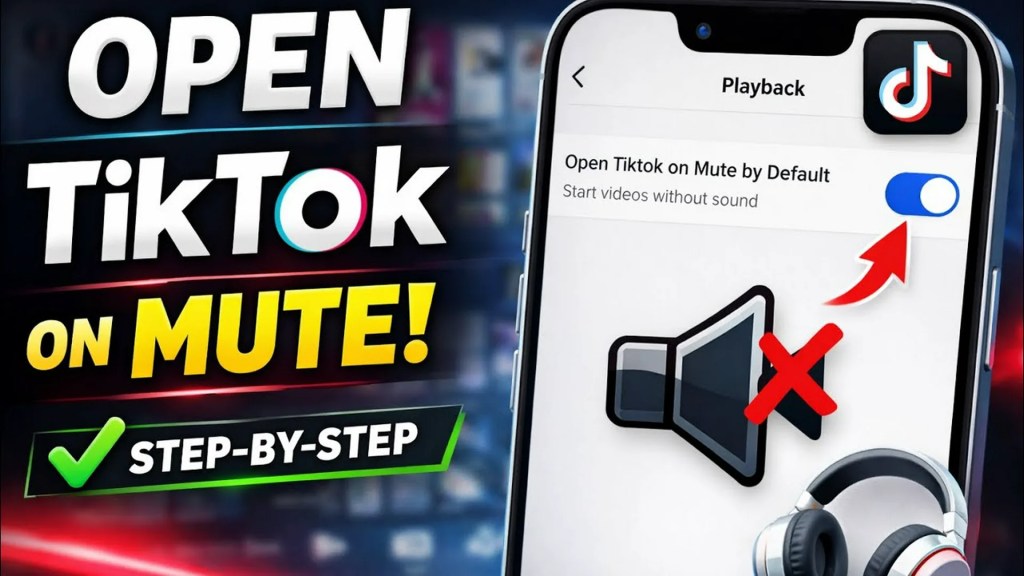
To make TikTok start without sound, enable Open TikTok on Mute: Profile → Menu ☰ → Settings and privacy → Content and Display → Playback. Turn on the switch, then close and reopen the mobile app. Videos should begin muted, while you can still unmute an individual video when you want audio. The option is documented in the current TikTok mobile interface, but its availability and labels can vary by app build, account, platform, region and rollout.
Turn on TikTok’s mute-on-launch setting
The same basic route is used on iPhone, iPad and Android. TikTok may display the label as “Open TikTok on Mute” or “Open TikTok on mute,” depending on the build.
| # | Preview | Product | Price | |
|---|---|---|---|---|
| 1 |

|
Apple iPhone 14, 128GB, Blue - Unlocked (Renewed) | $309.89 | Buy on Amazon |
| 2 |

|
Apple iPhone 14, 128GB, Midnight - Unlocked (Renewed) | $308.00 | Buy on Amazon |
| 3 |

|
Apple iPhone 13, 128GB, Midnight - Unlocked (Renewed) | $262.00 | Buy on Amazon |
| 4 |

|
Apple iPhone 16e, 128GB, Black - Unlocked (Renewed) | $389.00 | Buy on Amazon |
| 5 |

|
Apple iPhone 15, 128GB, Black - Unlocked (Renewed) | $410.00 | Buy on Amazon |
- Open the official TikTok mobile app.
- Tap Profile at the bottom.
- Tap the Menu ☰ button in the upper-right corner.
- Choose Settings and privacy.
- Scroll to Content and Display.
- Tap Playback.
- Switch on Open TikTok on Mute.
- Close and reopen TikTok, then check that the first video starts silently.
The menu path and expected behavior are described in current mobile-app coverage from iDownloadBlog, Dexerto and a 2026 tutorial. No subscription or command is required.
What the setting actually changes
Open TikTok on Mute controls video playback when the app launches. It is not a permanent removal of audio: a video can still be unmuted, and other TikTok sounds or device audio settings may behave separately.
Recommended Free Tools
#1 Best Overall
- Vibrant 6.1-inch Super Retina XDR display with OLED technology. Action mode for smooth, steady, handheld videos.
| Control | What it affects |
|---|---|
| Open TikTok on Mute | TikTok video playback when the app opens |
| Speaker or Unmute control | The current video or playback session |
| Device media volume | Media from TikTok and potentially every other app |
| iPhone Ring/Silent switch or Action button | Primarily ringtones, alerts and notifications; it is not a substitute for TikTok’s playback preference |
| TikTok notification settings | Push notifications and alerts, not video audio |
| Muted posts | Removes selected creators’ posts from feeds, not their sound |
TikTok describes muted posts and muted notifications as separate content and alert controls in its Help Center: muting posts and messages and notification settings.
How to hear one video
With the launch preference enabled, use the video player’s audio control to restore sound. Depending on the app version and playback state, it may appear as a speaker icon, a muted-speaker icon or an Unmute label, generally near the lower-right area of the player. You can also try the device’s volume buttons.
Rank #2
- This phone is unlocked and compatible with any carrier of choice on GSM and CDMA networks (e.g. AT&T, T-Mobile, Sprint, Verizon, US Cellular, Cricket, Metro, Tracfone, Mint Mobile, etc.).
- Please check with your carrier to verify compatibility.
- The device does not come with headphones or a SIM card. It does include a generic (Mfi certified) charging cable.
- Tested for battery health and guaranteed to have a minimum battery capacity of 80%.
Unmuting a video changes playback for the current viewing session; it is not the same action as switching off Open TikTok on Mute. Current coverage indicates the preference normally remains enabled unless you return to the Playback menu and disable it, although user reports describe inconsistent persistence on some builds and devices (TikTok Help report; another user report).
Turn normal launch sound back on
Return to Profile → Menu ☰ → Settings and privacy → Content and Display → Playback, then switch Open TikTok on Mute off. TikTok should return to its ordinary launch behavior, subject to your phone’s media volume and selected audio output.
Rank #3
- This pre-owned product is not Apple certified, but has been professionally inspected, tested and cleaned by Amazon-qualified suppliers.
- There will be no visible cosmetic imperfections when held at an arm’s length.
- This product is eligible for a replacement or refund within 90 days of receipt if you are not satisfied.
- Product may come in generic Box.
If you cannot find “Open TikTok on Mute”
- Update TikTok through the iOS App Store or Google Play.
- Confirm that you are using the official mobile app, not TikTok in a mobile browser or on a desktop site.
- Look under Playback, rather than Notifications, Privacy or Content preferences.
- Force-close and reopen TikTok after updating.
- Sign out and back in only if ordinary troubleshooting has failed.
- Treat reinstalling as a last resort: it can remove locally stored drafts and require authentication again.
TikTok may expose features gradually, and menu names can differ by account, device, platform, region or app version. TikTok’s support search material generally recommends keeping the app current when troubleshooting, but it does not clearly document this particular playback toggle in a dedicated Help Center article (TikTok support search).
Why TikTok may still seem to play sound
Audio is routed to another device
Check AirPods, Bluetooth headphones, a car system or a wireless speaker. Change or disconnect the output before concluding that TikTok ignored the preference.
Rank #4
- 6.1" Super Retina XDR OLED, HDR10, 800 nits (HBM), 1200 nits (peak), 2532x1170px at 460ppi, 4005mAh Battery
- 8GB RAM, Apple A18 6-core CPU (2 performance + 4 efficiency cores), Apple GPU 4-core, 16‑core Neural Engine
- Rear camera: 48MP, f/1.6, wide, Front Camera: 12MP, f/1.9, wide, iOS 18.3.1, upgradable to iOS 18.5
- Connectivity: Global 4G LTE, Sub-6 GHz 5G, LTE, Wi-Fi 6, Bluetooth 5.3, NFC, USB-C, Wireless Charging (7.5W). (does not have mmWave 5G or MagSafe or physical SIM card) - Dual eSIM Only
- Unlocked for freedom to choose your carrier. Compatible with both GSM & CDMA networks. The phone is unlocked to work with all GSM Carriers & CDMA Carriers Including AT&T, T-Mobile, Verizon, Straight Talk., Etc.
Media volume is still audible
The TikTok toggle controls the app’s starting playback state; it does not set the phone’s global media volume. Other audio controls can therefore affect what you hear.
You manually unmuted playback
A tap on the player’s audio control can restore sound for the current video without necessarily disabling the launch preference. If later launches are no longer muted, check Playback again; behavior can vary across builds.
Best Value
- 6.1inch Super Retina XDR display. Aluminum with color-infused glass back. Ring/Silent switch
- Dynamic Island. A magical way to interact with iPhone. A16 Bionic chip with 5-core GPU
- Advanced dual-camera system. 48MP Main | Ultra Wide. Super-high-resolution photos (24MP and 48MP). Next-generation portraits with Focus and Depth Control. 4X optical zoom range
- Emergency SOS via satellite. Crash Detection. Roadside Assistance via satellite
- Up to 26 hours video playback. USB C, Supports USB 2. Face ID
Another audio app was interrupted
Muting TikTok does not guarantee that Spotify, a podcast or another media app will continue uninterrupted. TikTok can still request audio focus when it opens. Android user reports discuss this interaction, but it is not a universal platform rule (Pixel user report).
You are using a browser or desktop
The documented toggle is for the mobile app. Browser and desktop versions may not provide it, so use the browser tab’s mute control, lower system media volume or select a different operating-system audio output.
Independent reader supportYour contribution helps us test, update, and keep practical guides available for everyone.Device-level fallbacks
Use these only when TikTok’s own setting is unavailable or malfunctioning. They affect more than TikTok and are therefore less precise.
iPhone and iPad
- Lower media volume before launching TikTok.
- Check whether sound is being sent to AirPods, Bluetooth speakers, a car or another output.
- Do not rely on the Ring/Silent switch or Action button as a universal TikTok-video mute; those controls primarily govern ringtones and alerts.
Android
- Set Media volume to zero before opening TikTok.
- Check Bluetooth and connected headphones.
- Some manufacturers offer per-app sound controls, routines or automation, but their paths differ.
- Tools such as Tasker or Automate can change media volume when TikTok opens on some devices, but they require extra permissions, can affect all media and are unnecessary when the built-in toggle is available.
Device-level fallback context also appears in user discussions at r/Tiktokhelp and r/Pixel6.
Free tools Windows power users keep installed
One-click scans. No signup required.
Important limitations
- The setting is “muted by default when TikTok opens,” not a guarantee that no video can ever produce sound after you unmute it.
- Availability is not verified for every region, account or app build; no definitive iOS, Android or TikTok version requirement is established.
- Muting playback does not automatically guarantee captions. Captions depend on the creator, TikTok processing and the video’s available accessibility features.
- The route is substantially similar on iPhone, iPad and Android, but labels and controls can change with updates.
One recent guide questions whether a permanent mute switch is consistently available, while other current coverage shows the dedicated Playback control. The safest conclusion is that the setting exists in at least the documented mobile-app interface, with availability and persistence qualified rather than guaranteed for every user (Position Is Everything).
Quick Recap
Product prices and availability are accurate as of the date/time indicated and are subject to change. Any price and availability information displayed on Amazon at the time of purchase will apply.