What’s actually slowing this PC down?
Pick the symptom - the matching free tool is one click away.
YouTube TV new pricing is $82.99 per month plus tax for the regular main plan as of August 13, 2026. The main plan includes 100+ channels, unlimited cloud DVR, six household accounts, and three simultaneous streams; eligible new users may temporarily pay $67.99 for three months, while sports-focused and Spanish-language plans cost less.
The important distinction is between regular prices and promotions, and between broad channel access and the lineup available at your ZIP code. YouTube TV also offers genre-focused plans, a $64.99 Sports Plan, a $24.99 standalone Spanish Plan, and optional 4K Plus features.


Key takeaways
- YouTube TV’s regular main-plan price is $82.99 per month plus tax as checked on August 13, 2026; the advertised $67.99 rate lasts only three months for eligible new users.
- The main plan includes more than 100 channels, unlimited cloud DVR, up to six household accounts, and three simultaneous streams, but local stations depend on your ZIP code.
- The Sports Plan costs $64.99 per month and focuses on sports and local channels, so it is not simply the full main plan at a discount.
- The standalone Spanish Plan costs $24.99 per month plus tax and includes 28+ Spanish-language networks without requiring a main-plan membership.
- 4K Plus is optional: selected programs support 4K, and the add-on adds unlimited streams on the home Wi-Fi network, three streams outside the home, and offline playback for eligible DVR recordings.
How much is YouTube TV now?
YouTube TV’s regular main plan costs $82.99 per month plus tax as of August 13, 2026. The main plan is the broadest package and includes more than 100 channels, but the price can be temporarily lower for eligible new subscribers. YouTube TV’s official pricing page should be treated as the final source because prices, promotions, taxes, and plan availability can change.
YouTube TV is currently advertising a new-user main-plan promotion of $67.99 per month for the first three months. YouTube TV shows that promotion as ending August 26, 2026, and shows $45 in total savings. The promotional rate is not the regular recurring price: after the promotional period, the membership returns to the standard price for the selected plan, plus tax and any add-ons.
#1 Best Overall

- Ultra-speedy streaming: Roku Ultra is 30% faster than any other Roku player, delivering a lightning-fast interface and apps that launch in a snap.
- Cinematic streaming: This TV streaming device brings the movie theater to your living room with spectacular 4K, HDR10+, and Dolby Vision picture alongside immersive Dolby Atmos audio.
- The ultimate Roku remote: The rechargeable Roku Voice Remote Pro offers backlit buttons, hands-free voice controls, and a lost remote finder.
- No more fumbling in the dark: See what you’re pressing with backlit buttons.
- Say goodbye to batteries: Keep your remote powered for months on a single charge.
YouTube TV is also advertising the Sports Plan at $54.99 per month for the first 12 months for eligible new users, with the promotion shown as ending August 26, 2026. YouTube TV shows $120 in total savings for that offer. Promotional eligibility is limited to new users, and the offer should be checked during signup rather than assumed to apply to an existing account.
| Option | Regular advertised price | Introductory price shown | What the price means |
|---|---|---|---|
| Main plan | $82.99/month plus tax | $67.99/month for the first three months | Broadest package; regular price applies after the eligible new-user promotion |
| Sports Plan | $64.99/month | $54.99/month for the first 12 months | Sports-focused package with local channels; regular price applies after the promotion |
| Spanish Plan | $24.99/month plus tax | No promotional price specified in the dossier | Standalone Spanish-language membership; a main-plan subscription is not required |
What channels do you get with YouTube TV?
The main YouTube TV plan includes more than 100 channels spanning local broadcast television, live sports, news, popular cable networks, and general entertainment. Official examples include CBS, FOX, NBC, ESPN, TNT, HGTV, Telemundo, Comedy Central, OWN, and Oxygen True Crime. STARZ and other premium networks are available through premium channels and add-ons rather than necessarily being included in the base price. YouTube TV’s official channel directory is the appropriate place to check the current network list.
The phrase “100+ channels” does not mean that every subscriber receives the same lineup. National networks are generally more consistent, while local stations, regional sports networks, and some other services depend on geography, current carriage agreements, and the ZIP code attached to the membership. Enter your ZIP code into YouTube TV’s channel lookup before subscribing if a local CBS, FOX, NBC, ABC affiliate, or regional sports network is essential.
| What you want to watch | What YouTube TV offers | What to verify |
|---|---|---|
| National sports and sports news | Sports channels are included in the main plan and in the Sports Plan’s sports-focused lineup | League, event, blackout, regional-network, and local-station availability |
| Local broadcast stations | Local channels are included where available, including the Sports Plan’s local-channel offering | Your ZIP-code lineup and the specific local affiliate |
| Cable entertainment and lifestyle | The main plan offers the broadest general cable coverage; genre plans narrow the selection | The current plan selector and channel directory |
| Spanish-language programming | Choose the standalone Spanish Plan or add Spanish Plus to a main membership | Whether you need only Spanish programming or Spanish channels alongside the main plan |
| Premium channels | Premium networks such as STARZ are available through add-ons | The add-on’s current price and included network list |
What is the difference between YouTube TV and the Sports Plan?
The main plan is YouTube TV’s broadest live-TV package, while the Sports Plan is a lower-priced option focused on sports channels and local channels. YouTube TV’s official plan documentation describes the Sports Plan as including the sports channels from the main plan plus local channels, but the Sports Plan has a narrower entertainment and cable lineup. YouTube TV’s plan documentation explains the current plan structure.
| Decision factor | Main plan | Sports Plan |
|---|---|---|
| Regular price checked August 13, 2026 | $82.99/month plus tax | $64.99/month |
| Channel purpose | Broad live-TV replacement with 100+ channels | Sports-focused package with local channels |
| Entertainment and cable breadth | Broadest selection | Narrower than the main plan |
| Local channels | Location-dependent | Included where available; location-dependent |
| Sports coverage | Sports channels in the main lineup, subject to location and rights | Sports channels from the main plan, subject to location and rights |
| Best fit | Households that want sports, news, local stations, and general entertainment together | Households prioritizing sports and local broadcast channels without the full cable lineup |
Is YouTube TV Sports Plan worth it? The Sports Plan is potentially the better value when a household mainly needs live sports and local broadcast coverage. The Sports Plan is not automatically the right choice for every sports fan: a subscriber should confirm the required league, regional sports network, local station, and specific events in the ZIP-code plan selector. YouTube TV says the Sports Plan can also be paired with NFL Sunday Ticket, but current Sunday Ticket pricing and eligibility should be checked separately.
What other YouTube TV plan combinations are available?
YouTube TV now organizes some offerings around genres instead of requiring every subscriber to buy the broadest package. Customers can choose combinations focused on sports, news, entertainment, and family programming, but YouTube TV does not provide a fully custom package in which customers select individual channels.
The plan families listed in YouTube TV’s official documentation include Main plan; Sports; Sports + News; Sports + Entertainment; Sports + Family; Sports + News + Entertainment; Sports + News + Family; Sports + Entertainment + Family; Sports + News + Entertainment + Family; News + Entertainment; News + Family; News + Entertainment + Family; Entertainment; and Entertainment + Family. Prices for these combinations can depend on the current account, billing route, and plan-selection flow, so the article does not present an unverified fixed price for each combination.
The genre structure is useful for readers who want a narrower category mix, but the plan selector remains more reliable than a permanent channel list. Entertainment plans are intended for cable entertainment, lifestyle, reality, movies, and general-interest viewing. News combinations add news programming to entertainment or family programming. Family combinations add children’s and family-oriented networks to another genre. Network carriage can change, and customers billed through a mobile carrier, internet provider, or Google Play may not see every plan immediately. Direct billing through YouTube TV may offer the widest plan selection.
Do these 3 things before closing this tab:
1Fix the driver behind crashes, sound loss and screen glitches2Clear out junk files and repair common Windows errors3Scan for outdated or missing drivers - takes under a minuteWhat is the cheapest YouTube TV plan?
The cheapest standalone YouTube TV option identified here is the Spanish Plan at $24.99 per month plus tax. The Spanish Plan includes 28+ Spanish-language networks and does not require a main YouTube TV membership. The $64.99 Sports Plan is the lower-priced alternative for subscribers who want sports and local channels, while the $82.99 main plan is the broadest option.
What is the difference between Spanish Plan and Spanish Plus?
The Spanish Plan is a standalone membership for primarily Spanish-language viewing; Spanish Plus is an add-on that supplies 25+ additional Spanish-language networks to an existing YouTube TV membership. The two options are not interchangeable. YouTube TV’s Spanish-language plan documentation describes the distinction.
Rank #3

- Ultra-speedy streaming: Roku Ultra is 30% faster than any other Roku player, delivering a lightning-fast interface and apps that launch in a snap.
- Cinematic streaming: This TV streaming device brings the movie theater to your living room with spectacular 4K, HDR10+, and Dolby Vision picture alongside immersive Dolby Atmos audio.
- The ultimate Roku remote: The rechargeable Roku Voice Remote Pro offers backlit buttons, hands-free voice controls, and a lost remote finder.
| Spanish-language option | Price stated in the dossier | Network access | Requires the main plan? |
|---|---|---|---|
| Spanish Plan | $24.99/month plus tax | 28+ Spanish-language networks | No |
| Spanish Plus | Account-dependent add-on pricing; verify before purchase | 25+ additional Spanish-language networks | Yes |
How many people can watch YouTube TV at once?
A standard YouTube TV membership supports up to six household accounts and three simultaneous streams. The six-account allowance describes the household membership structure, not six unrelated households. Family sharing is intended for the household associated with the membership, and location rules apply.
The core feature set also includes unlimited cloud DVR, Multiview, family sharing, and the plan-specific channel lineup. YouTube TV says these core features are available across the main plan and the other plan types, although the channels themselves vary by plan.
The Tool Desk
Outbyte Driver Updater FREEScan for outdated or missing drivers - takes under a minuteDriver Scan →Outbyte PC Repair FREEClear out junk files and repair common Windows errorsFree Scan →Is 4K included with YouTube TV?
4K is not included automatically with every YouTube TV membership. 4K Plus is an optional add-on that provides 4K playback for selected live and on-demand programs, unlimited simultaneous streams on the household’s home Wi-Fi network, three streams outside the home, and offline playback of eligible DVR recordings on mobile devices. YouTube TV’s 4K Plus documentation describes the add-on’s current capabilities.
4K Plus does not convert the entire YouTube TV catalog to 4K. Only selected content is offered in 4K, and the television, streaming device, HDMI connection, and internet connection must support the required standards. YouTube TV recommends at least 25 Mbps download speed for 4K playback. The current 4K Plus price is account-dependent and can vary, so check the add-on page in the membership flow instead of relying on a fixed published figure.
Do I need a Roku for YouTube TV?
You do not need a Roku to subscribe to YouTube TV. YouTube TV works through supported web browsers, compatible Android and Apple mobile devices, selected smart TVs, game consoles, and streaming players. Officially supported examples include Roku devices such as Roku Ultra, Apple TV 4th generation and 4K, Chromecast with Google TV, listed Fire TV devices, selected LG, Samsung, Vizio, Hisense, and Roku TVs, PlayStation consoles, and Xbox consoles. YouTube TV’s supported-device list is the authority for current compatibility.
A physical player matters only when an existing television is not compatible or when a household wants a new interface. A Roku Ultra streaming player is one optional supported route for watching YouTube TV; a compatible smart TV, console, computer, phone, or another listed streaming player may work just as well. Readers buying a device for 4K should verify that the device, television, HDMI connection, and internet setup support the required 4K standards.
Windows Errors? Fix Them Before They Spread
Repair common Windows errors and clear accumulated junk for a smoother, more stable PC - no reinstall needed.Free scan · no reinstallOutdated Drivers Are Slowing You Down
One free scan finds every outdated or missing driver and matches the right update for your exact hardware.Free scan · exact hardware matchCan I watch YouTube TV without cable?
YouTube TV is designed as an internet-delivered live-TV service, so a cable-TV subscription and cable box are not required. You do need a supported device and an internet connection. A browser, compatible smart TV, game console, mobile device, or streaming player can serve as the viewing hardware.
Independent reader supportYour contribution helps us test, update, and keep practical guides available for everyone.How do YouTube TV trials, billing, and plan changes work?
Eligible new subscribers may receive a free trial, but YouTube TV says the trial duration varies by plan. A trial becomes a paid membership at the standard price for the selected plan plus add-ons when the trial ends unless the subscriber cancels. YouTube TV’s free-trial guidance should be checked for the offer shown on the account.
YouTube TV allows subscribers to pause, cancel, or switch plans. When a subscriber switches plans, the new plan starts immediately, and the unused portion of the previous plan may be credited. Switching can also remove a promotional price. Existing add-ons generally carry over, but an add-on’s billing cycle may remain separate from the new main-plan billing date. Billing arrangements can also affect which plan choices appear; subscribers billed through a mobile carrier, internet provider, or Google Play may see a different selection from customers billed directly by YouTube TV. YouTube TV’s billing and payment documentation covers account billing management.
Which YouTube TV plan should you choose?
Choose the main plan when a household wants the broadest channel lineup, local stations where available, sports, news, entertainment, unlimited DVR, and three ordinary simultaneous streams in one membership. Choose the Sports Plan when sports and local channels matter more than the wider entertainment and cable lineup. Choose the Spanish Plan when the primary requirement is Spanish-language television and a main membership is unnecessary.
Recommended Free Tools
- Choose the main plan if several people in the household watch different types of live television and you want more than 100 channels.
- Choose the Sports Plan if the household mainly wants live sports, sports analysis, sports news, and local channels, after checking the ZIP-code lineup.
- Choose a genre combination if the available category mix matches your needs and the current plan selector shows a meaningful saving or better fit.
- Choose the Spanish Plan if you want a standalone Spanish-language service with 28+ Spanish-language networks.
- Add Spanish Plus if you already need the main plan and want 25+ additional Spanish-language networks.
- Add 4K Plus only if selected 4K programming, unlimited in-home streams, or eligible mobile offline DVR playback justifies the account-specific add-on price.
What should you check before subscribing?
- Enter your ZIP code and confirm every local station and regional sports network you need.
- Compare the regular recurring price with the introductory price and note when the promotion ends.
- Check whether your preferred league, sports channel, or event is actually available on the selected plan.
- Confirm whether you need a standalone Spanish Plan, Spanish Plus, premium channel, NFL Sunday Ticket, or 4K Plus add-on.
- Verify that your television, browser, mobile device, console, or streaming player is supported.
- Review the trial terms shown during signup; do not assume every plan receives the same trial length.
- If you are switching plans, check whether the change removes a promotion and how the unused prior-plan balance will be handled.
Prices, promotions, channel contracts, local lineups, plan availability through billing partners, trial terms, add-on pricing, and device support can change. The figures in this article were checked against the supplied YouTube TV research on August 13, 2026; verify the official pricing page, plan selector, ZIP-code channel lookup, and account-specific add-on pages immediately before purchase.
Best Value
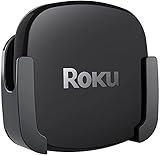
- DESIGNED IN THE USA.
- COMPATIBLE with ALL Roku Ultra models (including Roku Ultra 2024, 2025, and 2026).
- WHAT’S IN THE BOX: Premium mount for Roku Ultra and all mounting hardware.
- PERFECT FOR WALL-MOUNTED TELEVISIONS: Attaches Roku Ultra to the back of your television (or to a wall near your television). Makes Roku Ultra installation easy. Provides direct access to the HDMI ports on the back of your television and eliminates the need to tunnel an HDMI cable through your wall.
- HEAT MANAGEMENT – Ventilation channels allow cool air to flow under your Roku Ultra.
Frequently Asked Questions
How much is YouTube TV now?
YouTube TV’s main plan costs $82.99 per month plus tax as of August 13, 2026. Eligible new users may see $67.99 per month for the first three months, but the regular price applies afterward.
What is the cheapest YouTube TV plan?
The cheapest standalone option identified is the Spanish Plan at $24.99 per month plus tax. The Sports Plan costs $64.99 per month and is the lower-priced option for sports and local-channel viewing.
How many people can watch YouTube TV at once?
YouTube TV’s standard membership supports up to six household accounts and three simultaneous streams. Six accounts are intended for one household, not six independent households.
Do I need a Roku for YouTube TV?
No. YouTube TV can run on supported smart TVs, browsers, phones, tablets, game consoles, and streaming players, including listed Roku devices. Roku Ultra is optional rather than required.
The Bottom Line
Bottom line: YouTube TV’s main plan is $82.99 per month plus tax and delivers the broadest package, while the $64.99 Sports Plan is a narrower sports-and-local-channel option. The best choice depends on your ZIP code, required sports and Spanish-language channels, and whether optional 4K Plus features justify their account-specific price.
Quick Recap
Product prices and availability are accurate as of the date/time indicated and are subject to change. Any price and availability information displayed on Amazon at the time of purchase will apply.