Crashes, No Sound, or Screen Glitches?
Random freezes, missing sound and display glitches usually trace back to one bad driver. Find and replace yours safely.Free scan · under a minutePC Slower Than It Used to Be?
A free scan shows the junk files, broken settings and background clutter dragging Windows down - then fixes them in one click.Free scan · Windows 10 & 11To use an iPhone, iPad, or Mac as a teleprompter, open a teleprompter app, add your script, position the text near the camera, and adjust its size and scrolling speed until you can read comfortably. Use the same device for a simple setup, a second Apple screen for a larger prompt, or an iPhone as your Mac’s webcam while another screen displays the script. Continuity Camera connects the iPhone camera to compatible Mac apps; it does not scroll a script.
Choose the setup that fits your recording
Read from the device you are recording with
An iPhone is compact for a close camera position, while an iPad provides more display area in many setups. Open a teleprompter app, paste or import your script, and use the app’s camera-recording feature if it offers one. Features vary: some apps provide scrolling and text-size controls, while recording, captions, mirroring, or external controls may depend on the app or plan. Check the app’s current listing before relying on a specific feature. App Store listings
Use an iPad or iPhone as a separate prompt screen
Put the prompt device beside or just below the camera so your eyes do not travel far from the lens. An iPad may make larger text easier to read at a distance. If you use a professional beam-splitter teleprompter, check whether its setup requires mirrored or reversed text; ordinary screen reading generally does not.
Use an iPhone as a Mac webcam and keep the script separate
Apple’s Continuity Camera lets a compatible Mac app use an iPhone camera or microphone. It is a webcam feature, not a teleprompter. Mount the iPhone securely with its rear camera facing you; Apple recommends landscape orientation for automatic camera selection by apps. Keep the script on the Mac or another screen near the camera. Apple: Use Continuity Camera
#1 Best Overall
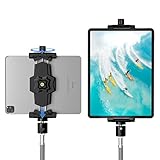
- 【More Stable & Secure】The upgraded iPad tripod mount adapter is built-in reinforcing rib in the middle of the base. Powerful spring-loaded arms and large jaws combined to make sure your device being held steadily. Moreover, the iPad clamp mount base and jaws are covered with non-slip pads to protect your device from scratches and slips, reducing the risk of its falling.
- 【Universal Compatibility】KDD tablet tripod mount has the 5.3-10.6” width opening, which fits different size screen cell phones and tablets, such as iPad 1 2 3 4 5 6 7 8 9, iPad Mini 1 2 3 4 5 6, iPad Air 1 2 3 4, iPad Pro 12.9" 11" 10.5" 9.7", iPhone 15/15pro/15pro max,14/14pro/14pro max, 13/13pro/13pro max, 12/12 Pro/12 Pro, 11/11 Pro/11 Pro Max, X/XS/XR/XS Max, Galaxy tab, Surface Pro, Nexus etc.
- 【Wide Application】Equipped with 2 standard 1/4" screw holes on the bottom and back of base, this iPad holder for tripod supports mounting tablet to steering gimbal, tripod stand, selfie stick, ring light tripod or any devices with standard 1/4"-20 thread. Perfect for video recording, selfie, remote teaching, online courses, live music shoot, Zoom meeting, watching movies and more.
- 【360°Adjustable Angle】This ipad mount for tripod comes with a high-quality & durable swivel metal ball head, allowing you rotate or adjust the angle of the tablet between portrait and horizontal orientations to meet your needs at different angles. PS: It does not include a tripod stand.
- 【Friendly Design】The ipad holder stand, based on a stretchable spring design, has a locking knob for easy width adjustment to fit different sized devices. Jaws on both sides have reserved charging space which make it easier for tablet charging.
Use a Mac as the prompt display
On a Mac, run a teleprompter app or place a script window near the camera. Some apps describe overlay, multiple-window, or external-display options; confirm that the feature works with your app and macOS version. During a call or recording, make sure the prompt does not cover controls or the preview. Sidecar can extend or mirror a Mac desktop to an iPad, but Sidecar alone does not provide scrolling script text. Apple: Use one Mac with multiple devices
Set up the script and practice the delivery
- Choose and prepare the prompt device. Decide whether the script will appear on the recording device, a second Apple screen, or a Mac display. Paste or import a clean script into the teleprompter app.
- Place the text near the lens. Position the phone, tablet, or prompt window as close to the camera as practical. Use a stable mount if the device is serving as a webcam or must remain fixed.
- Set readable text and a comfortable pace. Adjust font size for your viewing distance, then choose a scroll speed that lets you speak naturally. There is no universal best size or speed; rehearse with your actual setup.
- Test controls before recording. Start a short practice passage and check whether you can pause, resume, or change speed without disrupting the shot. Use an app-compatible remote only if you need one.
- Record or join the call. Recheck framing, eye-line, and whether the prompt obscures anything on screen. Make a brief test recording if the delivery matters.
Use Apple’s continuity features for the right job
Continuity Camera makes an iPhone camera or microphone available to compatible Mac apps. Apple’s stated requirements include Wi-Fi and Bluetooth being on, the devices using the same Apple Account, and the devices being within 10 meters; a wired USB connection is also supported. These are Continuity Camera requirements, not requirements for every teleprompter app. Apple lists iOS 16 or later and iPhone XR or later, plus macOS Ventura 13 or later, for Continuity Camera with Mac. Apple’s Continuity Camera guide and requirements
Rank #2
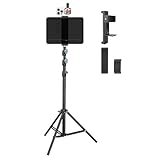
- Tablet Teleprompter: Supports using a tablet as a teleprompter with smartphone camera, offering clearer lines on larger screen. Featuring an innovative dual-clamp design, it is specially crafted for live streamers, video presenters, public speakers - say goodbye to forgotten lines forever.
- Dual-screen Sync Shooting: Enables synchronized filming with both tablet and smartphone in the same orientation - ideal for capturing multi-angle footage or simultaneous multi-platform streaming. The extendable tripod provides flexible positioning unrestricted by space or height, enabling freestanding use for live streams, recordings, and video conferences.
- Without Power Worries: Place the tablet/smartphone facing you and the power bank on the back - no battery anxiety, just pure enjoyment. Perfect for various scenarios like home entertainment, fitness exercise, cooking learning, music practice and more.
- Flexible and adjustable: Three models of clamps with different adjustable range are available, large: 6.2"-8.7"(15.8-22cm), medium: 4.4"-7.3"(11.2-18.5cm), small: 2.2"-3.5"(5.5-9cm). The smartphone holder supports 360° rotation, and the height of the holder bar can be freely adjusted from 20.5"- 70.8"(52-180cm). You can easily get desired angle and positions to meet your needs, perfect for live video streaming, video recording and watching.
- High-quality materials: Made of premium aluminum alloy material, providing sturdy support with reliable durability. The anti-slip plastic on the clamps add security to tablet/smartphone holding.
Sidecar extends or mirrors the Mac desktop to an iPad, which can help put a Mac app window on the iPad. It does not add teleprompter scrolling. iPhone Mirroring is a separate feature: Apple says it requires iOS 18 or later and macOS Sequoia 15 or later on a Mac with Apple silicon or the T2 Security Chip. Apple’s requirements page says availability is limited by region and that iPhone Mirroring is not currently available in the European Union. Neither iPhone Mirroring nor Continuity Camera supplies prompting by itself. Apple: Continuity system requirements
Mirroring, remote controls, and app features
Mirror text only for a rig that needs it
Reversed text is useful when a beam-splitter teleprompter reflects the display toward the reader. For direct reading from a normal phone or tablet screen, use ordinary, readable text unless your equipment specifically calls for mirroring.
The Tool Desk
Outbyte PC Repair FREERepair Windows errors before they cause bigger problemsFix Now →Outbyte Driver Updater FREEFix the driver behind crashes, sound loss and screen glitchesFind Drivers →Rank #3

- Two Holders Included: This tripod stand comes with two separate holders – one for tablets and one for phones. The two holders can be attached to the stand at the same time using the 1/4‑inch dual‑head thread. The tablet holder fits most tablets, and the phone holder fits most phones. You can put both devices on the stand at the same time.
- Hands‑Free Positioning: Once the stand is set up, you can place it on the floor or on a desk. This allows you to keep your hands free while looking at your device. Some people use it for video calls, watching movies, or reading. It does not require you to hold the tablet or phone yourself.
- Adjustable Height: The tripod can be adjusted in height from 15.7 inches up to 63 inches. You can change the height by loosening and tightening the flip locks on the legs or center column. The top of the stand has a ball head that lets you tilt and rotate your device to different angles. With these adjustments, you can set the stand to work.
- High Quality: The stand is made of aluminum alloy. The material is intended to provide a balance between being sturdy enough to hold a device and being light enough to carry around. You can fold the tripod legs inward, which makes the whole stand more compact. When folded, it takes up less space in a bag or a closet.
- Universal Fit: The diagonal-adjust tablet holder securely fits devices from 4.7" to 12.9", including all iPad Pros, Galaxy Tabs, and Microsoft Surfaces. The side-mount phone clamp expands for all smartphones and iPad Minis. Plus, the standard 1/4" screw works seamlessly with cameras, microphones, ring lights, and webcams—true universal versatility.
Check remote compatibility before buying
Depending on the app, scrolling may be controlled by an on-screen button, keyboard, Bluetooth clicker, game controller, or foot pedal. Compatibility and connection methods differ by app and device, so verify the exact combination before purchasing a remote. A remote is optional; it is not needed for a basic setup.
Verify optional capabilities and plan limits
Recording, external-display output, script export, captions, and other functions are app-specific. Review the current app listing and plan details for the feature you need. Do not assume Apple’s built-in Camera app scrolls a script, or that Continuity Camera adds teleprompter controls.
Rank #4

- Universal Fit - Adjustable clamp expands from 6.25 to 9.30 inches and securely holds any iPad or tablet including iPad Pro 12.9, iPad Air, iPad Mini, Surface Pro, Galaxy Tab and other 7 to 13 inch tablets. Tripod not included.
- Metal Swivel Ball Head - Durable metal ball head allows smooth rotation between landscape and portrait orientation and easy angle adjustment for video recording, streaming and photography.
- Bluetooth Remote Included - Wireless remote shutter lets you capture photos and videos from up to 30 feet away without touching your device. Ideal for content creation, group photos and hands free recording.
- Secure Screw Lock Design - Strong adjustable screw lock keeps your tablet stable and prevents slipping while padded grips protect your device from scratches.
- Compatible with Most Tripods - Attaches to any tripod with a 1/4 inch screw mount. Lightweight and portable design makes it easy to use at home, in the studio or on location.
Common problems and fixes
- Your eyes move noticeably across the frame: Move the prompt closer to the camera lens or use a smaller display placed directly beneath it.
- You lose your place or rush the words: Increase text size if needed, slow the scroll, and rehearse at the final viewing distance. Adjust one setting at a time.
- The prompt appears backward: Turn off mirror or reverse-text mode for ordinary screen reading. Enable it only when the physical teleprompter rig requires reflected text.
- A remote will not control scrolling: Confirm that the app supports that specific remote and check its pairing or connection steps. Remote compatibility is not universal.
- The iPhone does not appear as a Mac camera: Check that the Mac and iPhone meet Apple’s Continuity Camera requirements, have Wi-Fi and Bluetooth enabled, use the same Apple Account, and are close enough; try USB if needed. Confirm that the Mac app supports selecting an iPhone camera.
- The iPad shows the Mac desktop but does not scroll the script: That is expected from Sidecar alone. Open a teleprompter app or script workflow that supplies scrolling.
- The prompt covers call controls or the recording preview: Move the window or use a separate screen, then test the layout before the real session.
Or let it run in the cloud
If your goal is to keep prerecorded video live on YouTube rather than read a script on camera, StreamNeo is a different tool for that job. Upload a recording or build a playlist, add your YouTube stream key, and go live; StreamNeo loops the uploaded video from the cloud, so your computer and home connection do not have to stay on. It does not go live from a camera.
- Nothing has to stay on at home; the stream runs in the cloud.
- Videos stream as uploaded, up to 4K 60fps, at one flat price per slot with no quality tiers.
- Automatic recovery if YouTube drops the stream.
- The first day is free with no card, once per account.
Monthly: $9.99 per month. See StreamNeo or start your free day.
Free tools Windows power users keep installed
One-click scans. No signup required.
Quick Recap
Best Value

- 【Introducing NEEWER BASICS】 Simple and practical, NEEWER BASICS is an economical product line that focuses on essential functions and designs, without unnecessary extras and materials. Note: Not for phone shooting
- 【Upgraded No Assembly Design】 NEEWER X12B teleprompter is upgraded with an installation free design for ultimate user friendliness. Made of premium aluminum alloy, it's lightweight yet durable enough to hold your iPad, tablet and camera in place while making videos. The liftable platform and glass make it suitable for various photography equipment by keeping the lens always centered. It is an all in one teleprompter for presentations, online courses, and tutorial recording, Please note that this product does not function as a monitor or allow direct on screen self viewing during recording.
- 【Intelligent Remote Control 】 This X12B enables intelligent control via the included RT113 remote (AAA battery not included) and the NEEWER Teleprompter App. Pair the remote with your smartphone/tablet in the app via Bluetooth connection, or a direct Bluetooth link from your smartphone/tablet. Simply click to play/pause, adjust scroll speed, turn script pages, and change font size. The RT113 features a black appearance and quiet buttons. The app is compatible with iOS 11.0/Android 6.0 and later
- 【Easy to Read with 12" HD Display】 Thanks to an innovative coating technique, the high quality beam splitter glass ensures 75% light transmittance. With its adjustable hood and leading technology glass, the text on your tablet is clearly reflected onto the 12" high definition display of the teleprompter. The reflected text can be read up to 10ft (3m) away. If you prefer a teleprompter with a bigger screen, check out NEEWER X14, X14 Pro, X14 II, X16, and X17 II teleprompters
- 【Foldable & Portable】 The flip open structure makes it collapsible for easy storage and transport. When not in use, fold it flat and fit it inside the durable carry case for storage and protection
Product prices and availability are accurate as of the date/time indicated and are subject to change. Any price and availability information displayed on Amazon at the time of purchase will apply.

