There is no universal set of ten guitar pedals every player must own. The right choices depend on the music you play, your guitar and amplifier, the effects you already have, and what you want to change about your sound. These ten categories make a useful starting point—not a shopping checklist or ranking.
What to consider before buying
Start with the sound or practical problem you want to address. A tuner solves a different need from reverb; overdrive, distortion, and fuzz are related gain effects, but they do not create the same character. Your amplifier matters, too: a pedal that pushes a clean amp may behave differently when the amp is already overdriven.
- Sound role: Identify the effect you need, rather than buying a category because it is considered essential.
- Gain character: For overdrive, distortion, and fuzz, decide whether you want a light push, heavier distortion, or a more saturated, pronounced sound.
- Rig fit: Consider your guitar, amp settings, signal-chain position, and desired result together.
- Live control: Check the exact model for features such as footswitching, tap tempo, or an expression input; these are not guaranteed across a category.
- Board and power: Confirm dimensions, connections, and power requirements before choosing a standalone pedal or a multi-effects unit.
Ten useful pedal categories
1. Tuner
A tuner pedal reads the guitar signal and provides a convenient way to tune between songs or during practice. BOSS recommends placing a tuner first in the chain, where it can receive a clean signal for pitch detection. A fuzz with particular bypass behavior may need a different position, so check its manual and test the actual rig. BOSS’s signal-chain guide explains these placement considerations.
2. Compressor
A compressor controls dynamics by reducing the difference between louder and quieter parts of a signal. It can help even out a performance or shape the feel of a clean tone. BOSS recommends placing compression near the guitar so it responds to the instrument’s clean signal. Whether that is useful depends on how much dynamic variation you want to preserve.
#1 Best Overall

- 80 preset patches and 80 user patches, enough for creating your sound library. You can save any preferred tones by simply pressing down the SAVE button.
- 8 effect modules, including 66 effect types, providing you with the most unique Mooer sound library. Simply rotate the knob above the screen and everyth
- 6 assignable expression pedal parameters which greatly improve the convenience and diversity of controlling the tone. Unique adjustable output mode setting allows you to use line out mode to still get a good tone when playing without an amp.
- By using 180 seconds looper and a drum machine which contains a variety of rhythm patterns, you can create your own music without using a computer.
- GE100 has scale and chord learning function. Just click the LESSION button to enter the scale and chord knowledge reserve interface.
3. Wah or filter
A wah pedal lets you sweep a filter with your foot, changing which frequencies stand out as you play. Other filter effects shape the frequency balance in different ways. A common starting position is after the tuner and before gain pedals, but signal-chain order is not fixed; try it in the context of your own rig.
4. Overdrive
Overdrive adds gain and can push an amplifier-like sound from a mild edge into stronger breakup. The important choice is how much the pedal changes your existing tone and how it responds to playing dynamics. BOSS’s overdrive catalog includes SD-1 and BD-2 families, which are examples to compare—not a universal recommendation. See BOSS’s overdrive listings.
5. Distortion
Distortion offers another kind of gain shaping, often with more sustained or pronounced clipping than a light overdrive setting. Models vary in their range and voicing, so match the sound to the music and to whether your amp is clean or already driven. The BOSS DS-1 is one example of a physical distortion pedal, but a catalog listing does not establish that it is best for every player. Browse BOSS distortion examples.
Rank #2
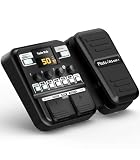
- Advanced DSP Simulation: Unlike traditional guitar effects pedals, the KMF-1 utilizes advanced DSP technology with TSAC for precise analog circuit simulation. It incorporates 512-point IR Sampling to mimic different cabinet sounds. With 32-bit signal processing, it ensures clear, dynamic sound, making it ideal for both studio recording and live performances
- More CAB & AMP Options: Equipped with 77 classic effects across 8 essential effect modules: Amplifier, Cabinet, drive, Modulation, Delay, Dynamics, Reverb, and Filter, the KMF-1 has everything you need. With its impressive collection of 18 amp models and 18 cabinet simulators, it stands out among similar products on the market
- Flex Your Music Creativity: With 50 preset patches, even beginners can start playing right away. Instantly switch tones in Memory Mode during live sets. The built-in tuner, 30s looper, and 42 drum rhythms, and AUX IN to connect your phone for playing along with backing tracks—maximizing your creative inspiration
- Customize Pro-Level Effects: The KMF-1’s Stomp Mode replicates classic single-pedal operation with 5 independent effect blocks that can be flexibly enabled and sequenced. The advanced Edit Mode allows fine-tuning of each effect parameter. Combined with a 2-in-1 expression pedal supporting 6 assignable effects, it meets your high-level playing and creative needs
- User-Friendly Design: The KMF-1 electric guitar pedal features a upgraded clear 128×32 LCD screen with real-time feedback. Intuitive controls—including knobs, buttons, and a customizable durable pedal, make switching effects easy. It supports two power modes with a battery compartment for 6 AA batteries, offering up to 2.5 hours of use, ensuring freedom to create music even outdoors
6. Fuzz
Fuzz is a distinct, heavily clipped gain character, often chosen for a pronounced, saturated sound. It is not simply a substitute label for overdrive or distortion: listen for the kind of clipping and response you want. BOSS’s WAZA Craft catalog lists fuzz examples including the FZ-1W and FZ-5. View the WAZA Craft catalog.
Do these 3 things before closing this tab:
1Repair Windows errors before they cause bigger problems2Fix the driver behind crashes, sound loss and screen glitches3Clear out junk files and repair common Windows errors7. Modulation, such as chorus
Modulation effects alter or layer aspects of the signal over time. Chorus is one familiar example; flanger and phaser are others, each with a different character. BOSS suggests trying modulation after gain pedals as a starting point, while noting that placement is a matter of experimentation.
8. Delay
Delay repeats the guitar signal, from short echoes to more prominent repeats. Placed after distortion, its repeats tend to sound cleaner and more even; placed before distortion, they may blend together or drop out as the distortion responds to them. Choose the order according to whether you want distinct echoes or a more integrated, smeared sound.
Rank #3

- Legendary Distortion Heritage: Used by guitarists everywhere since 1978, establishing the standard for distortion pedals
- Pioneering Sound Design: First distortion pedal from BOSS defined a bold new sound, delivering hard-edged attack and smooth sustain that's been a staple of players for generations
- Clear Hard-Edged Attack: Remains clear even at maximum distortion settings for heavy rhythms and cutting solos
- Versatile Booster Function: Works as a booster at low distortion settings for enhanced tonal flexibility
- Wide-Range Tone Control: Unique tone control offers a wide range of sound shaping possibilities
9. Reverb
Reverb adds a sense of ambience, from a subtle impression of space to a more obvious wash. BOSS recommends trying it after delay. An amplifier’s effects loop is another possible position, depending on the amp and the sound you want.
10. Looper
A looper records and repeats phrases, making it useful for practice or performance. Its position determines whether later effects process the recorded loop. For example, placing a looper before delay lets the delay affect the looped phrase; placing it later in the chain changes what gets recorded.
The Tool Desk
Outbyte PC Repair FREEClear out junk files and repair common Windows errorsFree Scan →Outbyte Driver Updater FREEFix the driver behind crashes, sound loss and screen glitchesFind Drivers →A practical signal-chain starting point
For a conventional setup, try this order and adjust it to taste:
Rank #4

- GE150 Pro Series, is designed based on MOOER’s updated GE series design language and MNRS modelling technology. Two editions: the standard mains-powered option and the GE150 Pro Li, which features a staggering 9 hours of battery life through an integrated Lithium battery. The standard GE150 Pro comes with a neutral white finish.
- More Flexibility: Four multi-purpose footswitches for browsing presets and triggering a wide range of functions. paired with an upgraded effect chain control logic, allowing guitarists to utilize all four footswitches for enhanced flexibility when switching between different patches during performance. Expression pedal that supports both parameter control and output volume control.
- Massive Tone: 200 factory preset tones, 55 classic amp preamps based on MOOER’s in-house MNRS modelling technology, 26 high-quality cabinet simulations, AMP and CAB modules now support MNRS sample files (GNR and GIR). The AMP module has 20 slots for loading samples, and the CAB module's slots have been increased to 20.
- Multi-function purposes have also been built into the pedal’s UI, once again meeting the growing control system demands of guitarists creating on the cutting-edge of music technology. The GE150 Pro pedal can be mapped to effect parameters for dynamic live control and also features a "toe tap" feature to switch the mapping "Expression" to "Volume" control mode.
- Ready to Jam: tune with precise instrument tuner, play with built-in 80-second stereo LOOPER function, built-in drum machine module with 40 drum rhythms and 10 metronome modes. Best of all, all of these rhythmic and looping features can be controlled through the four multi-purpose foot switches, ensuring that loop improvisations and backing tracks can be seamlessly integrated into both live performances and practice sessions.
- Tuner
- Compressor and wah or filter
- Gain pedals, from lighter overdrive toward heavier distortion
- Modulation
- Delay
- Reverb
This is a starting arrangement, not a rule. Fuzz can require special placement depending on its bypass behavior, and the looper belongs wherever makes sense for the effects you want applied to recorded phrases. BOSS also notes that some pedal positions are debated, so listen to the result rather than treating one chain as mandatory.
When a different choice makes more sense
These ten categories are one plausible general-purpose selection, not a prescription. EQ may be a more useful purchase if you need to shape frequency balance; a volume pedal or noise-control tool may better address a specific playing need. If you want several effects without building a board one pedal at a time, a multi-effects processor is another option: BOSS’s ME-25 and GT-001 pages show multiple effect types integrated in single processors. BOSS ME-25 and BOSS GT-001 are product examples, not a comparison or ranking.
Quick Recap
Product prices and availability are accurate as of the date/time indicated and are subject to change. Any price and availability information displayed on Amazon at the time of purchase will apply.




