To add a pet cam to a live stream, connect a camera near your pet and add its feed to your streaming setup. In OBS, add a Video Capture Source to a scene, select the camera, then position and resize it. If the pet is too far from the streaming computer, use a phone or tablet as a second camera, a computer-accessible camera feed, or a network camera that explicitly supports RTSP.
Choose the camera setup that fits your room
| Option | Best when | Main constraint |
|---|---|---|
| USB webcam in OBS | Your pet is close to the streaming computer | Cable reach and an available USB connection |
| Phone, tablet, or laptop as a second camera | You can place a spare device near the pet | It needs a camera, browser access, internet, and permission to use the camera |
| Camera app or browser feed | The camera already provides a view accessible on the computer | Compatibility depends on the camera and streaming software |
| Network camera over RTSP | The camera explicitly supports RTSP and is reachable on your network | The stream address and setup are model-specific |
| YouTube’s direct webcam workflow | A single webcam-led broadcast is enough | It does not provide OBS-style composition of multiple scene sources |
Add a USB webcam in OBS
This is the simplest route when the pet’s usual spot is within cable range of the computer. OBS’s documented process is to add a Video Capture Source, then position and resize it in the scene. OBS: How do I add my webcam?
- Open or create the intended scene. In OBS, select the scene where you want the pet view to appear.
- Add the camera source. In the Sources panel, select + and choose Video Capture Device (also described as a Video Capture Source). Create a new source or select an existing one.
- Select the webcam. In the source properties, choose the connected camera from the device list. If it is not listed, check its USB connection and whether another application is using it.
- Place and size the image. Select the source in the preview and drag it into position; use its handles to resize. Crop edges if needed so the pet remains in view without covering important stream content.
- Check the scene before broadcasting. Confirm the camera is visible, focused, and framed as intended. Verify audio routing separately if you want the pet’s surroundings heard.
A wired webcam works only if its cable can reach the pet’s location safely and comfortably. A stable mount or tripod can help, but it is optional; any support must keep the camera secure and out of the pet’s reach.
Use a phone, tablet, or laptop as a second camera
A spare device can sit near the pet while the main computer runs the stream. Streamlabs’ Collab Cam tutorial describes this workflow: the second device needs a camera, internet access, and a browser. Its steps use a source link opened on the second device, camera permission, camera selection, and joining the session. Interface details and service terms can change, so follow the current prompts in the product.
#1 Best Overall

- Dog multivitamins chewable for skin & coat : Dog multivitamin is rich in Omega-3 fatty acids and vitamin E,which can relieve skin allergies,dryness,itching and other problems.Multivitamin for dogs nourishes skin follicles.Long-term consumption of dog vitamins multivitamin can make dog hair stronger and smoother,and reduce coat loss.The COQ10 in dog multivitamin chewable can resist oxidation and delay cell aging.Dogs with skin injuries can eat dog vitamins and supplements to promote wound healing
- Dog multivitamin relieves joint inflammation: Dog vitamins for hip and joint can supplement high-quality MSM, glucosamine, and chondroitin sulfate to promote cartilage development and repair. Long-term consumption of dog multivitamins chewable can enhance the elasticity and toughness of joint cartilage, improve joint flexibility, and move more freely. Dog multivitamin chews can reduce joint friction and relieve joint pain. Dog vitamins and supplements can prevent and improve dog joint problems
- Dog multivitamin chews are good for the gut: Vet-endorsed formula dog vitamins and supplements made from natural ingredients.Dog vitamins multivitamin chewables contain a rich blend of probiotics to support intestinal and digestive health.Dog vitamins for small dogs can regulate the balance of intestinal flora,help calcium absorption,and promote bone development.Dog multivitamins chewables improve energy metabolism,converting food into energy, making dogs more energetic in their daily activities
- Dog multivitamin chews protect overall health:Senior dog vitamins and supplements help improve blood circulation and prevent cardiovascular disease.Dog multivitamins chewable support normal liver function,promote liver detoxification,and improve negative mood.For dog with heart problems and older dog,taking dog vitamins and supplements in moderation is an auxiliary health care measure.Dog vitamins multivitamin helps enhance white blood cell activity,improve immunity,prevent infection and disease
- Dog multivitamins chewable promote brain development: The DHA in krill oil in multivitamin for dogs is an important component of the brain and retina. Dog vitamins and supplements can improve dog cognitive ability. When training puppies to learn basic commands, puppies who are properly supplemented with dog vitamins multivitamin will behave more intelligently and improve memory.Dog supplements & vitamins can prevent and relieve eye problems such as dry eyes and tear stains, and keep eyes healthy
- Create a second-camera source in the streaming setup using the current Collab Cam instructions.
- Open the provided link on the phone, tablet, or laptop you will position near the pet.
- Allow camera access in the browser, select the intended camera, and join.
- Position the device so the pet is in frame, then place and size the incoming source in your scene.
- Check visibility and connection in the preview before going live.
Streamlabs’ tutorial says Collab Cam is free for one guest or second camera; that is the provider’s statement, not a guarantee of current terms. Check its current offering before relying on it.
Use a camera app, browser feed, or RTSP source
Camera app or online feed
Some cameras show their video through a computer-accessible app or online feed. Streamlabs describes using a phone emulator to show a camera app on the computer, or adding an online feed as a browser source when the feed is available to the computer. These options are not universal: confirm that your camera’s feed can be accessed and added by the streaming software you use before building your setup around it.
Rank #2
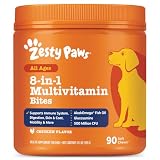
- 8-in-1 Formula - Zesty Paws Multifunctional Bites are functional supplement chews with premium ingredients that support physical performance, antioxidants, hip & joint, heart, immune, skin, liver, & gut health for dogs of all ages, breeds, and sizes.
- Skin Health & Antioxidants – For animals with sensitive skin, this formula contains Cod Liver Fish Oil and Vitamin E to help maintain normal moisture and CoQ10 to help reduce oxidative stress.
- Hip, Joint & Performance Support - Each dog chew features OptiMSM, a premium form of MSM for muscular support, which works synergistically with the Glucosamine HCl and Chondroitin Sulfate in these chews for hip and joint support plus Cod Liver Oil and B-Complex Vitamins support normal physical performance.
- Gut Health & Probiotics - These chews also contain a six-strain Gut Health Blend (500 million cfu per chew) and a Digestive Health Blend to promote gut flora while supporting normal bowel function for dogs.
- Heart, Liver & Immune Health - Multifunctional Bites feature powerful antioxidants, premium CoQ10, Cod Liver Oil and Vitamins A, C, & E to promote healthy cardiovascular function, support liver health and enhance immune response.
Network camera with RTSP
An RTSP source is an option only when the camera supports RTSP and the computer can reach it on the network. AVer’s OBS camera-plugin manual gives an RTSP input example and these prerequisites, but it is not a compatibility guide for every pet camera. Check the camera manufacturer’s current documentation for the exact model-specific stream address. Do not show a URL containing camera credentials in a public stream, screenshot, or recording.
Control framing, visibility, and audio
Place the physical camera where it can capture the pet comfortably, then compose the feed in the scene. Before broadcasting, check the preview for framing, crop, focus, exposure, and whether the source is visible when you intend it to be. If you do not want the pet camera on screen continuously, OBS source visibility can hide it; you can also assign hotkeys to show or hide the source. Make sure a hotkey will not be triggered accidentally during the broadcast.
Rank #3

- COMPLETE 26-IN-1 DAILY WELLNESS FORMULA: Our advanced multivitamin for dogs is formulated to help support 26 vital nutritional areas as part of a daily routine. With essential vitamins A, C, D3, and E, these gummies help support the immune system and contribute to overall heart and brain health for dogs of all sizes.
- ADVANCED HIP AND JOINT MOBILITY SUPPORT: Formulated with Glucosamine HCl, Chondroitin, and MSM to help support cartilage health, joint flexibility, and everyday mobility — making them a great daily supplement for large breed dogs and active senior dogs.
- SKIN & COAT SUPPORT: Packed with Norwegian Salmon Oil and Biotin, our dog multivitamin helps nourish skin from within and supports a soft, glossy coat. Omega 3 fatty acids contribute to healthy skin and coat as part of a complete daily nutritional routine.
- PROBIOTICS & DIGESTIVE SUPPORT: Features a Six-Probiotic Blend (500 Million CFU) and Digestive Enzymes to help support gut health, smooth digestion, and nutrient absorption. Cranberry Powder is included as part of this comprehensive daily wellness formula.
- UNBEATABLE VALUE 250 COUNT JAR: Our 250-count jar provides lasting daily support in a delicious chicken flavor. Made in the USA in a GMP-certified facility, our soft chews are grain-free and suitable for puppies, adult, and senior dogs alike.
Decide whether the camera’s microphone should be heard. A camera can add sound as well as video, so inspect your audio mixer and routing rather than assuming the video source is silent. Do a short private or unlisted check if you need to confirm the final scene and audio behavior before a public broadcast.
OBS scenes, Virtual Camera, and YouTube’s direct webcam route
Use an OBS scene when you want to combine the pet view with other elements, such as a title, another camera, or a documentary-style layout. OBS Virtual Camera serves a different purpose: it shares an OBS output as a webcam input to another application that accepts a camera. It is not itself a broadcast to YouTube. See the OBS Virtual Camera Guide.
Rank #4

- Joint Health Supplement for Dogs: Cosequin is the #1 vet recommended retail joint health supplement brand, supporting joint health in dogs for over 25 years
- Contains Glucosamine for Dogs: Cosequin contains glucosamine hydrochloride (FCHG49) and sodium chondroitin sulfate (TRH122), plus methylsulfonylmethane (MSM). This unique combination of ingredients supports healthy joints
- For Any Breed or Size: Whether you have a young or senior dog, a small or large breed, Cosequin helps support their joint health
- Tasty Chews for Daily Use: Cosequin comes in a tasty chewable tablet, making daily administration easy and convenient
- Exceptional Quality: Cosequin is backed by science, undergoing thorough quality inspections to ensure your dog receives a safe, high-quality product. It is manufactured in the United States with globally sourced ingredients
YouTube also has a direct webcam workflow for broadcasting from a camera without first composing an OBS scene. YouTube’s flow includes setting up live-stream access, opening the webcam workflow, entering stream details, choosing privacy, selecting camera and microphone, and going live. Check YouTube’s current eligibility and interface requirements before scheduling a broadcast; these can change. Follow YouTube Help: Create a live stream via webcam.
Independent reader supportYour contribution helps us test, update, and keep practical guides available for everyone.Copyright and privacy checks for a pet broadcast
- Use audio and video you have rights to stream. A pet-cam picture does not make background music, television audio, or other copyrighted material safe to broadcast. Review YouTube’s current copyright rules and any rights that apply to music or footage in the room.
- Choose the right audience setting. Set the stream’s privacy deliberately in YouTube’s setup, especially when testing camera position or audio.
- Protect private information. Keep camera credentials, private camera-app screens, and identifying details out of the broadcast. Check the full camera frame for people or information you did not intend to show.
- Keep the animal safe. Secure cables and mounts, and position equipment so the pet cannot chew, pull down, or become tangled in it.
Troubleshooting a pet cam
The camera does not appear in OBS
- Check that the camera is connected and powered, then reopen its source properties and select the correct device.
- If another application may be using the camera, close that application and try again.
- For a second-device workflow, confirm the device has internet access, browser camera permission, and the intended camera selected.
The feed is black or missing in the scene
- Check the source’s visibility control and confirm it is not hidden behind another scene element.
- Recheck the selected device or, for an online or RTSP feed, confirm the feed is reachable and its address is correct for that camera.
- For RTSP, verify both network reachability and explicit RTSP support in the camera’s model documentation.
The pet is out of frame or the picture is poorly composed
- Adjust the physical camera angle first, then reposition, resize, or crop the source in OBS.
- Check the preview after changing the pet’s usual position; a framing that works while the pet rests may not work when it moves.
- Use a secure support rather than leaving a device where it can fall or be reached by the pet.
Viewers cannot hear the intended sound
- Check that the correct microphone or camera audio source is selected and that it is not muted in the mixer.
- Listen to a test recording or private preview to confirm the sound level and avoid unintentionally broadcasting room audio.
Or let it run in the cloud
If your goal is to keep an uploaded pet video playing as a 24/7 YouTube stream, rather than show a live camera, StreamNeo is a cloud option: upload a recording or build a playlist, add your YouTube stream key once, and go live. Nothing has to stay on at home; it streams your upload as made up to 4K 60fps at one flat price per slot, and automatically recovers if YouTube drops the stream. The first day is free with no card. Monthly: $9.99 per month. Start your StreamNeo free day.
Do these 3 things before closing this tab:
1Scan for outdated or missing drivers - takes under a minute2Repair Windows errors before they cause bigger problems3Fix the driver behind crashes, sound loss and screen glitchesQuick Recap
Best Value

- Itch & Allergy Relief with Omega-3 for Dogs - with 500mg of Omega (EPA+DHA) per serving, our chewable supplement helps with hot spots, dry itchy skin, ease itching, irritated skin, stops shedding.
- Skin & Coat + Hip & Joint Supplement Combined - Omega 3 is a vital element to keep your pet active, support healthy hip and joints, brain, heart, immune health. Can be served with regular pet food.
- Bark&Spark Commitment - we are keen to give best to our furry customers and we take NO compromise when it comes to product quality. Our omega 3 bites are made in the USA, with human grade ingredients.
- Up to 3 Month Supply - with 180 salmon oil treats per jar you keep your pet healthy while not spending a fortune on overpriced supplements. Best value.
- Is Your Dog a Picky Eater? We stick to simple formulas rich in natural flavors, that could tempt a fussy eater. No hassle with pills, powder, tablets or capsules.
Product prices and availability are accurate as of the date/time indicated and are subject to change. Any price and availability information displayed on Amazon at the time of purchase will apply.




