Quick wins for a faster PC:
Fix the driver behind crashes, sound loss and screen glitchesFind Drivers →Clear out junk files and repair common Windows errorsFree Scan →You can copy Spotify playlists into YouTube Music without rebuilding them song by song. Start with YouTube Music’s built-in transfer tool: Profile picture → Settings → Privacy & data → Transfer playlists from other apps. The process creates new YouTube Music playlists; it does not delete Spotify originals or keep the two services synchronized. Some songs may be unavailable or matched to the wrong version, so verify important playlists before changing anything in Spotify.
Google’s documented instructions are available at YouTube Music Help.
Before you start
- Update the YouTube Music app and sign in to the Google Account and YouTube channel where you want the playlists.
- Confirm that you are using the intended Spotify account and can open the playlists you want to copy.
- Keep Spotify playlists intact until you have checked the destination.
- Expect catalog matching, not copied audio files. Spotify downloads, listening history, recommendations, billing, followers and other account data do not become YouTube Music data.
- Save the names of especially important playlists so you can check them after processing.
Google’s transfer documentation does not establish that a YouTube Music Premium subscription is universally required. Your account, region or rollout may show different requirements; read the authorization screen before proceeding.
Use YouTube Music’s built-in transfer tool
- Open the YouTube Music mobile app.
- Tap your profile picture.
- Tap Settings.
- Open Privacy & data.
- Select Transfer playlists from other apps.
- Tap Let’s start.
- Choose Spotify if the service list appears, then sign in and authorize access on Spotify’s authorization page.
- Select the playlists, albums, artists or tracks to import.
- Tap Transfer to YouTube Music.
- Sign in to the Google Account associated with YouTube Music if prompted and approve the destination access.
- Wait for the confirmation. Large libraries can continue processing in the background, so Google says you do not need to keep the app or page open.
Menu labels can change with app versions, account types or regional rollouts. If the option is not present, use the troubleshooting section below rather than assuming your Spotify account is incompatible.
#1 Best Overall

- Portable storage wallet for CDs, DVDs and data disc collections; 400 disc capacity
- Durable, protective exterior case construction with zipper enclosure and carrying handle
- Interior binder sleeves feature soft fabric backing; each page holds 4 discs per side (400 discs total)
- Neatly protect, store and organize music, movies, media and more CD and DVD collections in one place
- Dimensions: 12.2 x 11.7 x 6.6 inches (LxWxH)
What the transfer creates—and what it does not
| Item | Expected result |
|---|---|
| Spotify playlists | New YouTube Music playlist copies are created; Spotify originals remain. |
| Playlist tracks | YouTube Music catalog entries are matched to the source tracks when available. |
| Albums, artists and tracks | These content types are supported by Google’s documented transfer flow. |
| Playlist order and duplicates | Do not assume exact preservation; inspect the resulting playlist. |
| Spotify downloads | Not copied as files. YouTube Music must provide its own playable catalog versions. |
| Listening history and recommendations | Not part of this playlist import. |
| Podcasts | Not supported by this transfer path. |
| Future edits | No automatic synchronization between Spotify and YouTube Music. |
| Private uploads and non-catalog audio | Do not expect them to transfer as ordinary catalog tracks. |
The operation is additive: it does not cancel Spotify, remove playlists or transfer your Spotify subscription. Later edits on either service remain separate unless you use a third-party synchronization service.
Verify the result before deleting or reorganizing anything
- Open Library → Playlists in YouTube Music.
- Check each important playlist’s name and approximate track count.
- Play samples from the beginning, middle and end of long playlists.
- Look for live recordings, remixes, covers, karaoke versions, music videos, clean/explicit substitutions and duplicate entries.
- Confirm that the destination is the intended Google Account and YouTube channel.
- Check privacy and collaboration settings instead of assuming Spotify visibility or ownership transferred exactly.
Playlist followers, collaborative relationships and ownership may not carry over. Google’s separate playlist-copy documentation describes restrictions involving curated playlists and collaborative playlists the user does not own: Google Account Help.
Rank #2
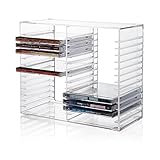
- American made with high-quality, durable BPA-free clear plastic. Domestic production of this CD organizer provides you with the peace of mind that you're buying a product that contributed less carbon emissions to the atmosphere from creation to delivery than those produced overseas.
- Say goodbye to cluttered media room shelves or office desks with these stackable CD holders. Designed to maximize space efficiency, they allow you to neatly organize and store your CD collection, freeing up valuable shelf or desk space.
- Each organizer easily accommodates up to 30 standard-sized jewel CD cases, including 2 double cases. Whether you're a music aficionado or a movie buff, you'll have plenty of room to store your favorite CDs without compromising on space.
- These organizers stack securely with the help of four rubber feet on the bottom of each unit. This ensures stability and prevents sliding or toppling, keeping your CD collection safe and organized at all times.
- Measuring 10.5" W x 4.875" L x 8.625" H, these CD organizers strike the perfect balance between spaciousness and compactness. Their rectangular design fits seamlessly on media room shelves or office desks, adding a touch of organization to your space.
Fix missing or incorrectly matched songs
A Spotify track can be absent from YouTube Music’s catalog or matched to a different release. Repair the playlist manually:
- Use any transfer report to identify unmatched entries.
- Search YouTube Music using the exact title and artist, then compare album, release year, version label and duration.
- Replace live, remix, cover, karaoke, clean or explicit mismatches with the intended recording.
- Check soundtrack and compilation editions separately when the original album is missing.
- For classical music, search by composer, work, movement and performer rather than title alone.
- For regional releases, try alternate spellings and the local-language title.
- Put unresolved songs in a temporary “Missing from transfer” playlist or note while retaining the Spotify source.
Google warns that some songs may not be available. Soundiiz also reports tracks it cannot match, but no service can guarantee identical catalog coverage across platforms.
Rank #3

- 【High-Capacity CD Case or DVD Case】CCidea Portable CD /DVD storage Holder, Fabric made of Polyester fabric +PVC film plastic + Non woven fabric, is easy to hold 128 CDs, Blu-ray discs with extra storage space left.
- 【Durable Disc Binder】CD/ DVD storage cases filled with a piece of sponge for safety and longtime use,The soft outer material dust prevent scratches, make your beloved CD, DVD safe.
- 【Delicate CD Holders Protection】Storage your various CDs to make your space more tidy,for home, school, office, car.
- 【Portable DVD Wallet for Travel】Portable handle design makes it more convenient for you to carry CDs, DVDs, movies, games, wherever you go! which is perfect for taking your movie, music, and game with you wherever you go. The DVD storage case suitable for car, home, travel, movie, office, etc.
- 【DVD Organizer Space-Saving Design】6.5*4.16*11.3 inches CD binder. The case has sufficient space and no sense of oppression.After storage, your space becomes larger and cleaner!
If the transfer option is missing
- Update YouTube Music from your device’s app store.
- Confirm you opened YouTube Music, not only the main YouTube app.
- Recheck Profile picture → Settings → Privacy & data.
- Sign out and back in to the intended Google Account.
- Try another supported device.
- Check live account- or region-specific availability; Google may roll features out unevenly.
- Back up playlist names and track information before authorizing another provider.
If the built-in route remains unavailable, a third-party service can be a fallback. Google lists such services but says it does not guarantee their quality, privacy practices or disputes. Review permissions, terms and privacy policies first.
Third-party alternatives
| Method | Best for | Limits and trade-offs |
|---|---|---|
| TuneMyMusic | Browser-based transfers and broader service support | Its FAQ advertises up to 500 tracks free. It also advertises file/text import, backups and auto-sync. External authorization is required. Free-transfer FAQ · Product page |
| Soundiiz | Many playlists, multiple services, bulk work or synchronization | The free plan is advertised as one playlist at a time, up to 200 tracks per playlist. Its pricing page displayed Premium at $5 per month billed monthly or $39 per year billed annually when crawled in August 2026; verify current pricing. Transfer guide · Pricing |
| FreeYourMusic | Users who prefer an installed app on iPhone, iPad, Android, Mac, Windows or Linux | The vendor advertises a free allowance of 600 songs and features such as rematching and reports. Those are vendor claims, not a Google guarantee. Transfer page · Downloads |
| Manual recreation | One tiny or highly curated playlist, or minimum account sharing | Maximum control, but slow and error-prone for large libraries. |
Which method should you choose?
- One-time Spotify-to-YouTube Music move: Try YouTube Music’s built-in tool first.
- One short playlist: The built-in route or manual recreation is usually simplest.
- Large or numerous playlists: Start with the built-in route; consider Soundiiz or TuneMyMusic if limits or controls become a problem.
- Several streaming services: TuneMyMusic or Soundiiz offers broader service coverage.
- Recurring synchronization: A paid third-party plan may be appropriate, but it is a sync service—not the same as a one-time import.
- Privacy-sensitive migration: Use the built-in route or manual recreation, grant only the necessary permissions and revoke third-party access afterward.
Account and privacy precautions
- Use official OAuth sign-in pages rather than typing Spotify or Google passwords into an unfamiliar converter.
- Read the requested permissions and the provider’s privacy policy.
- Revoke the provider’s account access after a one-time transfer if you no longer need it.
- Avoid unofficial downloads that promise to extract unauthorized Spotify audio.
- Do not transfer into the wrong Google Account or channel expecting an easy ownership switch; verify the destination before authorizing.
Bottom line
For most readers, the least complicated current route is YouTube Music → Profile picture → Settings → Privacy & data → Transfer playlists from other apps. It copies supported catalog items while leaving Spotify untouched. Keep the source playlists until you have checked versions, order, duplicates and missing tracks; use TuneMyMusic, Soundiiz or FreeYourMusic only when the built-in option or its one-time scope does not meet your needs.
Quick Recap
Best Value

- Room for the Whole Collection: Holds up to 165 CD sleeves, 60 slim cases, or 30 jewel cases in one lidded box - more capacity than loose cd cases stacked on a shelf or in a drawer
- Snaps Together in Seconds: No tools required - heavy-duty panels snap securely into place, creating a reliable media storage unit that is ready to fill and stack right out of the box
- Chrome Hardware and Label Holder: A chrome card holder lets you label and re-label by genre or artist, and the leather-like laminate looks sharp on any of your cd storage boxes
- Built for Collectors and Everyday Use: This lidded box stacks neatly for closet, shelf, or media console storage - ideal music cd storage for anyone building or maintaining a collection
- Reinforced for Everyday Handling: Heavy-duty panels and reinforced corners hold up to regular use, making this a dependable cd storage bin for closets, shelves, or media console storage
Rank #4

- Clear Top Design: Transparent PVC lid lets you easily identify your CDs without opening the box, saving time when searching for your favorite album
- Dust-Proof Protection: Zipper closure keeps CDs safe from dust, dirt, and moisture, preserving your collection in top condition
- Perfect Capacity: Designed to hold up to 35 standard CD jewel cases, keeping your music neatly stored and organized
- Durable Construction: Made of premium non-woven fabric with sturdy cardboard sides, ensuring lasting use and shape stability
- Space-Saving & Portable: Lightweight, stackable design with side handles for easy carrying and efficient storage in closets or shelves
Product prices and availability are accurate as of the date/time indicated and are subject to change. Any price and availability information displayed on Amazon at the time of purchase will apply.