Spotify Lossless not showing up usually means the account, app version, content type, device, connection route, or network needs checking. Lossless is a Premium feature; Spotify lists mobile app version 9.0.58 and desktop version 1.2.67 as supported minimums, with the setting under Settings and privacy → Media quality.
Spotify’s phased Lossless rollout began in 2025, and availability can differ by account, country or region, device, and playback route. The fastest diagnosis is to test a normal music track on an updated Premium account, then verify the connection without Bluetooth.
Key takeaways
- Spotify Lossless is a Premium feature, so a Free account should not be expected to show the Lossless setting.
- Spotify’s documented minimum app versions are mobile 9.0.58 and desktop 1.2.67.
- On mobile, tablet, and desktop, Lossless is selected through Settings and privacy → Media quality.
- Music videos, podcasts, and audiobooks do not support Lossless playback.
- Bluetooth compresses Spotify’s lossless signal; wired headphones, wired speakers, AUX, USB, or a compatible Spotify Connect device provide a better test.
- Spotify recommends a steady 1.5 to 2 Mbps connection for the best lossless experience, but a visible setting does not guarantee uninterrupted playback.
Why is Spotify Lossless not showing up?
Spotify Lossless can be missing because the account is not Premium, the app is outdated, the feature has not reached the account or region, the wrong type of content is playing, or the connected device and playback route are unsupported. Check those causes in that order instead of repeatedly changing unrelated audio settings.
Is Spotify Lossless available everywhere?
Spotify announced Lossless on September 10, 2025, as a phased rollout to more than 50 markets. In an October 6, 2025 update, Spotify said Lossless was available to Premium users in more than 50 markets. Availability in a country does not necessarily mean that every account, device, multi-room system, or playback route exposes the control identically. See Spotify’s official Lossless rollout announcement for the rollout history.
Recommended Free Tools
#1 Best Overall

- Lightweight 1.38 in neodymium dynamic drivers deliver a punchy, rhythmic response to even the most demanding tracks. Driver Unit: Dome type.Specific uses for product : Travel
- The swiveling earcup design allows easy storage when you’re not using them, and enhances portability when you’re traveling
- Cushioned earpads for total comfort and enfolding closed-back design seals in sound
- The wide frequency range—spanning 12 Hz to 22 kHz—delivers deep bass, rich midrange, and soaring highs
- Plug: L-shaped stereo mini plug 3.5mm. Impedance (Ohm) 24 ohm (1KHz). Cord Length 3.94 ft
Spotify bases an account’s country or region on where the account holder was when signing up. Moving to another country and changing the country or region can affect applicable service, pricing, and catalog availability, according to Spotify’s country and region guidance. There is no authoritative universal waiting period for an account that does not yet show Lossless, so do not assume that waiting a specific number of days will solve the problem.
How do you turn on Spotify Lossless?
On a supported mobile, tablet, or desktop app, open Settings and privacy → Media quality, then choose Lossless for the relevant Wi-Fi, cellular streaming, or download setting. Spotify says Lossless can provide audio of up to 24-bit/44.1 kHz FLAC. The setting may affect streaming and downloads separately, so check the option that matches how you listen.
On a compatible third-party device, connect to the device through Spotify Connect first, then change the quality setting while that device is selected. Spotify explains the device-specific process through its Spotify Connect Lossless documentation.
Rank #2

- Bass Sound: Enjoy clear sound and superior comfort with the OneOdio Studio Monitor Headphones. Equipped with large 50mm speaker drivers and neodymium magnets, pro-10 deliver powerful bass, clear vocals, and crisp highs for a balanced stereo sound.
- Built for Comfort: The soft, padded ear cushions are designed to provide long-lasting comfort and effective noise isolation. The adjustable, stretchable headband allows you to easily find the perfect fit and angle for your listening pleasure.
- Single-side Monitoring: The 90° swiveling ear cups allow for single-ear monitoring, making it ideal for DJing or mixing. The self-adjusting and flexible headband ensures a fatigue-free listening experience, even during extended sessions, making these headphones perfect for mastering and mixing.
- Compatibility: Pro-10 wired headphones work exclusively in wired mode and are compatible with a wide range of devices, including smartphones, laptops, tablets, desktop computers, audio interfaces, DJ mixers, amplifiers, and any device that features either a 3.5mm or 6.35mm audio jack.
- Share Audio Port: With a shared audio port, easily connect another pair to share music or videos—no splitters or special cables needed.
| Where you are listening | What to check | Expected action |
|---|---|---|
| iPhone, Android phone, or tablet | Spotify app version and Media quality menu | Update to mobile version 9.0.58 or later, then open Settings and privacy → Media quality. |
| Windows or Mac desktop app | Desktop app version and Media quality menu | Update to desktop version 1.2.67 or later, then select Lossless. |
| Spotify Connect speaker or other third-party device | Device compatibility, firmware, and active Connect session | Update the app and device firmware, connect through Spotify Connect, and change the quality setting. |
| Bluetooth headphones or speaker | Wireless transmission path | Use a wired or compatible Connect route when verifying whether the complete lossless signal is reaching the listener. |
What should you check when Spotify Lossless is missing?
- Confirm the subscription. Spotify documents Lossless as a Premium benefit. A Free account should not be expected to expose the Lossless control. Spotify’s Premium Individual support page describes the applicable Premium benefits.
- Update Spotify. Spotify’s current support documentation lists mobile app version 9.0.58 or later and desktop app version 1.2.67 or later for Lossless support. Update the firmware on a compatible third-party device as well. An outdated app is a more likely explanation than an unrelated equalizer or volume setting.
- Open the correct menu. Go to Settings and privacy → Media quality and inspect the Wi-Fi, cellular streaming, and download choices. On third-party equipment, select the device through Spotify Connect before changing the quality setting.
- Test a normal music track. Spotify does not offer Lossless for music videos, podcasts, or audiobooks. Play a standard song from a music album or playlist and check for the Lossless indicator in Now Playing or the Connect Picker.
- Inspect the playback route. Spotify says connection type, including Bluetooth, Spotify Connect, and AUX, can affect quality. For a clean diagnostic, use wired headphones or speakers through a non-Bluetooth connection.
- Check the network. Spotify recommends a steady 1.5 to 2 Mbps connection for the best lossless experience. If playback buffers or glitches, test the connection and temporarily lower the quality setting to determine whether bandwidth or network stability is involved.
- Restart the complete setup. For a connected speaker, update the app and device, restart Spotify, restart the speaker and other playback equipment, restart the Wi-Fi connection, try another Wi-Fi network, and inspect or replace a faulty AUX or USB cable.
Why does Bluetooth make Spotify Lossless seem missing?
Bluetooth can play Spotify audio, but Bluetooth is not a reliable way to verify an end-to-end lossless signal. Spotify VP of Subscriptions Gustav Gyllenhammar said in the September 10, 2025 announcement: Currently, Bluetooth doesn’t provide enough bandwidth to transmit lossless audio, so the signal has to be compressed before being sent.
Read the Spotify announcement about Bluetooth and Lossless for the original statement.
What’s actually slowing this PC down?
Pick the symptom - the matching free tool is one click away.
Use wired headphones, wired speakers, AUX, USB, or a compatible Spotify Connect device when diagnosing the feature. If you want to verify Spotify Lossless without Bluetooth in the chain, compare the result with wired headphones for Spotify Lossless. No particular headphone model automatically unlocks Lossless, and a wired connection does not make an ineligible account eligible.
Desktop listeners who already use wired headphones or speakers may also consider a USB DAC for wired audio as an optional part of the signal path. A USB DAC or headphone amplifier is not required for Spotify Lossless eligibility, and compatibility should be checked for the computer, headphones, speakers, and DAC together.
Rank #3

- High-Resolution Sound Quality: Engineered with massive 50mm dynamic drivers, these wired headphones deliver punchy bass, balanced mids, and precise treble across a wide $20 ext{Hz} - 20 ext{kHz}$ frequency range. Ideal for DJ mixing, studio monitoring, and audiophile listening, they ensure accurate vocal self-monitoring during recording and tracking sessions.
- Maximum Comfort & Portability: Weighing just 260g (9.1 oz), this over-ear headset features skin-friendly protein leather and plush memory foam for long-lasting comfort and passive noise isolation.
- Single-Side Monitoring: Designed for live performing and mixing, the 90° swiveling earcups allow instant single-ear monitoring. The self-adjustable, flexible headband contours perfectly to any head size, ensuring a secure, fatigue-free fit during extended studio sessions.
- Music & Audio Sharing Tech: Share your mix or media without a splitter. This unique feature allows you to daisy-chain multiple headphones: connect the main headset to your device via the 3.5mm jack, then bridge the 6.35mm output to another pair for seamless, zero-latency co-listening.
- No Adapter Required: Equipped with a detachable 5.7ft - 6ft coiled cord, these headphones offer ultimate freedom of movement. Dual 3.5mm and 6.35mm plugs provide plug-and-play compatibility with audio mixers, interfaces, PCs, tablets, and smartphones.
Can a connected speaker or multi-room device prevent Lossless?
Yes. Spotify supports Lossless on mobile, desktop, and tablet apps and on some compatible third-party devices, but not every speaker, television, car system, multi-room device, or audio path necessarily supports the feature. Spotify advises checking device compatibility and installing the latest firmware. Lossless may also be unavailable on some multi-room devices while device rollout continues.
Spotify’s speaker troubleshooting guidance recommends updating both the app and speaker, restarting the app and devices, restarting Wi-Fi, trying another Wi-Fi connection, and checking or replacing AUX or USB cables. Follow Spotify’s official Spotify-on-speakers troubleshooting steps before concluding that the account is the problem.
Do these 3 things before closing this tab:
1Clear out junk files and repair common Windows errors2Fix the driver behind crashes, sound loss and screen glitches3Repair Windows errors before they cause bigger problemsWhat does the Lossless indicator actually prove?
A Lossless label in Now Playing or the Connect Picker indicates that Spotify has selected the Lossless playback mode for the tested music route. The label does not prove that every part of the chain is transmitting an uncompressed signal, that the hardware supports the mode, or that playback will remain stable on an insufficient network.
Rank #4
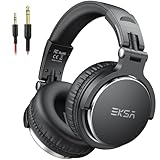
- Bass Sound: Enjoy clear sound and superior comfort with the EKSA Studio Monitor Headphones. Equipped with large 50mm speaker drivers and neodymium magnets, P100 Wired headphone deliver powerful bass, clear vocals, and crisp highs for a balanced stereo sound.
- Built for Comfort: The soft, padded ear cushions are designed to provide long-lasting comfort and effective noise isolation. The adjustable, stretchable headband allows you to easily find the perfect fit and angle for your listening pleasure.
- Single-side Monitoring: The 90° swiveling ear cups allow for single-ear monitoring, making it ideal for DJing or mixing. The self-adjusting and flexible headband ensures a fatigue-free listening experience, even during extended sessions, making these headphones perfect for mastering and mixing.
- Compatibility: P100 wired headphones work exclusively in wired mode and are compatible with a wide range of devices, including smartphones, laptops, tablets, desktop computers, audio interfaces, DJ mixers, amplifiers, and any device that features either a 3.5mm or 6.35mm audio jack.
- Share Audio Port: With a shared audio port, easily connect another pair to share music or videos—no splitters or special cables needed.
Use a normal music track, a supported app version, a compatible device, and a wired or appropriate Spotify Connect route for the most meaningful test. Spotify’s support documentation notes that source availability, device compatibility, connection type, firmware, and network conditions can all affect the result.
Independent reader supportYour contribution helps us test, update, and keep practical guides available for everyone.When should you contact Spotify or the device manufacturer?
Contact Spotify support after confirming Premium eligibility, the documented app version, the correct Media quality path, a standard music track, and the account’s country or region. Include the device model, operating system, Spotify app version, account plan, playback route, and whether Lossless appears in Now Playing or the Connect Picker.
Contact the device manufacturer when the Spotify app shows Lossless but the connected speaker, receiver, television, car system, DAC, or multi-room setup does not accept or report it. Spotify’s official documentation does not establish compatibility for every third-party model, so manufacturer firmware and compatibility documentation remains the authority for that specific device.
Best Value

- Advanced build quality and engineering; Designed for studio tracking and mixing
- 40 mm drivers with rare earth magnets and copper clad aluminum wire voice coils
- Tuned for enhanced low frequency performance
- Circumaural design contours around the ears for excellent sound isolation in loud environments
- Convenient single side cable exit
Frequently Asked Questions
Do you need Spotify Premium for Lossless?
Spotify Lossless is a Premium feature. Free accounts should not be expected to show the Lossless option, even when Lossless is available in the account’s country or region.
What Spotify app version supports Lossless?
Spotify’s documented minimum versions are mobile app 9.0.58 or later and desktop app 1.2.67 or later. Third-party devices may also require current firmware.
Why does Lossless not appear on a podcast or music video?
Spotify Lossless is unavailable for music videos, podcasts, and audiobooks. Test the feature with a standard music track and check Now Playing or the Connect Picker for the Lossless indicator.
Can Bluetooth headphones play Spotify Lossless?
Bluetooth can compress Spotify’s lossless signal because Spotify says Bluetooth does not provide enough bandwidth for lossless transmission. Use wired headphones, wired speakers, AUX, USB, or a compatible Spotify Connect device to verify the playback route.
The Tool Desk
Outbyte PC Repair FREEClear out junk files and repair common Windows errorsFree Scan →Outbyte Driver Updater FREEFix the driver behind crashes, sound loss and screen glitchesFind Drivers →The Bottom Line
If Spotify Lossless is not showing up, first verify Premium eligibility, update the app to mobile 9.0.58 or desktop 1.2.67, select Lossless under Settings and privacy → Media quality, and test a standard music track. Then remove Bluetooth from the diagnostic path, verify device compatibility and firmware, and check the network. Spotify has not published a universal per-account rollout timer or a percentage of users affected.
Quick Recap
Product prices and availability are accurate as of the date/time indicated and are subject to change. Any price and availability information displayed on Amazon at the time of purchase will apply.



