The Tool Desk
Outbyte Driver Updater FREEScan for outdated or missing drivers - takes under a minuteDriver Scan →Outbyte PC Repair FREERepair Windows errors before they cause bigger problemsFix Now →Board Game Arena (BGA) lets you play digital adaptations of board and card games in a web browser, without downloading a game client. Create a free account, choose a title, and join a real-time or turn-based table with friends or other players. The free account gives you access to a large part of the platform, but not every game-creation option or Premium feature is free.
This is an online gaming service—not a place to download unauthorized copies of physical board games. BGA says its catalog consists almost entirely of adaptations of existing commercial tabletop games made under licensing arrangements. Its official FAQ and licensing documentation explain the platform’s approach.
What is Board Game Arena?
Board Game Arena is a browser-based platform for playing board games and card games online. It supports games against friends, automated opponents, and players from around the world. The catalog includes licensed digital adaptations of commercial tabletop games alongside traditional games and card games.
BGA’s homepage advertises more than 1,300 games, availability in dozens of languages and more than 200 countries, and millions of games played each month. Those counters are dynamic, so they should be understood as rounded current descriptions rather than permanent statistics. You can browse the live catalog at Board Game Arena.
#1 Best Overall

- GAME OF SWEET REVENGE: Enjoy classic Sorry! gameplay with this Sorry! board game for kids. It's an edge-of-your-seat race to home, so hurry up and get there first
- FIRST ONE HOME WINS: Who will be the first player to get all 3 of their pawns to the home space? But watch out! Players can get "sweet revenge" by sending each other's pawns back to the starting point
- SO MANY POSSIBILITIES: Slide, collide, and score to win the Sorry! game. This family game for kids and adults features so many possibilities depending on the card picked up and strategy chosen
- CLASSIC SORRY! GAMEPLAY: Remember playing the original Sorry! game as a kid? Bring back memories of playing the Sorry! game with family members and introduce it to a new generation
- FAMILY GAME NIGHT FAVORITE: A go-to game for family time or anytime indoor fun, the Sorry! game for kids is one of the best family games for game night
The main attraction is convenience: you need a current browser and an account, not a Windows, macOS, or mobile game download. BGA handles the board, cards, pieces, legal moves, scoring, and turn order inside the browser. The exact interface differs from game to game because each title is a separate adaptation.
What you need before you start
- A free BGA account: You can create one or sign in through the platform’s account system.
- A modern web browser: BGA identifies current Chrome, Firefox, Safari, and Edge versions as optimal choices. Keeping the browser updated is particularly important for compatibility.
- A reliable internet connection: Real-time games depend on a responsive connection, while turn-based games are more forgiving when you are not continuously online.
- A suitable screen: Phones and tablets are supported in general, but some adaptations are difficult to use on small touchscreens. A desktop or laptop is the safer choice for complex games.
You do not need to install a separate BGA application or purchase a physical copy of a game to join an online table. However, a physical edition can be worthwhile if you enjoy the digital version and want to play away from a screen. BGA notes that online discovery can contribute to interest in physical games, so readers who want to continue offline can look for the physical edition of a game you discover. Availability, editions, prices, and regional shipping vary.
How to play a game on Board Game Arena
- Open BGA in your browser. Go to en.boardgamearena.com and create an account or sign in.
- Open the Play Now area. This is the main route for finding a game and entering a table.
- Choose a play mode. Select real-time if everyone can play together now, or turn-based if players will take moves at different times.
- Select a game. Check the game’s page or the lobby to see its access status, player requirements, and available tables. Do not assume that every title remains free forever; publishers determine whether individual games are Premium or non-Premium.
- Choose how to find opponents. You can use automatic matching, join an existing public table, or create a table when your account and the game’s rules allow it.
- Wait for the table to fill. Once the required players are present, the table administrator can start the game.
For a first session, the automatic-opponent or simplified-lobby route is usually easier than manually configuring every table option. BGA has described its simple lobby as a way to select a game and wait for automatic table creation and matching, reducing the number of decisions a new player must make. The current interface may change, so follow the labels shown in your account.
Real-time or turn-based: which should you choose?
| Mode | How it works | Best for | Things to watch |
|---|---|---|---|
| Real-time | All players are expected to be online during the same session. | A planned evening with friends, short games, and immediate conversation. | You may have a clock, and leaving because of a connection or schedule problem can disrupt the table. |
| Turn-based | Players make moves at different times. After you move, the opponent receives a notification and continues when available. | Busy schedules, longer strategy games, learning an unfamiliar interface, and players in different time zones. | A game may last days or weeks, depending on its pace and how often everyone plays. |
BGA’s turn-based documentation explains that players can select an expected move frequency and run several turn-based games in parallel. Choose real-time when everyone can agree on an uninterrupted window. Choose turn-based when availability is uncertain or the game is too long for one sitting.
How to play with friends
You can join a public table or create one and invite friends when the selected game and your account permissions permit it. In practice, one person can create a table and share the invitation or use BGA’s player-invitation tools, while the others join through their own accounts.
Premium access matters most when a group chooses a Premium game. BGA’s FAQ says that only a Premium member needs to create the table for a Premium game; non-Premium players can join that table. This can allow a group to play together without every participant subscribing, but it does not make Premium features generally available to everyone.
There are two important location-related restrictions:
Rank #2

- UNO card game provides classic play, where players match colors or numbers in a race to get rid of all their cards!
- Action Cards and Wild Cards add unexpected excitement and game-changing fun, like the Reverse Card that switches the direction of play!
- The deck includes 3 blank Wild Cards for house rules anyone can make up -- erase and create new rules each game!
- When down to one card, players don't want to forget to yell 'UNO!' Keep score and the first player or team to 500 wins!
- The color blind accessible deck has special graphic symbols on each card to help identify its color, allowing players with any form of color blindness to play!
- Same-location play: BGA describes playing with people in the same physical location as a Premium feature.
- Hotseat: Hotseat lets multiple players take turns on one device and is also described as Premium.
If friends are physically together, ordinary online tables with each player using a separate device may not be equivalent to BGA’s same-location or hotseat options. Check the current rules on the BGA account and multi-account FAQ before planning a group session.
Free tools Windows power users keep installed
One-click scans. No signup required.
What is free on BGA?
BGA says that all of its board games and many platform features can be enjoyed for free, but the practical access rules vary by title. Free users can join tables, and standard games generally allow free table creation. Selected games and features are reserved for Premium members.
The important qualification is that “free” does not mean every game can always be created by every account at no cost. Publisher agreements determine whether a particular game is Premium or non-Premium, and those arrangements can change. A title’s popularity or quality should not be inferred from its Premium status. Before inviting friends, check the game’s page or the lobby for its current access label.
What does BGA Premium add?
BGA Premium is an optional subscription billed monthly or annually. BGA’s live Premium page lists benefits that can include:
- Creating tables for Premium games.
- Starting games without certain waiting restrictions.
- Same-location play and hotseat play.
- Additional ways to invite friends.
- Integrated voice and video chat.
- Detailed game statistics.
Prices and billing terms can vary by region and payment method, so check the live Premium page rather than relying on an old price quoted elsewhere. BGA says recurring payments can be stopped from the account.
What’s actually slowing this PC down?
Pick the symptom - the matching free tool is one click away.
Premium is a convenience and access subscription, not a competitive advantage. It does not improve card draws, dice rolls, available resources, or any other game mechanic. BGA explicitly states that Premium does not alter game balance.
Rank #3

- EXPLORE THE ISLAND OF CATAN: Settle the uninhabited island of Catan by gathering resources, building infrastructure, and nurturing trade relationships.
- STRATEGY AND COMPETITION: Compete with 2-3 opponents to expand your settlements and cities while managing resources and avoiding the robber.
- TRADE, BUILD, AND SETTLE: Use brick, wood, wheat, ore, and sheep to construct roads, settlements, and cities in your race to 10 victory points.
- REPLAYABLE AND ENGAGING: With a modular hexagonal board, no two games are the same, offering endless strategic opportunities and replayability.
- FOR FAMILIES AND STRATEGY ENTHUSIASTS: Designed for 3-4 players, ages 10 and up, CATAN 6th Edition is perfect for family game nights and friendly competition. Add the CATAN 5-6 Player Extension (sold separately) to expand your game to 5-6 players.
Learn the rules before joining a table
If you are new to a game, look for its tutorial, rules information, or learning option before joining a ranked or time-limited table. BGA’s stated purpose includes discovering and learning games, and its community materials include game tutorials. However, the exact learning experience is not necessarily identical for every title.
A sensible first-game routine is:
- Read the short game description and check the player count.
- Open the available tutorial or rules information.
- Play a practice or unranked game if the title offers one.
- Choose a turn-based table if you need time to understand the interface.
- Tell other players that you are learning, especially in a real-time game.
For a complicated title, an external rulebook or strategy guide may help, but it is optional. The online adaptation may automate procedures that are easy to overlook in a paper rulebook, while the physical rules remain the authoritative source for the tabletop edition. If you later buy a physical game, verify that the rulebook matches the exact edition and publisher.
Finding opponents and filling a table
Popular games may have opponents available at many times. Less-populated titles may require more patience or a busier playing period. Before starting a real-time table, check the number of online or available players shown in the lobby.
If a real-time table does not fill, BGA says it may be possible to convert it to turn-based play so another player can join later. This is often more practical than leaving an empty table open indefinitely, particularly for games with a smaller audience.
When inviting friends, agree on the mode first. A friend who expects a 30-minute real-time session may not want to discover that the table is configured for a multi-day turn-based game—or vice versa.
Basic table etiquette
- Read the table’s settings before joining.
- Do not enter a real-time game unless you can remain available for its likely duration.
- Use the chat to explain that you are learning rather than silently making repeated mistakes.
- In turn-based games, respect the expected move frequency and avoid abandoning tables.
- Do not intentionally delay a real-time turn or disconnect to avoid an outcome.
- Use the game’s undo or confirmation controls carefully; not every action can necessarily be reversed.
Phone, tablet, or computer?
BGA’s general FAQ supports tablets and smartphones, but its older guidance warns that some adaptations were not designed well for small touchscreens and that mobile use could involve unresolved bugs. The result is game-dependent rather than a simple yes-or-no mobile guarantee.
Rank #4

- CLASSIC BEGINNER GAME: Do you remember playing Candy Land when you were a kid. Introduce new generations to this sweet kids' board game
- RACE TO THE CASTLE: Players encounter all kinds of "delicious" surprises as they move their cute gingerbread man pawn around the path in a race to the castle
- NO READING REQUIRED TO PLAY: For kids ages 3 and up, Candy Land can be a great game for kids who haven't learned how to read yet
- GREAT GAME FOR LITTLE ONES: The Candy Land board game features colored cards, sweet destinations, and fun illustrations that kids love
Use a desktop or laptop when:
- The game has a crowded board or many small controls.
- You need to read extensive rules, player aids, or chat.
- The game is timed and a touch-control mistake could cost a turn.
- You are troubleshooting a display or interaction problem.
A phone or tablet may be perfectly convenient for a simple card or abstract game, especially in turn-based mode. If the board is hard to read or controls do not respond correctly, switch to a larger screen before assuming the game or server is broken.
Do these 3 things before closing this tab:
1Scan for outdated or missing drivers - takes under a minute2Repair Windows errors before they cause bigger problems3Fix the driver behind crashes, sound loss and screen glitchesTroubleshooting BGA performance problems
Start by identifying whether the problem is the network, the browser, the device, or BGA itself. These causes require different fixes.
If the page is slow or fails to load
- Refresh the page and sign in again if necessary.
- Close unnecessary tabs and browser applications.
- Try a current version of Chrome, Firefox, Safari, or Edge.
- Test another browser to identify an extension or compatibility problem.
- Disable problematic browser extensions temporarily, particularly script-blocking extensions, then test again.
- Try another computer or device if one is available.
If moves lag or the table disconnects
- Test the connection in another service.
- Move closer to the Wi-Fi router or use a wired connection where practical.
- Pause large downloads, uploads, cloud backups, and other traffic.
- Try another internet connection or device.
- Use turn-based mode for games where a continuously responsive connection is not practical.
A slow or unstable internet connection is not the same as a slow Windows computer. Cleaning up a PC cannot make a distant server respond faster or repair congestion in your Wi-Fi or broadband connection. BGA’s troubleshooting guidance recommends testing another browser, computer, or internet connection because the cause is often local to the user’s setup rather than the game server.
Be cautious with real-time clocks
BGA warns that entering a real-time game while the service is not responding can expose a player to clock penalties. If the site is visibly unresponsive, do not repeatedly join timed tables hoping the problem will resolve mid-game. Test the service first, and choose turn-based play when you cannot maintain a stable session.
Only after free browser, restart, connection, and device checks should a Windows user investigate local system performance. A general PC cleanup tool for a slow browser may be relevant when the computer itself is overloaded, but it is not a fix for internet latency, incompatible BGA adaptations, or BGA outages. Review any utility carefully before installing it and prefer built-in Windows diagnostics when they identify the problem.
Recommended Free Tools
If the Windows PC itself is overloaded, Outbyte PC Repair is an optional tool to review for local cleanup and performance troubleshooting; it will not address internet latency or a BGA outage.
What “free online board games” means here
BGA does not give you a free downloadable copy of a commercial board game. It provides an online adaptation that you access through its service. The rules and artwork may be based on the licensed tabletop title, but playing online and owning the physical edition are separate experiences.
Best Value
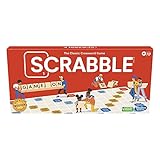
- CLASSIC CROSSWORD GAME: Get family and friends together for a fun game night with the Scrabble board game! Put letters together, build words, and earn the most points to win
- WOODEN TILES AND RACKS: This edition of the Scrabble game features 100 wooden letter tiles and wooden tile racks. The textured gameboard helps tiles stay on the board
- RACK UP THE POINTS: Scrabble letters are worth points, and premium squares on the gameboard multiply the score. Surprise opponents with 2-letter words, challenge their choices, and strategize to win
- GAME FOR 2-4 PLAYERS: Go for classic Scrabble gameplay in a head-to-head face-off, or mix things up and play in teams. The game guide offers expert tips, and other ways to play this classic word game
- FUN FAMILY GAME: Do you remember playing Scrabble when you were a kid? Introduce this fun game to your kids and grandkids! Connect over a classic board game and create memories for generations to come
The digital version is useful for learning a game, finding opponents, and playing when a group cannot meet in person. The physical version offers a different social experience, including handling components and playing without depending on a browser or internet connection. If BGA helps you discover a title, check the publisher’s official edition and the correct regional release before buying.
Frequently Asked Questions
Is Board Game Arena completely free?
No. BGA offers a substantial free experience, including access to many games and the ability to join tables, but selected games and features are Premium. Publisher arrangements determine the access status of individual titles, so check the current game page or lobby.
Quick wins for a faster PC:
Clear out junk files and repair common Windows errorsFree Scan →Fix the driver behind crashes, sound loss and screen glitchesFind Drivers →Do I need to download Board Game Arena?
No. BGA is designed to run in a modern web browser. The service recommends current Chrome, Firefox, Safari, or Edge versions. Phones and tablets are supported in general, although some games work better on a desktop or laptop.
Can I play BGA with friends who do not have Premium?
For Premium games, BGA says only the player creating the table needs Premium; non-Premium players can join that table. Premium is still required for some other features, including same-location play and hotseat mode.
Is BGA good for learning board games?
It can be. Look for a game’s tutorial or rules information before joining a competitive or timed table. The learning tools differ by title, so do not assume every game provides the same tutorial experience.
Can a BGA game last more than one day?
Yes. Turn-based games allow players to move at different times and may last days or weeks depending on the selected pace and how often participants return. Real-time games are intended for a shared, uninterrupted session.
The Bottom Line
Bottom line: Board Game Arena is one of the simplest ways to try and play board games online: use a current browser, create an account, choose real-time or turn-based play, and join a table. The free tier is substantial, but access varies by game and Premium features. Use a computer for complicated titles, learn the rules before joining timed tables, and treat BGA as a licensed online adaptation—not a free download of a physical game.
Quick Recap
Product prices and availability are accurate as of the date/time indicated and are subject to change. Any price and availability information displayed on Amazon at the time of purchase will apply.